[How-to] AIVA free vs paid: Who Actually Owns the Music You Make?
- Free tier: Yes
- Cheapest paid plan: US$16.5/mo and up
- Free quota: Free plan provides a monthly download quota of 3 times, a single‑track …
- Last checked: 2026-10-23
Article last updated: 2026-10-25



AIVA writes orchestral and soundtrack music from a short prompt. You pick a style, it composes, you download the result. The free plan is real work, not a crippled demo — you can make finished tracks without paying a cent. But the number that trips up most beginners isn’t the download quota or the time limit. It’s a single line buried in the plan comparison: who owns the music you just made.
Here is the short version before you spend an evening on it. On the free plan, and on the mid-tier Standard plan, AIVA keeps the copyright to your track. “Monetize on YouTube” and “own your music” are not the same thing, and AIVA charges real money for the gap between them. This guide gets a first track out the door, shows what the free tier can actually do, and then marks exactly where that ownership line sits so you don’t find out after you’ve built something around it.
What the free plan lets a beginner make
The free tier is enough to learn the tool and finish small pieces. Here is what you get, straight from the plan page we checked:
- 3 downloads per month. A download is each time you export a finished track to your computer. Three slots reset monthly. Previewing and regenerating inside the browser is where you’ll spend most of your time; the quota only bites when you save the final file.
- 3 minutes maximum per track. Fine for a loop, a title theme, a short cue, or background music for a clip. Not enough for a full long-form piece.
- Non-commercial use only. You cannot put a free-tier track behind anything that makes money.
- AIVA owns the copyright. More on why that matters below.
- Attribution required in public. If you post the music anywhere public, you have to credit AIVA — a visible “music by AIVA” line.
That’s a usable sandbox. A student scoring a class project, a hobbyist making a short film, or anyone testing whether AI composition fits their workflow can do real things inside those limits without paying.
Figure: aiva.ai official page, captured 2026-10-25.
Your first track in AIVA: steps, blockers, fixes
The flow is short. Here’s how to get from signup to a saved file.
- Sign up free at aiva.ai. No payment needed for the free tier.
- Start a composition. Choose a preset style (cinematic, ambient, and so on) or generate from an influence. You tell it the mood and length; it writes a full arrangement.
- Preview and regenerate. Listen, and if a section is wrong, regenerate it or tweak the settings. This costs you nothing — only the final export counts against your quota.
- Download. Exporting the finished track uses one of your three monthly slots.
Now the blockers that stop beginners, and what to do about each:
- “My track keeps getting cut to 3 minutes.” That’s the free cap. Keep pieces under three minutes, or move to a paid plan — Standard raises the ceiling to 5 minutes, Pro to 5 minutes 30 seconds.
- “I’ve used all 3 downloads.” Wait for the monthly reset, or upgrade. Standard gives 15 downloads a month; Pro gives 300. Plan your three free exports carefully — don’t burn one on a rough draft you’ll redo.
- “I want to use this in a video that earns money.” Not allowed on free; it’s non-commercial only. You need at least Standard for that.
- “I don’t want the ‘music by AIVA’ credit showing.” Dropping the attribution requires Standard or higher.
- “I need the raw MIDI or a high-quality WAV to edit in my own software.” MIDI is the file that stores the notes and timing so you can rework the music in a digital audio workstation; WAV is an uncompressed, high-quality audio file. The data names WAV and lossless MIDI as a Pro feature specifically — see the exclusive check below before you assume a lower tier hands you an editable file.
The real question: who owns the music?
This is the part the pricing page soft-pedals, and it’s the reason to read before you subscribe. Think of it as a copyright ladder.
Free — AIVA owns the copyright. Non-commercial only. Credit required. You’re borrowing the music, not owning it.
Standard — US$16.5/month. Fifteen downloads a month, tracks up to 5 minutes, no attribution needed, and you’re allowed to monetize on social platforms: YouTube, Twitch, TikTok, Instagram. This is the plan that looks like freedom. But read the fine print: AIVA still owns the copyright. You can run ads over your video and keep the ad money; you do not own the composition as an asset.
Pro — US$53.5/month. Three hundred downloads a month, tracks up to 5 minutes 30 seconds, WAV and lossless MIDI export, and the thing you’re actually paying for: 100% of the music copyright and every commercial permission. This is the only tier where the music is yours outright.
Here’s the trap in plain terms. Standard’s “monetize on social” wording makes it sound like you’ve bought your creative freedom. For a YouTuber who just wants background music under a vlog and never thinks about it again, that may be all they need. But “AIVA keeps the copyright” means the composition isn’t yours to control as property. If you’re delivering a track to a paying client, shipping it inside a product you sell, or licensing it onward as your own work, Standard doesn’t cover you — and nothing cheaper than Pro does. The jump from US$16.5 to US$53.5 isn’t about more downloads. It’s about ownership.
One note on pricing for readers outside Taiwan: AIVA bills in euros, and the US$ figures here are the approximate equivalents the data showed — prices vary by country, and we checked from Taiwan. Annual billing lowers the monthly rate to €11/month for Standard and €33/month for Pro. No US$ figure is published for the annual rate, so we’re not going to invent one.
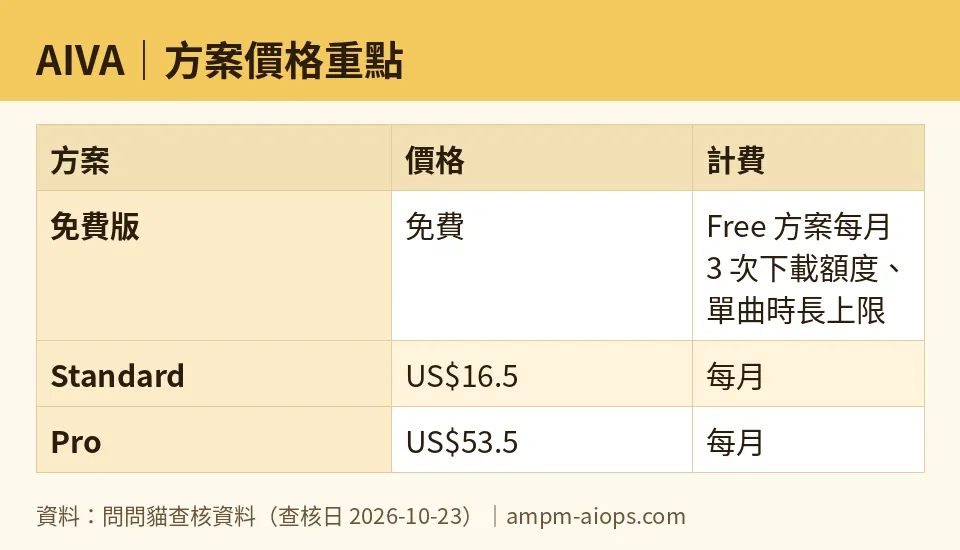
Figure: compiled by AMPM from its verified data (last verified 2026-10-23).
🔍 AMPM exclusive check
What we verified that the vendor page does not put front and center:
- “Monetize” is not “own.” The pricing page frames Standard around social monetization. The copyright line is the real divider, and it’s easy to miss: free and Standard both leave the copyright with AIVA, and only Pro hands you 100%. We’re flagging this because the monetization wording makes Standard read like full commercial freedom, and for client or product work it isn’t.
- File formats below Pro aren’t spelled out. The data names WAV and lossless MIDI as a Pro-specific feature. What exactly the free and Standard tiers let you export is not detailed in what we pulled. If you need an editable MIDI to finish the track in your own software, confirm on the current page before you pick a tier — don’t assume.
- Honesty caveat. AIVA came into our database as a challenger candidate on a single automated pass; we haven’t hand-verified it three ways yet. Everything above matches what the official pricing page showed on 2026-10-23. Vendors change free quotas and commercial terms quietly, so check the free download limit and the ownership terms on aiva.ai yourself before you rely on them.
Verdict: who should use it, who should skip it
Use the free plan if you’re a hobbyist, student, or anyone scoring a personal, non-commercial project. You’re fine crediting AIVA, you can work in three-minute pieces, and three exports a month is enough. Don’t pay for what the free tier already does.
Use Standard if you’re a social creator who needs background music on monetized YouTube, Twitch, TikTok, or Instagram, you want the attribution gone, and you genuinely do not care who holds the underlying copyright. For that specific use, it’s the practical pick.
Use Pro if you must own the music: freelancers delivering to clients, game or film projects, anything you’ll sell or license, or anyone who needs WAV and lossless MIDI and more than a handful of exports a month. Ownership is the feature here, not volume.
Skip it if you want guaranteed outright ownership but only at the cheap price — that combination doesn’t exist on AIVA. Decide what you actually need (monetize vs. own) first, because that choice, not the download count, is what you’re really paying for.
Written: 2026-10-25 Price last verified: 2026-10-23 Tool last health-checked: 2026-10-25
🔗 Related on AMPM
📎 Sources
All prices and quotas in this article come from AMPM’s verified dataset for AIVA (last verified 2026-10-23); primary sources:
🐾 Meet the cats: AMO and PIMI

AMPM is a Taiwan-based AI-tool pricing watchdog. Our motto: ask before you subscribe. Two cats argue every tool from two sides:
- ☀️ AMO — the budget-minded cat. Always asks: is the free tier enough, and is paying actually worth it?
- 🌙 PIMI — the performance-minded cat. Cares about whether it works well, fast, and gets your job done.

When they are done arguing, you know whether to pay. Every number is checked by us, with the verification date at the end.
🐾 Our sister sites also checked
Read next
- AIVA Full breakdown: pricing, features and real-world limits
- AIVA Is the free quota enough?
- AIVA Alternatives
- Free plan limits for every AI tool we track
