[How-to] Bland AI Free vs Paid: Is the Upgrade Worth It After Your First Test Calls?
- Free tier: Yes
- Cheapest paid plan: US$0/mo and up
- Free quota: The Start plan has no monthly fee; registering without linking a …
- Last checked: 2026-11-02
Article last updated: 2026-10-30



Bland AI builds voice agents: software that phones people, or answers calls, and talks like a human. This guide is for a beginner who wants to place a first test call without paying a monthly fee. My angle is simple: use the free Start plan until it hurts, and only then ask whether the paid Build plan fixes the thing that hurts.
Prices vary by country; we checked from Taiwan, and every figure below is the US$ figure from Bland’s pricing page.
What you get on Start
Start has no monthly fee. You sign up without a credit card and get two call credits (prepaid units of usage) plus an inbound phone number. Bland lists that number at US$15 per month, so it’s a real perk. Inbound just means people can call your agent, not only the other way around.

Illustration: A massive fixed monthly fee outweighs tiny call discounts unless stacked with an overwhelming mountain of calls.
After the credits run out, you pay by use. Start costs US$0.14 per connected minute. A connected minute is a minute where someone actually picks up and the call is live. Transferring a call to a human costs US$0.05 per minute.
That US$0.14 already includes three things that other tools bill separately: the language model (the AI that decides what to say), speech-to-text (turning the caller’s voice into words) and speech synthesis (turning the reply back into a voice). One line on the invoice instead of three is easier for a beginner.
Start also has two caps. You can make up to 100 calls a day, and up to 10 calls can run at the same time. The second cap is called concurrency. It matters once you try to call a list of people at once.
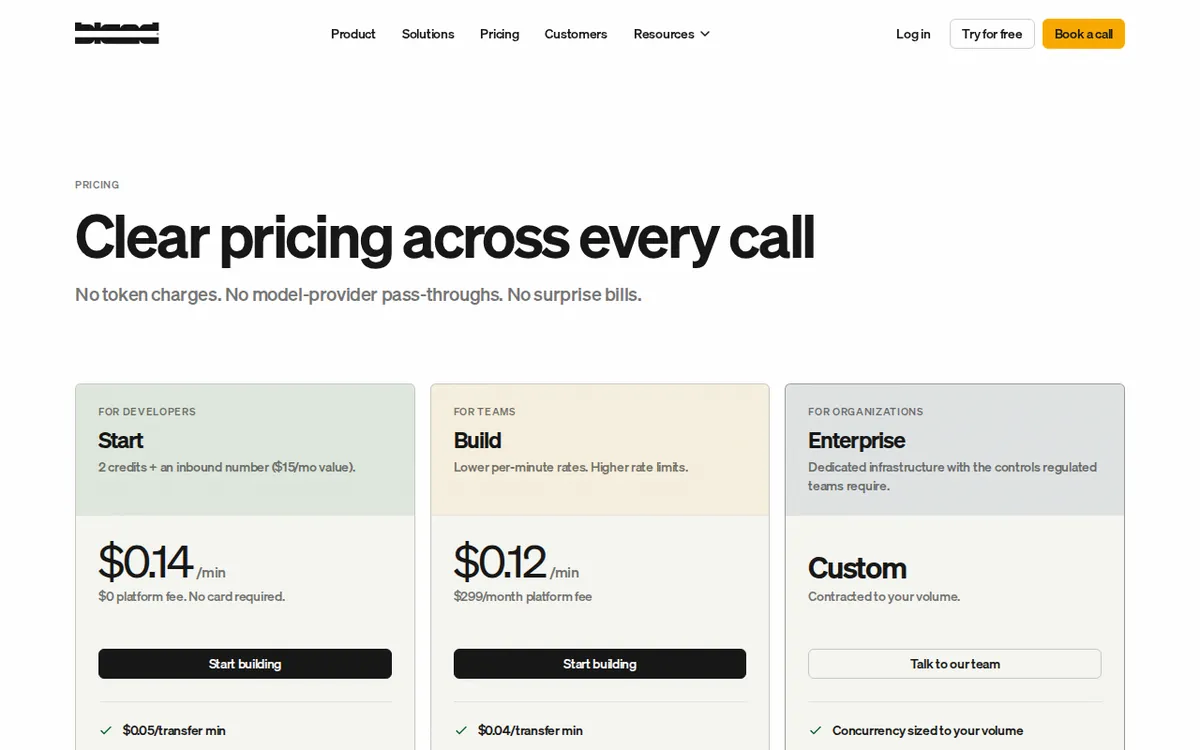
Figure: bland.ai official pricing page, captured 2026-10-30.
A first-session walkthrough
Bland is a programmatic platform. That means you control it mainly by sending instructions from code through an API, a standard way for one program to talk to another. You don’t need to be a senior developer, but you should be comfortable pasting a request into a terminal or a tool like Postman. We did not click through the dashboard step by step for this piece, so treat the order below as a plan, not a screen-by-screen tutorial.
- Sign up at bland.ai. No card is needed on Start. Confirm that the two credits and the inbound number show up in your account.
- Write the agent’s job in plain English. Who is it, what does it want from the caller, and when should it hang up or hand off? A short, narrow task works best for a first test.
- Call your own phone first. Use a number you control. You’ll hear the voice, the pauses and how it handles being interrupted.
- Call the inbound number from another phone. This tests the other direction and uses the number that came with your account.
- Read the result. Listen for awkward gaps, wrong answers and moments where it should have transferred but didn’t.
- Only then scale up. Try a handful of calls before a batch.
Keep your first prompts boring. A voice agent that books a haircut is easier to judge than one that “handles customer service.”
Common blockers and fixes
The credits vanish faster than expected. You have two. Our data doesn’t say how many minutes one credit buys, so don’t plan a demo around a guess. Run one short call, then check your balance.
You hit the daily cap. Start stops at 100 calls a day. For testing that’s plenty. For a real outreach campaign, it’s the first wall you’ll hit. Spread calls across days, or look at Build.
Calls bunch up and some don’t go out. The limit is 10 live calls at once. Send smaller batches, and don’t fire a whole list in one go.
A transfer bill surprises you. Handing a call to a human is billed at US$0.05 per minute on Start, on top of the US$0.14 for the AI part. Decide whether your agent should transfer at all.
You expected a fixed price. Start is usage-based, so cost follows talk time. Long, chatty prompts make long calls. Tell the agent to be brief.
What Build changes
Build is US$299 per month. Per-minute pricing drops to US$0.12, and transfers drop to US$0.04 per minute. The caps open up: up to 2,000 calls a day, 50 calls at once, five cloned voices and 50 knowledge bases. A cloned voice is a synthetic copy of a specific voice. A knowledge base is a set of documents the agent can look things up in during a call.
Our data has no yearly price for Build, so we can’t say whether annual billing is cheaper. We also only saw the monthly price.
🔍 AMPM exclusive check
Nothing differed from the official page this time. Every number in this article matches it. Our automated checks on 2026-10-27, 2026-10-28 and 2026-10-29 each found the prices and limits unchanged, and we re-read the page on 2026-10-30.
Two honest limits. First, this tool entered our database as a newer candidate, and the data has had one automated pass, not a full three-way manual cross-check. Second, the page doesn’t spell out how many minutes one signup credit covers, and we haven’t confirmed it. Check commercial-use terms on Bland’s own pricing page before you build a business on the free plan.
☀️ AMO, the budget-minded cat

Is free enough? For learning, yes. Start has no monthly fee, needs no card, and hands you two credits and a phone number that Bland itself lists at US$15 per month. You can build an agent, call yourself and decide whether the voice is good enough before spending anything.
Free stops being enough when the credits run out. Then you’re paying US$0.14 per connected minute, and a transfer adds US$0.05 per minute. That’s cheap for small volumes. You only pay for answered calls, and there’s no idle monthly bill.
Is Build worth it? Look at what you’d actually get for US$299 a month. The per-minute rate falls from US$0.14 to US$0.12, and transfers from US$0.05 to US$0.04. Those savings are small per minute. You’d need a lot of talk time before the discount covers the monthly fee, so don’t upgrade for the cheaper rate alone.
The better reason to pay is the caps. If 100 calls a day or 10 at once blocks your plan, Build lifts you to 2,000 and 50. If those caps haven’t blocked you, you haven’t earned the upgrade yet. My advice: stay on Start, watch your daily call count, and upgrade the week you actually hit a limit.
🌙 PIMI, the performance-minded cat

Does it work well? I can speak to the setup, not to a lab test. Bland’s pitch is human-sounding voice calls, and the rate bundling means the voice, the listening and the brain come from one provider. Fewer vendors means fewer places for delays to creep in. We have not benchmarked latency or voice quality, so judge by ear on your first calls.
On Start, speed is limited by your caps, not by the product. Ten calls at once and 100 a day is fine for a pilot. If you’re testing a script across many numbers, you’ll queue.
Build is where performance features show up. Fifty simultaneous calls is five times the Start ceiling, and 2,000 a day is twenty times. Five cloned voices let you give different agents different personalities. Fifty knowledge bases let you give each agent its own reference material instead of cramming everything into one prompt. If your agent must answer product questions accurately, that is the feature that matters.
My test plan: on Start, make the same call five times with slightly different prompts. Listen for gaps, wrong facts and bad hand-offs. If the agent fails on a task, paying US$299 won’t fix a weak prompt. If it succeeds but you can’t run enough calls, Build is the fix.
Verdict: who should use it, who should skip it
Use Start if you’re a developer, founder or tinkerer who wants to hear a voice agent work before committing. No monthly fee, no card, two credits and a phone number are enough for a proper first test.
Move to Build if you’ve proven the script works and the 100-call daily limit, the 10-call concurrency limit, or the single-voice setup is holding you back. The 2,000 calls a day, 50 live calls, five cloned voices and 50 knowledge bases are what the US$299 buys. The lower per-minute rate is a bonus.
Skip it for now if you want a no-code point-and-click tool, or you need a fixed, predictable bill. Start is billed by use, so cost follows how long people talk.
Written: 2026-10-30 Price last verified: 2026-10-29 Tool last health-checked: 2026-10-30
🔗 Related on AMPM
📎 Sources
All prices and quotas in this article come from AMPM’s verified dataset for Bland AI (last verified 2026-10-29); primary sources:
🐾 Meet the cats: AMO and PIMI

AMPM is a Taiwan-based AI-tool pricing watchdog. Our motto: ask before you subscribe. Two cats argue every tool from two sides:
- ☀️ AMO — the budget-minded cat. Always asks: is the free tier enough, and is paying actually worth it?
- 🌙 PIMI — the performance-minded cat. Cares about whether it works well, fast, and gets your job done.

When they are done arguing, you know whether to pay. Every number is checked by us, with the verification date at the end.
🐾 Our sister sites also checked
Read next
- Bland AI Full breakdown: pricing, features and real-world limits
- Bland AI Is the free quota enough?
- Bland AI Alternatives
- Free plan limits for every AI tool we track
