[How-to] Calendly Free Plan Limits: What Breaks First When You Book Real Clients
- Free tier: Yes
- Cheapest paid plan: US$12/mo and up
- Free quota: Free Forever version: provides 1 active Event Type, connects 1 …
- Last checked: 2026-11-02
Article last updated: 2026-11-02



You can run a real booking page on Calendly without paying anything. The catch is not the number of meetings. It is the number of things you are allowed to offer.
Calendly is an online scheduling tool. You publish a link, people pick a time, and the meeting lands on your calendar. The free tier is permanent, not a trial. It gives you 1 active event type (an event type is one bookable meeting template, like “30-min intro call”), 1 connected personal calendar, unlimited bookings for one-on-one meetings, basic notifications, and a custom booking link.
That sounds generous until you try to run a business on it. This guide walks a beginner through setup, shows what the free tier actually covers, and flags the two walls you will hit first. Prices vary by country; we checked from Taiwan.
Set up your first bookable link in four steps
Step 1: Connect one calendar. Calendly reads your existing calendar to block times you are already busy. On free, you get exactly 1 connected personal calendar. If you keep work and personal events in separate calendars, pick the one that holds most of your conflicts. Do not connect a second one — the free tier will not take it.
Step 2: Create your event type. You get 1 active event type on free. Name it for the outcome, not the duration: “Intro call” beats “30 minutes.” Set your availability window, buffer time between meetings, and how far ahead people can book.
Step 3: Share the link. Calendly gives you a custom booking link. Put it in your email signature, your site, and your social bio. Every one-on-one booking through it is unlimited on free — there is no monthly cap on how many people can book that single event type.
Step 4: Test it yourself. Book your own link from a private browser window. Check that the confirmation email arrives, the event shows on your connected calendar, and the time zone displays correctly for the person booking. Time zone bugs are the most common first-week complaint, and they are almost always a wrong setting on your side, not Calendly’s.
That is the whole free setup. For a solo consultant taking intro calls, it works. For almost anything else, read on.
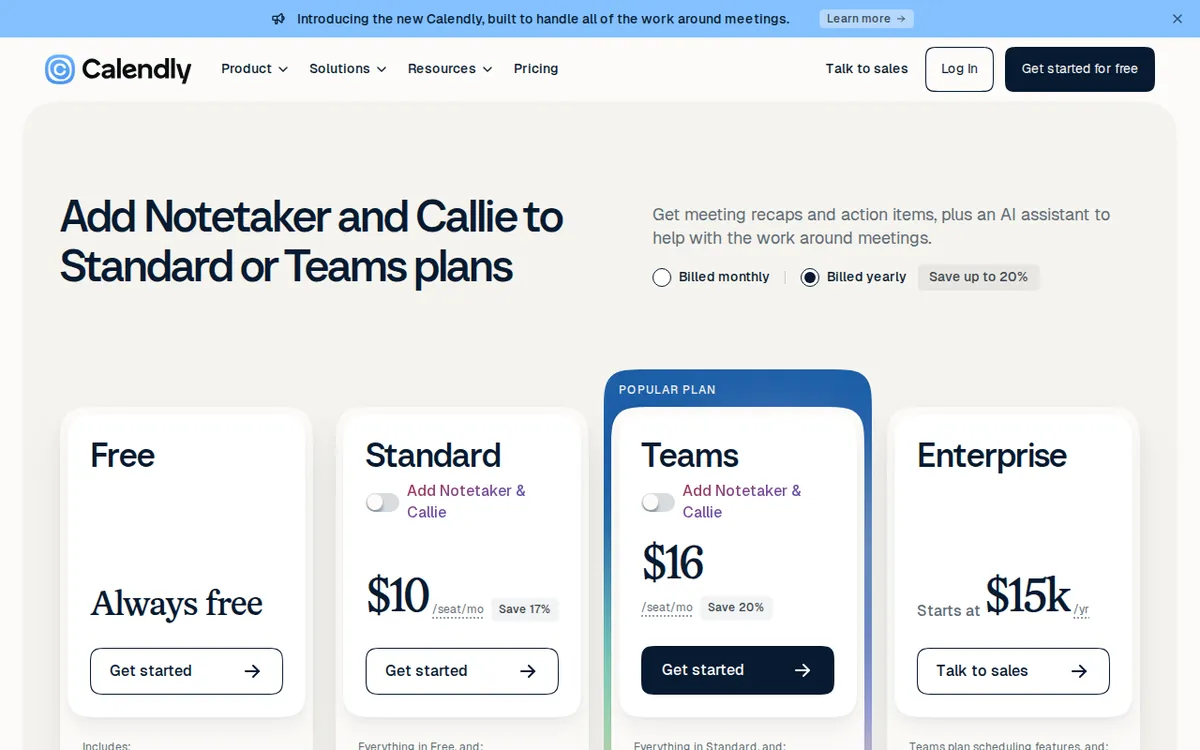
Figure: calendly.com official pricing page, captured 2026-11-02.
The two walls: event types and calendars
Wall one is event types. Free gives you 1 active event type. The moment you want a second bookable option — a 15-minute screening call next to your 60-minute deep dive, or a paid consultation next to a free intro — you are stuck. You can deactivate one and activate another, but you cannot offer both at once. Anyone who has tried to route different kinds of meetings through a single link knows how fast that gets messy.
Wall two is calendars. Free connects 1 personal calendar. If you run a side business alongside a day job, or you share a team calendar, Calendly will not see the conflicts on the calendar you did not connect. Double bookings follow.
Both walls come down on Standard. Standard is US$12 per seat per month on the monthly list price, or US$10 per seat per month when billed annually. It removes the event type cap entirely, connects up to 6 calendars, and adds Stripe and PayPal payment collection, HubSpot and Mailchimp integrations, and automated workflow reminders.
Teams is US$20 per seat per month monthly, or US$16 per seat per month billed annually. It includes everything in Standard plus Round-Robin rotation (meetings get distributed across several people), Routing Forms (a form that sends leads to the right person), Salesforce integration, and a central admin dashboard.
Notice what the paid tiers are really selling: not more bookings, but more shapes of booking. Free already gives unlimited one-on-one meetings. You pay when you need variety, multiple calendars, or money changing hands at the point of booking.
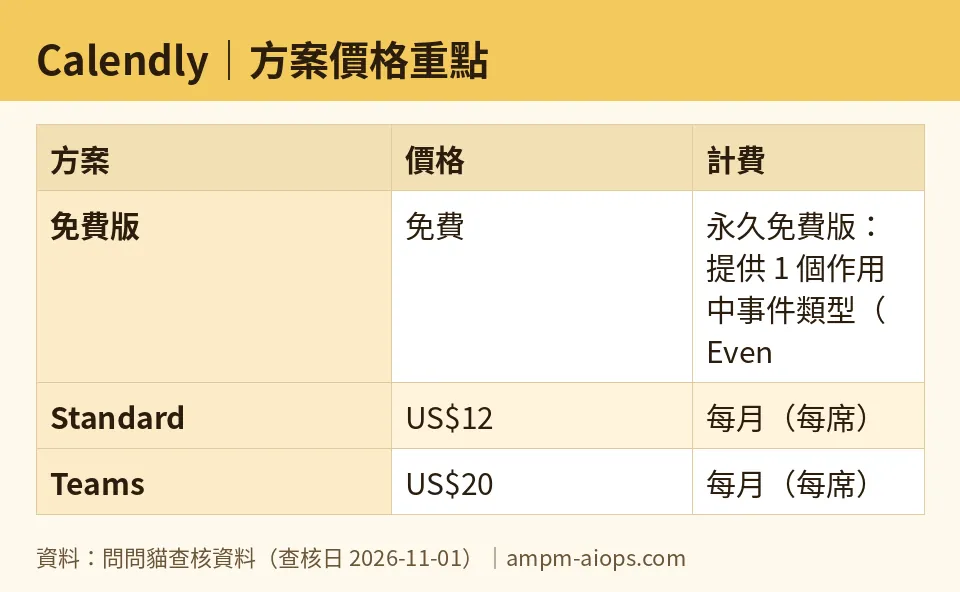
Figure: compiled by AMPM from its verified data (last verified 2026-11-01).
🔍 AMPM exclusive check
Nothing differed from the official page this time; every number below matches it, checked 2026-11-01.
One thing worth stating plainly, because the vendor page buries it: the free tier’s “unlimited” applies only to one-on-one bookings on your single event type. It is not a general unlimited plan. Readers routinely misread “unlimited bookings” as “unlimited everything” and then discover the event type cap the hard way, usually the week they try to add a second meeting format.
We also want to be honest about verification depth. This tool entered our database as an auto-ingested challenger. The figures were read directly from the official site and pricing page and cross-checked against a third-party source, but they have not yet gone through our full three-way manual cross-check. Free quotas and commercial terms can shift; treat the official page as the final word on the day you sign up.
☀️ AMO, the budget-minded cat

Free is genuinely enough for one specific person: the solo operator who offers exactly one kind of meeting and keeps exactly one calendar.
Run the math on that person. They get unlimited one-on-one bookings, basic notifications, and a custom link, forever, for free. A freelancer doing intro calls does not need a second event type. They do not need Stripe collection inside the booking flow — they can invoice after the call. They do not need HubSpot syncing. For them, paying US$12 per seat per month buys nothing they will use. That is a real, permanent free tier, not a countdown.
Now the honest part. The moment you want a second bookable meeting type, free stops working, and the cheapest fix is Standard at US$12 per seat per month monthly, or US$10 per seat per month billed annually. Is that worth it? Compare it to what you lose by staying free: you either cram every meeting into one template, or you juggle two scheduling tools, or you go back to email tag. For anyone booking more than a handful of calls a month, US$12 is cheaper than the admin time it saves.
The trap is upgrading for the wrong reason. Do not pay for Standard because you think free is “limited.” Pay because you specifically need a second event type, a second calendar, or in-flow payment. If none of those three applies to you this month, stay free and revisit next month.
Teams at US$20 per seat per month monthly, or US$16 per seat per month billed annually, is a different decision entirely. It only makes sense once several people share the booking load and you need rotation or lead routing. A solo user paying for Teams is burning money.
🌙 PIMI, the performance-minded cat

Does it actually work? Yes, and the core booking flow is fast and reliable. The link loads, the calendar sync is near-instant, and confirmations land. As a scheduling engine, the free tier performs.
The performance question is where it stops performing. One event type means your booking page can only ever answer one question. The moment a prospect wants to know “do I book the free intro or the paid session,” your page cannot answer, and they email you instead. That is a conversion leak, not a feature gap.
One connected calendar is the sharper problem. If you run more than one calendar, Calendly is working from incomplete information. It will offer slots you are not actually free for. You find out when the double booking happens. No amount of speed fixes a scheduling tool that cannot see your real availability.
Standard at US$12 per seat per month monthly, or US$10 per seat per month billed annually, fixes both: unlimited event types and up to 6 calendars. That is the tier where the product starts performing like the tool people recommend. Teams at US$20 per seat per month monthly, or US$16 per seat per month billed annually, adds Round-Robin and Routing Forms — the features that matter once booking is a team sport rather than a personal habit.
One caution on the paid tiers: the annual price is quoted as a monthly average, not a yearly total. The data we hold does not include a yearly figure, so do not assume one. Check the official page for what you actually pay upfront.
Verdict: who should use it, who should skip it
Use the free tier if you offer one kind of meeting, keep one calendar, and take one-on-one calls. It is permanent, it is unlimited for that use case, and paying would buy you nothing.
Pay for Standard at US$12 per seat per month monthly, or US$10 per seat per month billed annually, the moment you need a second event type, a second calendar, or payment collection inside the booking flow. That is the real upgrade trigger, not a vague sense that free is too small.
Skip Calendly entirely if you need several people sharing one booking pool from day one. That is Teams territory at US$20 per seat per month monthly, or US$16 per seat per month billed annually, and if the price does not fit, a different tool probably will.
Written: 2026-11-02 Price last verified: 2026-11-01 Tool last health-checked: 2026-11-02
🔗 Related on AMPM
📎 Sources
All prices and quotas in this article come from AMPM’s verified dataset for Calendly (last verified 2026-11-01); primary sources:
🐾 Meet the cats: AMO and PIMI

AMPM is a Taiwan-based AI-tool pricing watchdog. Our motto: ask before you subscribe. Two cats argue every tool from two sides:
- ☀️ AMO — the budget-minded cat. Always asks: is the free tier enough, and is paying actually worth it?
- 🌙 PIMI — the performance-minded cat. Cares about whether it works well, fast, and gets your job done.

When they are done arguing, you know whether to pay. Every number is checked by us, with the verification date at the end.
🐾 Our sister sites also checked
Read next
- Calendly Full breakdown: pricing, features and real-world limits
- Calendly Is the free quota enough?
- Calendly Alternatives
- Free plan limits for every AI tool we track
