[Review] Canva Pro Got More Expensive: Is the Free Tier Still Worth Using?
- Free tier: Yes
- Cheapest paid plan: US$18/mo and up
- Free quota: Free version includes up to 200 Standard AI features or 20 Premium AI …
- Last checked: 2026-11-02
Article last updated: 2026-10-07



Canva raised its Pro plan to US$18 a month in July 2026, up from US$15. Annual billing now runs US$180 a year. The Business plan, built for teams, climbed to US$25 per seat per month, up from US$20. Those are the numbers on Canva’s pricing page today, and they’re the reason anyone is asking whether Canva pricing is still worth it, or whether the free tier covers enough to skip paying altogether.
This piece walks through what actually changed, what the free plan gives you before you hit a wall, and whether the new price tags make sense for a solo user versus a team. Two AMPM cats — one watching the wallet, one watching performance — read the same numbers and came to different conclusions.
What actually changed in the price hike
Canva didn’t touch its free tier limits when it raised paid prices. Free accounts still get up to 200 uses of “Standard AI” features or 20 uses of “Premium AI” features, 5GB of cloud storage, and one brand kit limited to three colors. A brand kit is just a saved set of your logo, fonts, and colors so designs stay consistent — three colors is thin if your brand has more than that.

Illustration: While the plan costs rise for newcomers, existing subscribers temporarily remain protected under an earlier pricing umbrella.
The increase landed on the paid tiers. Pro moved from US$15 to US$18 a month, or US$180 a year if you pay annually. Business moved from US$20 to US$25 per seat per month — “per seat” means the price is charged for each team member added, not a flat fee for the whole team. Paid annually, Business works out to about US$20.83 a month per seat, with a total annual charge of US$250 per seat.
Canva’s own “Pricing Promise,” published on its newsroom, says the company gives 60 days’ notice before a price increase, and some existing subscribers were kept on their old price rather than moved to the new one automatically. If you’re already on Canva Pro at US$15, check your billing page — you may not be paying US$18 yet.
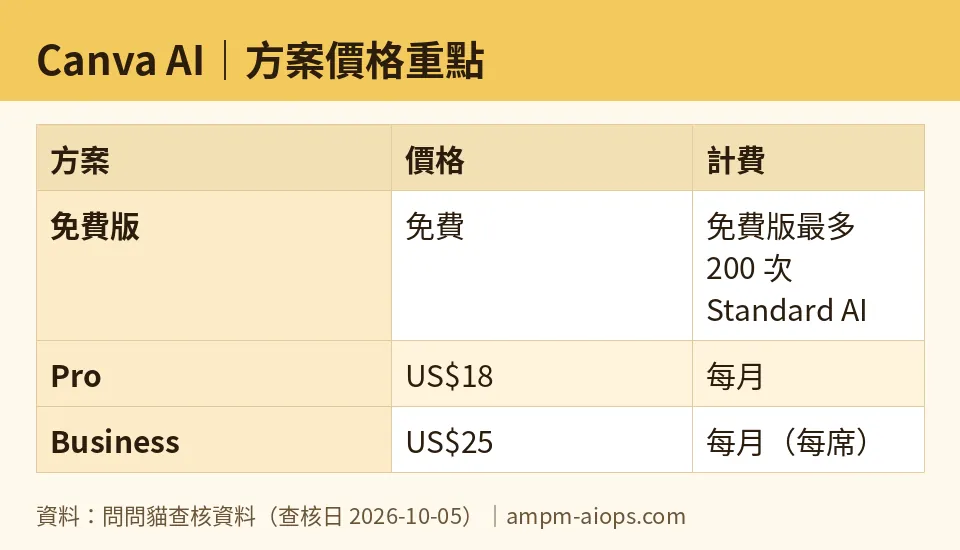
Figure: compiled by AMPM from its verified data (last verified 2026-10-05).
What Pro and Business actually include
Pro is built for one person who wants more design power and AI access. It includes Standard, Premium, and Ultra AI tools (Canva doesn’t break out what counts as “Ultra” versus the other tiers on the public page, but the quota jump is clear), with AI usage set at 10 times the free account’s allowance. Beyond AI, Pro adds advanced tools like resizing, translation, and background removal, access to a library of more than 3.6 million templates and 141 million premium photos, videos, graphics, and audio clips, five brand kits instead of one, 100GB of storage instead of 5GB, and access to “Affinity with AI” — Affinity being the professional design software Canva acquired.
Business keeps everything in Pro and adds team-level brand kits and collaboration tools, priced per seat rather than as a single subscription. One naming note worth flagging: the plan is still called “Business,” not “Teams.” We’ll get to why that matters below.
🔍 AMPM exclusive check
Here’s where our numbers differ from what a casual read of Canva’s site might suggest. We’d previously flagged a discrepancy between US$144 and US$180 as the Pro annual price — that’s resolved. Reading Canva’s pricing page directly confirmed the annual Pro plan is US$180 a year for one person, not US$144, and not some other figure you might get by guessing at a discount rate. If you’ve seen US$144 anywhere, that’s outdated.
Second, and more interesting: we’d also recorded that Canva’s “Business” plan had been renamed to “Teams.” That was wrong, and we’ve corrected it. Canva’s own FAQ states plainly that “Canva Teams is no longer available for new sign-ups” — meaning Teams was a separate, now-discontinued offering, not a rebrand of Business. The plan you’d sign up for today, at US$25 per seat per month, is still officially called Business. If you’re comparing old screenshots or articles that mention “Canva Teams,” know that it’s a dead plan name, not the current one.
Beyond those two corrections, every price and quota in this piece — the US$18 and US$25 monthly figures, the US$180 and US$250 annual figures, the 200/20 free AI quota, the 5GB and 100GB storage numbers — matches Canva’s live pricing page as of our October 5, 2026 check.
☀️ AMO, the budget-minded cat

AMO ran the free tier through actual use before touching the paid numbers, and the free plan held up better than expected for light users. Two hundred Standard AI actions is a real number to work with — that’s not “try it once and get locked out,” that’s enough to draft several weeks of social posts or slide decks before you’d need to think about upgrading. The catch is the 20-use cap on Premium AI features, which burns through fast if you’re leaning on Canva’s higher-end AI tools rather than the basic ones, and the one-brand-kit, three-color limit will frustrate anyone with an actual brand palette.
The jump to US$18 a month changes the math, though. At US$15, Pro undercut most all-in-one design-plus-AI subscriptions. At US$18 a month or US$180 a year, it’s priced closer to competitors, and the free tier’s 200/20 quota split becomes the real decision point: if you’re a solo creator posting a few times a week, free likely still covers you. If you’re running daily content, the 10x AI quota bump in Pro is the thing actually worth paying for — not the templates, not the stock library, the AI quota specifically. Business at US$25 a seat is a harder sell for small teams; that’s real per-person cost that adds up linearly with headcount, and a 3-person team is paying US$25 per person a month (US$250 per person a year) just to get shared brand kits and collaboration tools on top of what Pro already offers one person.
AMO’s take: free is worth sticking with longer than Canva wants you to think, and the Business per-seat pricing deserves scrutiny before any team signs up.
🌙 PIMI, the performance-minded cat

PIMI cares less about the sticker price and more about whether the tool actually performs at that price. The free tier’s AI quota — 200 Standard or 20 Premium actions — is a hard stop, not a soft throttle, so for any workflow that depends on AI generation running reliably, free isn’t viable past casual use. The question isn’t “is US$18 fair,” it’s “does Pro’s AI quota — 10 times the free allowance — actually keep up with real output.”
What’s notable in the plan details is that Pro isn’t just a quota bump. The jump to 3.6 million templates and 141 million premium assets, plus access to Affinity with AI, means Pro users get professional-grade editing tools bundled with the AI features, not just more AI credits. That bundling is where the US$18 price starts to make sense from a capability standpoint rather than a pure cost one — you’re not paying US$3 more a month for the same tool with a bigger quota, you’re paying for a materially bigger toolset.
Business’s value proposition is murkier on pure capability: it adds team brand kits and collaboration tools on top of Pro, but doesn’t appear to raise the AI quota or asset library beyond what Pro already offers per person. That means the US$25-a-seat premium over Pro’s US$18 solo price is buying collaboration infrastructure, not more AI horsepower. For a team that genuinely needs shared brand controls across multiple people, that’s a fair trade. For a team that’s really just multiple people independently using Canva, Pro licenses per person might perform identically for less.
PIMI’s take: Pro at US$18 earns its price through genuine capability gains, not just inflation. Business earns its price only if your team actually uses the collaboration features, not just the AI.
Verdict: who should use it, who should skip it
Stick with free if you’re a casual or occasional user — 200 Standard AI actions a month is enough runway for most light workflows, and the 5GB storage cap won’t bite unless you’re stockpiling large video files. Skip free and go Pro if AI generation is central to your workflow; the 10x quota increase and the Affinity-with-AI access are the real reasons to pay US$18 a month or US$180 a year, not the template count.
Skip Business unless your team specifically needs shared brand kits and multi-person collaboration tools — at US$25 per seat per month (US$250 per seat annually), it’s priced per head, and teams that don’t actually use the collaboration features are better off with individual Pro subscriptions. And if you’ve been going by an old US$15 Pro price or the “Canva Teams” name, update both: the current numbers are US$18/US$180 for Pro, and the team plan is still called Business.
Written: 2026-10-07 Price last verified: 2026-10-05 Tool last health-checked: 2026-10-07
🔗 Related on AMPM
📎 Sources
All prices and quotas in this article come from AMPM’s verified dataset for Canva AI (last verified 2026-10-05); primary sources:
🐾 Meet the cats: AMO and PIMI

AMPM is an independent AI-tool pricing watchdog tracking official prices worldwide. Our motto: ask before you subscribe. Two cats argue every tool from two sides:
- ☀️ AMO — the budget-minded cat. Always asks: is the free tier enough, and is paying actually worth it?
- 🌙 PIMI — the performance-minded cat. Cares about whether it works well, fast, and gets your job done.
When they are done arguing, you know whether to pay. Every number is checked by us, with the verification date at the end.
🐾 Our sister sites also checked
Read next
- Canva AI Full breakdown: pricing, features and real-world limits
- Canva AI Is the free quota enough?
- Canva AI Alternatives
- Free plan limits for every AI tool we track
