[How-to] ClickUp Free Plan Limits: What Breaks First When You Add AI and Automations
- Free tier: Yes
- Cheapest paid plan: US$10/mo and up
- Free quota: Free Forever plan supports unlimited tasks and users, 60MB storage …
- Last checked: 2026-11-04
Article last updated: 2026-11-03



ClickUp sells itself as one place to run projects, docs, and AI help. The free tier looks generous: unlimited tasks, unlimited users. Then you hit two walls — 60MB of storage and 100 automation runs a month — and a third, quieter wall: AI credits.
This guide is for beginners who want to actually get work done on the free plan, and want to know exactly when paying becomes unavoidable. Every number below comes from ClickUp’s own pricing page, checked 2026-11-02. Prices vary by country; we checked from Taiwan.
What the free tier really gives you
ClickUp’s Free Forever plan includes unlimited tasks and unlimited users. That part is real. You can invite your whole team and never pay a seat fee.
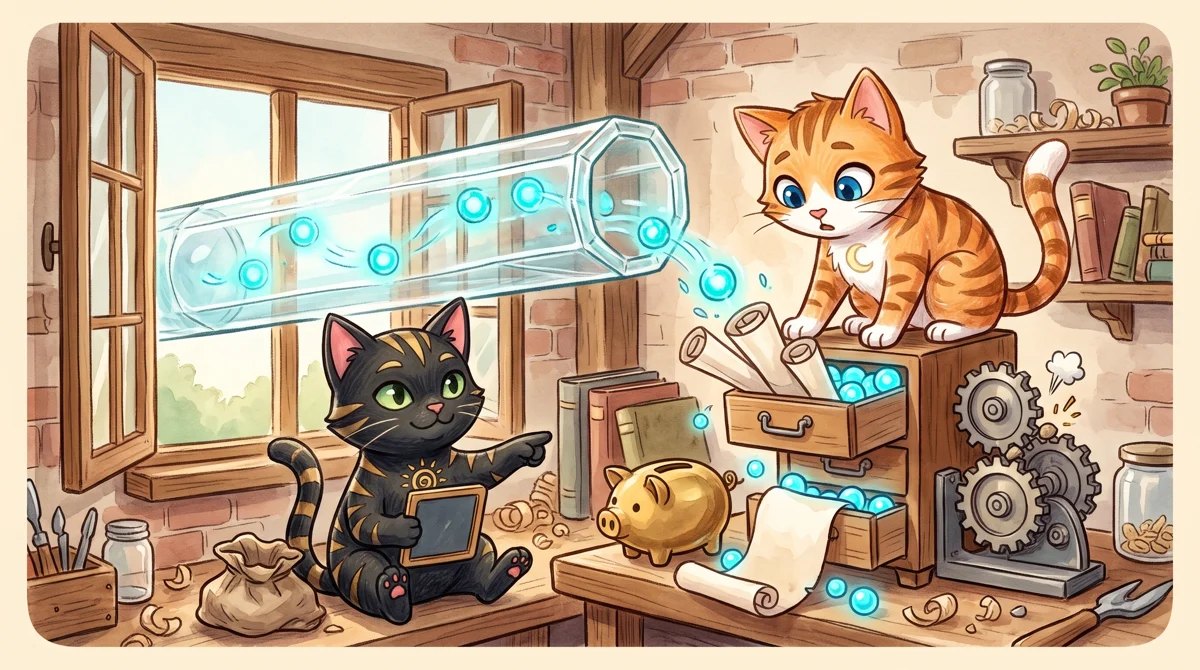
Illustration: While the external pipe is fully open, the tiny storage drawer quickly overflows and jams the mechanical gears.
The limits are where it gets interesting:
- 60MB storage. That is total workspace storage, not per person. A single phone photo can eat 5MB. A short screen recording can eat the rest.
- 100 automation runs per month. An automation is a rule like “when a task is marked done, move it to another list.” Every time that rule fires, it counts as one run.
- 500 AI credits, workspace-wide, as a trial. ClickUp Brain is the AI layer — it summarizes tasks, writes drafts, answers questions about your workspace. Credits are the unit ClickUp charges for AI use. 500 is a trial amount, not a monthly refill.
Read that again: 500 credits is a one-time trial for the whole workspace. If ten teammates each ask Brain to summarize a project, that pool drains fast and does not come back on the free plan.
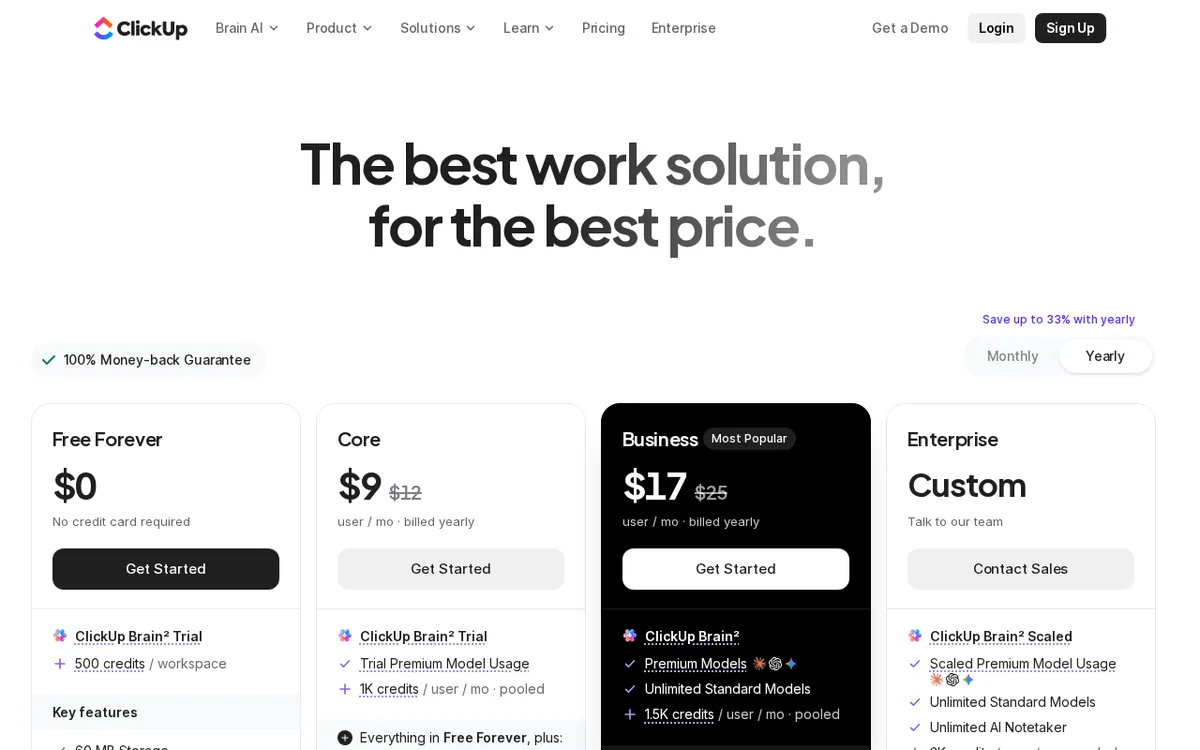
Figure: clickup.com official pricing page, captured 2026-11-03.
How to set up your first week without burning the free tier
Step 1: Pick one real project, not five. Unlimited tasks means nothing if your workspace is a junk drawer. Create one Space for one project. Add lists inside it. Keep it small enough that you can see everything on one screen.
Step 2: Turn on only the automations you will actually use. The 100-run cap sounds like a lot until you build a rule that fires on every task update. A 20-task sprint with one status-change automation can burn 20 runs in a day. Start with one automation, watch the counter for a week, then decide.
Step 3: Keep files out of ClickUp. This is the single biggest beginner mistake. Attach files to Google Drive or Dropbox and paste the link into the task instead. Your 60MB lasts far longer when it only holds small screenshots and PDFs.
Step 4: Spend AI credits on high-value asks. Don’t use Brain to rewrite a one-line task name. Use it to summarize a long thread or draft a project brief you would otherwise write from scratch. Those are the asks worth credits.
Step 5: Know the upgrade triggers before you hit them. When storage runs out, the fix is Unlimited at US$10 per person per month, or US$7 per person per month billed annually. That plan removes the storage cap, unlocks unlimited list views and Gantt charts, and raises automations to 1,000 runs a month. When you need workload management, timeline view, Google SSO, or 10,000 automation runs, that is Business at US$19 per person per month, or US$12 per person per month billed annually.
Common blockers and fixes
“My automations stopped working mid-month.” You hit 100 runs. Check the automation history to see which rule is firing too often. Often one rule is the culprit. Rewrite it to fire on a narrower trigger, or move that step to a manual checklist.
“Brain says I’m out of credits.” The 500-credit trial is gone. There is no free monthly refill. Either stop using AI features or move to a paid plan — the data does not list a standalone AI credit price, so treat the plan upgrade as the only documented path.
“Storage is full and I only uploaded a few files.” Check version history and deleted items. Old file versions still count. Clear them out before you assume you need to pay.
“The free plan feels slow with my whole team on it.” Unlimited users is real, but every user shares the same 60MB and 100 runs. A 15-person team on Free Forever will hit the automation cap in days. That is not a bug; it is the design.
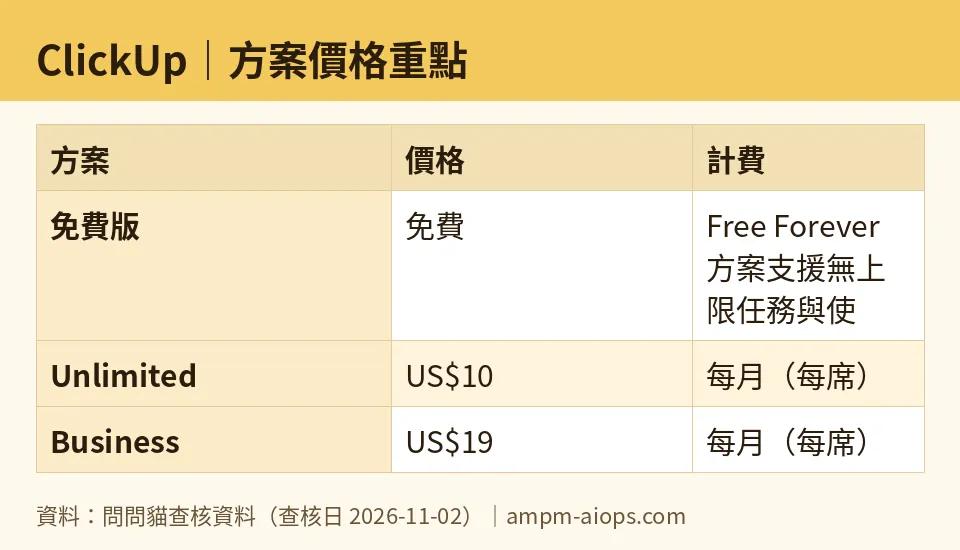
Figure: compiled by AMPM from its verified data (last verified 2026-11-02).
🔍 AMPM exclusive check
Nothing differed from the official page this time; every number below matches it, checked 2026-11-02.
One thing worth stating plainly, because the pricing page buries it: the 500 ClickUp Brain credits are described as a workspace trial, not a monthly allowance. Many free-tier AI tools refill credits each month. ClickUp’s free tier does not, according to the page we read. That changes how you should plan — treat those 500 credits as a one-time budget for your first month, not a recurring resource.
We also checked whether the free plan’s automation limit is per user or per workspace. It is per workspace. A 20-person team shares the same 100 runs. That is the number that breaks first for most growing teams, well before storage does.
☀️ AMO, the budget-minded cat

Free Forever is genuinely usable if you are one person or a small team that mostly tracks tasks. Unlimited tasks and unlimited users at no cost is a real offer, and plenty of paid competitors cap both.
Do the math on your own habits before upgrading. If you stay under 60MB and under 100 automation runs, you pay nothing and lose nothing important. The Unlimited plan at US$10 per person per month, or US$7 per person per month billed annually, only makes sense when storage is the thing blocking you. For a five-person team, that is a real monthly cost, and the annual billing discount is the difference between US$10 and US$7 per seat — worth taking if you are sure you will stay.
The AI credits are the trap for budget users. 500 credits sounds like a feature. It is a sample. If your workflow depends on Brain, the free plan is not a long-term home, and the data does not show a cheap add-on to top up credits. You either live without AI or you move up a tier. Decide which before you build habits around it.
🌙 PIMI, the performance-minded cat

On speed and capability, the free tier does the core job: tasks, lists, and basic views work without a paywall. Where it underperforms is anything that scales.
100 automation runs per workspace per month is thin. A team running sprint ceremonies, status syncs, and handoffs will exhaust it in the first week. Unlimited’s 1,000 runs is ten times more, and Business’s 10,000 runs is a hundred times more. Those jumps are not marketing padding; they reflect how quickly automation demand grows once a team relies on it.
The AI layer is the bigger performance question. 500 workspace credits will not survive a team that uses Brain daily. And because the data lists no standalone credit pricing, you cannot budget AI usage separately — it is bundled into plan decisions. For a performance buyer, that is a planning risk, not a feature.
Storage at 60MB is the hard ceiling. Unlimited removes it entirely, which matters the moment you store design files, recordings, or exports inside ClickUp. If your team does that, the free plan is a demo, not a workspace.
Verdict: who should use it, who should skip it
Use the free plan if: you are solo or a small team, you keep files in cloud storage instead of ClickUp, you run few or no automations, and you can live without ClickUp Brain after the 500-credit trial runs out.
Skip it and pay if: storage is your blocker (Unlimited, US$10 per person per month, or US$7 billed annually), or you need workload management, timeline view, Google SSO, and 10,000 automation runs (Business, US$19 per person per month, or US$12 billed annually).
The honest middle: most growing teams will outgrow Free Forever on automations before anything else. Watch that counter in week one. It tells you more about your real plan than any feature comparison.
Written: 2026-11-03 Price last verified: 2026-11-02 Tool last health-checked: 2026-11-03
🔗 Related on AMPM
📎 Sources
All prices and quotas in this article come from AMPM’s verified dataset for ClickUp (last verified 2026-11-02); primary sources:
🐾 Meet the cats: AMO and PIMI

AMPM is a Taiwan-based AI-tool pricing watchdog. Our motto: ask before you subscribe. Two cats argue every tool from two sides:
- ☀️ AMO — the budget-minded cat. Always asks: is the free tier enough, and is paying actually worth it?
- 🌙 PIMI — the performance-minded cat. Cares about whether it works well, fast, and gets your job done.

When they are done arguing, you know whether to pay. Every number is checked by us, with the verification date at the end.
🐾 Our sister sites also checked
Read next
- ClickUp Full breakdown: pricing, features and real-world limits
- ClickUp Is the free quota enough?
- ClickUp Alternatives
- Free plan limits for every AI tool we track
