[How-to] Colibri free vs paid: Why the Free Plan Only Hears English
- Free tier: Yes
- Cheapest paid plan: US$20/mo and up
- Free quota: 5 hours of live transcription per month (English only), up to 40 …
- Last checked: 2026-10-22
Article last updated: 2026-10-22



Colibri records your meetings, turns the audio into text live, and writes summaries. The free plan looks generous until you read one line in the fine print: live transcription works in English only. If your meetings run in Chinese, the free tier will happily record the audio and give you almost no usable transcript. This guide gets a first-timer productive on the free plan, shows exactly where it stops, and tells you which paid step actually removes the blocker you hit.
What the free plan gives a beginner
Here is the free tier, plain:
- 5 hours per month of live transcription — but English only. “Live transcription” means the speech is converted to text while the meeting is happening, not uploaded afterward.
- 40-minute cap on a single meeting recording. A call that runs longer gets cut at that point.
- 2 months of video retention, unlimited audio storage. Your recorded video is kept for two months; the audio files stay.
- 1 user. One account, no teammates sharing it.
That is enough to test the product honestly. You can sit through a few English calls, read the transcript, and decide whether the accuracy is good enough for your work before spending anything.
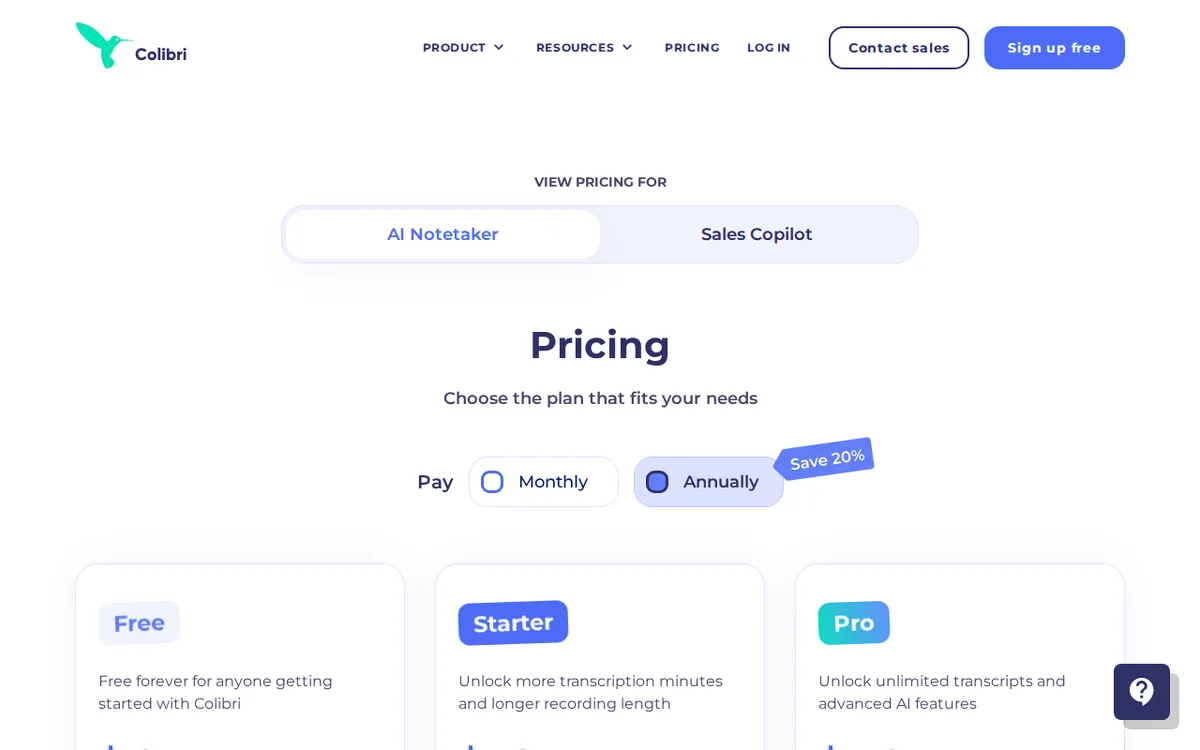
Figure: colibri.ai official pricing page, captured 2026-10-22.
Get productive on the free plan in five steps
- Sign up at colibri.ai and connect your calendar. Colibri joins meetings as a bot — a participant that sits in the call and records. Granting calendar access lets it auto-join scheduled calls.
- Run your first call in English. This is the one that matters. The free transcript is English-only, so test it on the language the free tier actually supports. Keep the call under 40 minutes or the recording stops at the cap.
- Watch your 5-hour meter. Those 5 hours cover live transcription for the whole month. Three 90-minute calls and you are nearly out. Plan which meetings are worth spending the quota on.
- Read the transcript, not just the recording. Check names, numbers, and jargon. Live transcription makes mistakes on accents and overlapping speakers. If it is wrong on the things you care about, no plan fixes that for you.
- Export before month two ends. Video is retained for 2 months. Pull anything you need to keep out before it ages past that window. Audio stays, video does not.
The three blockers you will hit — and what clears each one
Blocker 1: your meetings aren’t in English. This is the big one, and it is why the free plan disappoints anyone running Chinese, Japanese, or other-language calls. The free limit specifies English. The data we have does not list which languages the paid plans add, so do not assume a specific upgrade unlocks your language — check the current pricing page for your language before you pay. Paying to fix a language gap you haven’t confirmed is the most expensive mistake here.
Blocker 2: the 40-minute recording cap. Most real meetings run longer. The first paid step, Starter, raises the single-recording cap to 90 minutes and the monthly transcription allowance to 20 hours. Starter is US$20 per seat per month on monthly billing, or US$16 as the per-month average if you pay for a year up front. “Per seat” means you pay that amount for each person on the account; “seat” is one named user. Starter also adds a smart agenda and advanced search across your transcripts.
Blocker 3: no AI summary on free or Starter. The free tier and Starter record and transcribe, but the automatic meeting summary, highlight extraction, and auto-chapters live on Pro. Pro is US$50 per seat per month monthly, or US$40 per-month average billed annually. It also drops the transcription-hours limit entirely and raises the single-recording cap to 4 hours, plus Slack integration and priority support. If the reason you want this tool is “I don’t want to write up notes myself,” Pro is the first plan that does it.
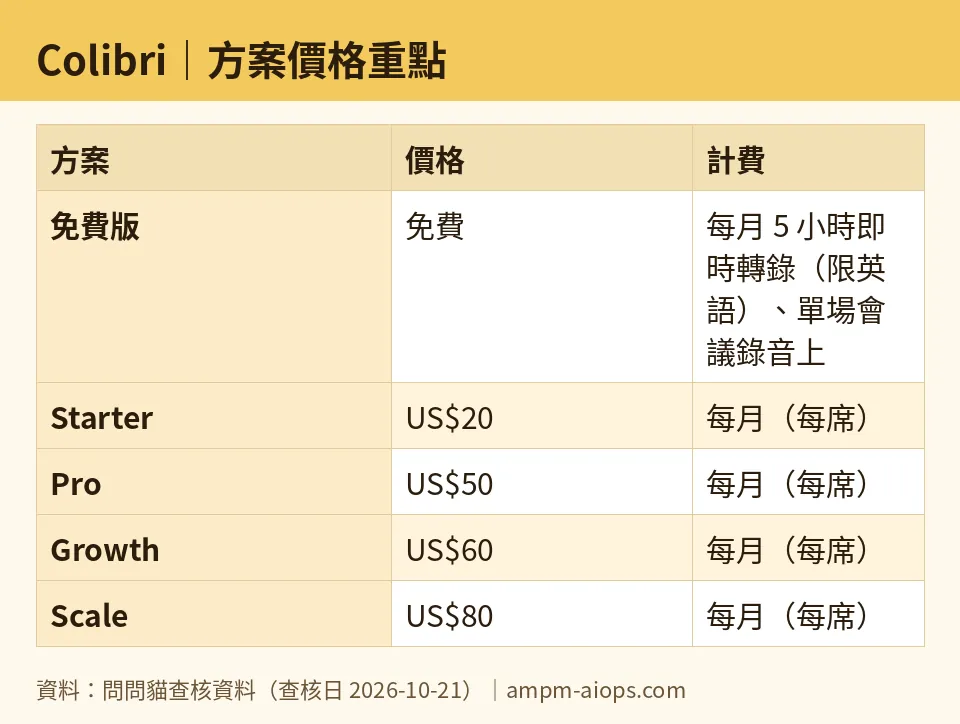
Figure: compiled by AMPM from its verified data (last verified 2026-10-21).
The two plans built for sales teams, not note-takers
Colibri’s top two tiers are a different product aimed at sales coaching, not personal note-taking.
Growth, at US$60 per seat per month monthly (US$50 per-month average billed annually), is the coaching Copilot plan. It adds live cue cards — prompt cards that pop up during the call to suggest what to say — plus alerts when one person talks too long, a team performance dashboard, and talk-ratio analysis (who spoke what share of the call). It also includes unlimited free Viewer accounts, read-only logins for people who need to watch but not run calls.
Scale, at US$80 per seat per month monthly (US$70 per-month average billed annually), removes the recording length limit entirely, keeps video for 3 years, adds manager real-time alerts, Salesforce integration, custom language models, and VIP onboarding help.
If you are a solo user or a small team that just wants clean notes, these two tiers are not for you. They are priced for revenue teams that measure call behavior.
🔍 AMPM exclusive check
Two things the pricing page does not put front and center, and one honesty note.
First, the free plan’s English-only restriction is the single most important fact for our international and Chinese-language readers, and it is easy to miss. The free “5 hours of live transcription” headline reads as universal. It is not. If your meetings are not in English, the free tier gives you recording and storage but not the transcript you came for.
Second, the two numbers for each paid plan — the monthly rate and the lower annual-average rate — mean you only reach the lower figure by committing to a full year up front. The monthly price is what you actually pay month to month. We list both so no one budgets off the cheaper number and gets billed the higher one.
Honesty note: Colibri came into our tracker as an automatic challenger candidate. We have run one verification pass (dated 2026-10-21), not our usual three-way human cross-check. Every number above matches colibri.ai as read on that date, but treat the commercial terms — and especially which languages each paid plan supports — as “confirm on the live page before paying.” We have not independently tested paid-tier language coverage.
Verdict: who should use it, who should skip it
Use the free plan if your meetings are in English, they run under 40 minutes, you are one person, and you want to judge transcript accuracy before paying. It is a fair trial.
Go to Starter (US$20/seat/mo) if English calls run longer than 40 minutes and you need more than 5 hours a month, but you are fine writing your own summaries.
Go to Pro (US$50/seat/mo) if the automatic AI summary is the whole point — this is the first plan that writes the notes for you and lifts the hours cap.
Look at Growth or Scale only if you run a sales team and want live coaching, talk-ratio data, and CRM integration. For a note-taker, that money is wasted.
Skip Colibri for now if your meetings are in Chinese or another non-English language and you were counting on the free tier to transcribe them — it won’t, and we have not confirmed which paid plan would. Verify language support on the live pricing page first, then decide.
Written: 2026-10-22 Price last verified: 2026-10-21 Tool last health-checked: 2026-10-22
🔗 Related on AMPM
📎 Sources
All prices and quotas in this article come from AMPM’s verified dataset for Colibri (last verified 2026-10-21); primary sources:
🐾 Meet the cats: AMO and PIMI

AMPM is a Taiwan-based AI-tool pricing watchdog. Our motto: ask before you subscribe. Two cats argue every tool from two sides:
- ☀️ AMO — the budget-minded cat. Always asks: is the free tier enough, and is paying actually worth it?
- 🌙 PIMI — the performance-minded cat. Cares about whether it works well, fast, and gets your job done.

When they are done arguing, you know whether to pay. Every number is checked by us, with the verification date at the end.
🐾 Our sister sites also checked
Read next
- Colibri Full breakdown: pricing, features and real-world limits
- Colibri Is the free quota enough?
- Colibri Alternatives
- Free plan limits for every AI tool we track
