[News] Cursor Pricing Just Changed: Does the Cheap Plan Cover What You Actually Use?
- Free tier: Yes
- Cheapest paid plan: US$8/mo and up
- Free quota: Hobby: 2000 times of completion + 50 times of slow progress …
- Last checked: 2026-11-01
Article last updated: 2026-11-01



Cursor, the AI code editor most engineers already know, rebuilt its plan lineup. Our check of the official pricing page found the new list on 2026-10-17 and again on 2026-10-18. It has matched every day since.
My angle is simple. The new entry plan has a low sticker price, but the sticker price only covers part of what many people use Cursor for. Before you move, or stay put, you need to know what the cheap tier includes and what gets billed on top.
Prices vary by country, and we checked from Taiwan. All figures below are the US$ ones on the page.
What changed on the pricing page
Our change log records the old lineup as Pro 20, Pro+ 60, Ultra 200 and Teams 40. That is four paid plans.
The page now shows five:
- Plus: US$8 per month
- Premium: US$30 per month
- Super: US$100 per month
- Ultra: US$200 per month
- Teams: from US$30 per seat per month
A “seat” is one paid user on a team account. Ultra is the only name that survived at the same price point, US$200 per month. The rest were renamed and repriced.
The bigger shift is how the tiers are described. Cursor now sells them as multiples of the Plus usage allowance. Premium gives 4 times Plus. Super gives 15 times. Ultra gives 50 times. That is a clean ladder. The page does not tell you what the Plus allowance is in requests or dollars, so the multiples are hard to turn into real work. Treat “4x” as a relative number, not a promise of a specific amount of coding.
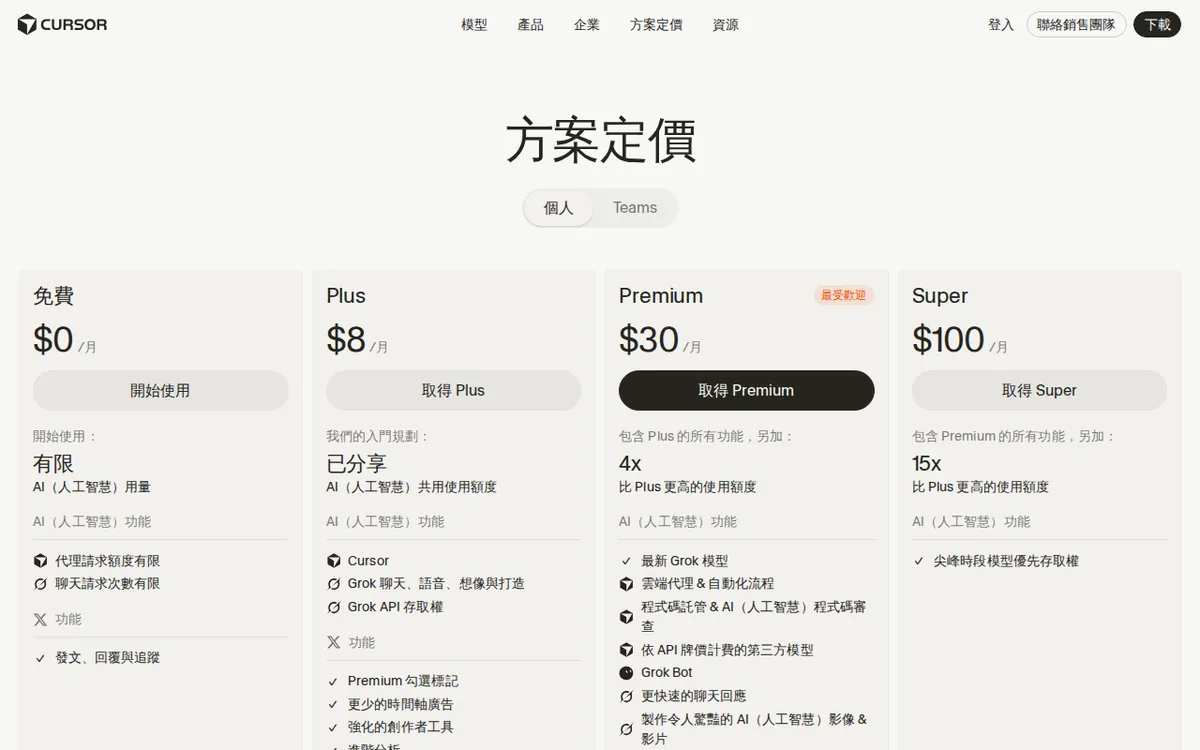
Figure: cursor.com official pricing page, captured 2026-11-01.
The US$8 Plus plan: read the fine print
US$8 per month looks like a bargain. Here is what it is.

Illustration: The low-cost package unlocks only one gem, leaving all other choices secured under glass domes requiring extra coins.
Plus is priced the same as a combined subscription with x.ai, the company behind the Grok models. It includes a shared pool of AI usage, Grok chat, voice, image generation and “Build”, plus access to the Grok API. An API is a way for software to call an AI model directly, without the chat window.
The catch is one line: Plus can only use Grok models. If your workflow runs on other vendors’ models, Plus does not cover it. Third-party models are billed separately, by how much you use them.
So there are two questions. Do you like how Grok performs in your editor? And if you don’t, are you ready to pay per use on top of US$8?
Plus includes everything in Free. That helps, but it means Plus is an add-on to the free tier built around one model family, not a general “Pro” replacement.
Premium and above: what you get, what still costs extra
Premium is US$30 per month. The page marks it as the most popular plan. It includes everything in Plus, with 4 times the usage, the latest Grok models, cloud agents and automation, code hosting with AI code review, and third-party models.
Those third-party models are billed at the vendor’s API list price. In plain terms, you pay what the model company charges developers directly. That is not a flat allowance. The Premium price covers the editor and the Grok-side usage. It does not cap what you spend on outside models.
Super, at US$100 per month, gives 15 times Plus usage and priority access to models at peak hours. Ultra, at US$200 per month, gives 50 times Plus and earliest access to all new products and models. Both are aimed at heavy daily users. The page does not say whether third-party billing on these plans differs from Premium’s. We did not find any wording that suggests it does, but we can’t confirm it.
Teams starts at US$30 per seat per month. It adds central billing, usage analytics, team privacy settings and SAML/OIDC single sign-on (a company-wide login system). Teams can mix seat levels, with usage from 4 to 50 times Plus. A team lead can give heavy users a bigger seat and light users a smaller one.
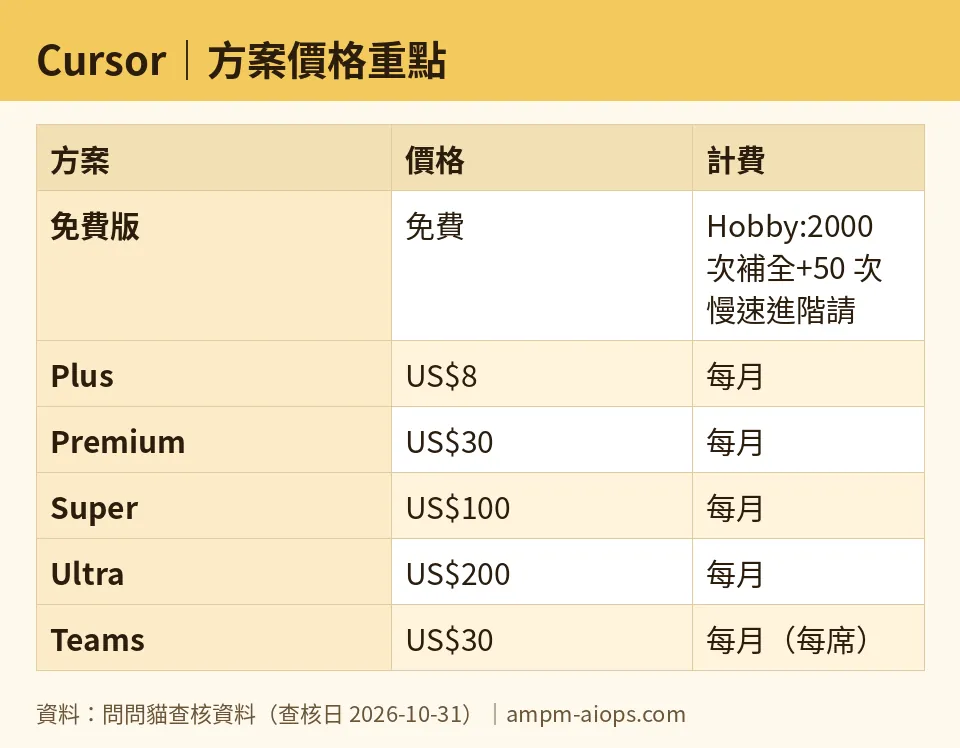
Figure: compiled by AMPM from its verified data (last verified 2026-10-31).
What about free?
Cursor still has a free tier. It needs no credit card. Free gives you limited agent requests (the AI doing multi-step coding tasks for you) and access to Composer, Cursor’s multi-file editing feature.
Older figures put the free plan at 2,000 code completions and 50 slow premium requests. We want to be careful here. As of 2026-07-26 the official page no longer prints those numbers. It only says “limited”. We now find them only in third-party community sources. We keep them on file with medium confidence. Treat them as a rough guide, not a guarantee.
🔍 AMPM exclusive check
Here is what we verified and where the page leaves gaps.
- The page was stable. We read it on 2026-10-17 and 2026-10-18, and the plan list was identical both days. Our automated checks then matched the page every day through 2026-10-31. The prices in this article match it.
- The Plus restriction is not in the headline. The US$8 price is easy to see. The fact that Plus works only with Grok models, and that other vendors’ models cost extra by usage, takes more reading. That is the part that changes whether US$8 is a good deal for you.
- Premium’s outside-model billing is also easy to miss. The plan’s value pitch is about usage multiples. Third-party models are charged at API list price on top.
- The free tier numbers have no official source. The page says “limited”. The 2,000 and 50 figures come from community sources only.
- We did not verify what happens to existing subscribers. The page shows the new lineup. We don’t have a source for how current Pro or Pro+ customers are moved or when their price changes. Check your own billing page before you assume anything.
☀️ AMO, the budget-minded cat

AMO’s questions are always the same: is free enough, and is paying worth it?
Is free enough? For light use, maybe. Free costs nothing, needs no card, and gives you limited agent requests plus Composer. If you open Cursor a few times a week to fix a bug or write a small script, free may be all you need. The catch is that “limited” has no official number any more. The 2,000 completions and 50 slow requests that circulate are community figures. If you start hitting walls, you’ll find out by running into them.
Is US$8 worth it? Only if you want Grok. Plus is a low price for a shared usage pool and Grok access, but it is a one-model-family plan. If you pick other vendors’ models in the editor, those costs come on top by usage. AMO’s rule: if you can’t name the model you will use, don’t pay for Plus yet. Stay free and test.
Is US$30 worth it? This is where the money gets real. Premium gives 4 times Plus usage, cloud agents, and code review. But outside models are billed at API list price, so your bill depends on habits, not just the plan. A budget cat should set a spending alert on the model vendor side and watch the first month.
US$100 and US$200? Super is US$100 and Ultra is US$200 per month. AMO says: only if the tool is how you earn money, and you have already hit the Premium ceiling more than once.
Verdict: who should use it, who should skip it
Stay on free if you code occasionally and don’t have a model preference. Free costs nothing, needs no card, and still gives you Composer.
Try Plus (US$8) if you want to work with Grok models and use the shared pool. Skip it if your workflow depends on other vendors’ models. You’d pay US$8 and then pay again per use.
Choose Premium (US$30) if you code daily, want cloud agents and AI code review, and are comfortable with a variable bill from third-party models. Set your spending limits first.
Go Super or Ultra (US$100 or US$200) only after Premium has proven too small. The multiples (15x and 50x Plus) are relative, so test before committing.
Teams (from US$30 per seat) makes sense when you need central billing, SSO and privacy controls. Mixed seat levels let you avoid paying for the top tier across the whole team.
Skip all of it for now if you are an existing subscriber and haven’t seen your own billing page change. Look there first.
The lineup is cleaner than before. The cost is less clear. The headline number is the editor and Grok. The model bill you actually pay may be somewhere else.
Written: 2026-11-01 Price last verified: 2026-10-31 Tool last health-checked: 2026-11-01
🔗 Related on AMPM
📎 Sources
All prices and quotas in this article come from AMPM’s verified dataset for Cursor (last verified 2026-10-31); primary sources:
🐾 Meet the cats: AMO and PIMI

AMPM is a Taiwan-based AI-tool pricing watchdog. Our motto: ask before you subscribe. Two cats argue every tool from two sides:
- ☀️ AMO — the budget-minded cat. Always asks: is the free tier enough, and is paying actually worth it?
- 🌙 PIMI — the performance-minded cat. Cares about whether it works well, fast, and gets your job done.

When they are done arguing, you know whether to pay. Every number is checked by us, with the verification date at the end.
🐾 Our sister sites also checked
Read next
- Cursor Full breakdown: pricing, features and real-world limits
- Cursor Is the free quota enough?
- Cursor Alternatives
- Free plan limits for every AI tool we track
More verified articles on this tool
- [Review] Cursor's Free Tier Limits: The Official Page Stopped Naming Numbers
- Cursor Cloud Agents Without a Repo: Start From Scratch, Then Save It as a Repo Afterwards
- Cursor Agents Can Now Run on Your Own Machine — and Drive a Browser While They're There
