[How-to] ElevenReader Free Plan: How to Start Listening and Spot the Limit Before It Spots You
- Free tier: Yes
- Cheapest paid plan: US$11/mo and up
- Free quota: Free Permanent Plan: provides 10 hours of Text to Audio quota per …
- Last checked: 2026-11-04
Article last updated: 2026-11-05



My angle is simple. ElevenReader reads your files aloud in a realistic human voice, and the free plan is enough to find out whether you’ll actually use it. This guide covers setup, what the free plan can do, where beginners get stuck, and how to tell when paying makes sense. Prices vary by country, and we checked from Taiwan.
What ElevenReader is, in one minute
ElevenReader is an AI reading app. You give it an ebook, a PDF or an article, and it turns the text into audio using lifelike voices. The technical term is text-to-speech (software that reads written words aloud). The app runs on the web and on mobile, and your place syncs between devices.
It also carries a library of audiobooks. Those are a separate pool from your own files, and the difference between the two pools drives most of the pricing.
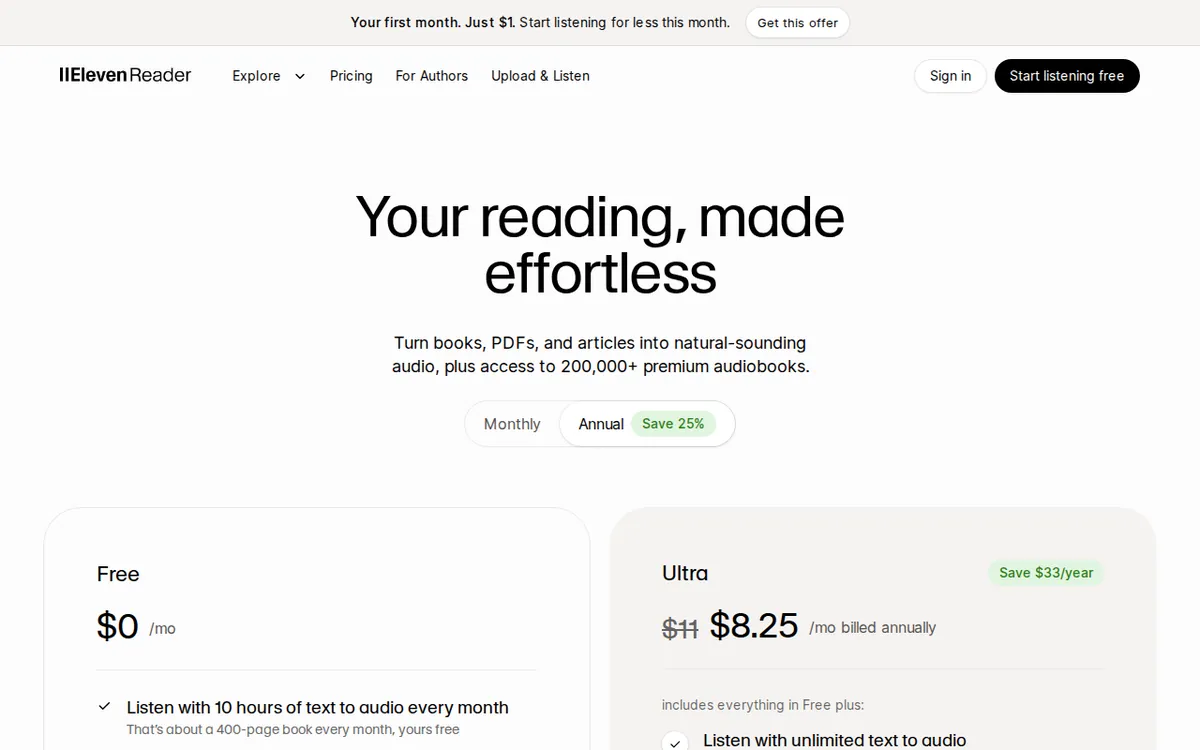
Figure: elevenreader.io official pricing page, captured 2026-11-05.
What the free plan gives you
The free plan has no expiry date. It is not a trial. Here is what the official page lists:
- 10 hours of text-to-audio per month. The page says that equals about 400 book pages read aloud per month.
- A library of 1,000+ lifelike voices.
- Thousands of free public-domain audiobooks. Public domain means the copyright has expired, so classics are free to listen to.
- Sync across the web app and the mobile app.
- Playback speed up to 4.0x, plus a sleep timer.
The key phrase is “text-to-audio.” That 10-hour monthly allowance is what you spend when the app converts your own documents into speech. Public-domain audiobooks are listed as a separate free feature, so you can listen to those without worrying about the same meter. The page does not spell out how the two interact, so watch your usage the first month.
Getting started: five steps
The exact button names may change, so treat these as a map, not a script.
- Create a free account. Use the web app first. It is easier to test with a big screen and a real file.
- Install the mobile app and sign in with the same account. Syncing is on the free plan, so you can start on a laptop and continue on a phone.
- Start with a public-domain book. Pick a classic from the free library. This tests the voices and the speed controls without spending any of your own-document hours.
- Import one short document of your own. Choose a chapter, an article or a short PDF. Don’t start with a whole textbook. A short file shows you the voice quality and the layout handling at low cost.
- Try a few voices and a faster speed. With 1,000+ voices, the default is rarely the best one for you. Try the same paragraph in three voices. Then push the speed up. The free plan goes to 4.0x, which is far faster than most people can follow, so find your own comfortable ceiling.
Common blockers and fixes
The voice sounds wrong for your content. Fiction and technical text need different voices. Switch voices before you decide the tool is poor.
Your PDF reads out page numbers and headers. This is the most common complaint with any reader that handles PDFs. The paid Ultra plan has a smart layout filter that automatically skips repeated headers, footers and serial numbers. The free plan’s page does not list that feature. If your files are scanned reports or textbooks, expect some clutter and test with a clean file first.
You run out of hours mid-month. The free allowance is 10 hours of text-to-audio per month, which the page equates to about 400 pages. A single long textbook can eat a lot of that. Convert only the chapters you need. Use public-domain audiobooks for casual listening.
You want to listen offline. Offline download is listed under Ultra, not under the free plan. If you commute through dead zones, this matters.
You wanted a voice that sounds like you. Custom voice models are an Ultra feature as well.
🔍 AMPM exclusive check
Our check was narrower than we would like, and you should know that. ElevenReader entered our database as a candidate tool. Its data has been through one round of review, not our usual three-way cross-check against separate sources.
What we did verify: every day from 2026-10-30 to 2026-11-04, our system re-read the official pricing page and confirmed the free-plan and Ultra numbers in this article had not changed. The last check was on 2026-11-04. The sources were the official site, the official pricing page, and a third-party discussion thread.
What we did not verify: we did not run a stopwatch test on the 10-hour allowance. So we can’t confirm that 10 hours equals 400 pages in your use. That conversion is the vendor’s claim. We also did not confirm the commercial-use terms for the free plan. If you plan to publish audio you make with ElevenReader, read the terms on the official site first.
One more point the pricing page leaves open: the free plan lists “thousands” of public-domain audiobooks, with no exact count. We don’t have a number, so we won’t give you one.
☀️ AMO, the budget-minded cat

Is free enough? For a light user, yes. You get 10 hours of text-to-audio a month, which the vendor says covers about 400 pages. That is a few short books, or a stack of articles, each month. You also get the public-domain library, all 1,000+ voices, sync across devices, and playback up to 4.0x. There is no card to enter and no clock running.
Now the paid side. Ultra costs US$11 on monthly billing. The yearly option is US$99 a year, which the page says works out to US$8.25 a month. Those are the only two prices in our data.
What does the money buy? Your own imported files get up to 24 hours of text-to-speech per day. On the free plan, the whole month is 10 hours. The gap is huge. You also get 20 hours a month of popular bestseller audiobooks from a library of 200,000+ titles. Plus offline download, custom voice models, the layout filter and priority support.
My rule: stay free until you hit the 10-hour wall twice. If you hit it once, you may have just imported too much too fast. If it happens two months running, US$11 a month is a fair price for removing the cap. If you know you’ll stay, the yearly price of US$99 is the cheaper route. Cancel the monthly plan if it sits unused.
🌙 PIMI, the performance-minded cat

Does it do the job? That depends on what you feed it. The pitch is lifelike voices, and the free plan gives you the full voice library, so you can judge the quality at no cost. That’s an honest setup. Test it.
Speed is the second thing I check. The free plan goes up to 4.0x and includes a sleep timer. Most people stop at 2x or so, but if you skim long documents by ear, the headroom helps.
Where I’d push hardest is messy files. Real PDFs have page numbers in the middle of sentences, running headers and footers. Ultra’s smart layout filter skips those automatically. The free plan doesn’t list it. If your daily reading is reports or scanned books, the filter may matter more than the extra hours.
The numbers that change how you work are on Ultra. The 24 hours per day for imported files means you can queue a big pile and not think about it. Offline download means no stalls when your signal drops. Priority support means faster help when an import fails. And the bestseller pool is 20 hours a month, which is a real limit, not unlimited.
My test: take one clean chapter and one ugly PDF. Run both on the free plan. If the ugly one is unbearable, you have your answer about Ultra before you’ve paid anything.
Verdict: who should use it, who should skip it
Use the free plan if you want to hear articles and short documents read aloud, you like trying different voices, or you enjoy public-domain classics. It costs nothing, and the monthly cap is easy to track.
Consider Ultra (US$11 monthly, or US$99 yearly) if you import long documents often, you run out of the 10 hours before the month ends, you need offline listening, or your PDFs come with clutter that the layout filter would clear.
Skip it if you only want modern bestsellers on demand without limits. The Ultra bestseller allowance is 20 hours a month, and that is a cap. Also skip it if you need firm commercial-use answers today. We haven’t confirmed them, so check the official terms.
Start with one public-domain book and one short file of your own. Within an hour you’ll know if the voices work for you.
Written: 2026-11-05 Price last verified: 2026-11-04 Tool last health-checked: 2026-11-04
🔗 Related on AMPM
📎 Sources
All prices and quotas in this article come from AMPM’s verified dataset for ElevenReader (last verified 2026-11-04); primary sources:
🐾 Meet the cats: AMO and PIMI

AMPM is a Taiwan-based AI-tool pricing watchdog. Our motto: ask before you subscribe. Two cats argue every tool from two sides:
- ☀️ AMO — the budget-minded cat. Always asks: is the free tier enough, and is paying actually worth it?
- 🌙 PIMI — the performance-minded cat. Cares about whether it works well, fast, and gets your job done.

When they are done arguing, you know whether to pay. Every number is checked by us, with the verification date at the end.
🐾 Our sister sites also checked
Read next
- ElevenReader Full breakdown: pricing, features and real-world limits
- ElevenReader Is the free quota enough?
- ElevenReader Alternatives
- Free plan limits for every AI tool we track
