Ask Cat › AI Tool Summary › Fireflies.ai
[How-to] Fireflies.ai Free Tier: How Far 20 AI Credits and 400 Minutes of Storage Really Go
- Free tier: There is
- Cheapest paid plan: US$18/mo and up
- Free quota: On the official pricing page for the free tier, the Free column reads: …
- Last checked: 2026-10-06
Article last updated: 2026-10-08



Fireflies.ai is a meeting note-taker — it joins your video calls, writes a transcript, and generates a summary afterward. If you’re checking whether the Fireflies.ai free tier is enough before you pay for anything, the honest answer is: it depends entirely on two numbers most people never look at closely — 400 minutes of shared storage and 20 AI credits a month. Get those wrong and you’ll hit a wall in your second or third week. Here’s how to set it up so you don’t.
What “free” actually includes
The official pricing page lists the free plan as: unlimited transcription (with an asterisk), limited AI summaries, 400 minutes of storage per team, and 20 AI credits per month.
Start with the transcription. “Unlimited transcription” sounds like you can record as many meetings as you want, and technically you can — Firefiles will keep transcribing. But the asterisk matters: downloading your transcripts (exporting them as a file) is a Pro-tier feature. On the free plan, you can read a transcript inside Fireflies, but you can’t pull it out as a document. If your workflow depends on exporting transcripts into another tool, the free plan won’t do that for you.
Then there’s the “AI credits” — this is Fireflies’ internal currency for AI-generated work, like asking its assistant to summarize a meeting in a custom way or answer questions about what was discussed. You get 20 of these per month, and they reset on a monthly cycle. Basic AI summaries are generated automatically and are described as “limited” rather than unlimited — don’t assume every meeting gets a full, detailed summary once you’re active across several calls a day.
One more limit that catches people off guard: each individual recording you upload or import is capped at 100MB or 150 minutes, whichever comes first. If you’re uploading a long pre-recorded webinar rather than using Fireflies live on a call, check the run time first.
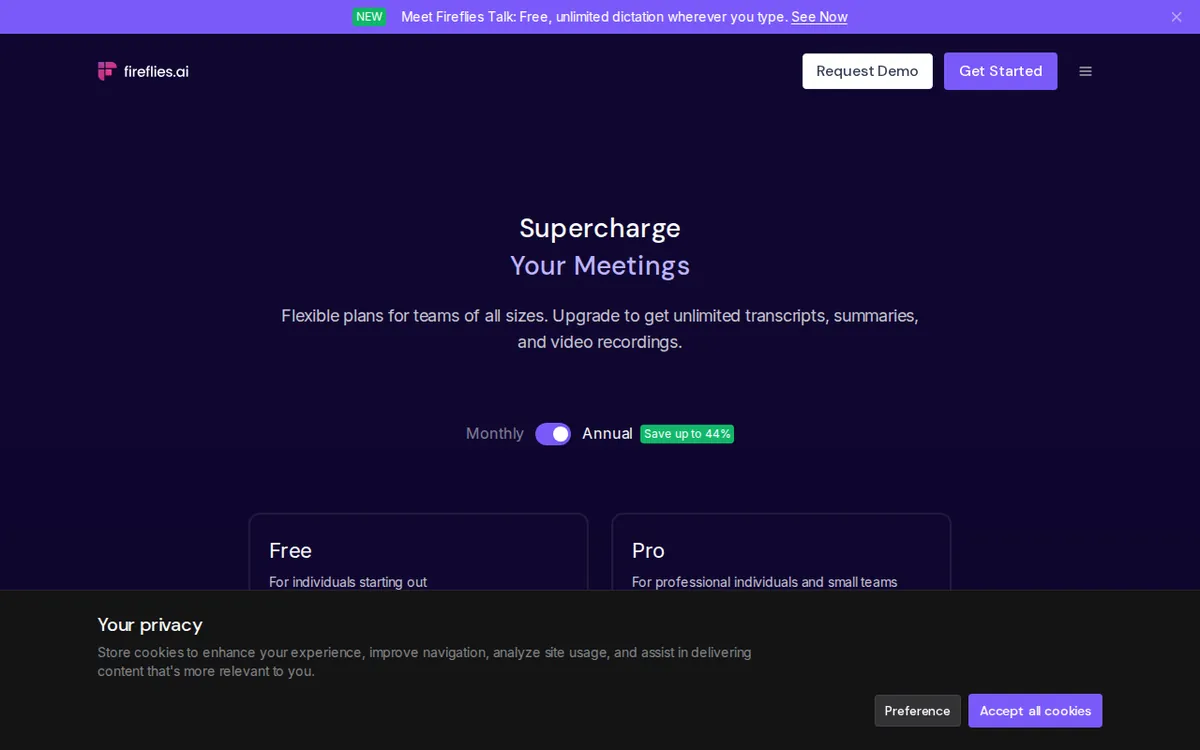
Figure: fireflies.ai official pricing page, captured 2026-10-08.
The 400-minute storage trap
This is the one that actually breaks workflows. The 400 minutes of storage is not a monthly allowance that refreshes — it’s a total bucket shared across your whole team (or account, depending on how you’re set up). Once you’ve banked 400 minutes of meetings, you don’t get more until you delete old ones.

Illustration: The shared storage accumulates permanently, requiring manual cleanup of old meeting records once the limit is reached.
Practically, that means a free Fireflies account for a single heavy user burns through its storage in a few weeks of back-to-back meetings. A team sharing one free account will hit it even faster, since everyone’s recordings count against the same 400-minute pool.
The fix is simple but needs to become a habit: go into your meeting library every week or two and delete transcripts you no longer need — old one-off calls, duplicate test recordings, anything you’ve already acted on. Treat it like clearing out an inbox. If you wait until you’re blocked (new meetings failing to save or transcribe) you’ll be scrambling mid-week to free up space instead of doing it on your own schedule.
Setting it up without wasting your 20 credits
Since AI credits are the scarcest resource on the free plan, decide upfront which meetings deserve one. A good starting routine:
- Connect your calendar first. Fireflies auto-joins meetings from your calendar instead of you adding the bot manually every time — this alone prevents half the “I forgot to record” problems beginners run into.
- Let automatic transcription run on everything. It’s unlimited, so there’s no cost to recording every call.
- Spend AI credits only on meetings you’ll actually revisit — client calls, decisions you need a written record of, anything you’d otherwise type notes for by hand. Don’t spend a credit on a quick two-person sync you’ll remember anyway.
- Check your credit count before a big week. If you know you have five important calls coming up and only a handful of credits left, prioritize which ones get the AI treatment.
- Clear out old recordings on a recurring day — pick a weekday, make it part of your routine, and you’ll never hit the 400-minute wall unexpectedly.
A common blocker: a new user burns most of their 20 credits in the first few days testing the feature out of curiosity, then has nothing left when a real meeting needs summarizing. Treat the first few credits as a test run on a low-stakes meeting, not your whole monthly budget.
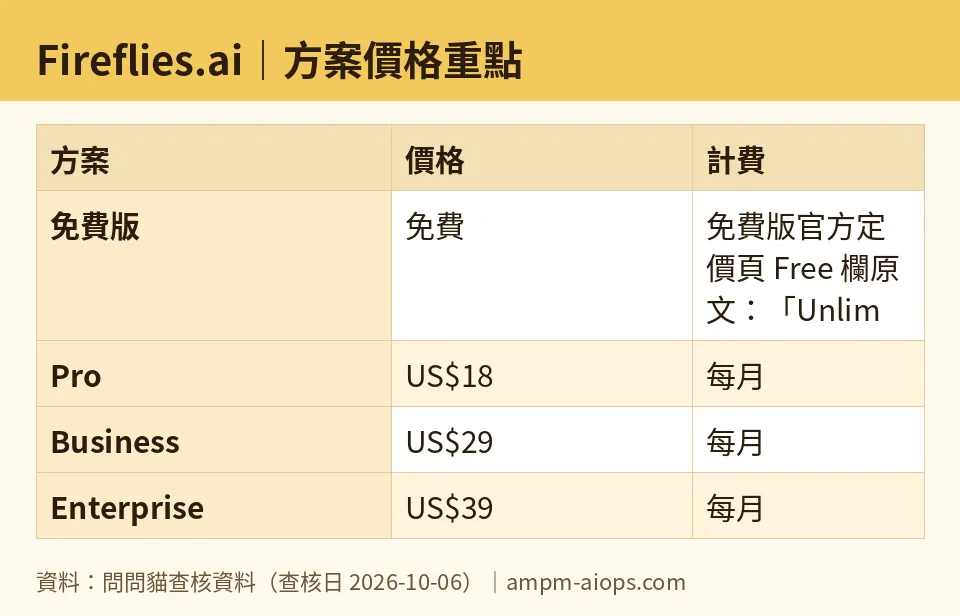
Figure: compiled by AMPM from its verified data (last verified 2026-10-06).
When the free plan stops being enough
You’ll know it’s time to upgrade when you’re regularly deleting meetings you’d rather keep, or when you need transcript downloads for sharing outside Fireflies. The paid tiers are priced per seat (a seat is one paid user license on the account) per month:
- Pro: US$18 per seat per month billed monthly, or works out to US$10 per month per seat if you pay annually. This tier adds unlimited AI summaries and transcript downloads.
- Business: US$29 per seat per month billed monthly, or US$19 per month per seat billed annually. Adds team management features on top of Pro.
- Enterprise: US$39 per seat per month — this one is the same price whether billed monthly or annually.
If you’re a solo user who just needs more breathing room on storage and full AI summaries, Pro is the natural next step, and the annual price is a meaningfully better deal than paying monthly. If you’re managing Fireflies across a team with shared admin needs, Business is where the team controls live.
🔍 AMPM exclusive check
Two things we found when checking Fireflies’ own pages against each other didn’t line up, and one correction to flag from our own records.
First: Fireflies’ pricing page says free storage is “400 mins of storage/team,” but a separate official page describing the free plan says “per seat.” Those are two different models — a shared team pool versus an individual allowance — and Fireflies’ own materials disagree with each other. We’re going with the pricing page’s “per team” wording since that’s the canonical pricing source, but if your account behaves like per-seat storage, that would explain why your numbers don’t match what we describe here.
Second, a correction: an earlier version of our data mistakenly recorded the free plan as including “unlimited AI summaries.” The actual pricing page says “limited AI summaries” for the free tier — unlimited summaries only start at Pro. If you’re budgeting your free-tier usage, plan around limited summaries, not unlimited ones.
Everything else — the 20 AI credits per month (confirmed as a monthly reset on Fireflies’ own free-plan page), the 100MB/150-minute upload cap, and all three paid-tier prices — matched the official pricing page exactly as of our 2026-10-06 check.
Verdict: who should use it, who should skip it
The free tier works well for anyone testing Fireflies on a handful of meetings a week, or for a single light user who doesn’t need to export transcripts. The unlimited transcription is genuinely useful even with the AI-summary limits, since you can always read the raw transcript for free.
It starts to strain for teams sharing one account, because the 400-minute storage pool fills up fast when multiple people are recording into it, and for anyone who needs transcript downloads — that’s a Pro-only feature, full stop.
Skip the free tier and go straight to Pro if you already know you’ll want transcript exports or unlimited AI summaries from day one; testing those specific features on a plan that doesn’t include them just wastes time. For everyone else, start free, watch your 400-minute pool and your 20 credits, and upgrade only once you can point to the specific limit you’re hitting.
Written: 2026-10-08 Price last verified: 2026-10-06 Tool last health-checked: 2026-10-08
🔗 Related on AMPM
📎 Sources
All prices and quotas in this article come from AMPM’s verified dataset for Fireflies.ai (last verified 2026-10-06); primary sources:
🐾 Meet the cats: AMO and PIMI

AMPM is a Taiwan-based AI-tool pricing watchdog. Our motto: ask before you subscribe. Two cats argue every tool from two sides:
- ☀️ AMO — the budget-minded cat. Always asks: is the free tier enough, and is paying actually worth it?
- 🌙 PIMI — the performance-minded cat. Cares about whether it works well, fast, and gets your job done.

When they are done arguing, you know whether to pay. Every number is checked by us, with the verification date at the end.
🐾 Our sister sites also checked
Let's take a look at these
- Fireflies.ai Comprehensive Introduction: Pricing, Features, and Actual Limitations
- Fireflies.ai Is the free quota enough?
- Fireflies.ai Alternatives
- Comprehensive Free Quota List for All Tools
More verified articles on this tool
- Fireflies Free Is 3 Meetings by Default: The Asterisk on "Unlimited Transcription" Is Auto Join
- Fireflies Free Cannot Export Transcripts: Unlimited Recording, Zero Downloads — Is US$18 Pro Worth It? (Checked Sept 2026)
- Fireflies Free Plan 2026: The 400 Storage Minutes Do Not Reset Monthly
