[Review] Floot Free Usage Limits 2026: Where the Free Plan Actually Stops
- Free tier: Yes
- Cheapest paid plan: US$25/mo and up
- Free quota: 100 actions per day using your own AI, on the US$0/month free plan. …
- Last checked: 2026-11-02
Article last updated: 2026-10-31



Floot is an AI tool that builds websites and apps for you. Its free plan has a headline number that looks generous. This review asks a narrower question: where does free actually stop working for you?
We read the vendor’s pricing page and its billing FAQ. We did not build anything with Floot, and nothing below pretends otherwise. Every point comes from what the vendor publishes.
What the free plan gives you
The free plan costs nothing. You get 100 “actions” per day. An action is one edit, read or test that the AI assistant performs on your project. The count resets daily.
Two details stand out.
First, failed actions never count. That is the vendor’s own wording. If the AI tries something and it breaks, you are not charged for the attempt. Most builders in this category don’t say that.
Second, you bring your own AI. The free plan works with Claude, ChatGPT and similar models you already have access to. The data we checked doesn’t say what that costs you on the AI provider’s side. Check that before you assume the whole thing is free.
Once an app is live, a separate pot applies. The app can use built-in AI features, paid for with “credits” (a unit the platform uses to meter AI usage). Free gives a one-time 3,000 starter credits. Hosting gets a US$3 starter allowance, meant to get your first app online.
Commercial use is allowed on free. That matters if you want to sell what you build.
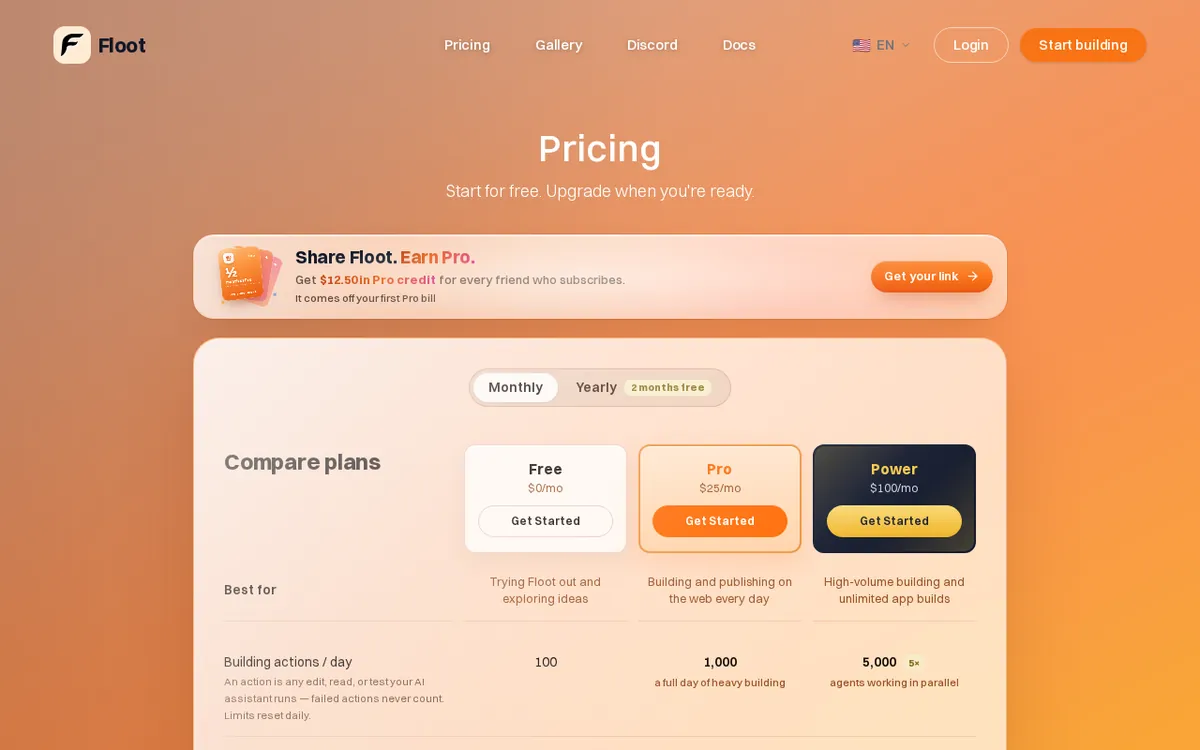
Figure: floot.com official pricing page, captured 2026-10-31.
The three things that annoy us
1. The weekly pool has no published size. The pricing page says limits reset daily, then adds in brackets that free also has a weekly pool. That is the whole disclosure. We found no number for it. So “100 a day” may not be what you can really use across a week. You can’t plan around a cap nobody states.
2. The project limits arrive late. The headline says 100 actions a day. The FAQ says a free account keeps at most 2 projects and 1 published app. The published app must sit on a free *.floot.app subdomain (a web address that ends in Floot’s own domain, not yours). It also carries the Floot badge, a small label showing the app was built with Floot. A third project means deleting an old one first. Custom domains and badge removal both need Pro.
3. Paid pricing is monthly only, and the steps are big. Pro is US$25 a month. Power is US$100 a month. We found no yearly option on the pricing page, and no promos or discount codes. Enterprise has no published price; ask for a quote. Rolled-over credits also need a paid plan to use. If you only need one extra feature, such as a custom domain, you still pay for the whole Pro plan.
What Floot does well
The failed-action rule is the real plus. It removes a quiet frustration of AI builders, where the tool burns your allowance on its own mistakes.
The daily limit is also large for a free plan. In the data’s own words, 100 actions a day is generous compared with similar tools.
Free also isn’t a toy tier on rights. Commercial use is allowed. You can launch a real app, with the badge and the subdomain.
Finally, the paid ladder is easy to read. Pro gives 1,000 actions a day, 5,000 app AI credits a month and a US$10 hosting allowance. It adds a custom domain (one free domain included) and removes the badge. Power gives 5,000 actions a day, 15,000 app AI credits a month and a US$25 hosting allowance. It adds the ability to turn your project into a mobile app. Power also includes everything in Pro.
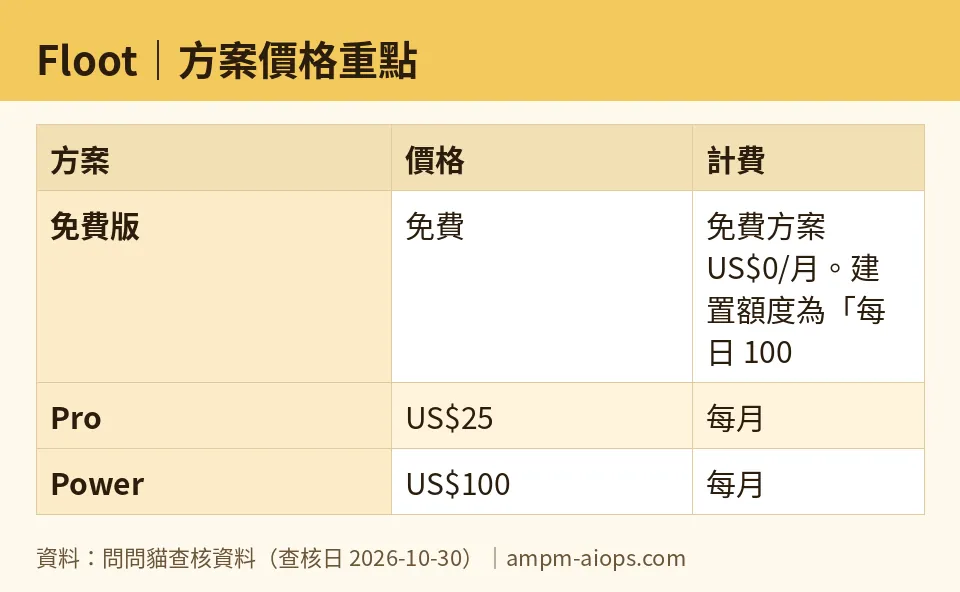
Figure: compiled by AMPM from its verified data (last verified 2026-10-30).
🔍 AMPM exclusive check
Here is what we checked, and the limits of that check.
We read Floot’s pricing page and its billing and credits FAQ on 2026-08-09. Our automated checks then compared the stored numbers against the vendor’s site every day through 2026-10-30. They found no changes. That is a number comparison, not a fresh read of the whole page each day.
Three things the pricing page does not spell out in one place:
- The 2-project and 1-published-app caps appear in the FAQ, not in the headline free-plan description.
- The weekly pool is mentioned once, in brackets, with no size.
- Enterprise shows no price. In our records it appears as a zero, but that means “not published,” not “free.”
Where our check differs from the headline: “100 actions a day” is true as stated, but it is not the only cap on free. The weekly pool and the project limits sit behind it. Prices are the monthly list prices. We found no yearly price, so we won’t state one.
☀️ AMO, the budget-minded cat

Is free enough? For one small project, yes, probably.
A hundred actions a day costs nothing, and failed ones are not counted. That alone saves budget. You also get 3,000 starter credits for your app’s AI features and a US$3 hosting allowance. That is enough to put one app online and see if anyone cares.
But watch the edges. You get 2 projects and 1 published app. You can’t use your own domain. The Floot badge stays on your product. And the weekly pool has an unknown size, so you can’t tell how many good days in a row you get.
Is paying worth it? Pro at US$25 a month makes sense only when you need what it unlocks. That means a custom domain, no badge, and 1,000 actions a day. It also brings 5,000 app AI credits a month and a US$10 hosting allowance. If your app is a side experiment, that is a recurring bill for cosmetics.
Power at US$100 a month is a different tier of commitment. You get 5,000 actions a day, 15,000 app AI credits a month, a US$25 hosting allowance and mobile app export. That is for people who ship several projects or need a phone version. With no yearly option, there’s no discount for committing.
My advice: stay free until the badge or the subdomain costs you customers. Then step to Pro, and only for as long as you need it.
🌙 PIMI, the performance-minded cat

I can’t tell you how good the code is. Nothing in our data measures speed or output quality, and we haven’t built anything with it. What I can judge is whether the limits let you work without being cut off.
On free, 100 actions a day covers a few focused sessions on one project. Each edit, read or test counts as one action, so a messy debugging loop can eat the allowance fast. The failed-action rule softens that. If the AI stumbles and retries, those stumbles don’t count against you.
The unknown is the weekly pool. It is the one limit that could stop you mid-project, and there is no number to check against. If you work in bursts, that is the cap to worry about.
Free also uses your own AI, such as Claude or ChatGPT. So output quality depends on the model you pick, not on a model Floot chose for you. That’s good for control. It also means you manage that model’s cost and limits yourself.
If you build heavily, the paid numbers matter. Pro gives 1,000 actions a day. Power gives 5,000. Those are real ceilings you can plan around, unlike the weekly pool on free. For a team shipping daily, that predictability is the product.
Verdict: who should use it, who should skip it
Use the free plan if you want to test one idea, with one live app and one spare project. You’re fine with a *.floot.app address and a Floot badge. And you want a tool that doesn’t charge you for its own failed attempts.
Move to Pro (US$25 a month) if your app is going public under your own name. You need a custom domain, no badge, and room for 1,000 actions a day.
Look at Power (US$100 a month) if you run several projects or need a mobile app version.
Skip it if you need to know your exact weekly capacity before you start. The weekly pool has no published size. Skip it too if you want a yearly price: we found none. And skip it if you plan to run three or more projects on a free budget. You’ll be deleting work to make room.
Written: 2026-10-31 Price last verified: 2026-10-30 Tool last health-checked: 2026-10-31
🔗 Related on AMPM
📎 Sources
All prices and quotas in this article come from AMPM’s verified dataset for Floot (last verified 2026-10-30); primary sources:
🐾 Meet the cats: AMO and PIMI

AMPM is a Taiwan-based AI-tool pricing watchdog. Our motto: ask before you subscribe. Two cats argue every tool from two sides:
- ☀️ AMO — the budget-minded cat. Always asks: is the free tier enough, and is paying actually worth it?
- 🌙 PIMI — the performance-minded cat. Cares about whether it works well, fast, and gets your job done.

When they are done arguing, you know whether to pay. Every number is checked by us, with the verification date at the end.
🐾 Our sister sites also checked
Read next
- Floot Full breakdown: pricing, features and real-world limits
- Floot Is the free quota enough?
- Floot Alternatives
- Free plan limits for every AI tool we track
