[Verified] Framer's Free Tier: How Fast the Monthly AI Credits Really Run Out
- Free tier: There is
- Cheapest paid plan: US$10/mo and up
- Free quota: Free version: unlimited design drafts, publish to framer.website …
- Last checked: 2026-10-17
Article last updated: 2026-10-04



Framer markets itself as a way to design and publish a real website in the browser without writing code — you drag and drop layouts, and an AI assistant called Wireframer can build a page from a one-line prompt. The question most people ask before signing up is simple: how far does the Framer free tier actually get you before you have to pay? We checked the numbers instead of taking the pricing page at face value. Short answer: the free tier’s AI allowance runs out almost immediately, and the real cost of going paid is less about the sticker price and more about add-ons the pricing page doesn’t put front and center.
What You Actually Get for Free
Framer’s free plan doesn’t ask for a credit card, and the design editor itself is unlimited — you can build as many draft projects as you want, add components, and set up animations with no meter running. The limits show up once you try to put a site live and keep it running:
- Publishing works, but only to a framer.website subdomain, and every page carries a “Made in Framer” badge you can’t remove.
- Bandwidth is capped at 1 GB a month — fine for a quiet portfolio, not enough once a site gets real visitors.
- You get 500 AI credits a month. Credits are the usage currency that Framer’s AI features (Wireframer page generation, AI translation) draw down each time you use them.
- File uploads are capped at 5 MB, the workspace supports one language (locale), and up to 3 people can edit the project.
- Commercial use is allowed on the free tier — you can run an actual business off a framer.website address if the badge doesn’t bother you.
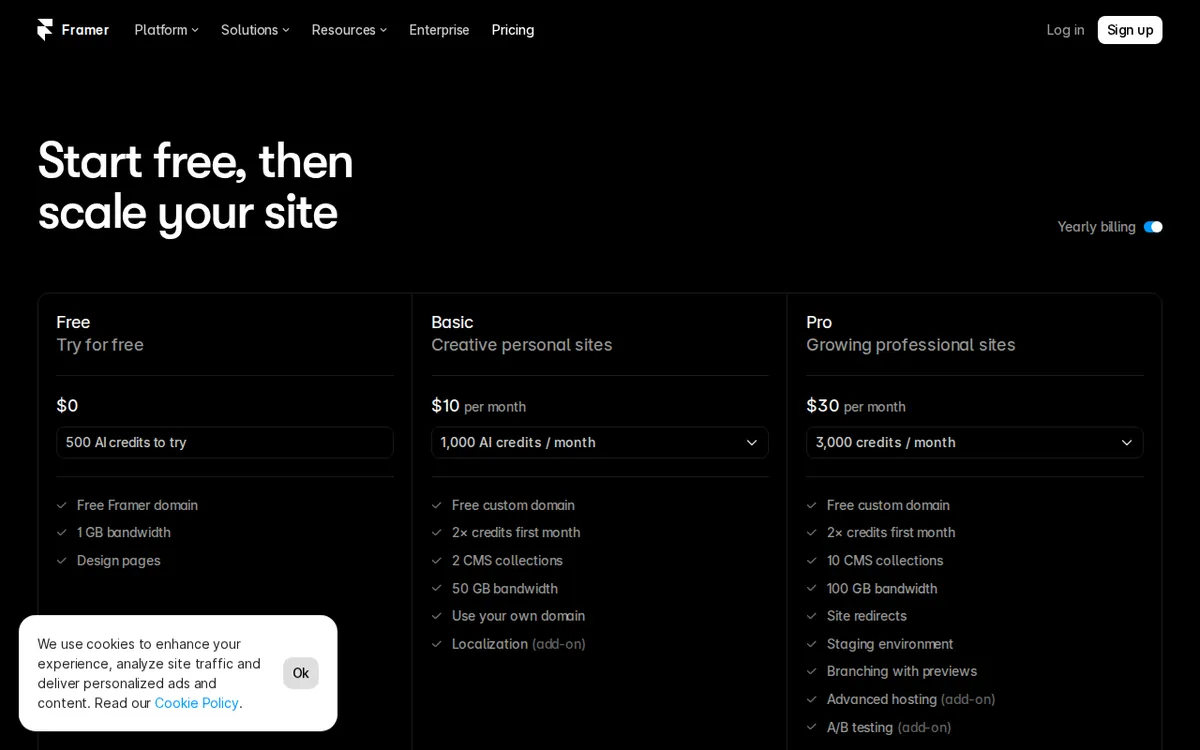
Figure: framer.com official page, captured 2026-10-04.
The 500-Credit Wall
This is where the free tier falls apart fast. Based on our check, generating one full landing page with Wireframer costs around 300 credits. A 500-credit monthly allowance covers one full generation with a little left over, or two tries if your first attempt needs a redo. For a tool whose headline feature is “describe a page, get a layout,” that’s barely enough to test the feature once before the meter resets.

Illustration: Generating just one complete webpage drains nearly the entire credit meter, leaving AMO and PIMI with almost nothing for another try.
Translation is the same story on a smaller scale. The free plan includes exactly 1 locale. Adding a second language — a basic requirement for any site aiming at more than one country — costs US$20 per locale per month as a paid add-on, separate from the site plan itself.
Basic vs. Pro: Where the Money Goes
Once you’re ready to pay, Framer’s plans are billed per site, not per account — run three sites and you pay three times.
Basic is US$10/month (billed annually) per site. It buys a free custom domain, removal of the Framer badge, 30 pages (you can add 100 more for US$20), 2 CMS collections (a CMS, or content management system, is the database behind blog posts or other repeating content), 1,000 CMS items, 50 GB of bandwidth, 1,000 AI credits a month, and built-in SEO tools.
Pro is US$30/month (billed annually) per site — three times the price for roughly five times the ceiling: 150 pages, 10 CMS collections, 2,500 CMS items, 100 GB bandwidth, and 3,000 AI credits a month, plus a staging environment and branch previews for testing changes before they go live, and site-level redirects. Pro also unlocks two optional add-ons: Convert A/B testing at US$50 per 500,000 events, and an advanced hosting upgrade priced at US$200.
Enterprise is custom-quoted: unlimited editors, SSO/SCIM (single sign-on and automated user provisioning for company accounts), enterprise-grade security, and an SLA (a contractual uptime guarantee).
One cost that’s easy to miss entirely: seats. The free workspace includes up to 3 editors, but once you’re on a paid site plan, adding a collaborator beyond what’s included costs an extra US$20 per person per month. If you’re budgeting just the US$10 or US$30 site fee and forgetting the people who’ll work on it with you, the real monthly number is higher than the plan page suggests.
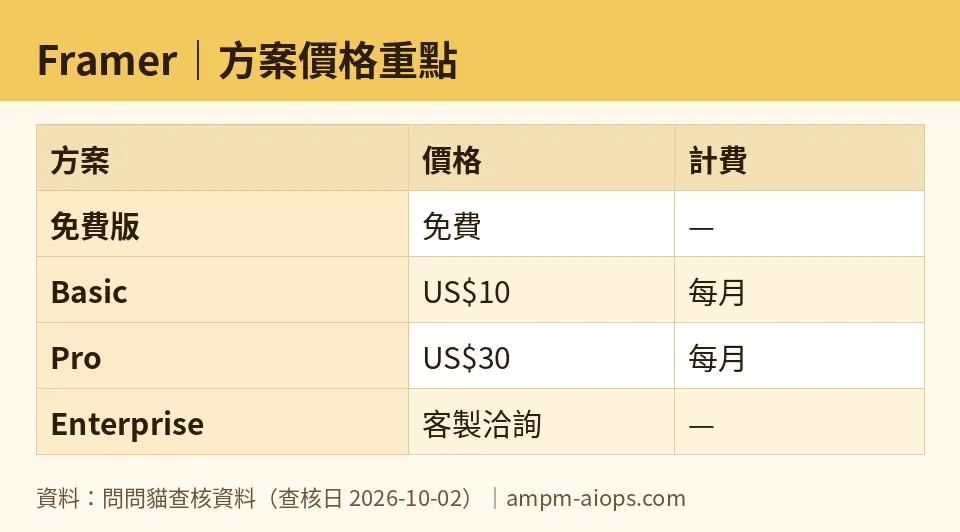
Figure: compiled by AMPM from its verified data (last verified 2026-10-02).
🔍 AMPM exclusive check
We checked Framer’s own pricing page against its own blog, and they don’t agree. The pricing page states free-tier AI credits refresh monthly, at 500 credits. But Framer’s blog post from June 2026, announcing the AI-credit and pricing overhaul, describes the free tier as resetting daily rather than monthly. The two official sources contradict each other, and Framer doesn’t flag the discrepancy anywhere we could find. Our advice: don’t trust either document blindly — check the credit count shown live inside your own workspace, since that’s the only number that reflects what you’re actually getting right now.
The other thing the pricing page doesn’t spell out, but our check confirms with a rough credit count: 500 free credits isn’t “try it for a month,” it’s “try it once, maybe twice.” A single AI-generated landing page eats about 300 of those 500 credits. That math isn’t on Framer’s pricing page at all — you only find it by actually generating a page and watching the balance drop.
Nothing else differed from the official page. The plan prices, page limits, CMS caps, and bandwidth figures all matched what’s published, checked 2026-10-02.
☀️ AMO, the budget-minded cat

The free tier is a real design tool, not a locked demo — unlimited drafts, a working editor, commercial use allowed. If you just want a small badge-and-subdomain site, free genuinely works, and that’s worth something. But the AI credits are the catch: 500 a month sounds generous until you realize one landing page costs 300 of them. If the AI generation feature is the reason you picked Framer over a plain drag-and-drop builder, the free plan lets you test it maybe twice before you’re back to building manually or paying.
The jump to paid isn’t actually US$10. Basic is US$10/month billed annually, per site — so it’s a yearly commitment dressed up as a monthly number, and that’s before you add pages beyond 30 (US$20 per 100), extra locales (US$20/locale/month), or extra editors (US$20/person/month) in a paid workspace. For someone comparing this against a free Carrd page or a US$0 GitHub Pages portfolio, US$10/month annualized still beats hiring a developer, but it’s not the “ten bucks and done” the plan name implies once your site needs more than one page or one language. If all you need is a custom domain and no badge, Basic is the cheapest way to get there — just budget for the add-ons separately.

🌙 PIMI, the performance-minded cat

Design-wise, Framer does the job — it’s a real visual editor with animation and components, not a watered-down builder. The AI Wireframer feature is the interesting part, and it does generate a workable page layout from a prompt. The problem isn’t whether it works; it’s whether the free tier lets you actually use it. At roughly 300 credits per generated page against a 500-credit monthly cap, you can’t iterate. Good AI-assisted design needs multiple passes — generate, tweak the prompt, regenerate — and the free tier cuts you off after essentially one shot.
Pro, at US$30/month billed annually per site, is where this tool starts to perform like a real platform: a staging environment and branch previews mean you can test changes before publishing, which matters once a site is live and you can’t afford to break it. 3,000 AI credits a month is enough to actually iterate on Wireframer output rather than treating it as a one-time novelty. The 100 GB bandwidth and 10 CMS collections also matter if the site carries real content and real traffic — the free tier’s 1 GB bandwidth cap will choke under any meaningful visitor count. If you need the tool to perform, not just exist, Pro is the tier where the AI features and the infrastructure both become usable rather than theoretical.
Verdict: who should use it, who should skip it
Use the free tier if you want to test Framer’s editor, build a quiet single-language portfolio, and don’t mind the badge and subdomain — it’s a legitimate free product, not a trial. Skip straight past it, or budget for Basic (US$10/month, billed annually, per site) immediately, if the AI Wireframer feature is your main reason for choosing Framer — 500 monthly credits against a roughly 300-credit cost per generated page means the free tier barely lets you try the feature once. Businesses that need multiple languages, more than one collaborator, or any real traffic should plan for Basic or Pro from day one and factor in the per-locale (US$20/month), per-page (30-page cap, US$20/100 more), and per-seat (US$20/person/month) add-ons before deciding the plan price is the whole bill.
Written: 2026-10-04 Price last verified: 2026-10-02 Tool last health-checked: 2026-10-03
🔗 Related on AMPM
📎 Sources
All prices and quotas in this article come from AMPM’s verified dataset for Framer (last verified 2026-10-02); primary sources:
🐾 Meet the cats: AMO and PIMI

AMPM is an independent AI-tool pricing watchdog tracking official prices worldwide. Our motto: ask before you subscribe. Two cats argue every tool from two sides:
- ☀️ AMO — the budget-minded cat. Always asks: is the free tier enough, and is paying actually worth it?
- 🌙 PIMI — the performance-minded cat. Cares about whether it works well, fast, and gets your job done.

When they are done arguing, you know whether to pay. Every number is checked by us, with the verification date at the end.
🐾 Our sister sites also checked
Let's take a look at these
- Framer Comprehensive Introduction: Pricing, Features, and Actual Limitations
- Framer Is the free quota enough?
- Framer Alternatives
- Comprehensive Free Quota List for All Tools
More verified articles on this tool
- Can You Actually Publish a Site on Framer's Free Plan? Yes, but Know These Walls First
- Framer Pricing 2026: The Entry Plan Is Cheap, but Overages Are Where the Bill Actually Grows
