[News] GitHub Copilot's New Local Sandbox: Which Plans Get It, and What It Protects
- Free tier: Yes
- Cheapest paid plan: US$10/mo and up
- Free quota: The general user free tier includes 2,000 completions and 50 chats per …
- Last checked: 2026-10-22
Article last updated: 2026-10-09



GitHub shipped something this week that has nothing to do with Copilot’s price list and everything to do with how much you can trust it to act on its own. On October 7, 2026, GitHub announced local sandboxing for Copilot is now generally available across the Copilot CLI (the command-line version of Copilot), the Copilot desktop app, and VS Code sessions that use Agent Host — a mechanism for running Copilot’s autonomous “agent mode” inside VS Code. The headline for anyone checking plans before they buy: this is included free, on every tier, including the free tier. No upgrade required, no new line item on the pricing page.
That matters more than it sounds. Copilot’s agent features let the tool run commands, edit files, and call outside tools on its own, inside a workflow the user doesn’t watch line by line. Sandboxing is the fence around that behavior — it decides what the agent’s tools and commands are allowed to touch before anything executes.
What Actually Shipped
The feature is built on something GitHub calls Microsoft eXecution Container (MXC), a layer that translates one sandbox policy into native controls on Windows, macOS, and Linux, so the same rule behaves the same way regardless of operating system. In practice, a developer or an organization can now define exactly which files and folders an agent’s commands are allowed to read or write, and whether that agent gets access to the internet, the local network, Git credentials, or GitHub CLI credentials. The same boundary also extends to local tools and services the agent might call, including supported local MCP servers (MCP, or Model Context Protocol, is the standard Copilot uses to let an agent call outside tools and services) and language servers.
For organizations, the practical change is that admins can now force sandboxing on through enterprise management settings, and developers working under that policy can’t quietly turn it off. GitHub is explicit that this is a separate concern from which AI model is doing the reasoning — whichever model powers a given Copilot session, the sandbox policy governing what its tools can actually do stays the same.
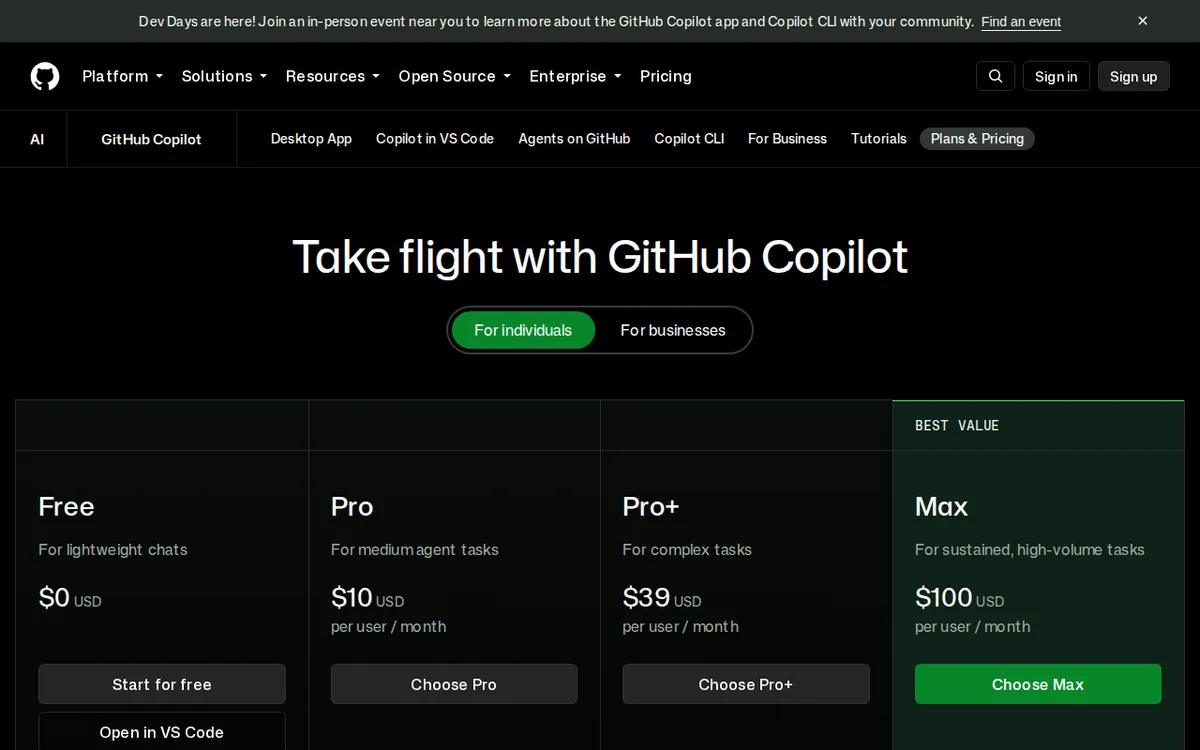
Figure: github.com official pricing page, captured 2026-10-09.
Why This Lands Now, Not Later
The timing lines up with where Copilot’s own feature set has been heading. GitHub’s plans already draw a hard line between tiers on autonomy: the free tier gets limited chat and limited agent mode, with cloud agent and code review locked out entirely; Pro (US$10/month) unlocks unlimited code completions and next-edit suggestions plus access to third-party agents like Claude Code and Codex; Pro+ (US$39/month) adds premium models, including Opus, with usage GitHub describes as more than four times Pro’s built-in allowance. As Copilot pushes users toward letting it act more independently, a security boundary that doesn’t depend on which model is in the loop is the kind of thing that has to exist before “autonomous” stops being a selling point and starts being a liability.
Does This Change the Free-vs-Paid Math?
Not in the way a price change would. Sandboxing isn’t metered, isn’t gated behind a plan, and doesn’t touch the quotas that actually define each tier. What it changes is the risk calculation underneath those quotas — specifically, how much you can trust an agent session not to touch something it shouldn’t, regardless of which plan is running it.
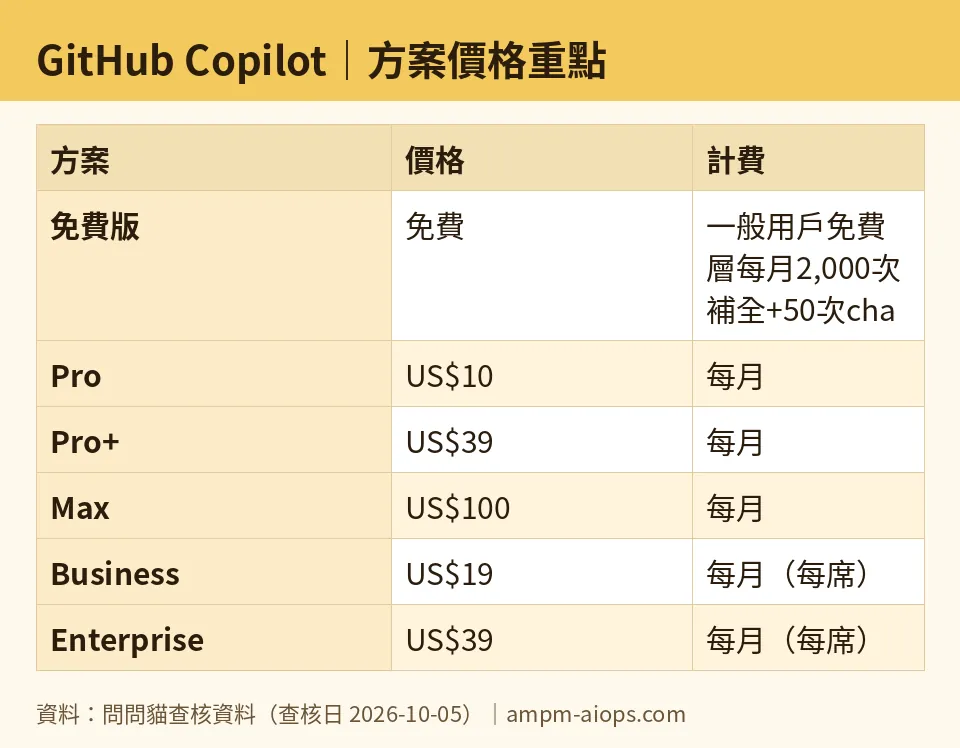
Figure: compiled by AMPM from its verified data (last verified 2026-10-05).
🔍 AMPM exclusive check
GitHub’s changelog post frames this as a universal safety upgrade, true for “any Copilot surface.” We checked that claim against our own plan-by-plan data rather than taking it at face value, and the practical benefit splits unevenly. Free-tier accounts are capped at 2,000 code completions and 50 chat requests per month, and GitHub’s own feature list already marks “Agent mode” as limited and “Cloud agent” as unavailable on free. A sandbox is only doing work when there’s an agent session running inside it — so for a free-tier user who’s already hitting a hard ceiling on how much agent activity they’re allowed to generate in the first place, the new security boundary has less surface area to protect than it does for a Pro+ or Business seat running agent sessions all day. Nothing here contradicts GitHub’s announcement; the gap is that the “included in every plan” framing reads as more consequential for free users than the free tier’s existing limits actually allow it to be. Everything else — pricing, quotas, plan names — matches the official page as of our October 5, 2026 price check, two days before this feature went live, and nothing in this announcement changed any of those numbers.
☀️ AMO, the budget-minded cat

Meow. Before anyone panics about running the free tier unsandboxed — you weren’t, and you still aren’t paying more for this. The free tier stays exactly where it was: 2,000 completions a month, 50 chat messages, no credit card needed to sign up, and no cloud agent or code review no matter what. That math hasn’t moved an inch.
Where I’d actually spend money is still the same place it was before this announcement. If you’re leaning on agent mode daily and keep bumping into the free tier’s limits, Pro at US$10 a month buys unlimited completions and next-edit suggestions plus a US$15-a-month allowance of GitHub AI Credits (a usage currency that pays for premium model calls and agent actions beyond the baseline). Pro+ at US$39 a month is the one to consider only if you’re actually reaching for Opus-class models — it comes with over four times Pro’s built-in usage and a US$70-a-month AI Credits allowance, and Pro+ (and above) also isn’t locked to GitHub’s own “Auto” model picker the way Free and Student accounts have been since June. If neither of those frictions describes you, this sandbox news changes nothing about your bill. It’s a safety feature, not a feature you were being asked to pay to unlock, so free stays enough right up until the point your actual complaint is completions running out or model choice — not security.
Verdict: who should use it, who should skip it
If you already use Copilot’s agent mode, Copilot CLI, or VS Code’s Agent Host to let the tool run commands or touch files on its own, turn this on — it costs nothing and narrows what an autonomous session can reach without your say. Teams managing multiple developers should look at the enterprise-enforced version specifically, since it’s the one case here where an admin gets a lever individual developers can’t override. If you’re a free-tier user who mostly uses Copilot for inline completions and the occasional chat message, this announcement is good to know about but won’t change your day: your agent usage is already capped low enough that the sandbox has little to actually fence in. And if you’re deciding between plans right now, don’t let this feature tip the decision — it shipped identically across every tier, so the real questions are still the same ones they were before October 7: how many completions you burn through, and whether you need agent features the free tier doesn’t give you.
Written: 2026-10-09 Price last verified: 2026-10-05 Tool last health-checked: 2026-10-09
🔗 Related on AMPM
📎 Sources
All prices and quotas in this article come from AMPM’s verified dataset for GitHub Copilot (last verified 2026-10-05); primary sources:
🐾 Meet the cats: AMO and PIMI

AMPM is an independent AI-tool pricing watchdog tracking official prices worldwide. Our motto: ask before you subscribe. Two cats argue every tool from two sides:
- ☀️ AMO — the budget-minded cat. Always asks: is the free tier enough, and is paying actually worth it?
- 🌙 PIMI — the performance-minded cat. Cares about whether it works well, fast, and gets your job done.

When they are done arguing, you know whether to pay. Every number is checked by us, with the verification date at the end.
🐾 Our sister sites also checked
Read next
- GitHub Copilot Full breakdown: pricing, features and real-world limits
- GitHub Copilot Is the free quota enough?
- GitHub Copilot Alternatives
- Free plan limits for every AI tool we track
More verified articles on this tool
- [News] GitHub Copilot's HydraFusion Multi-Model Mode Lands in VS Code: Who Can Use It
- [News] GitHub Copilot Adds GPT-6.1 Sol, But Free Tier Users Are Locked Out
- [Verified] GitHub Copilot Free Tier: Is the Monthly Allowance Enough for Real Work?
