[Pricing] Glaze by Raycast: Why the Free Credits Don't Renew, and What Pro Really Costs
- Free tier: Yes
- Cheapest paid plan: US$10/mo and up
- Free quota: 120 credits once at sign-up, with no recurring free allowance: the …
- Last checked: 2026-10-23
Article last updated: 2026-10-08



Glaze by Raycast is an AI chat tool that builds native macOS apps from plain-English prompts — you describe what you want, it writes and assembles the app. The pitch is “free to start,” and that’s technically true. But the free tier is not a monthly free tier the way most AI tools structure it. It’s a one-time welcome pack of 120 credits (credits are the usage currency — each build or edit spends some, based on how much work it takes), and once they’re gone, they don’t come back. If you’re asking whether Glaze’s free tier is actually usable long-term, or whether you’ll be pushed into paying within your first week, here’s what the numbers say.
What the free 120 credits actually get you
Glaze’s own FAQ is unusually direct about this: there is “no recurring allowance on Free.” The 120 credits you get at signup are a one-time allocation — they don’t roll over, and they don’t reset or recur. Once your balance hits zero, app building simply stops. There’s no downgrade to a slower free mode, no waiting for next month’s refill. You’re done until you pay.
How far 120 credits goes depends entirely on what you’re building. Glaze charges by the actual work involved in a turn — the company’s own description is that “a quick tweak is cheap, building from scratch costs more.” There’s no published per-action price list, so you can’t calculate in advance how many apps or edits 120 credits buys you. A handful of small tweaks to an existing app will stretch further than trying to build something from zero.
What free users CAN do: build apps within their credit balance, and publish those apps to Glaze’s public app store, where anyone can find, download, and use them — that part is free with no credit cost mentioned. What free users CANNOT do: publish an app as “unlisted” (private, link-only sharing), stop other people from remixing their published app, or buy more credits once the 120 run out. Free is also locked to one platform: macOS Tahoe running on Apple Silicon. There’s no Windows or Linux version yet.
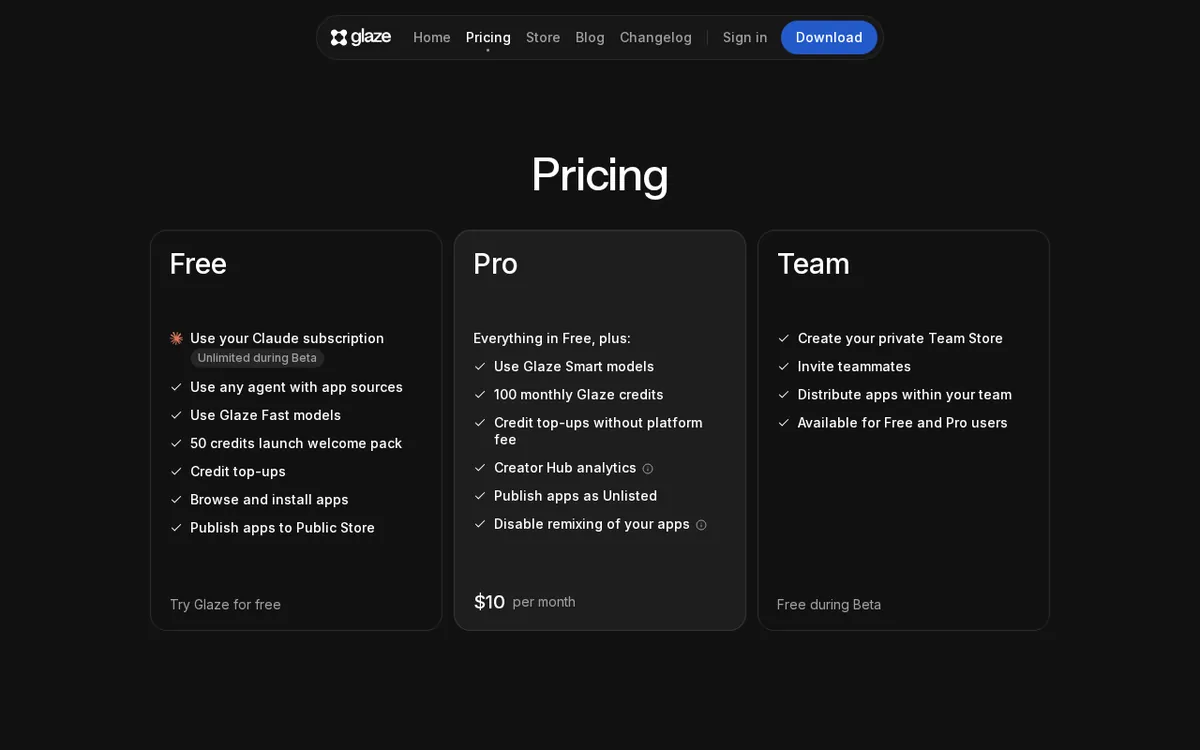
Figure: glaze.app official pricing page, captured 2026-10-08.
Pro’s US$20/month: what changes, and the catch with credits
The paid tier is called Pro, and it’s currently priced at US$20/month — discounted from a list price of US$25/month as part of a launch promotion. Raycast doesn’t say when that promotional price ends or whether it’s limited to first-time subscribers.
What Pro actually buys you: 200 credits per month that auto-renew, instead of one dead-end batch of 120. Unused credits carry over, but only up to two months’ worth — so credits don’t pile up indefinitely if you don’t use them. Pro also unlocks unlisted app sharing (sending a private app link to a client or collaborator without putting it in the public store), and the ability to buy additional credits if you burn through your monthly 200 before the month resets. Free users can’t top up at all; Pro users can.
The catch: 200 credits a month sounds generous next to a one-time 120, but Glaze still hasn’t published what a typical build or edit actually costs in credits. If you’re doing heavier work — building several apps from scratch in a month, say — you could still hit the ceiling and need to pay for a top-up on top of your US$20 subscription. Pro does not include team features: no shared private app store, no multi-person collaboration. That’s reserved for Team.
Team pricing, and why “monthly or annual” isn’t the real question
Team is priced at US$30/seat/month right now, down from a listed US$35/seat/month — the same kind of launch discount as Pro. A seat is one team member’s paid slot; Team pricing is per-seat, so a 3-person team pays for three seats. Each seat gets its own 200 monthly credits, auto-renewing the same way Pro’s do. Team’s actual selling point isn’t more credits — it’s a private team app store, visible only inside your organization, plus centralized billing so one person can manage payment for the whole team. There’s also a 14-day Store Trial that lets you test-drive a private team store before committing to a seat.
Here’s the detail worth flagging before you go comparing monthly-versus-annual math: there is no annual plan. The pricing page has no monthly/annual toggle at all. The US$20 and US$30 figures are flat monthly prices, full stop — not a teaser rate that renews higher, and not a discount for paying yearly. If you were hoping to save by committing for a year, that option doesn’t exist here.
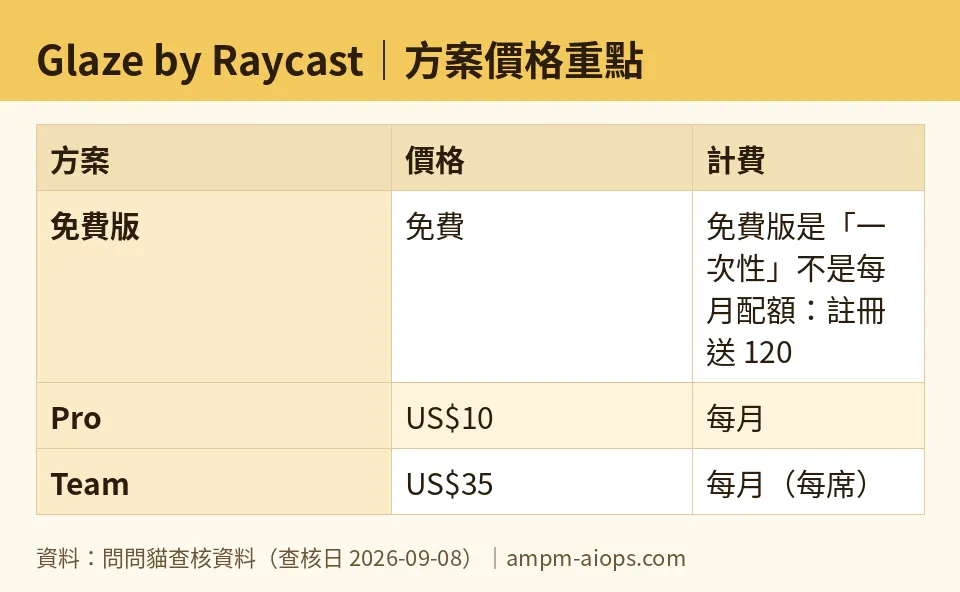
Figure: compiled by AMPM from its verified data (last verified 2026-09-08).
🔍 AMPM exclusive check
Three things the vendor page states but easy to misread, and one thing it doesn’t state at all:
First, the “free tier” framing is misleading if you assume it works like most AI subscriptions, where free means a small monthly allowance that refreshes. Glaze’s free tier refreshes zero times. It’s 120 credits, once, ever, per account. We confirmed this against Glaze’s own FAQ wording, not a general assumption — the site explicitly uses the phrase “one-time allocation” and “do not roll over or recur.”
Second, we checked whether the struck-through US$25 → US$20 and US$35 → US$30 pricing was an annual-versus-monthly comparison, since that’s the most common way SaaS pricing pages dress up a discount. It isn’t. We looked for a billing-cycle toggle on the pricing page and found none — both prices shown are month-to-month, and the strikethrough is purely a launch promotion against the same billing cycle.
Third, the credit-cost-per-action gap is real and unresolved. Glaze tells you the relative cost (small edit cheap, full build expensive) but never gives you a number, so no outside party — us included — can calculate exactly how many builds 120 or 200 credits represents. We flag this as an actual transparency gap rather than paper over it with an estimate.
Nothing else differed from the official page as of our check on 2026-09-08: the credit rollover cap (two months), the macOS Tahoe plus Apple Silicon platform restriction, and the Team per-seat structure all matched glaze.app/pricing exactly as published.
☀️ AMO, the budget-minded cat

AMO’s read: free is fine for exactly one thing — finding out if you even like building apps this way, once, before the 120 credits run dry. Because that balance never refills, free isn’t really a “tier” you live in, it’s a trial that happens to not expire on a calendar. If you’re the kind of person who builds one small app and is done, the free pack might genuinely be all you ever need, and you’ll never see a bill.
But if you come back a second month and want to keep building, there’s no free path forward — you’re straight into the US$20/month Pro decision, no in-between option. And here’s the part that actually matters for a budget call: US$20/month for 200 renewing credits only makes sense if you know roughly what 200 credits gets you, and Glaze won’t tell you that number. You’re paying US$20 on faith that “a few builds a month” fits inside 200 credits, with a two-month rollover cushion if you don’t use them all. For a single hobbyist building the occasional personal tool, that’s a real monthly cost for something that might sit idle most weeks. For someone actively iterating on an app for clients — where unlisted sharing and top-up credits both come into play — US$20/month is cheap relative to the time saved, and worth paying. The dividing line is use frequency, not budget size: pay only if you’re building regularly, not once in a while.
Verdict: who should use it, who should skip it
Use it if: you want to try building a native Mac app from a prompt, you’re fine with a hard stop once your 120 free credits are gone, and you’re already committed to macOS on Apple Silicon. Also use Pro specifically if you need to share an app privately with one client or collaborator — that’s the one feature free can’t do at any price.
Skip it if: you need Windows or Linux support (not available), you want a monthly free allowance rather than a one-shot trial, or you want annual billing to lock in a lower rate — none of those exist here. Also skip Team for now if you’re a solo builder; its entire value is the shared private store, which a single person doesn’t need.
Written: 2026-10-08 Price last verified: 2026-09-08 Tool last health-checked: 2026-10-08
🔗 Related on AMPM
📎 Sources
All prices and quotas in this article come from AMPM’s verified dataset for Glaze by Raycast (last verified 2026-09-08); primary sources:
🐾 Meet the cats: AMO and PIMI

AMPM is an independent AI-tool pricing watchdog tracking official prices worldwide. Our motto: ask before you subscribe. Two cats argue every tool from two sides:
- ☀️ AMO — the budget-minded cat. Always asks: is the free tier enough, and is paying actually worth it?
- 🌙 PIMI — the performance-minded cat. Cares about whether it works well, fast, and gets your job done.

When they are done arguing, you know whether to pay. Every number is checked by us, with the verification date at the end.
🐾 Our sister sites also checked
Read next
- Glaze by Raycast Full breakdown: pricing, features and real-world limits
- Glaze by Raycast Is the free quota enough?
- Glaze by Raycast Alternatives
- Free plan limits for every AI tool we track
