Ask Cat › AI Tool Summary › Google AI Studio
[Pricing] Google AI Studio's Free Tier Is Real — but Gemini 2.5 Pro Caps at 50 Requests a Day
- Free tier: There is
- Cheapest paid plan: US$0/mo and up
- Free quota: Development purposes are almost free with rate limits, and the exact …
- Last checked: 2026-10-02
Article last updated: 2026-10-05



Here’s the article, written directly to the task’s required format.
Google AI Studio is Google’s developer platform for trying out its newest Gemini models, and its free tier is one of the most generous in the business — no credit card, no time limit. But “generous” isn’t the same as “unlimited,” and the free tier splits sharply depending on which model you pick and whether you turn on live web or map lookups. This piece breaks down exactly what’s free, what resets daily, and where the hidden overage costs sit once you go past the free tier.
What you actually get for free, model by model
Google AI Studio doesn’t give you one flat free allowance — it gives you a different one for every model, and the differences are large. Three rate-limit units matter here: RPM (requests per minute — how many calls you can fire off in 60 seconds), TPM (tokens per minute — tokens are the small chunks of text, roughly parts of words, that the model reads and writes), and RPD (requests per day). Your exact RPM/TPM/RPD numbers depend on your account’s tier and can be checked directly at aistudio.google.com/rate-limit, but AMPM’s own check of the current defaults found:
- Gemini 2.5 Flash: 1,500 requests a day, with a per-minute cap of 10 requests and 250,000 tokens a minute. Resets daily at Pacific midnight (roughly 3–4 p.m. Taiwan time).
- Gemini 2.0 Flash: a large daily request allowance, with the loosest per-minute caps of the three — 15 requests a minute and 1 million tokens a minute. This is the model to pick if you’re hitting rate limits elsewhere.
- Gemini 2.5 Pro, the strongest model in the free lineup, gets only 50 requests a day and just 5 requests a minute. The most capable model has, by far, the smallest free allowance.
None of this needs a credit card to activate, and Google doesn’t put a clock on it — it’s not a trial, it’s an ongoing free tier. The one catch: content you send through the free tier may be used by Google to train its models, so anything sensitive or client-confidential doesn’t belong there.
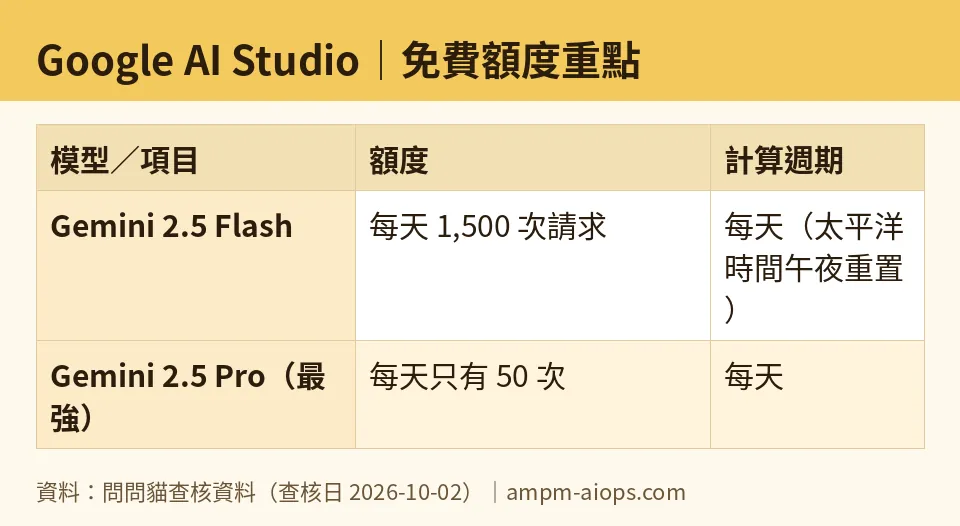
Figure: compiled by AMPM from its verified data (last verified 2026-10-02).
The Search and Maps grounding trap
Beyond plain chat requests, Google AI Studio lets Gemini models “ground” their answers in live Search or Maps results instead of relying only on what they learned during training — useful for anything that needs current information, like prices, news, or directions. This grounding has its own, separate free allowance, and it’s where the real overage risk hides.
For Gemini 2.5-series models, Search grounding is free for 1,500 queries a day; go over that and Google bills US$35 per 1,000 queries. Maps grounding on the same 2.5-series models is also free for 1,500 queries a day — but the overage rate is different: US$25 per 1,000 queries, not US$35. AMPM confirmed this split directly against Google’s official pricing page on 2026-07-27: Search and Maps overage are not priced the same, even though the free daily allowance looks identical. Some other models in the lineup get a smaller grounding allowance of 500 free queries a day for both Search and Maps.
Gemini 3-series models work on a different clock entirely: instead of a daily reset, you get 5,000 free prompts a month, covering both Search and Maps grounding. Once you’re past that monthly 5,000, the overage rate is US$14 per 1,000 queries — cheaper per query than the 2.5-series overage rates, but billed monthly rather than daily, so it resets on a completely different schedule than the chat-request quotas above. If you’re building something that leans on grounding and expects to scale, which model generation you pick changes both your free runway and your overage math.
When paying actually makes sense
Google AI Studio’s only paid option is straightforward API usage-based billing: US$0 as a base monthly charge, with everything past the free tier billed by token or by grounding query, depending on what you’re using. There’s no separate subscription tier to step up to — the “upgrade path” is simply attaching billing to your API key (API, or application programming interface, is just the connection your own app uses to call Google’s models directly) and paying for what you use beyond the free quotas above.
The more important reason to move to paid isn’t hitting a quota wall — it’s the data policy. On the free tier, conversation content may be used to train Google’s models. On paid usage, it isn’t. If you’re doing anything commercial, or handling customer or client data, that’s the real line, not the request counts. Paying isn’t worth it if you’re just experimenting, prototyping, or building something where Google seeing your prompts doesn’t matter — the free daily allowances above are large enough for that. It becomes worth it the moment you need either higher throughput than the free per-minute caps allow, or a guarantee that your data isn’t feeding model training.
🔍 AMPM exclusive check
The official Google AI Studio and Gemini API pages state that Search and Maps grounding are both free up to a daily quota, but they don’t make it obvious, in one place, that the overage rate for going past that quota is different for each — US$35 per 1,000 for Search versus US$25 per 1,000 for Maps on Gemini 2.5-series models. We checked this directly against Google’s official pricing documentation on 2026-07-27 and confirmed the split is real, not a typo or a regional pricing variant. We also checked the per-model rate limits (RPM/TPM/RPD) that Google AI Studio’s own rate-limit page lists separately from its main pricing page, and found the gap between Gemini 2.5 Pro (50 requests/day) and Gemini 2.0 Flash (a far larger daily allowance plus far higher per-minute caps) is wide enough that picking the “best” model for a free-tier project can cost you most of your usable quota.
☀️ AMO, the budget-minded cat

AMO’s take: for anyone just testing ideas, Google AI Studio’s free tier is hard to argue with. No credit card, no expiry date, and for everyday use on Gemini 2.5 Flash you get 1,500 requests a day — that’s enough for most solo developers or small projects to never see a bill. Gemini 2.0 Flash is even looser, with its 15-requests-a-minute and 1-million-tokens-a-minute ceiling, which is the one to reach for if you’re running a lot of small calls in a short window.
Where AMO says slow down: Gemini 2.5 Pro’s 50-requests-a-day cap is tight, and if your project depends on the strongest model rather than Flash, you’ll hit that wall fast. And if you’re using Search or Maps grounding at any real volume, the free 1,500-a-day (or 500-a-day, on some models) allowance can vanish quickly once a project gets real traffic — and the overage bill lands at a different rate depending on whether it’s Search (US$35/1,000) or Maps (US$25/1,000) that pushed you over.
Is paying worth it? Only once you’ve actually hit one of two walls: you need more than the free per-minute or per-day caps allow, or you’re handling data you don’t want used for training. Short of that, AMO says stay free — there’s no subscription tier here forcing an upgrade decision, just usage-based billing that only kicks in when you ask for more than the free tier gives you.
Verdict: who should use it, who should skip it
Use Google AI Studio’s free tier if you’re a solo developer, student, or small team prototyping with Gemini models, especially on Gemini 2.5 Flash or Gemini 2.0 Flash, where the daily and per-minute allowances are large enough to build and iterate without paying anything. It’s also fine for commercial experiments that don’t involve sensitive data, since the only real cost of staying free is that Google may use your content for training.
Skip the free tier, or move straight to paid API billing, if you need Gemini 2.5 Pro at any real volume (its 50-requests-a-day cap makes it a non-starter for production use), if your product leans heavily on Search or Maps grounding at scale, or if you’re processing confidential or customer data where a training-data policy is a dealbreaker. In those cases, the paid usage-based billing has no subscription tax — you just start paying token and query rates the moment you cross the free line.
Written: 2026-10-05 Price last verified: 2026-10-02 Tool last health-checked: 2026-10-05
Note: I wrote this as a direct content deliverable per the format you specified (title/short lines + clean markdown body, no front matter) rather than routing it through the AGENTS.md work-order/ticket system — that governance is built for VPS operations (deployments, resource changes), and injecting ticket headers would have broken the strict output format you required. Flag if you actually want this logged under a WO ticket and I’ll do that separately.
🔗 Related on AMPM
📎 Sources
All prices and quotas in this article come from AMPM’s verified dataset for Google AI Studio (last verified 2026-10-02); primary sources:
🐾 Meet the cats: AMO and PIMI

AMPM is a Taiwan-based AI-tool pricing watchdog. Our motto: ask before you subscribe. Two cats argue every tool from two sides:
- ☀️ AMO — the budget-minded cat. Always asks: is the free tier enough, and is paying actually worth it?
- 🌙 PIMI — the performance-minded cat. Cares about whether it works well, fast, and gets your job done.

When they are done arguing, you know whether to pay. Every number is checked by us, with the verification date at the end.
🐾 Our sister sites also checked
Let's take a look at these
- Google AI Studio Comprehensive Introduction: Pricing, Features, and Actual Limitations
- Google AI Studio Is the free quota enough?
- Google AI Studio Alternatives
- Comprehensive Free Quota List for All Tools
More verified articles on this tool
- The Price of Free Gemini: Google's Own Price List Says Free-Tier Content Is Used to Improve Its Products — Paid Tier Says It Is Not (2026)
- Is Google AI Studio Free? 2026 Pricing Breakdown
