[How-to] GoSearch Free Usage Limits 2026: Can It Carry a Full Work Day?
- Free tier: Yes
- Cheapest paid plan: US$20/mo and up
- Free quota: 10 searches per day, 3 GoAI questions, 1 file upload (5 MB limit), …
- Last checked: 2026-10-22
Article last updated: 2026-10-22



Most “free” enterprise search tools fall into one of two camps: a tier you can genuinely work in, or a demo that runs dry before your morning coffee. GoSearch’s free tier leans toward the second. That is not a complaint — it is a signal. The free plan is built to show you how the tool feels, not to run your whole workflow for nothing.
So the useful question is not “is it free?” It is “how far does free get me in one real work day, and when do I hit a wall?” This guide walks a first-time user from sign-up to a useful answer, shows exactly what the free quota covers, and names the spots where beginners get stuck.
First, the plain English. GoSearch is a cross-workspace AI search tool — one search box that reads across all your connected work apps (Slack, Google Drive, Notion and similar) at once, instead of you digging through each app separately. It also has a built-in chat assistant called GoAI that answers questions using what it finds in those apps.
What the free tier actually lets you do
Here is the free allowance, exactly as GoSearch’s own pricing page listed it when we checked:
- 10 searches per day. A search is one query through the unified search box.
- 3 GoAI questions per day. GoAI is the chat assistant; each question you ask it counts as one.
- 1 file upload, 5 MB maximum. You can feed it a single document.
- Basic private connectors and Agents. A connector is the setup that lets GoSearch read one of your apps. An Agent is a saved assistant you point at a task.
- 1 AI task. One automated job the tool runs for you.
Two numbers decide whether this is usable: the 10 searches and the 3 GoAI questions. Both reset daily, not monthly — we confirmed that below. That daily reset matters more than the size of the number. A monthly cap you can burn through in an afternoon is a trap. A daily reset means the free tier can quietly serve a light user forever, as long as their day fits inside the limit.
Does it fit a real work day? If your job is answering a handful of “where is that doc” questions, yes, comfortably. Ten searches covers a lot when each search spans every connected app at once — one GoSearch query can replace five separate app searches. The three GoAI questions are the tighter leash. If you lean on the chat assistant to summarize or cross-reference, three runs out fast, often before lunch.
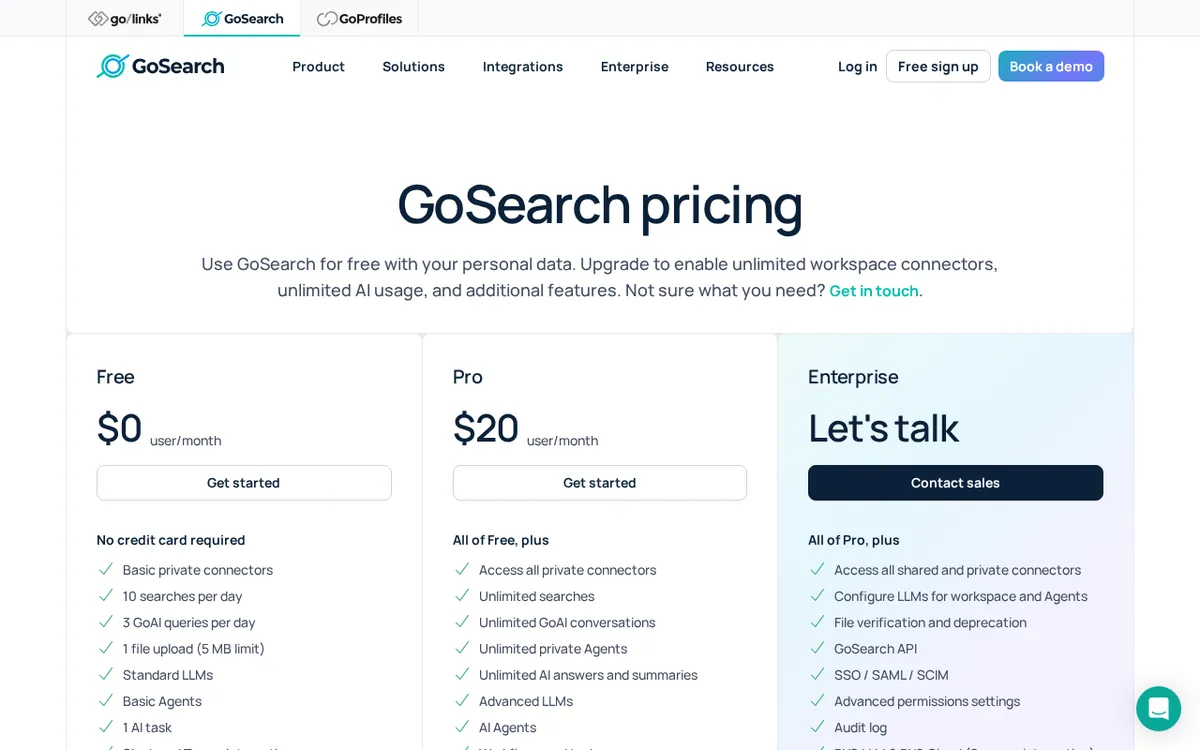
Figure: gosearch.ai official pricing page, captured 2026-10-22.
Three steps to your first useful answer
You do not need the paid plan to get a real result on day one. Here is the shortest path.
Step 1 — Sign up and connect one app, not five. After you create the account, GoSearch will offer to link your work apps through connectors. Resist the urge to connect everything. Pick the single app where your answers actually live — for most people that is Google Drive or Slack. Connecting one source well beats connecting five badly, and it keeps your first searches clean instead of drowning in noise from apps you rarely touch.
Step 2 — Run a real search, not a test search. Do not waste a query on “hello” or “test.” You only get 10 a day. Type the actual thing you are looking for, phrased the way you would ask a colleague: “Q3 marketing budget deck” or “the onboarding checklist we wrote in March.” The unified box searches across your connected app and ranks results, so a specific phrase pulls a better hit than a single vague keyword.
Step 3 — Save your three GoAI questions for things search alone can’t answer. A plain search finds documents. GoAI reads them and answers in words. So do not spend a GoAI question on something a normal search would have surfaced. Use the three for real synthesis: “summarize the decisions in the last three project updates” or “what did we agree on about pricing?” That is where the assistant earns its place, and where you feel what the paid tier would unlock.
Do those three and you have a working setup inside ten minutes, at zero cost.
Where beginners hit the wall (and what to do)
The wall: you run out of GoAI by mid-morning. Three questions is the real ceiling, not the ten searches. Fix: batch your thinking. Instead of three small questions, ask one bigger, well-scoped question that covers all of them. “Compare the timelines in these two project docs and flag any conflict” does more work per question than asking about each doc separately.
The wall: your file is bigger than 5 MB. The free upload cap is one file at 5 MB, which a slide deck or a scanned PDF blows past easily. Fix: on the free tier, upload a trimmed or exported version — text-only, or a single section — rather than the full heavy file. The 5 MB limit is a hard stop, not a soft warning.
The wall: results feel thin. On free, connectors and Agents are the “basic” versions, and you only get one AI task. If the tool isn’t reaching the content you expected, it is usually because the right app isn’t connected, or the content sits behind a connector type the basic tier doesn’t reach. Fix: check what you actually connected in Step 1 before assuming the search is weak. Nine times out of ten the problem is a missing source, not a bad engine.
The paid step up is a single plan. Pro is US$20 per person each month — that per-person price is what “per seat” means, one paid login per person. It removes the two limits that pinch most: searches and GoAI chat both go unlimited, private connectors go unlimited, you get the advanced LLM (the large language model, the AI engine behind the answers) instead of the basic one, you get workflow and automation support, and the single-file upload cap jumps from 5 MB to 80 MB. GoSearch’s pricing page listed only this monthly rate; there was no annual price shown, so we are not quoting one. Prices may vary by country; we checked from Taiwan.
🔍 AMPM exclusive check
Two things the vendor page does not make obvious, and one honest caveat about our own check.
What we verified that the pricing page glosses over: the free search and GoAI caps are daily, not monthly. That is the single most important fact about this free tier and it changes who it suits. A daily reset means a light, steady user can live on free indefinitely — the limit is “per day,” so tomorrow you start fresh. A heavy user burns through it and feels the wall every single morning. The vendor page states the numbers but not what that reset rhythm means for you.
Second, the 5 MB free upload and the 80 MB Pro upload are a single-file ceiling, not a storage pool — worth knowing before you try to drop a full deck into the free tier and wonder why it bounces.
Now the caveat, because we would rather you trust us than impress you: GoSearch entered our tracking as an automatic challenger candidate, and this data has been through one verification round, not our usual three-way manual cross-check. Every number above matched the official pricing page on 2026-10-21. But treat the free allowance and commercial terms as “correct as of our check” rather than carved in stone, and glance at the official page before you commit. We will re-verify on the next pass.
Verdict: who should use it, who should skip it
Use the free tier if you are a light, occasional searcher — someone who needs to find a handful of documents a day across a couple of apps and asks the AI assistant only now and then. For that person the daily reset is genuinely enough, and free can stay free for a long time. It is also the right way to test whether unified search clicks for how you work before anyone pays.
Go to Pro (US$20 per person per month) if GoAI is central to how you work and three questions a day is already frustrating you, if you need more than basic connectors to reach your content, or if your files routinely clear 5 MB. Those are exactly the limits the paid plan lifts.
Skip it entirely if your content lives in just one app that already has decent search of its own. GoSearch’s value is reading across many workspaces at once; with a single source, you may not feel the difference enough to bother connecting it.
Start free, connect one app, and spend your first three GoAI questions on something that matters. You will know by the end of day one whether the wall is close or comfortably far off.
Written: 2026-10-22 Price last verified: 2026-10-21 Tool last health-checked: 2026-10-22
🔗 Related on AMPM
📎 Sources
All prices and quotas in this article come from AMPM’s verified dataset for GoSearch (last verified 2026-10-21); primary sources:
🐾 Meet the cats: AMO and PIMI

AMPM is a Taiwan-based AI-tool pricing watchdog. Our motto: ask before you subscribe. Two cats argue every tool from two sides:
- ☀️ AMO — the budget-minded cat. Always asks: is the free tier enough, and is paying actually worth it?
- 🌙 PIMI — the performance-minded cat. Cares about whether it works well, fast, and gets your job done.

When they are done arguing, you know whether to pay. Every number is checked by us, with the verification date at the end.
🐾 Our sister sites also checked
Read next
- GoSearch Full breakdown: pricing, features and real-world limits
- GoSearch Is the free quota enough?
- GoSearch Alternatives
- Free plan limits for every AI tool we track
