Ask Cat › AI Tool Summary › Grammarly
[Special] Grammarly Free Tier Limits: Unlimited Grammar Checks, Only 100 AI Rewrites a Month
- Free tier: There is
- Cheapest paid plan: US$12/mo and up
- Free quota: Grammar and spell check, tone detection, 100 times of AI generation …
- Last checked: 2026-10-06
Article last updated: 2026-10-05



Grammarly has been checking English spelling and grammar in browsers and inboxes for years, and its free tier is still genuinely useful: unlimited grammar and spelling checks, no daily cap, no watermark. But open the official pricing page and one number stands out from everything else — the free plan caps AI generation at 100 uses a month. That’s the real ceiling on Grammarly’s free tier, and it’s worth understanding before you decide whether paying US$12 a month for Pro is worth it.
This piece looks at exactly where that line sits: what the free version lets you do without limit, what gets rationed, and what you actually unlock by paying.
What “unlimited” really covers
The core of Grammarly — the proofreading engine that flags spelling mistakes, grammar errors, and awkward phrasing — has no usage cap on the free plan. You can run it across as many documents, emails, or browser tabs as you want, every month, for as long as you use the product. Tone detection is also free: it tells you whether a sentence reads as friendly, blunt, or something in between, which is handy if you’re not a native English speaker trying to gauge how a message lands.
This is the part of Grammarly most people actually open it for — catching typos before sending an email, fixing subject-verb agreement in a report, smoothing out a sentence that sounds stiff. None of that is throttled. If that’s all you need, the free tier doesn’t run out.
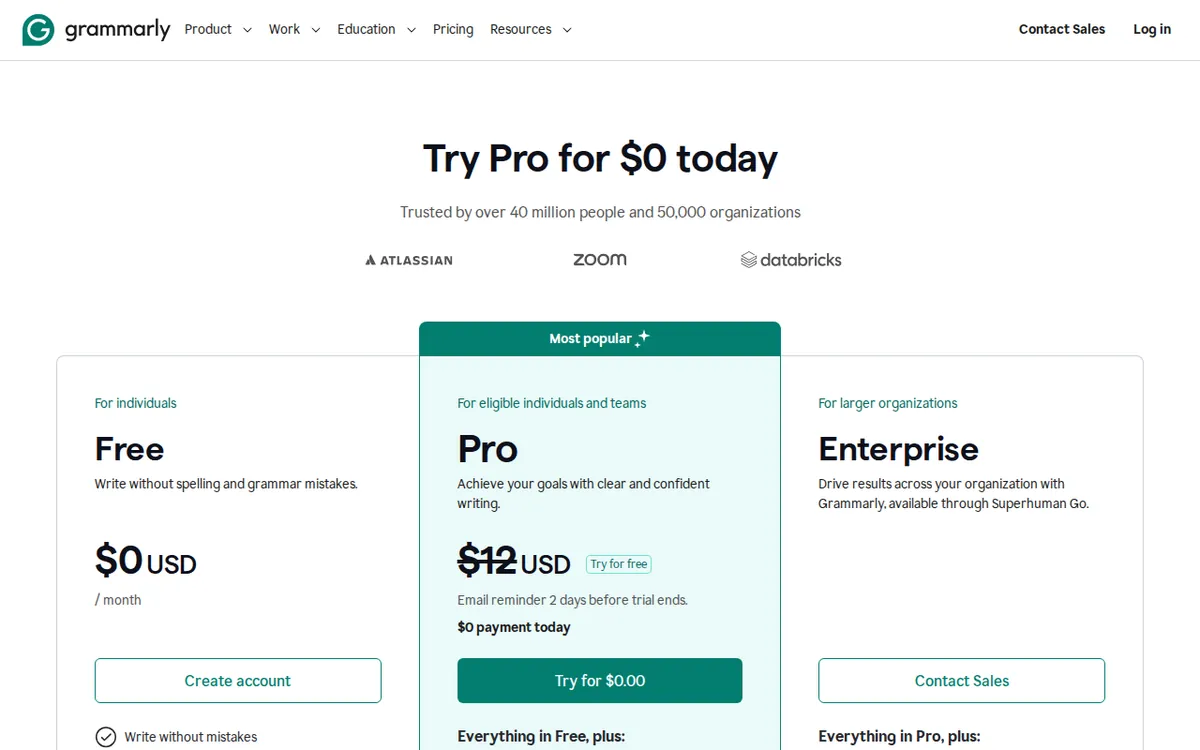
Figure: grammarly.com official pricing page, captured 2026-10-05.
Where the free plan actually stops you
The limit kicks in with AI generation — the feature that writes or substantially rewrites text for you, rather than just flagging an error. The free plan allows 100 AI generations per month. Once that’s used up, the proofreading still works, but the generation tools stop until next month’s reset.
Illustration: Basic proofreading flows without end, but full sentence rewrites are tightly rationed like precious drops.
Two features sit entirely behind the paywall, not rationed but simply unavailable free: full-sentence rewrites (Grammarly rewording an entire sentence in one click, not just suggesting a fix) and plagiarism detection. If you’re a student or anyone submitting written work that needs an originality check, the free plan can’t do that at all — it’s a Pro-only feature.
There’s also a limitation that isn’t really about pricing tiers at all: Grammarly only proofreads English. It doesn’t check Chinese, or any other language. That’s not a free-vs-paid distinction — even Pro and Enterprise don’t cross that line. But it’s the single most common misunderstanding people have about the tool, so it’s worth stating plainly here.
What US$12 a month actually buys
Grammarly Pro costs US$12 a month, billed monthly, and comes with a 7-day free trial. The jump from free to Pro is mostly about volume and depth, not entirely new functionality layered on top of nothing: AI generations go from 100 a month to 2,000 per person per month, sentence-level rewrites become available, tone adjustment gets more capable, and you gain plagiarism detection plus AI-generated-content detection. Pro also removes the cap on personalized writing suggestions and gives priority customer support.
Grammarly’s plans page mentions an annual billing discount exists, but — and this matters if you’re trying to budget — it does not publish what that discounted rate actually is anywhere on the public pricing page. So if you’re comparing monthly-vs-annual cost, you can confirm monthly pricing today, but you cannot get an annual number without going further into a signup flow.
Above Pro sits Enterprise, which is not a self-serve plan at all. It removes the AI generation cap entirely, adds encryption where the business holds its own keys (BYOK), single sign-on and user provisioning (SAML SSO/SCIM), data-leak protection, and custom role permissions. But there’s no listed price — Enterprise is quote-only, which means any number you see attached to it elsewhere is not an official rate.
🔍 AMPM exclusive check
Here’s where our check adds something the official pricing page doesn’t spell out clearly. Grammarly’s plans page states the free plan includes “100 AI generations” and that Pro includes “2,000 AI generations per person per month” — both numbers are accurate and we confirmed them directly on grammarly.com/plans. But the page frames Pro mainly around volume and rewriting power, without foregrounding two things casual readers tend to miss.
First, the annual-billing discount is referenced as existing but the actual discounted rate is never shown on the pricing page itself — it only shows up once you’re inside a purchase flow, which we did not go through since it would require starting a real subscription. So if you’re trying to decide “is annual cheaper,” the public page genuinely does not answer that; it’s not that we failed to find it, it’s that Grammarly doesn’t publish it at that stage.
Second, the “Enterprise, US$0” framing that shows up on some pricing aggregators and comparison tables is misleading. There’s no free Enterprise tier — it’s custom-quoted and requires talking to sales. Any listing that shows a dollar figure for Enterprise is not sourced from Grammarly’s own page.
Beyond those two gaps, every number in this piece — the US$12 Pro price, the 100 free AI generations, the 2,000 Pro AI generations, the 7-day trial — matches Grammarly’s own plans page, checked 2026-10-03.
☀️ AMO, the budget-minded cat

AMO only cares about one question: is free enough, and if not, is paying worth it. For Grammarly, free covers the thing most people actually open the tool for — catching spelling and grammar mistakes with no cap, plus tone detection so you don’t accidentally sound harsh in an email. If your English writing just needs a safety net, not a rewrite engine, the free tier doesn’t expire and doesn’t run out of the feature you’re using.
The 100 AI generations a month is the number to watch. If you lean on Grammarly to rewrite sentences, draft replies, or restructure paragraphs regularly, 100 uses a month disappears fast — potentially inside the first week if you’re using it for daily work emails. At that point the math is simple: US$12 a month buys 2,000 generations instead of 100, plus full-sentence rewrite and tone adjustment tools the free plan locks out entirely.
AMO’s take: don’t pay for Pro just to get “more” generations if you’re barely touching the free 100. But if you’re consistently hitting that cap before the month resets, or you specifically need plagiarism detection for coursework, the free plan simply cannot do the job — there’s no free workaround, and US$12 is the actual cost of unlocking it, not a markup for something you could get around.
Verdict: who should use it, who should skip it
Use the free plan if your main need is catching errors — spelling, grammar, basic tone — in emails, reports, or casual writing, and you rarely need the tool to rewrite content for you. Unlimited proofreading with no monthly reset risk is a strong deal for zero cost.
Upgrade to Pro if you regularly hit or exceed 100 AI generations a month, need full-sentence rewriting rather than error flags, or need plagiarism detection for academic or professional writing — US$12 a month buys a real jump in both volume (2,000 generations) and capability.
Skip Grammarly entirely if you need proofreading in any language other than English — this tool, free or paid, does not cover that, and no amount of upgrading changes it. And if you’re comparing annual pricing before committing, know that Grammarly’s own page won’t give you that number upfront; you’ll need to go further into checkout to see it.
Written: 2026-10-05 Price last verified: 2026-10-03 Tool last health-checked: 2026-10-05
🔗 Related on AMPM
📎 Sources
All prices and quotas in this article come from AMPM’s verified dataset for Grammarly (last verified 2026-10-03); primary sources:
🐾 Meet the cats: AMO and PIMI

AMPM is a Taiwan-based AI-tool pricing watchdog. Our motto: ask before you subscribe. Two cats argue every tool from two sides:
- ☀️ AMO — the budget-minded cat. Always asks: is the free tier enough, and is paying actually worth it?
- 🌙 PIMI — the performance-minded cat. Cares about whether it works well, fast, and gets your job done.

When they are done arguing, you know whether to pay. Every number is checked by us, with the verification date at the end.
🐾 Our sister sites also checked
Let's take a look at these
- Grammarly Comprehensive Introduction: Pricing, Features, and Actual Limitations
- Grammarly Is the free quota enough?
- Grammarly Alternatives
- Comprehensive Free Quota List for All Tools
More verified articles on this tool
- [Pricing] Grammarly free tier: 100 AI rewrites a month, or pay US$12 for 2,000?
- AI Tool Referral Cookies Range From 30 to 180 Days — a Sixfold Gap: Six Official Programs Compared, Plus a Three-Step Way to Work Out What You Would Actually Earn
- We Read Grammarly's Affiliate Terms Line by Line: The 90-Day Cookie Is Great, But Seven Rules Can Wipe a Commission Out
