[How-to] Hailuo AI free vs paid: What You Actually Give Up on the Free Tier
- Free tier: Yes
- Cheapest paid plan: US$14.99/mo and up
- Free quota: The official site does not publish the daily free credits; free output …
- Last checked: 2026-10-09
Article last updated: 2026-10-21



Hailuo AI is MiniMax’s text-to-video and image-to-video tool: you type a prompt (or upload a still), and it generates a short clip. The interface is available in Traditional Chinese, and the tool can output up to 1080p. That last point is the catch. The free tier does not get you there. If you came to Hailuo to make clean, shareable clips, the free plan is a place to learn the controls — not a place to ship finished work. Here’s what it can do, where it stops, and what each paid step actually buys.
Start here: what the free tier gets you
Signing up is the easy part. Create an account, pick text-to-video or image-to-video, write a prompt, and generate. The Chinese interface is clear enough that a beginner can produce a first clip in a few minutes.

Illustration: The free tier delivers coarse frames stamped with marks, while pristine sharpness remains locked behind a paid barrier.
Two limits define the free experience:
- Watermark. Free output carries a watermark. That alone rules it out for client work, a portfolio, or anything you’d post under your own name.
- Resolution capped at 768p. The tool’s 1080p ceiling is a paid feature. On the free plan, 768p is as sharp as it gets.
Now the honest part about free quota. Hailuo’s own site does not publish a daily free credit figure. Credits are the tool’s internal currency — each generation spends some, and your plan sets how many you get. The official pages don’t spell out the free daily refill. Third-party reviews report a small daily top-up, roughly enough for two to three short clips a day, but MiniMax has not confirmed that number. Treat it as a rumor, not a guarantee, and check what your own account shows on the day you sign up.
So the free tier is a trial, not a workhorse. Use it to test whether Hailuo’s output style, motion, and prompt-following suit your project before you pay.

Figure: hailuoai.video official page, captured 2026-10-21.
The paid plans, step by step
Everything above the free tier is a monthly subscription, priced in US dollars, and the whole ladder is built around how many credits you get per month. There are five tiers:
- Standard — US$14.99/month, 1,000 credits/month. Currently on a limited-time promo at US$7.99/month. The page states the price returns to US$14.99 once the promo ends.
- Pro — US$54.99/month, 4,500 credits/month. Promo price right now is US$24.99/month.
- Master — US$94.99/month, 10,000 credits/month. Promo price right now is US$63.99/month.
- Ultra — US$124.99/month, 12,000 credits/month. No promo listed.
- Max — US$199.99/month, 20,000 credits/month. No promo listed.
A few things to read carefully before you pick one.
The promo covers only the bottom three tiers (Standard, Pro, Master). Ultra and Max are shown at their standard price. The page is explicit that the discounted prices on the first three snap back to the regular figures after the promo window — so if you subscribe at US$7.99, budget for US$14.99 later, not the intro rate.
The jump between tiers is steep on both price and credits. Standard to Pro roughly quadruples your monthly credits (1,000 to 4,500) and, at full price, nearly quadruples the cost. The credit-to-dollar ratio shifts as you climb, so the “right” plan depends entirely on how many clips you actually generate in a month — not on which tier looks like the best headline deal.
On annual billing: Hailuo’s page says a yearly discount exists, but the data we verified does not include the annual dollar figures. We won’t invent them. If you want the yearly rate, you’ll have to read it off the pricing page at checkout, because we can’t quote a number that isn’t published to us.
One more gap worth flagging: the plan breakdown we have lists credits and prices, but it does not spell out, tier by tier, exactly which plan removes the watermark or unlocks 1080p beyond the fact that the free tier is capped at 768p with a watermark. If 1080p output is the whole reason you’re paying, confirm on the pricing page that the specific tier you choose includes it before you commit.
How to actually get a clean 1080p clip
Working flow for a beginner who wants finished, watermark-free video:
- Test on free first. Generate two or three clips at 768p. Judge whether Hailuo’s motion and prompt accuracy fit your idea. You lose nothing but time.
- Estimate your monthly volume. Count how many clips you realistically need per month. That number — not the price tag — decides your tier. A handful of clips points to Standard; steady production points higher up.
- Match volume to credits. 1,000 credits (Standard) is a light-use plan. If you burn through it in the first week, you’ve picked wrong — step up to Pro’s 4,500.
- Subscribe, then confirm the output settings. Once paid, check that your resolution is set to 1080p and the watermark is gone before you render anything you plan to publish.
- Watch the promo clock. If you took the US$7.99 Standard deal, note the renewal date. The full US$14.99 kicks in after the promo.
Common blocker: running dry mid-month. Credits don’t magically stretch. If you’re generating more than your tier allows, either upgrade or space your renders out. There’s no cheaper fix inside a given plan.
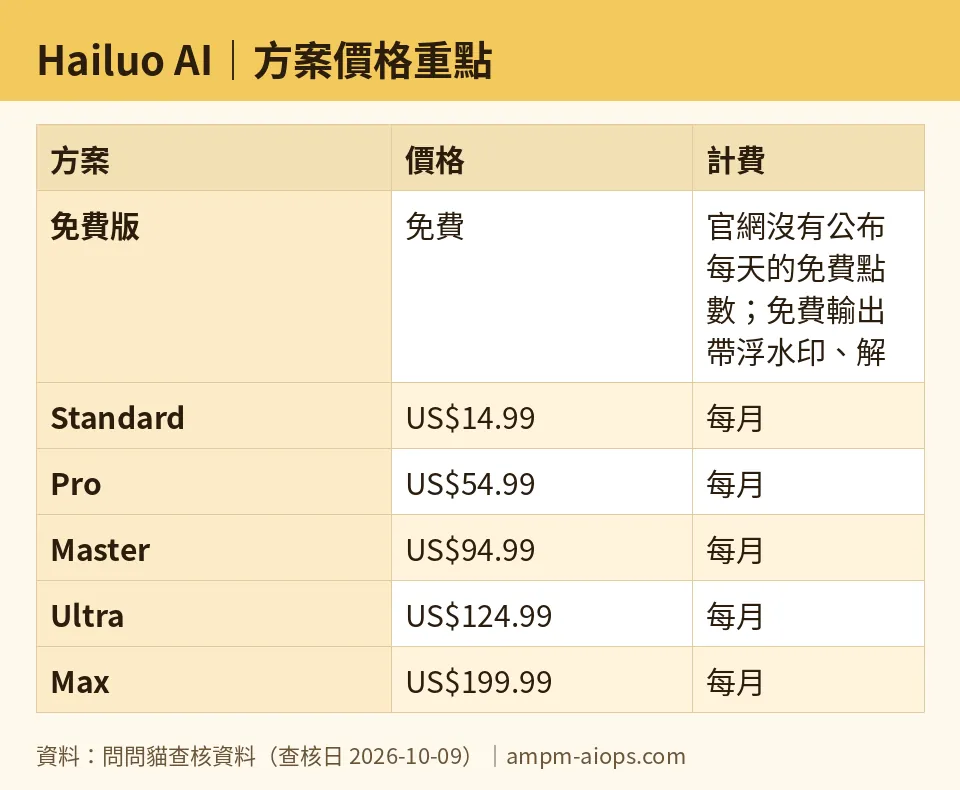
Figure: compiled by AMPM from its verified data (last verified 2026-10-09).
🔍 AMPM exclusive check
Two things the vendor page does not make clear, which we checked directly:
The free daily credit number is not published by Hailuo. The official site states the free tier exists, carries a watermark, and caps at 768p — but it does not list a daily free credit allowance. The “two to three short clips a day” figure comes from third-party reviews, not MiniMax. We’re repeating it with that caveat, and we recommend you trust what your own dashboard shows on the day, because the official source stays silent on it.
This is a first-pass check, not a triple-verified one. Hailuo AI entered our tracker as a challenger candidate, and the data here has been through one verification round, not our usual three-way manual cross-check. Prices were last verified 2026-10-09; free-tier details and the daily-credit question were looked at again on 2026-10-15. Free quota and any commercial-use terms should be confirmed against the live site at the moment you sign up, since challenger tools change fast and often.
Where the numbers above do come from the official pricing page — the five tier prices, the credit counts, and the promo structure — they match what we read on the day. The watermark and 768p cap are confirmed. The gaps are the free daily credit figure and the per-tier resolution breakdown, both of which the page leaves vague.
Verdict: who should use it, who should skip it
Use the free tier if you’re learning, experimenting, or deciding whether Hailuo’s style is right for you. For that, 768p with a watermark is fine.
Skip the free tier for real work. The watermark and the 768p cap mean nothing you make on it is publishable as-is.
Pay for Standard if you need clean clips but only make a few a month, and you’re comfortable that the US$7.99 promo becomes US$14.99 later. Step up to Pro or Master only when your monthly clip count clearly exceeds what the tier below covers — the price jumps are large, so buy the credits you’ll use, not the credits that look impressive.
Wait before committing long-term if you’re cautious. This tool is new to our tracker and has had one verification pass. Confirm the current free quota, the exact tier that unlocks 1080p, and the annual price yourself on the pricing page before you lock in a subscription.
Written: 2026-10-21 Price last verified: 2026-10-09 Tool last health-checked: 2026-10-20
🔗 Related on AMPM
📎 Sources
All prices and quotas in this article come from AMPM’s verified dataset for Hailuo AI (last verified 2026-10-09); primary sources:
🐾 Meet the cats: AMO and PIMI

AMPM is a Taiwan-based AI-tool pricing watchdog. Our motto: ask before you subscribe. Two cats argue every tool from two sides:
- ☀️ AMO — the budget-minded cat. Always asks: is the free tier enough, and is paying actually worth it?
- 🌙 PIMI — the performance-minded cat. Cares about whether it works well, fast, and gets your job done.

When they are done arguing, you know whether to pay. Every number is checked by us, with the verification date at the end.
🐾 Our sister sites also checked
Read next
- Hailuo AI Full breakdown: pricing, features and real-world limits
- Hailuo AI Is the free quota enough?
- Hailuo AI Alternatives
- Free plan limits for every AI tool we track
