Ask Cat › AI Tool Summary › InVideo AI
[Special] InVideo AI Pricing Check: The Free Tier Is Gone From the Official Page, Leaving Three Paid Plans Starting at US$20
- Free tier: None
- Cheapest paid plan: US$20/mo and up
- Free quota: As of 2026-09-25 the official pricing page does not list a free plan. …
- Last checked: 2026-10-07
Article last updated: 2026-10-07



As of our check on 2026-10-06, InVideo AI’s own pricing page lists exactly three plans — Starter, Plus, and Max — and no free tier at all. If you’ve been holding off on InVideo AI, waiting to see current pricing before you decide whether a free tier is still worth bothering with, here’s the short answer: the vendor isn’t advertising one anymore, at least not on the page where everyone looks first.
That’s a meaningful shift for a tool built around a simple pitch: type a prompt, and InVideo AI writes the script, pulls or generates the footage, adds a voiceover, and drops in subtitles — one pass, no manual editing required. (There’s also an older “Studio” line where you pick a template and cut the video by hand yourself, but that’s not what most people come for anymore.) A tool that leans on “try it for free” as its hook usually keeps that front and center. InVideo AI’s current page doesn’t.
What the Three Paid Plans Actually Buy You
Every InVideo AI plan is sold per seat — meaning you pay per person on the account, not a flat team price — and billed through “credits,” a monthly points allowance that different AI actions spend at different rates (a quick image costs a few points, a longer AI-generated video clip costs a lot more).
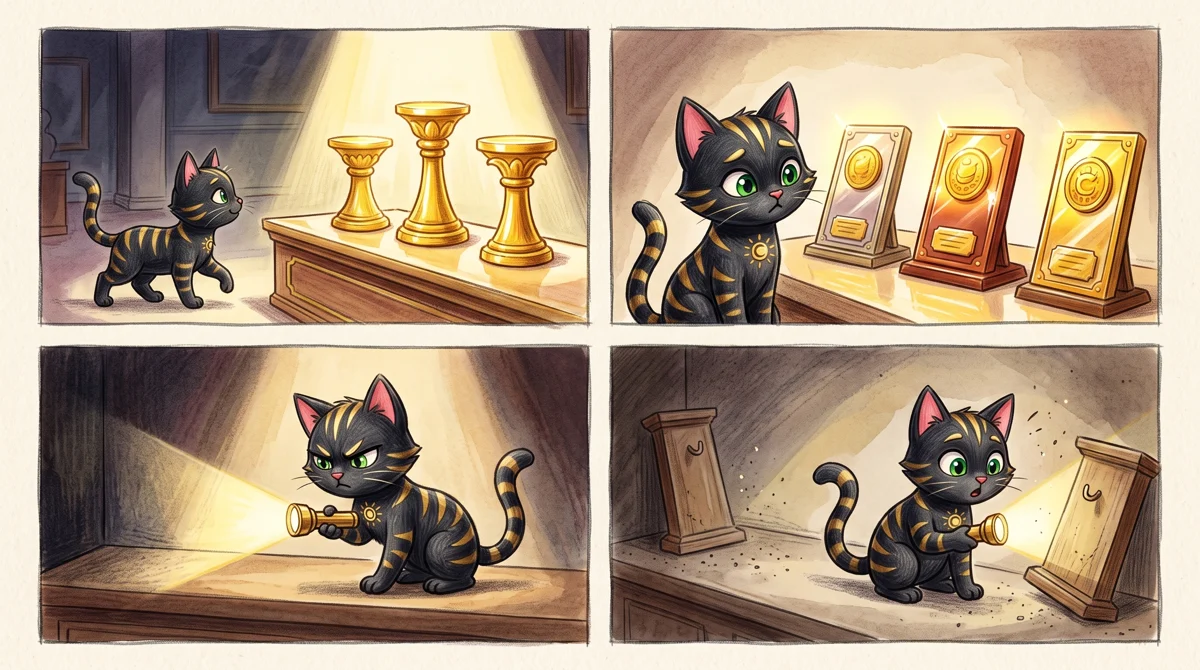
Illustration: Only three shining paid plan pedestals remain on display, while the free tier has vanished into the shadows.
Starter runs US$20 per seat per month, and the annual plan costs the same per month — no discount for committing to a year. Each seat gets 400 credits a month, which InVideo’s own page translates to roughly 160 images from its Nano Banana Pro model or about 15 short clips from Seedance 2.0 Fast. Starter doesn’t get the full model lineup: video generation is capped at Seedance 2.0 Fast and Mini, and the account tops out at 5 seats.
Plus costs US$60 per seat per month billed monthly, or US$50 per month if you pay annually (InVideo advertises this as a savings of US$122 per seat per year). Credits jump to 2,000 per seat per month, and this is the first tier that unlocks every generation model, including the full Seedance range up to 1080p or 4K resolution depending on version. Plus also adds InVideo’s “Agent Two” tools in Lite, Pro, and Ultra tiers, 200 licensed stock clips a month, and 600 GB of storage. Seat cap: 10.
Max is US$150 per seat per month billed monthly, or US$100 per month billed annually. Here’s a wrinkle worth flagging: InVideo’s savings callout for Max says you save US$579 per seat per year on the annual plan, but the comparison table lower on the same page puts the annual monthly rate at US$101, not US$100 — a one-dollar discrepancy between two sections of the same pricing page. Max seats get 5,000 credits a month by default, with options to buy up to 10,000 or 15,000, plus 500 stock clips, 2,000 GB of storage, and room for up to 20 seats. InVideo’s page claims this tier works out to the cheapest cost per credit, though it doesn’t publish the actual per-credit rate to check that against.
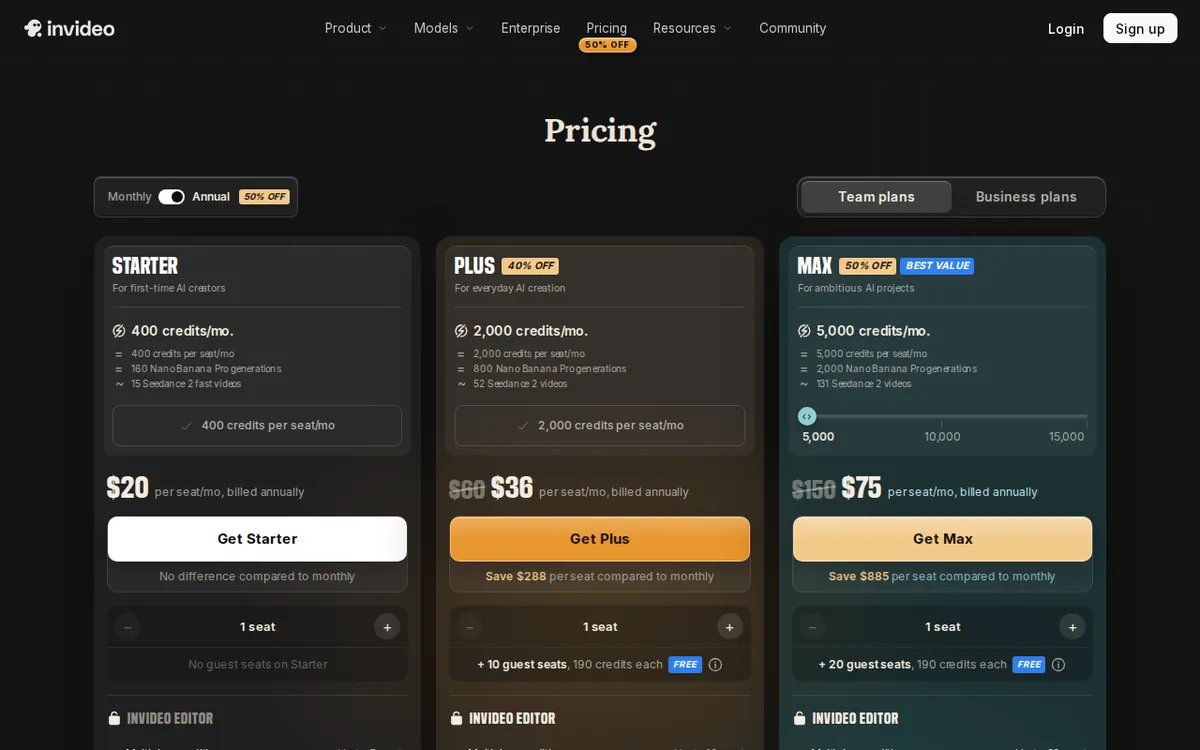
Figure: invideo.io official pricing page, captured 2026-10-07.
The Credit Math Nobody Advertises Up Front
None of these credit pools roll over. Whatever you don’t use by the end of the month disappears when the counter resets — there’s no banking unused credits for a heavier month later. That matters more than it sounds, because AI video generation burns credits fast in a specific way: if you regenerate the same shot three times because the first two takes weren’t right, you’re charged three separate times. There’s no “redo for free” grace built in.
That credit crunch is also why the free tier’s disappearance stings. Based on our pricing-history records from before 2026-08-28, the old free tier offered roughly 10 minutes of AI generation per week, reset weekly, plus about 4 exports a month — but every export carried a watermark burned directly into the video file, not a removable overlay. In other words, even when a free tier existed, it was really a trial of the workflow, not a usable output.
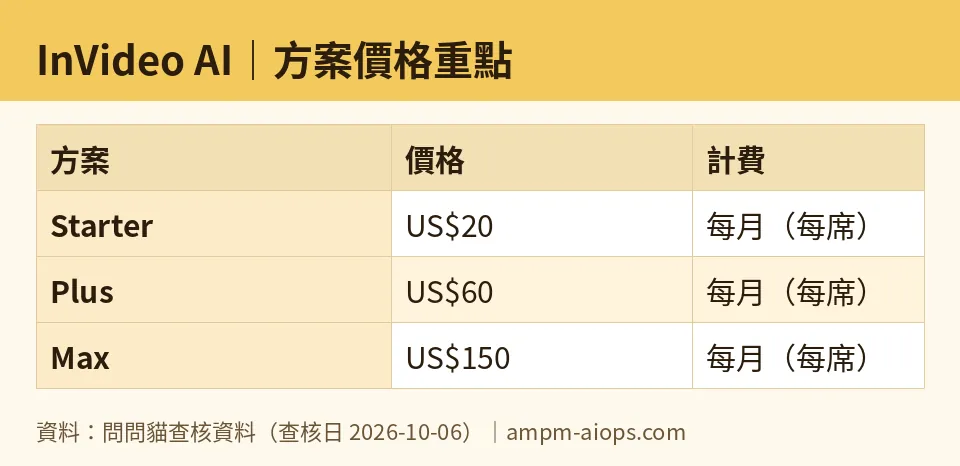
Figure: compiled by AMPM from its verified data (last verified 2026-10-06).
🔍 AMPM exclusive check
Here’s where our check adds something the vendor page doesn’t say outright: InVideo AI’s pricing page not listing a free tier isn’t the same as confirming one doesn’t exist. We could not verify, by direct sign-up, whether a free account is still issued behind the scenes — InVideo doesn’t require a credit card to open an account, and the only way to know for sure what a free account currently gets is to register and look inside, since the public pricing page simply stopped describing it. We flag this as unresolved rather than claim either way. Separately, we also caught the US$579-vs-US$101 mismatch on Max’s annual numbers described above — two different parts of the same official page don’t quite agree, and InVideo doesn’t clarify which one applies at checkout. We also noticed InVideo ran a temporary Max discount to US$135 (10% off the US$150 monthly price) on 2026-09-24, explicitly labeled as reverting to full price on renewal — a reminder that any discounted number you see on the page may not be the number you’re actually renewed at.
☀️ AMO, the budget-minded cat

AMO only wants to know one thing: is free still good enough, or is it time to pay? For InVideo AI right now, that question is harder to answer than usual, because the vendor stopped publishing free-tier numbers on its own pricing page as of our 2026-10-06 check. Going by the last confirmed figures (pre-2026-08-28), free got you about 10 minutes of AI generation a week and roughly 4 exports a month, every one watermarked and non-commercial. That’s enough to test whether the one-prompt-to-video workflow fits your style, not enough to publish anything. If AMO is testing the water, the free path — assuming it’s still handed out at signup — is fine for that single purpose and nothing more. Once AMO wants an actual watermark-free export, the cheapest paid door is Starter at US$20 a seat a month for 400 credits, which InVideo pegs at about 15 short AI video clips. That’s a real number to weigh against how many videos AMO actually needs per month: if it’s one or two short clips, US$20 covers it with room to spare; if it’s closer to the full 15, there’s no slack left for redoing a shot that didn’t land, since none of these credits carry over and every regeneration burns the pool again. For AMO, paying is worth it the moment free’s weekly cap and watermark actually get in the way — not before.
Verdict: who should use it, who should skip it
Use InVideo AI if you need full videos — script, visuals, voice, subtitles — out of a single prompt and you’re ready to commit at least US$20 a seat a month, because the credible free option has effectively disappeared from where most buyers would check. Starter suits someone testing the paid workflow at small volume with a limited model set; Plus is the realistic floor for anyone who wants every generation model and the full Seedance lineup, at US$60 a seat monthly or US$50 annually; Max’s 5,000-plus credits and 20-seat ceiling fit agencies or teams producing in volume, not individuals.
Skip it, for now, if you’re relying on a free tier to evaluate the tool seriously — the official page no longer tells you what that tier includes, and the last confirmed version (watermarked, roughly 10 minutes a week) was closer to a demo than a usable plan. Skip it too if your output needs vary month to month: credits that vanish unspent and regenerations that cost full price each time make InVideo AI expensive for anyone who needs several takes to get a shot right.
Written: 2026-10-07 Price last verified: 2026-10-06 Tool last health-checked: 2026-10-07
🔗 Related on AMPM
📎 Sources
All prices and quotas in this article come from AMPM’s verified dataset for InVideo AI (last verified 2026-10-06); primary sources:
🐾 Meet the cats: AMO and PIMI

AMPM is a Taiwan-based AI-tool pricing watchdog. Our motto: ask before you subscribe. Two cats argue every tool from two sides:
- ☀️ AMO — the budget-minded cat. Always asks: is the free tier enough, and is paying actually worth it?
- 🌙 PIMI — the performance-minded cat. Cares about whether it works well, fast, and gets your job done.

When they are done arguing, you know whether to pay. Every number is checked by us, with the verification date at the end.
🐾 Our sister sites also checked
Let's take a look at these
- InVideo AI Comprehensive Introduction: Pricing, Features, and Actual Limitations
- InVideo AI Is the free quota enough?
- InVideo AI Alternatives
- Comprehensive Free Quota List for All Tools
More verified articles on this tool
- InVideo Credits Don't Equal Videos: Understand the Billing Logic and Get Twice the Output
- InVideo Pricing 2026: Now Per Seat, Three Plans From US$20, and Credits Burn at Each Model's Own API Rate
