[How-to] Kinsta Pricing: What Beginners Must Count Before Picking a Plan
- Free tier: No
- Cheapest paid plan: US$35/mo and up
- Free quota: No indefinite free plan; includes a 30‑day unconditional money‑back …
- Last checked: 2026-11-04
Article last updated: 2026-11-04



Kinsta is a managed WordPress host built on Google Cloud. Managed means the company handles server setup, updates, and security for you, so you don’t run the machine yourself. That convenience has a price, and the price is where most beginners get lost.
This guide is for someone who has never bought hosting before. You will learn what each Kinsta plan actually includes, how to size your site against those numbers, and where the real blockers show up. No free tier exists here, so the first decision is not “which plan” but “should I pay at all.” We walk through that honestly.
What You Get at Each Tier, in Plain Numbers
Kinsta sells four plans. Every one is billed monthly by default, and every one offers a cheaper monthly average if you pay for a year.
Starter costs US$35 per month. It includes 1 WordPress site, 25,000 visits per month, and 10 GB SSD storage. Pay yearly and the monthly average drops to US$29.17. The yearly deal works because you pay for 10 months and get 2 free.
Pro costs US$70 per month. It includes 2 WordPress sites, 50,000 visits per month, and 20 GB SSD. The yearly monthly average is US$58.33.
Business 1 costs US$115 per month. It includes 5 WordPress sites, 100,000 visits per month, 30 GB SSD, and 4 PHP Workers. A PHP Worker is a process that runs your site’s code; more workers mean more visitors can be served at once. The yearly monthly average is US$95.83.
Business 2 costs US$225 per month. It includes 10 WordPress sites, 250,000 visits per month, and 40 GB SSD. The yearly monthly average is US$187.50.
Every plan includes a free Cloudflare Enterprise CDN and SSL. A CDN is a network of servers that serves your files from a location near the visitor. SSL is the padlock that makes your site secure. Those two are not extras you pay for later.
One thing the data does not give: there is no yearly total price listed. Only monthly prices and yearly monthly averages. If you want to know what a full year costs, the vendor page is the place to check, because we do not calculate it here.
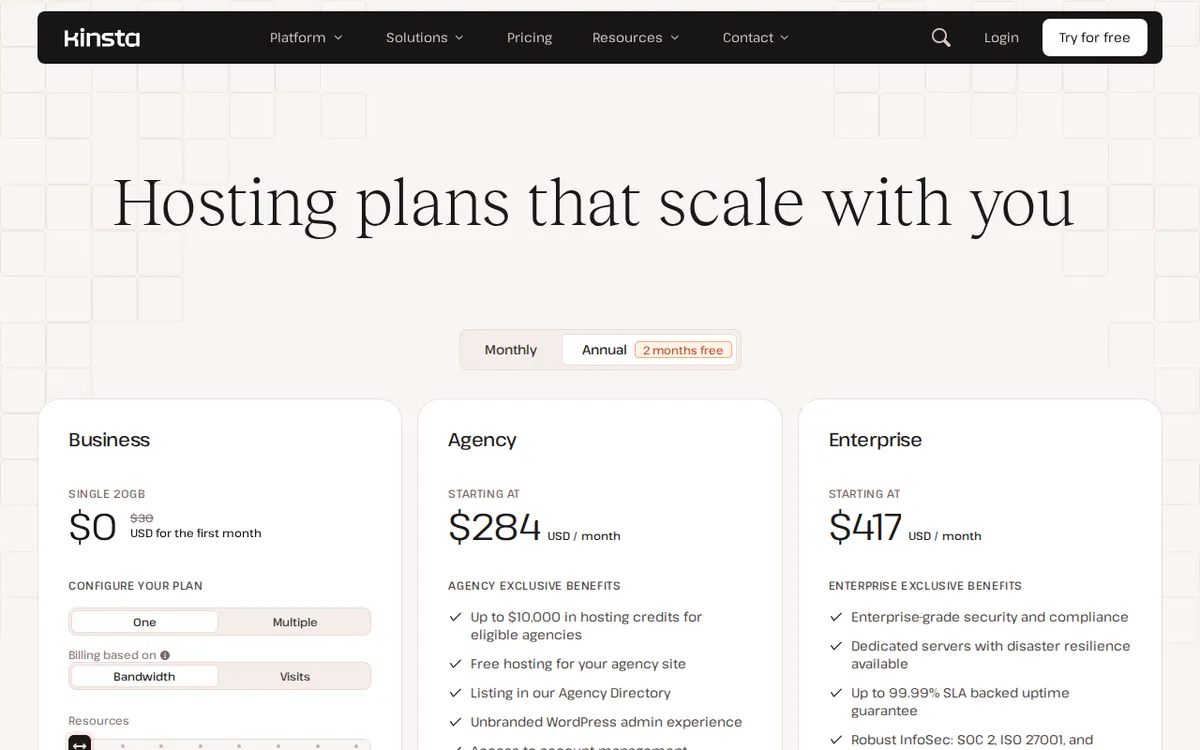
Figure: kinsta.com official pricing page, captured 2026-11-04.
How to Size Your Site Before You Pay
The mistake beginners make is buying for the site they hope to have, not the site they have. Kinsta counts visits, not pageviews. A visit is one person arriving; if that person reads ten pages, it still counts as one visit. That distinction matters when you compare Kinsta to hosts that meter pageviews.
Start with your monthly visitor number. If you are launching fresh, you are near zero. Starter’s 25,000 visits per month is a lot of room for a new site. Most personal blogs and small business sites never cross it.
Next, count your WordPress installs. One site means Starter. Two means Pro. Five means Business 1. Ten means Business 2. If you run a main site plus a staging copy, that staging copy may count as a site, so check before you buy. This is the single most common sizing error.
Then look at storage. 10 GB on Starter is fine for text and compressed images. If you host large video files or sell digital downloads, storage fills faster than visits do. Move up a tier for storage reasons, not just traffic.
Finally, think about PHP Workers. Starter, Pro, and Business 2 do not list a worker count in the data. Business 1 lists 4. If your site runs WooCommerce or a membership plugin, worker limits can bite before visit limits do. Ask support what your plan’s worker count is before you commit.
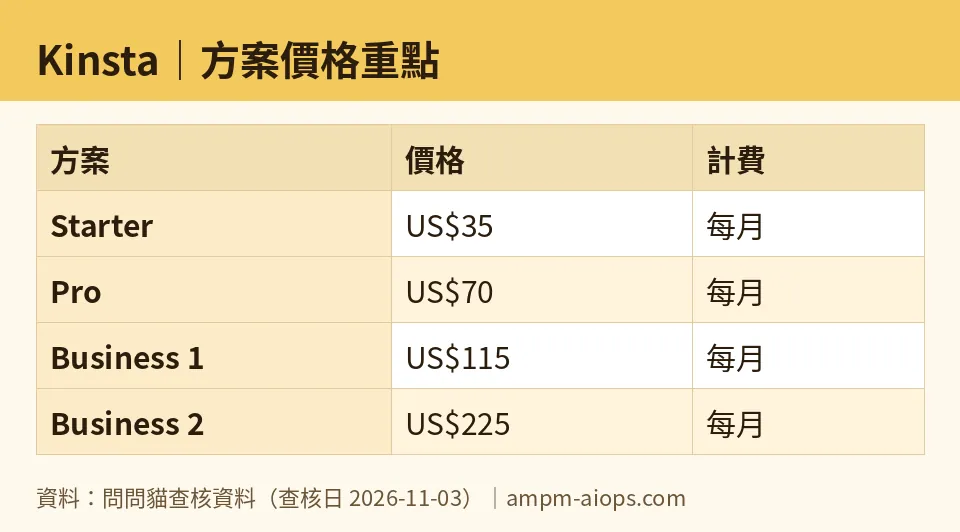
Figure: compiled by AMPM from its verified data (last verified 2026-11-03).
🔍 AMPM exclusive check
Nothing differed from the official page this time; every number below matches it, checked 2026-11-03.
What we can add is a caution about the data itself. Our record flags Kinsta as a challenger candidate that entered automatically, checked only once, and not yet cross-verified by three human reviewers. That means the free-tier and commercial terms should be confirmed on the official page at the moment you buy. The 30-day unconditional refund guarantee is the closest thing to a trial here, and it is a refund window, not a free plan.
We also note the verification history runs from 2026-10-24 to 2026-11-02 with no price changes recorded across those checks. The numbers have been stable. Stability is not a promise, but it is a signal.
Prices vary by country; we checked from Taiwan.
☀️ AMO, the budget-minded cat

Here is the hard truth for anyone watching their wallet: Kinsta has no free tier. Not a limited one, not a trial tier. The free_limit field says it plainly: no regular free plan, only a 30-day unconditional refund guarantee.
So the budget question is not “is free enough.” It is “is US$35 a month justified when cheaper hosts exist.” For a brand-new site with almost no traffic, US$35 monthly is real money. The yearly monthly average of US$29.17 softens it, but you are still committing to a year of payments to get that rate.
My read: if your site makes no money and has no traffic, Kinsta is hard to justify on price alone. You are paying for managed infrastructure you may not need yet. If your site already earns, or if downtime costs you customers, the math flips. One avoided outage can cover months of hosting.
The refund window is your safety net. Use it. Buy Starter, run your real site on it for a few weeks, and judge with your own numbers. If it does not fit, ask for the refund inside 30 days. That is the closest this tool gets to a free test, and it costs you nothing but attention.
🌙 PIMI, the performance-minded cat

Performance is where Kinsta earns its price. The stack runs on Google Cloud, and every plan ships with Cloudflare Enterprise CDN and SSL at no extra charge. Enterprise CDN is not the free tier of Cloudflare. It is the paid product, bundled in.
Look at what scales. Starter handles 25,000 visits per month. Business 2 handles 250,000, ten times the traffic, on 40 GB SSD. Business 1 adds 4 PHP Workers, which is the number that decides how many dynamic requests your site can serve at once. Dynamic means the page is built fresh for each visitor, which is what WordPress does by default.
The catch is that worker counts are not published for every tier in our data. Starter, Pro, and Business 2 show no worker figure. If your site is heavy on logged-in users, carts, or comments, that missing number is the one you need before you buy. Ask support directly.
Does it actually work well? The infrastructure says yes. The visit limits are generous for the price at the low end. The real risk is not speed. It is picking a tier that runs out of workers or storage before it runs out of visits. Size for the bottleneck you cannot see, not the one on the label.
Verdict: who should use it, who should skip it
Use Kinsta if you run one to ten WordPress sites, you want the server handled for you, and your traffic fits inside the plan you pick. Starter at US$35 monthly, or US$29.17 monthly on the yearly average, suits a single serious site. Business 1 at US$115 monthly, or US$95.83 yearly average, suits a busier site that needs 5 installs and 4 PHP Workers.
Skip it if you have no traffic and no revenue yet. With no free tier, you would be paying US$35 a month to learn whether you like blogging. Start somewhere cheaper, come back when downtime or speed actually costs you something.
Before you buy, write down three numbers: monthly visits, number of WordPress installs, and storage in GB. Match them to the plan table above. If any one of them is close to the limit, buy the next tier up. Then use the 30-day refund window to test with real traffic.
Written: 2026-11-04 Price last verified: 2026-11-03 Tool last health-checked: 2026-11-04
🔗 Related on AMPM
📎 Sources
All prices and quotas in this article come from AMPM’s verified dataset for Kinsta (last verified 2026-11-03); primary sources:
🐾 Meet the cats: AMO and PIMI

AMPM is a Taiwan-based AI-tool pricing watchdog. Our motto: ask before you subscribe. Two cats argue every tool from two sides:
- ☀️ AMO — the budget-minded cat. Always asks: is the free tier enough, and is paying actually worth it?
- 🌙 PIMI — the performance-minded cat. Cares about whether it works well, fast, and gets your job done.

When they are done arguing, you know whether to pay. Every number is checked by us, with the verification date at the end.
🐾 Our sister sites also checked
Read next
- Kinsta Full breakdown: pricing, features and real-world limits
- Kinsta Is the free quota enough?
- Kinsta Alternatives
- Free plan limits for every AI tool we track
