[How-to] Klaviyo Free vs Paid 2026: Which Limit Catches You First
- Free tier: Yes
- Cheapest paid plan: US$20/mo and up
- Free quota: Up to 250 active contact profiles (Active Profiles), with a monthly …
- Last checked: 2026-10-21
Article last updated: 2026-10-22



Klaviyo gives away a free plan, and almost everyone sizes it up by the same number: how many contacts it holds. That’s the wrong number to watch. For a store that’s just starting to collect email addresses, the contact ceiling is roomy. The send ceiling is the one that quietly stops you — often in the same week you finally get your automations working.
Here’s what the free plan covers, how to get something live on it as a beginner, and the exact point where you’ll feel the walls.
First, three words you’ll see everywhere in Klaviyo. A profile (Klaviyo calls them “active profiles”) is one person in your contact list — an email address with whatever Klaviyo knows about them. A flow is an automated email sequence that fires on a trigger, like a welcome email the moment someone subscribes. A campaign is a one-off email you send to a group you pick. Keep those three straight and the rest of the tool makes sense. Klaviyo bills as a subscription — a recurring monthly charge, not a one-time purchase — and markets itself as a cross-channel marketing-automation platform built around predictive AI and audience data.
What the free plan actually lets you do
The free tier holds up to 250 active profiles and lets you send up to 500 emails per month. It’s free — not a trial that expires, and not a free tier with fine print. It’s a standing free plan.
That’s enough to do real work. You can connect a store, build a signup form, set up a welcome flow, and send a small campaign or two. For a shop with a short list and a few automations, this is a genuine starting point, not a demo.
What it is not is a plan you can send often from. Five hundred sends a month has to cover your automated flows and any broadcast you run — it’s a single shared budget. Every welcome email, every back-in-stock note, every campaign draws from the same 500. That matters more than it looks, and it’s the heart of this piece.
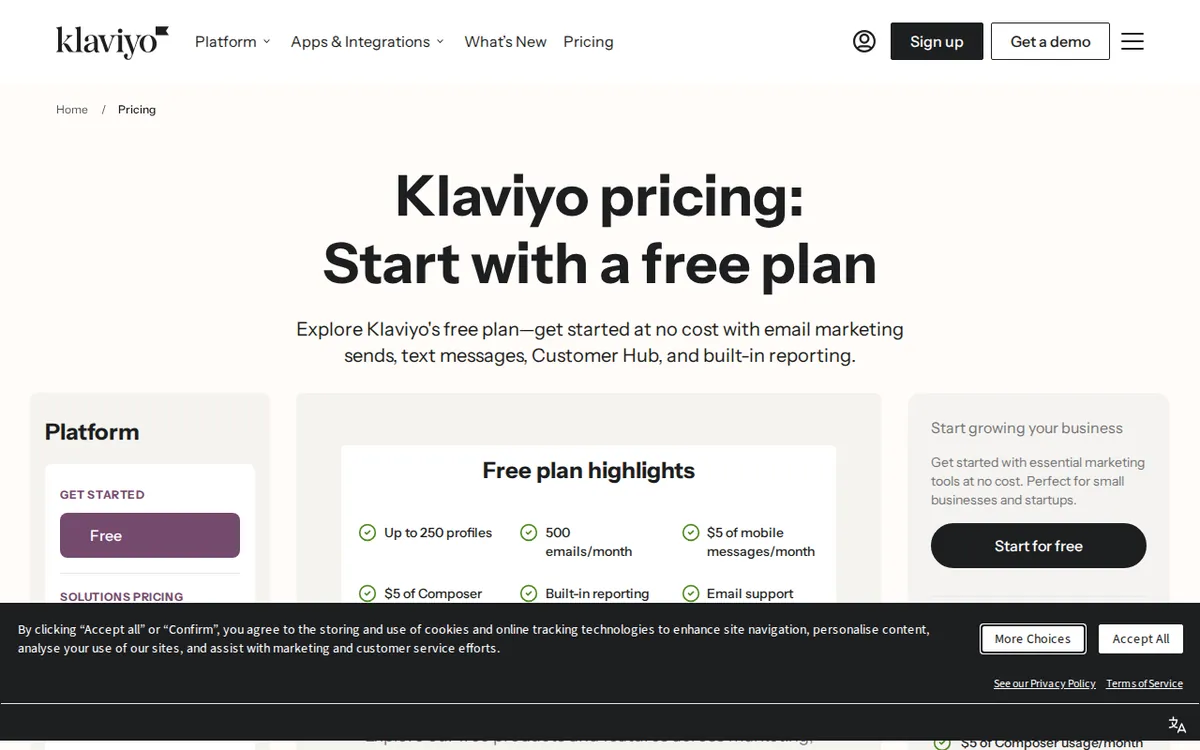
Figure: klaviyo.com official pricing page, captured 2026-10-22.
Getting your first setup live
A beginner can go from empty account to a working welcome flow in an afternoon. The order that avoids rework:
- Create the account and connect your data source. If you run an online store, link it so Klaviyo can pull in customers and orders. If you don’t, you can add contacts by hand or import a file.
- Put up a signup form before you import anything. This is the step people skip. A form that collects fresh subscribers keeps your list growing with people who actually opted in, which protects your deliverability — whether your mail lands in inboxes instead of spam — later on.
- Build one welcome flow. One trigger (someone subscribes), two or three emails spaced over a few days. Don’t build five flows on day one.
- Send one small campaign to a segment — a segment is just a saved filter, like “subscribed in the last 30 days.” Watch how it performs before you scale up.
- Find the two counters and keep an eye on them: your active-profile count and your monthly email sends. They move independently, and together they decide whether you ever need to pay.
Two blockers trip up almost every new user. The first: importing a large existing list on day one. Drop in a spreadsheet of a few hundred old contacts and you can blow past 250 profiles before you’ve sent a single email — and you’ve filled your list with addresses that may never open. Fix: start with the form, add contacts deliberately, and the free plan lasts. The second: leaving several flows running while you also try to send campaigns, then wondering why sends vanished. Fix: decide early whether this month’s 500 is for your flows or for a broadcast, because it can’t comfortably be both.
The two ceilings — and which one you’ll hit first
This is the part the pricing page doesn’t put in a headline. The free plan has two limits, not one: 250 profiles and 500 emails a month. New users fixate on the profile count. In practice the send count is the tighter leash.
Think about what’s drawing from that 500. Your welcome flow sends to every new subscriber. Any other flow you add sends too. Then you want to run an actual campaign to your list. With up to 250 people on the list and only 500 sends to share out, a list-wide campaign or two plus your running flows can empty the month’s budget fast. You end up with contacts you’re allowed to keep and no sends left to reach them.
So the honest trigger to upgrade is rarely “I hit 250 contacts.” It’s “I want to email my list more than a couple of times a month.” That’s the moment the free plan stops being enough.
Here’s the upgrade math, and it’s the reason the jump is worth understanding before you make it. Klaviyo’s paid pricing is tiered — the monthly price climbs in steps as your list grows. At 500 profiles it’s US$20 a month; at 1,000 profiles it’s US$30 a month. The important part isn’t the contact bump. It’s that on paid plans your monthly send allowance is ten times your contact cap — a far looser leash than the free plan’s flat 500. You’re not really paying for more contacts when you upgrade. You’re paying to send.
If you also want text messages, there’s an Email and SMS plan at US$35 a month at the 500-profile step. That includes the 500-profile email sending plus 1,250 SMS/MMS credits — a credit being one unit of text-message sending allowance, where an MMS (the kind with an image) costs more units than a plain SMS. Like the email plan, it steps up with your audience size.
One note for readers comparing from outside the US: Klaviyo’s prices vary by country, and we checked these from Taiwan. The US$ figures above are the ones Klaviyo shows. Billing here is monthly, and the pricing we saw doesn’t quote an annual rate — so we’re not going to invent one. Budget it as a monthly cost.
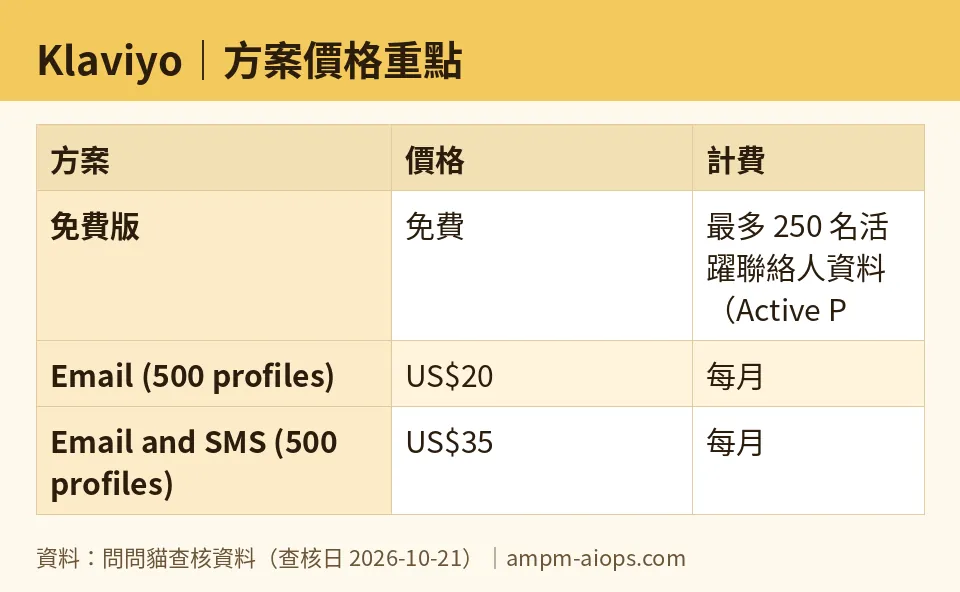
Figure: compiled by AMPM from its verified data (last verified 2026-10-21).
🔍 AMPM exclusive check
The numbers above match what Klaviyo’s own home and pricing pages showed when our bot read them on 2026-10-21. Nothing in the pricing contradicted the official page this time.
What we’ll add that the page doesn’t spell out: the free plan’s real constraint is the 500-email monthly cap, not the 250-profile cap. The pricing page leads with a contact-count slider, which trains you to treat your list size as the thing that forces an upgrade. For most new stores it isn’t. Line up the two free limits side by side — 250 profiles, 500 sends — and notice that paid plans lift the send allowance to ten times the contact cap while the contact cap itself only roughly doubles at the first step. The gap between those two ceilings is the whole pricing story, and it’s easy to miss if you only read the big number.
Full disclosure on our end: Klaviyo came into our tracker as an automatic challenger entry, and this is a first-pass check — one read, not yet our usual three-way manual cross-check. The quotas here were accurate on the date shown, but Klaviyo revises plan structure from time to time, so confirm the live numbers on the pricing page before you commit money.
Verdict: who should use it, who should skip it
Use the free plan if you’re setting up a store’s email for the first time, your list is under 250 and growing slowly, and you mainly want automated flows running with the occasional campaign. It’s a real tool at no cost, and you can learn the entire workflow on it.
Start budgeting for paid the moment you want to email your list on a schedule — a weekly newsletter, regular promotions, anything that reaches most of your contacts more than a couple of times a month. That ambition hits the 500-send wall long before it hits the 250-contact wall. At that point US$20 a month at 500 profiles is the entry step, and what you’re actually buying is room to send.
Skip Klaviyo’s free tier if you already have a sizeable opted-in list you need to email often — you’ll be on a paid tier from day one, so judge it on the paid price, not the free plan — or if you don’t run the kind of store or audience that needs automated, data-driven email at all.
Written: 2026-10-22 Price last verified: 2026-10-21 Tool last health-checked: 2026-10-22
🔗 Related on AMPM
📎 Sources
All prices and quotas in this article come from AMPM’s verified dataset for Klaviyo (last verified 2026-10-21); primary sources:
🐾 Meet the cats: AMO and PIMI

AMPM is a Taiwan-based AI-tool pricing watchdog. Our motto: ask before you subscribe. Two cats argue every tool from two sides:
- ☀️ AMO — the budget-minded cat. Always asks: is the free tier enough, and is paying actually worth it?
- 🌙 PIMI — the performance-minded cat. Cares about whether it works well, fast, and gets your job done.

When they are done arguing, you know whether to pay. Every number is checked by us, with the verification date at the end.
🐾 Our sister sites also checked
Read next
- Klaviyo Full breakdown: pricing, features and real-world limits
- Klaviyo Is the free quota enough?
- Klaviyo Alternatives
- Free plan limits for every AI tool we track
