Ask Cat › AI Tool Summary › Kling
[Review] Kling AI's Free Tier Gives 66 Credits a Day — Enough for 6 Videos, but Its Pricing Climbs in Three Stages
- Free tier: There is
- Cheapest paid plan: US$10/mo and up
- Free quota: Daily login rewards points, can generate a small amount
- Last checked: 2026-10-05
Article last updated: 2026-10-08



Kling is a Chinese-made AI video generator known for sharp output and a free tier that’s more generous than most competitors. We checked its free tier and pricing directly against the official site, and found two things worth flagging before you sign up: the free allowance resets daily rather than once, and the mid-tier paid plan doesn’t have one price — it has three.
What you actually get for free
Kling’s free tier runs on “credits” — a points system where every image or video you generate burns a set number of points, and the app shows you the balance before you hit generate. You get these credits by logging in: Kling hands out 66 credits every day, but they expire in 24 hours if unused. There’s no stockpiling.
How far does 66 credits go? Pricing depends on resolution and length. A 720p clip with no audio costs roughly 6 credits per second. Add audio and bump to 1080p, and it jumps to about 12 credits per second. A standard 5-second clip runs about 10 credits. At that rate, 66 daily credits cover roughly six 5-second standard videos — enough to test the tool seriously, not enough to produce anything you’d ship.
Two more free-tier limits worth knowing: “Element AI Multi-Shot,” a feature for generating multi-shot sequences from one input, is capped at 3 free uses per day. And “Element Creation” — building a reusable character or object you can reinsert into later generations — is capped at 30 on the free tier total, not per day.
The bigger catch: anything you make on the free tier can’t be used commercially. If you’re testing Kling for client work or anything you plan to publish for profit, the free tier is a demo, not a production tool.
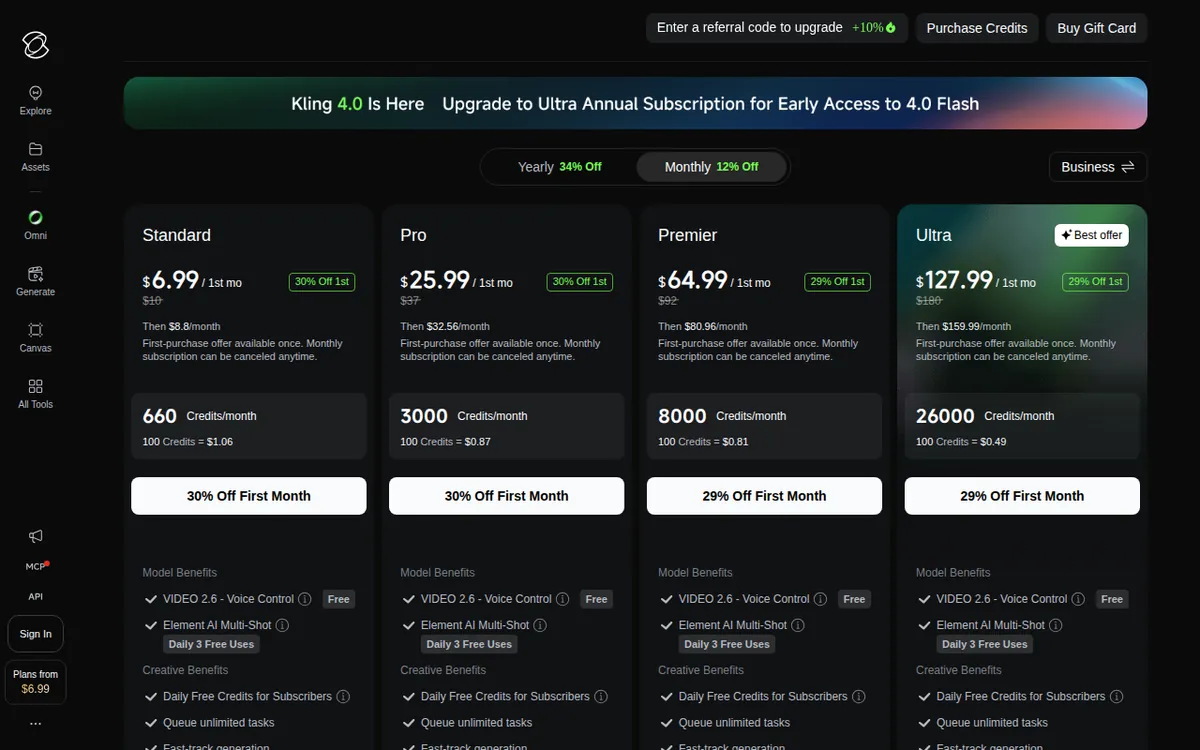
Figure: kling.ai official pricing page, captured 2026-10-08.
The Standard plan’s three different prices
This is where it gets messy. Kling’s cheapest paid tier, Standard, lists at US$10 a month. But almost nobody pays US$10 in their first month — the site shows a first-month promotional price of US$6.99. That part is normal; lots of subscription software does intro pricing.
What’s less obvious: when that first month ends and you renew, you don’t jump straight to US$10 either. Kling applies a 12% discount on the first renewal, bringing it to US$8.80, before the price finally returns to the full US$10 rate. So a new subscriber moves through three separate prices — US$6.99, then US$8.80, then US$10 — before settling at the listed rate. None of these stages carries a posted end date on the pricing page, so you can’t tell in advance exactly when the discount runs out.
We confirmed this isn’t a rumor or a stale screenshot circulating online — we read it straight from the official pricing page on 2026-07-26, and it matched what third-party reports had described. It’s real, it’s current, and it’s just not spelled out clearly as a three-step climb.
The other three plans — Pro, Premier, and Ultra — follow the same pattern of a discounted first month, just without the extra renewal-discount step that Standard gets:
- Pro: US$37/month, first month US$25.99
- Premier: US$92/month, first month US$64.99, with Premier also offering roughly a 34% saving if you pay annually instead of monthly
- Ultra: US$180/month, first month US$127.99, with no annual billing option at all
What changes once you pay
Every paid tier — Standard and up — removes the commercial-use restriction, so output becomes usable in client or monetized work. Paid tiers also add: unlimited queued generation tasks (no waiting for a slot to open), faster generation, 1080p/4K output, image upscaling, watermark removal, and the ability to extend existing videos. Premier and Ultra additionally get priority access to new features before they roll out more broadly, and Ultra adds beta-test invitations when they’re available.
The real differentiator between tiers is the monthly credit allowance, which scales steeply:
- Standard: 660 credits/month — about 660 images or 33 five-second 720p videos. Element Creation cap rises to 50.
- Pro: 3,000 credits/month — about 3,000 images or 150 videos. Element Creation cap rises to 150.
- Premier: 8,000 credits/month — about 8,000 images or 400 videos. Element Creation cap stays at 150.
- Ultra: 26,000 credits/month — about 26,000 images or 1,300 videos. Element Creation cap rises to 500.
That’s roughly a 39x jump in monthly credits between Standard and Ultra, for an 18x jump in monthly price — so heavier users do get comparatively more value per dollar at the top tier, at least on paper.
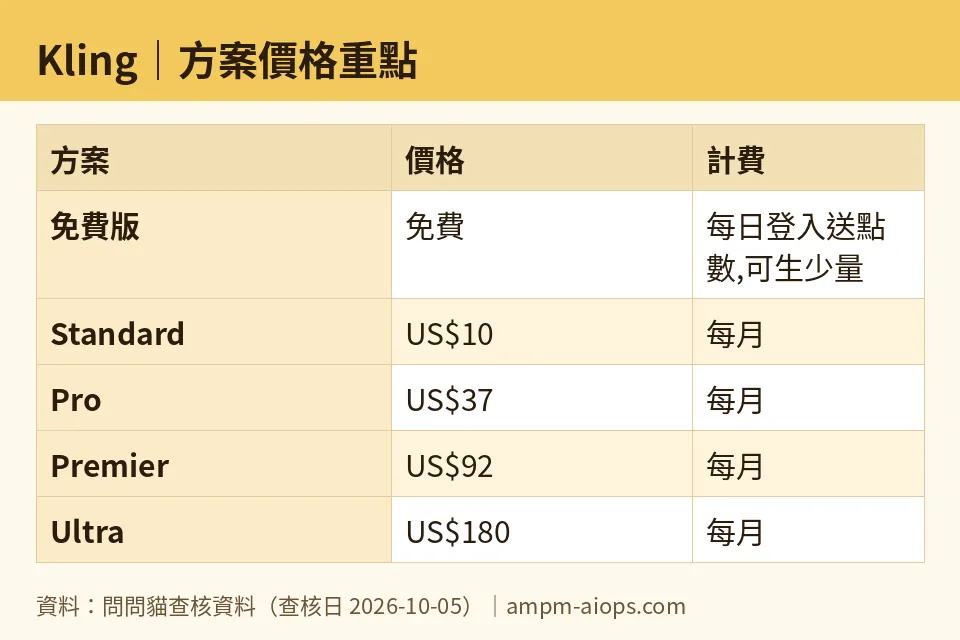
Figure: compiled by AMPM from its verified data (last verified 2026-10-05).
🔍 AMPM exclusive check
The vendor’s pricing page shows the first-month discount prominently on every plan — that part is upfront. What it does not spell out is that Standard’s price doesn’t settle after month one. It moves through a second, smaller discount (12% off, landing at US$8.80) on the first renewal before reaching the full US$10 rate. None of the three price points carries a listed expiration date, so a subscriber has no way to know from the page alone when the promotional pricing actually ends. We verified this by reading the official site directly (not a cached or third-party price list) on 2026-07-26, and the structure held: three sequential prices for one plan, with no stated cutoff. Every other number in this piece — the free daily credit amount, the per-second credit costs, and all four plans’ monthly credit quotas — matched the official page exactly as of our last check on 2026-10-05, and the tool itself was confirmed live and working on 2026-10-08.
☀️ AMO, the budget-minded cat

Sixty-six free credits a day sounds decent until you do the math: at roughly 10 credits for a 5-second standard video, that’s about six clips a day, every day, as long as you log in daily to collect them. That’s genuinely more generous than a lot of video tools that cap you at one video total or require a one-time trial. The catch that matters most for my wallet: free-tier output can’t be used commercially, so this is strictly a playground, not a plan.
If I’m going to pay, Standard is the one to look at — but the US$10 sticker price is not what you’ll actually be charged for a while. First month is US$6.99, the first renewal drops to US$8.80 thanks to a 12% discount, and only after that do you hit the real US$10/month. For that, you get 660 credits a month, which works out to about 33 standard videos — a steep drop from six videos a day for free, but now usable commercially and with watermarks removed. If you only need a handful of commercial clips a month, Standard at its true price of US$10 is affordable, but budget for the full US$10, not the US$6.99 headline, because that renewal escalation isn’t clearly dated anywhere on the page.
🌙 PIMI, the performance-minded cat

Credit quotas tell you what you can afford, not whether the tool performs. What matters to me is throughput and output quality tier: Standard already unlocks 1080p/4K generation, unlimited queued tasks, and faster generation speed — the queue and speed upgrades alone are a real functional jump from the free tier, where presumably you’re waiting behind paying users.
Where this gets interesting for serious use is credit cost at higher fidelity: 1080p with audio costs about 12 credits per second versus roughly 6 credits per second for plain 720p — basically double. That means a studio doing higher-resolution work with sound burns through a credit allowance twice as fast as someone sticking to silent 720p drafts. At Pro’s 3,000 credits a month (about 150 standard 720p videos), that budget could shrink to well under 150 clips if most of your work is 1080p-with-audio instead. Premier (8,000 credits, ~400 videos) and Ultra (26,000 credits, ~1,300 videos) exist for exactly that reason — scale matters more than per-video price once you’re doing paid production work. Premier and Ultra also get priority access to new features before other tiers, which is worth something if Kling keeps shipping model updates — you’re not stuck on last quarter’s generation quality while cheaper-tier users wait for rollout.
Verdict: who should use it, who should skip it
Use Kling’s free tier if you just want to see what it can do: 66 credits a day, resetting daily, is enough to run real tests without paying anything — just don’t plan to publish what you make, since commercial use is blocked until you subscribe.
Standard is worth it for light, occasional commercial use, but go in knowing the real price is US$10/month, not the US$6.99 or US$8.80 you’ll see first — both are temporary stepping stones with no posted end date. Pro, Premier, and Ultra scale credits fast enough (3,000 / 8,000 / 26,000 a month) that they make sense once you’re producing videos regularly rather than occasionally, and Premier’s roughly 34% annual discount is worth checking if you’re committing long-term. Skip Ultra unless you’re genuinely burning through thousands of credits a month — at US$180/month with no annual option, it’s a commitment with no long-term discount to soften it.
Written: 2026-10-08 Price last verified: 2026-10-05 Tool last health-checked: 2026-10-08
🔗 Related on AMPM
📎 Sources
All prices and quotas in this article come from AMPM’s verified dataset for Kling (last verified 2026-10-05); primary sources:
🐾 Meet the cats: AMO and PIMI

AMPM is a Taiwan-based AI-tool pricing watchdog. Our motto: ask before you subscribe. Two cats argue every tool from two sides:
- ☀️ AMO — the budget-minded cat. Always asks: is the free tier enough, and is paying actually worth it?
- 🌙 PIMI — the performance-minded cat. Cares about whether it works well, fast, and gets your job done.
When they are done arguing, you know whether to pay. Every number is checked by us, with the verification date at the end.
🐾 Our sister sites also checked
Let's take a look at these
- Kling Comprehensive Introduction: Pricing, Features, and Actual Limitations
- Kling Is the free quota enough?
- Kling Alternatives
- Comprehensive Free Quota List for All Tools
More verified articles on this tool
- [How-to] Get started with Kling's free 66 daily credits for video
- [Verified] Kling hands out 66 free credits a day that expire in 24 hours, and the US$10 plan mostly buys you the right to sell what you make
