Ask Cat › AI Tool Summary › Krisp
[How-to] Krisp Free Tier Limits Are Hidden in the App, Not the Pricing Page
- Free tier: There is
- Cheapest paid plan: US$16/mo and up
- Free quota: Free desktop version includes 60 minutes of noise reduction per day …
- Last checked: 2026-10-07
Article last updated: 2026-10-08



Krisp’s pricing page used to spell out exact free-tier numbers. Open it today and you won’t find them — just a 7-day free trial banner sitting above three paid plans. That’s exactly the kind of change that sends people searching “Krisp free tier limits” to figure out if the free version still exists. It does. The numbers just moved: instead of living on the marketing page, they’re enforced inside the desktop app itself, and you only see them once you’ve installed it and joined a call.
Krisp is a noise-cancellation tool that sits underneath whatever video call app you’re using — Zoom, Google Meet, Teams, Discord, Webex, anything. It strips background noise from both directions: your mic going out, and the other person’s audio coming in. It also bundles an AI meeting assistant that transcribes calls, writes summaries, and pulls out action items, plus an accent-conversion feature that’s still fairly new. Here’s what the free tier actually gets you, how to set it up, and where it runs out.
What Krisp’s Free Plan Actually Includes
Krisp’s own pricing page, read directly on 2026-08-28 and rechecked as recently as 2026-10-07, no longer states a numeric limit for the free tier — it only promotes the 7-day full-feature trial. The numbers below come from cross-referencing two independent pricing trackers (Top50AITools, updated 2026-08-13, and AIProductivity’s 2026 Krisp page), not from Krisp’s own copy, so treat them as close-but-verify-in-app rather than gospel:
Illustration: The official website only shows a trial period, but actual free limits are hidden inside the desktop app.
- Noise cancellation: 60 minutes a day. This is bidirectional — it cleans up noise from your own microphone and noise coming from whoever you’re talking to, regardless of which call app you’re in.
- AI meeting notes: 2 per day. Each one includes an automatic summary and action items. Transcription itself is unlimited, in 16+ languages (Krisp doesn’t explicitly list Chinese among them).
- Works with any call app through what Krisp calls a virtual microphone — essentially an audio layer that sits between your real mic and whatever call app you’re using, so Krisp can filter the sound before it ever reaches Zoom, Meet, Teams, or Discord.
- Call recording is available on the free tier, no watermark, and Krisp explicitly allows commercial use.
- Meeting history sticks around for 7 days before it’s gone, versus 10GB, 60GB, or unlimited storage on the paid tiers.
- Accent conversion is capped tightly on the free tier — it’s really there to get a taste before you hit a paid plan.
- Both daily counters — noise-cancellation minutes and AI notes — reset every 24 hours.
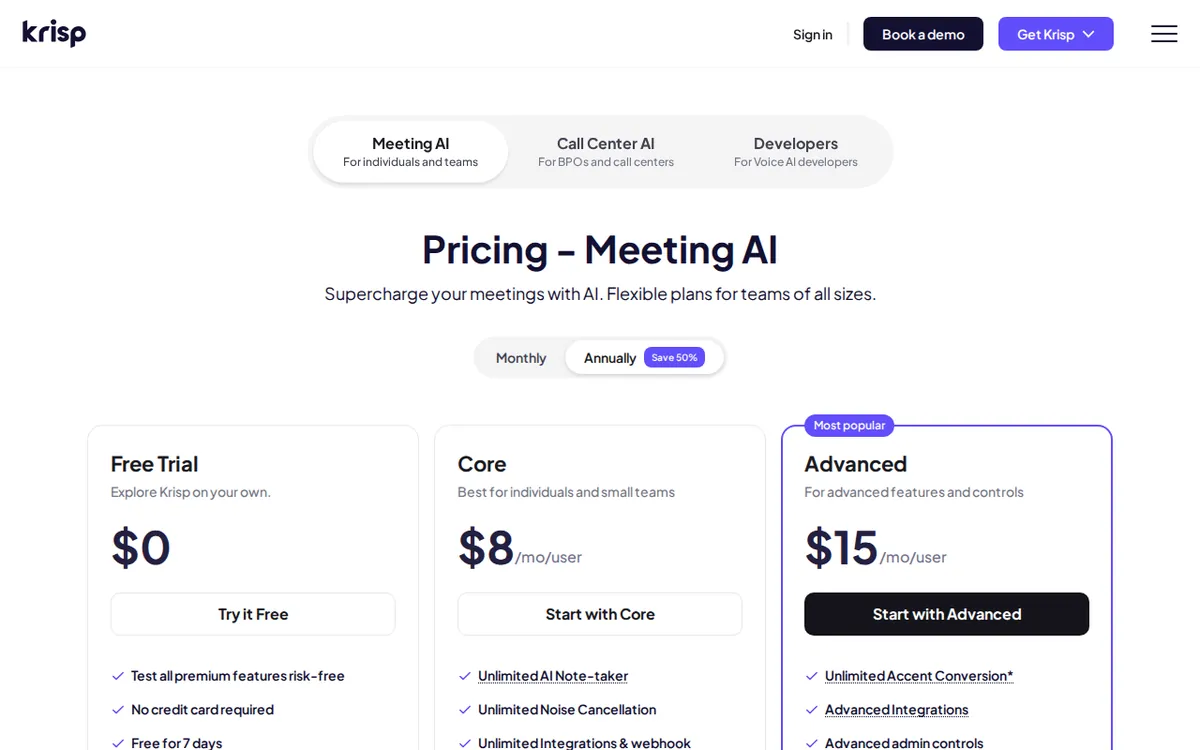
Figure: krisp.ai official pricing page, captured 2026-10-08.
Setting Up Krisp for Free: Step by Step
- Create an account at krisp.ai and download the desktop app. You need an account to unlock free-tier access at all.
- Use the 7-day trial window immediately. New accounts get a 7-day trial with full features unlocked — no credit card needed. This is your chance to test unlimited accent conversion and unlimited AI notes before they drop to the daily free caps.
- Set Krisp as your audio device inside your call app. Open your audio settings in Zoom, Meet, Teams, or whichever app you use, and select the Krisp microphone (and speaker, if you want incoming noise cleaned too) instead of your default device.
- Join a call and toggle noise cancellation on — Krisp runs a small floating control panel during calls where you switch it on for your mic, the other person’s audio, or both.
- Check the AI Notes tab after the call for the transcript, summary, and action items, if you used one of your two daily notes.
- Watch the in-app counters. Krisp shows your remaining noise-cancellation minutes and AI notes for the day right in the app — that display, not the pricing page, is the real source of truth on your limit.
Where the Free Tier Gets Tight (and How to Work Around It)
The 60-minutes-a-day noise cancellation cap is the first thing people hit. If your calls run longer than an hour combined per day, cancellation simply stops working once you’re out — there’s no partial mode. If that’s a regular problem, the next step up, Core, removes the cap entirely for US$16 a month paid monthly, or US$8 a month if you pay for the year upfront.
The 2-AI-notes-a-day limit bites just as fast if you’re in back-to-back meetings. With three or more calls in a day, pick the two that matter most for an automated summary and take your own notes for the rest — transcription itself stays unlimited even after you run out of summaries.
Accent conversion on the free tier is more of a demo than a daily tool — Core unlocks 1 hour a day of it, and Advanced bumps that to 4 hours a day for the speaker plus unlimited for the listener side, at US$30 a month paid monthly or US$15 a month billed annually.
The 7-day history window also catches people off guard: if you don’t export a transcript or summary within a week, it’s gone. Paid plans buy storage (10GB on Core, 60GB on Advanced, unlimited on Enterprise), so if you need an archive, that’s part of what you’re paying for.
One more practical snag if you’re comparing old reviews: Krisp renamed its mid-tier plans. The old “Pro” (US$8) and “Business” (US$10-15) plans don’t exist anymore under those names — they’ve been restructured into Core (US$16/month) and Advanced (US$30/month), with different feature splits (integrations, accent-conversion hours, admin controls). If an article or forum post references Pro or Business pricing, it’s describing a plan structure Krisp has already replaced.
For integrations — Slack, Notion, Zapier, Teams, HubSpot, and API access (API meaning a way other software can connect to and control Krisp automatically, without a person clicking anything) — those only show up starting at Core. The free tier doesn’t include them. Enterprise adds Salesforce-tier integrations, SSO/SCIM for company logins, SOC2 and HIPAA/BAA compliance for teams of 100+ seats (seats here means individual paid user licenses), and on-device transcription where audio never leaves your machine — all at a custom quote you’d need to request directly from Krisp’s sales team.
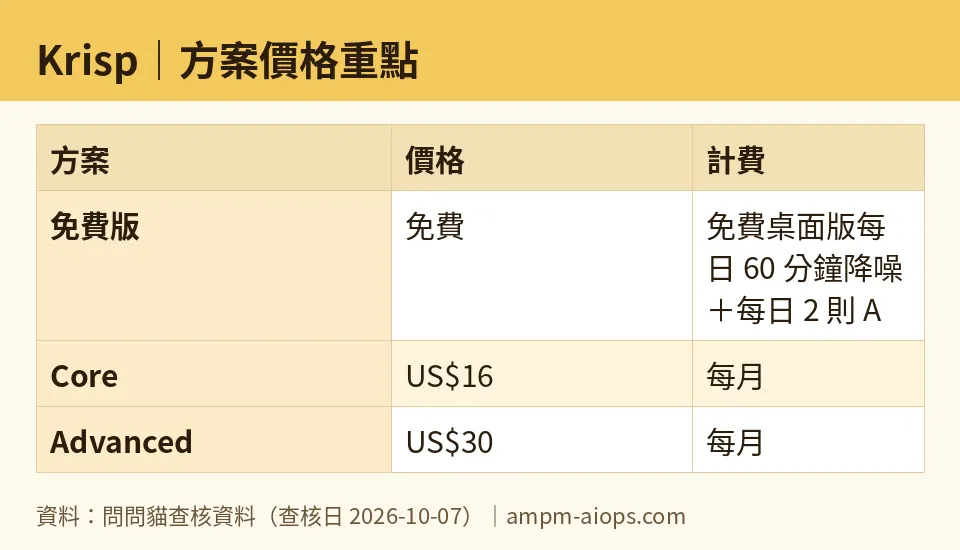
Figure: compiled by AMPM from its verified data (last verified 2026-10-07).
🔍 AMPM exclusive check
We read Krisp’s live pricing page directly on 2026-08-28 and again during our 2026-10-07 recheck. Both times, the page showed only the 7-day trial and the three paid tiers — it did not state a specific number for the permanent free tier anywhere on the page. The 60-minutes-a-day noise cancellation and 2-per-day AI meeting notes figures we’re reporting come from cross-referencing two independent third-party pricing trackers, not from Krisp’s own marketing copy. That’s a real gap between what the vendor publishes and what the app enforces: if you want the authoritative number for your account, check the in-app usage counter after you sign up, not the pricing page.
We also flagged the plan renaming ourselves rather than taking it at face value — the old Pro (US$8) and Business (US$10-15) tiers have been fully replaced by Core and Advanced at different price points and feature splits. Anyone cross-shopping using an older comparison article is benchmarking against plans Krisp no longer sells under those names. Our pricing and quota data has been re-verified daily against the live site from 2026-09-12 through 2026-10-07 with no changes detected in that window, so what’s listed above is stable as of this check.
Verdict: who should use it, who should skip it
Use it if you’re on video calls regularly but not constantly — under an hour a day combined — and want noise cancellation that works across every call app you use rather than one tied to a single platform. The unlimited transcription alone is useful even if you burn through your 2 daily AI summaries fast. Freelancers, students, and anyone doing occasional client calls will likely never feel the free-tier ceiling.
Skip the free tier if you’re in back-to-back meetings all day — the 60-minute noise-cancellation cap and 2-note limit will run out before lunch, and Core at US$16/month (or US$8/month billed annually) removes both caps outright. Skip straight to Advanced (US$30/month, or US$15/month annually) if accent conversion for international calls is the actual reason you’re here, since the free and Core tiers barely touch that feature. And if you’re buying for a regulated team — healthcare, finance, anything needing HIPAA, SOC2, or SSO — none of the consumer tiers apply; go straight to Enterprise and get a custom quote.
Written: 2026-10-08 Price last verified: 2026-10-07 Tool last health-checked: 2026-10-08
🔗 Related on AMPM
📎 Sources
All prices and quotas in this article come from AMPM’s verified dataset for Krisp (last verified 2026-10-07); primary sources:
🐾 Meet the cats: AMO and PIMI

AMPM is a Taiwan-based AI-tool pricing watchdog. Our motto: ask before you subscribe. Two cats argue every tool from two sides:
- ☀️ AMO — the budget-minded cat. Always asks: is the free tier enough, and is paying actually worth it?
- 🌙 PIMI — the performance-minded cat. Cares about whether it works well, fast, and gets your job done.

When they are done arguing, you know whether to pay. Every number is checked by us, with the verification date at the end.
🐾 Our sister sites also checked
Let's take a look at these
- Krisp Comprehensive Introduction: Pricing, Features, and Actual Limitations
- Krisp Is the free quota enough?
- Krisp Alternatives
- Comprehensive Free Quota List for All Tools
