[How-to] KrispCall Has No Free Plan: How to Test It Without Wasting Money
- Free tier: No
- Cheapest paid plan: US$15/mo and up
- Free quota: No permanent free plan or free trial without a card; paid subscription …
- Last checked: 2026-11-04
Article last updated: 2026-11-04



KrispCall has no free plan. It has no card-free trial either. This guide is for a beginner who wants to try the service anyway and keep the risk small. We look at what the entry plan covers, how to set it up, where people get stuck, and what the top plan’s “unlimited” calling really means.
KrispCall is a cloud phone system. You get business phone numbers that work over the internet, with call transcripts and summaries and links to customer-management software. That software is called a CRM, short for customer relationship management: the tool where a sales team keeps its contacts and notes.
Prices here are monthly list prices in US dollars, per user. Prices vary by country; we checked from Taiwan.
What “no free tier” means in practice
The official pricing page offers no permanent free plan. It also offers no trial that skips the credit card. You pay first.
What you do get is a 14-day money-back guarantee after you subscribe. That is the closest thing to a trial, and it is a refund promise, not a free period. Read the refund terms before you pay. Our data says “unconditional,” but a payment page is not the place to find out what that covers.
Billing is per seat. A seat is one user account. Three people on the plan means three seats, and the price is charged for each.
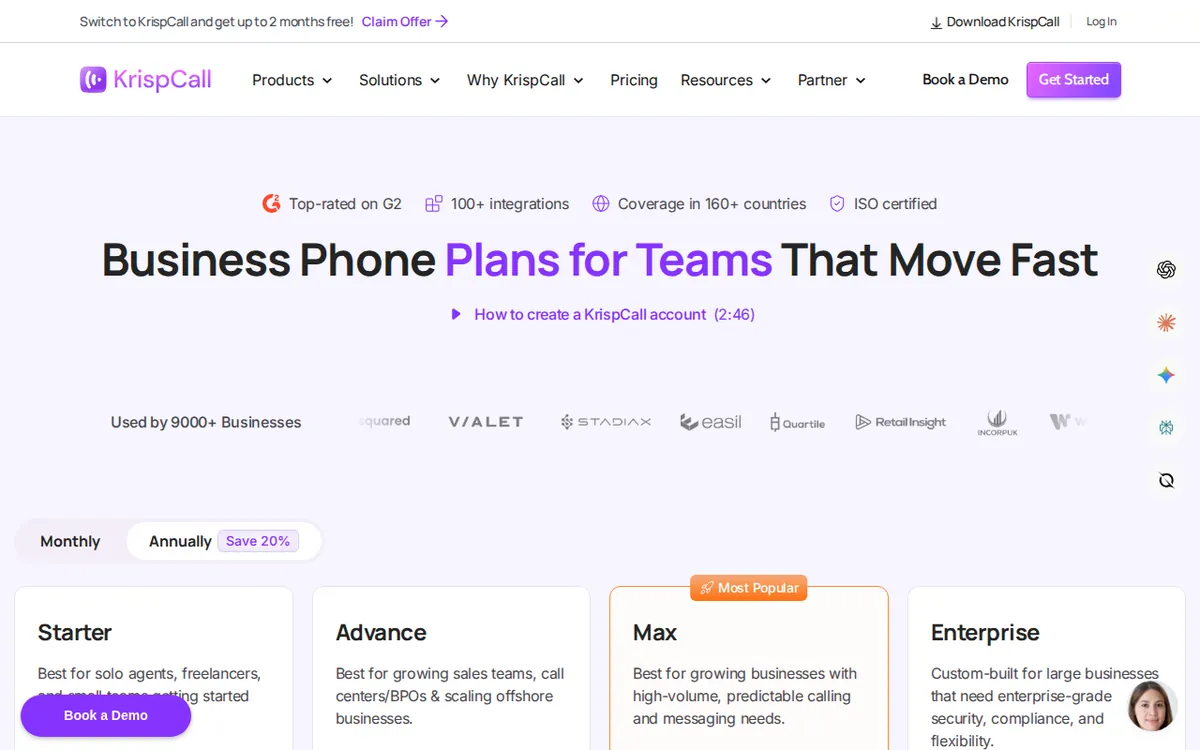
Figure: krispcall.com official pricing page, captured 2026-11-04.
The three plans, side by side
All three are billed per seat, per month. Each also has an annual prepay price.
Starter: US$15 per seat per month on monthly billing. Annual prepay brings it to US$12. It is capped at 5 users. Each user gets one virtual phone number (a number not tied to a SIM card) in the US, Canada or UK. Each month includes 200 outgoing minutes, 200 incoming minutes and 100 text messages. It supports multi-level IVR, call monitoring and basic integrations. IVR is the “press 1 for sales, press 2 for support” menu that answers callers.
Advance: US$40 per seat per month on monthly billing. Annual prepay brings it to US$32. It is capped at 50 users. Each user gets 1,000 outgoing minutes, 1,000 incoming minutes and 500 texts per month. This is the plan the vendor marks as most popular. It adds call recording, call transfer, AI call transcripts and summaries, a Power Dialer (software that dials your contact list automatically, one call after another) and deeper Salesforce integration.
Max: US$60 per seat per month on monthly billing. Annual prepay brings it to US$48. There is no cap on users. It lists “unlimited” calling under a fair usage policy, 1,000 texts, advanced CRM integrations and call detail records (CDR). A CDR report is a log of every call: who, when, how long.
The jump from Starter to Advance is the big one for most small teams. That is where the AI transcripts and summaries appear in our data. If your reason for looking at KrispCall is the AI notes, Starter’s feature list does not mention them.
How to start without overspending
You cannot test for free, so shrink the test. These steps work for a beginner.
Write down what you need before you open the pricing page. Do you need AI call notes? Do you need a CRM link? Do you only need a number that rings on your phone? If you only need the last one, Starter is the right size.
Count seats honestly. Pay for the people who will make or take calls this month. Starter allows up to 5 users, so a small team fits.
Pick monthly billing for the first round. The annual prepay price is lower per seat, but it asks you to commit before you have used the product. Monthly lets you leave. Move to annual once you are sure.
Subscribe and note the date. The 14-day refund window starts from your paid subscription. Put the last day in your calendar.
Set up one number and one simple IVR menu. Keep it small. One number, one greeting, one or two menu options.
Run real test calls in the first few days. Call it from a mobile phone and from a landline if you have one. Make outgoing calls too. Listen for delay or dropped audio.
If you are on Advance, test the AI transcript on a real call. Check whether the summary catches names, numbers and next steps.
Decide before the refund window closes. Do not leave the decision to the last hour.
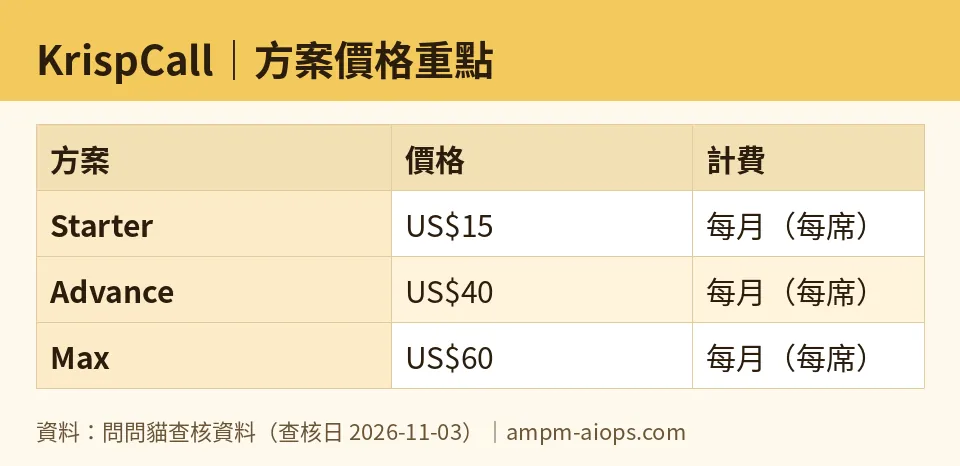
Figure: compiled by AMPM from its verified data (last verified 2026-11-03).
Common blockers and fixes
“I can’t find the free trial.” There isn’t one. Use the refund window as your trial.
“My team has more than 5 people.” Starter stops at 5 users. Advance goes to 50. Max has no user cap.
“I ran out of minutes.” Starter includes 200 outgoing and 200 incoming minutes per month, and its note does not say what happens past that. Check the per-minute rates on the vendor page before you go over.
“I need a number in another country.” The Starter note names US, Canada and UK numbers. Check the number list for your target country before you pay.
“The AI summary isn’t there.” Check your plan. The data lists transcripts and summaries under Advance.
🔍 AMPM exclusive check
This is the gap between the headline and the fine print.
The Max plan says “unlimited” calling. The vendor’s own note says it is subject to a fair usage policy. For the US, Canada, UK and Australia, that works out to about 2,000 minutes per month. That is a soft cap, not true unlimited. If your team is a heavy caller, plan around that figure, not around the word “unlimited.”
The figure we found applies to those four countries. We did not find a published cap for other countries. If you call from or into somewhere else, ask the vendor in writing before you pay for Max.
Two more things the page does not spell out clearly in our data:
- For Advance, minutes and texts are stated per person. For Max, the 1,000 texts are listed without saying whether that is per person or per account. Do not assume.
- The prices matched the official pricing page on each daily check from 2026-10-29 through 2026-11-03. But this tool is a newly added candidate, and the data has had one automated pass, not a full manual cross-check by three people. Treat the numbers as accurate to the page on those dates, and confirm at checkout.
☀️ AMO, the budget-minded cat

Free is not enough here, because free does not exist. So the question is whether paying is worth it, and how little you can pay to find out.
Start with Starter at US$15 per seat per month on monthly billing. That gets you a number, 200 outgoing minutes, 200 incoming minutes and 100 texts. For a solo founder or a two-person shop that mostly takes inbound calls, that can be plenty.
Do not buy the annual deal on day one. Yes, US$12 beats US$15. But a discount only saves money if you keep using the product. The 14-day refund window is your safety net on a monthly plan. Use it.
Advance at US$40 per seat is where the bill grows fast, because every seat pays it. Only put the people who need AI notes and call recording on it. If the plan structure lets you mix tiers, ask. Our data does not say.
Max at US$60 per seat only makes sense if your team truly makes thousands of minutes of calls each month. The “unlimited” label is a fair-use cap of roughly 2,000 minutes in the four countries named. Compare that to Advance’s 1,000 outgoing plus 1,000 incoming minutes. If your calls stay under what Advance includes, Max buys you advanced CRM links, CDR reports and no user cap, not more talk time you will use.
My verdict on cost: no free tier, but a short refund window and a cheap entry plan. Test on Starter, upgrade only when a missing feature costs you real time.
🌙 PIMI, the performance-minded cat

I care whether it does the job. Here is what the data supports, and what it does not.
The features that matter for work are on Advance: call recording, call transfer, AI transcripts and summaries, Power Dialer and Salesforce integration. A Power Dialer is the one to test hard. If your reps spend the day phoning lists, automatic dialing saves real time. A team that lives in Salesforce will care about the deep link, because call notes land where the deal lives.
Starter has multi-level IVR, call monitoring and basic integrations. That covers a call menu and listening in. It does not list recording or AI notes. So if your plan is “cheap plan, AI summaries,” Starter is not that plan.
Max adds advanced CRM integrations and CDR reports, plus no user cap. That is for managers who need to audit call volume and who run big teams.
What I cannot tell you: call quality, transcript accuracy, or how well the integrations behave. Our data covers plans and features, not a hands-on test of audio. So run your own test in the refund window. Make ten real calls. Read the transcripts against what was actually said. If the summaries miss details, the AI feature is not saving you time, and Advance’s extra cost is not justified.
Speed of setup should be quick for a basic number and menu. Judge it yourself on day one.
Verdict: who should use it, who should skip it
Use it if you need a cloud business phone system, you are fine paying from day one, and you will use the 14-day refund window as a real trial. Starter suits a small team that needs numbers and a call menu. Advance suits a sales team that wants AI call notes and a Salesforce link.
Pick Max only if you have a big team or heavy call volume, and you have confirmed the fair usage cap for your countries.
Skip it if you need a free plan or a card-free trial. KrispCall offers neither. Also skip it if you only want occasional calls on a zero budget.
Written: 2026-11-04 Price last verified: 2026-11-03 Tool last health-checked: 2026-11-04
🔗 Related on AMPM
📎 Sources
All prices and quotas in this article come from AMPM’s verified dataset for KrispCall (last verified 2026-11-03); primary sources:
🐾 Meet the cats: AMO and PIMI

AMPM is a Taiwan-based AI-tool pricing watchdog. Our motto: ask before you subscribe. Two cats argue every tool from two sides:
- ☀️ AMO — the budget-minded cat. Always asks: is the free tier enough, and is paying actually worth it?
- 🌙 PIMI — the performance-minded cat. Cares about whether it works well, fast, and gets your job done.

When they are done arguing, you know whether to pay. Every number is checked by us, with the verification date at the end.
🐾 Our sister sites also checked
Read next
- KrispCall Full breakdown: pricing, features and real-world limits
- KrispCall Is the free quota enough?
- KrispCall Alternatives
- Free plan limits for every AI tool we track
