[How-to] Linear free vs paid – Does the free tier really cover small dev teams?
- Free tier: Yes
- Cheapest paid plan: US$12/mo and up
- Free quota: 2 teams, 250 Issues (no limit on archived count), unlimited members, …
- Last checked: 2026-11-02
Article last updated: 2026-10-28



Linear markets itself as a modern issue‑tracker with AI‑driven workflow helpers. The headline claim is that you can run two teams and 250 issues for free, then pay per seat for larger groups. This piece shows exactly what you get without spending a dime, and where paying moves the needle for speed, integration and AI power.
What the free tier gives you
The free version lets you create up to 2 teams. Each team can hold unlimited members and file an unlimited number of archived Issues. Active Issues are capped at 250. Single‑file uploads are limited to 10 MB. The plan also includes the Agent platform and the Linear Agent basic features – the AI helpers that suggest issue titles, prioritize work, and automate simple actions.
No credit or seat cost is attached; you simply sign up and start tracking. The free tier is ideal for hobby projects, early‑stage startups, or a pair of product teams that do not need advanced AI extensions.
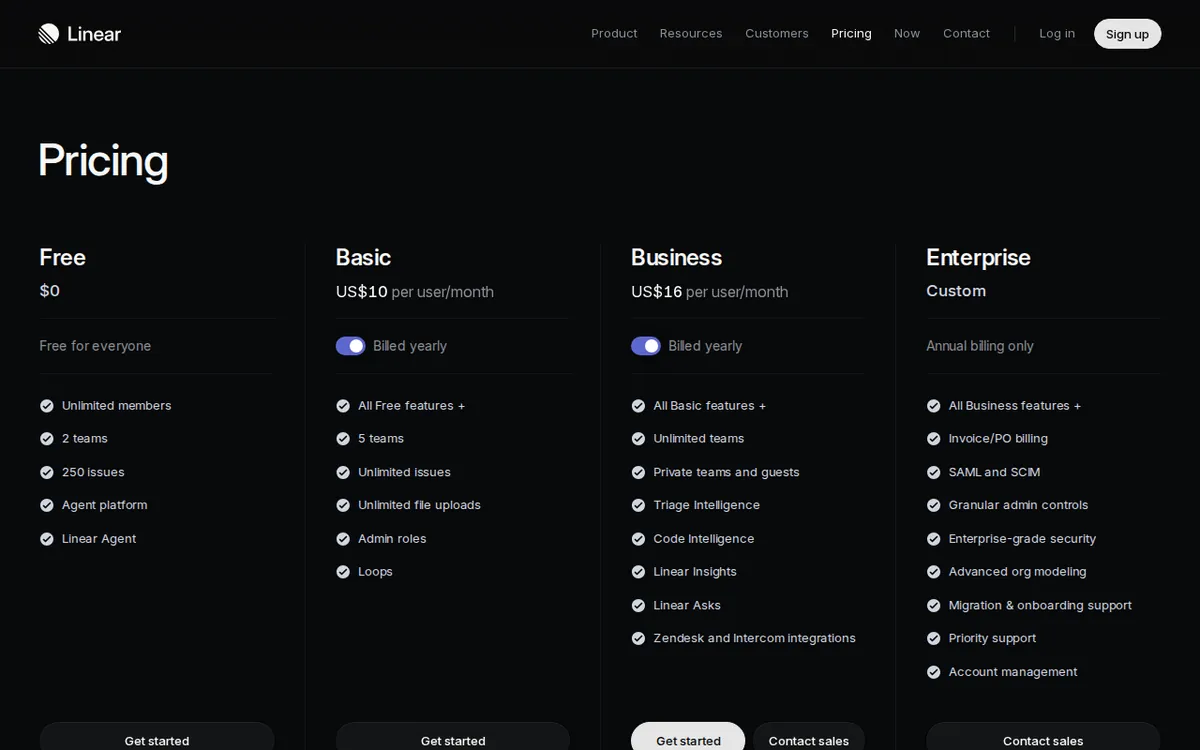
Figure: linear.app official pricing page, captured 2026-10-28.
Paid plans at a glance
Linear offers two subscription levels, both billed per seat (per user).
Basic – US$12 monthly per seat. Annual billing reduces the average to US$10 per seat. It expands team capacity to 5 teams, removes the Issue limit, removes the file‑size cap, adds an admin role and provides Loops (automation scripts). Some Loop actions still need extra AI credits (units you spend on AI processing).
Business – US$18 monthly per seat. Annual billing reduces the average to US$16 per seat. It removes any team limit, adds private teams and guest seats, and unlocks the full AI suite: Triage Intelligence, Code Intelligence, Linear Insights, Linear Asks, plus native Zendesk/Intercom integration.
Both plans stay on a subscription model; you pay each month or year for each active user.
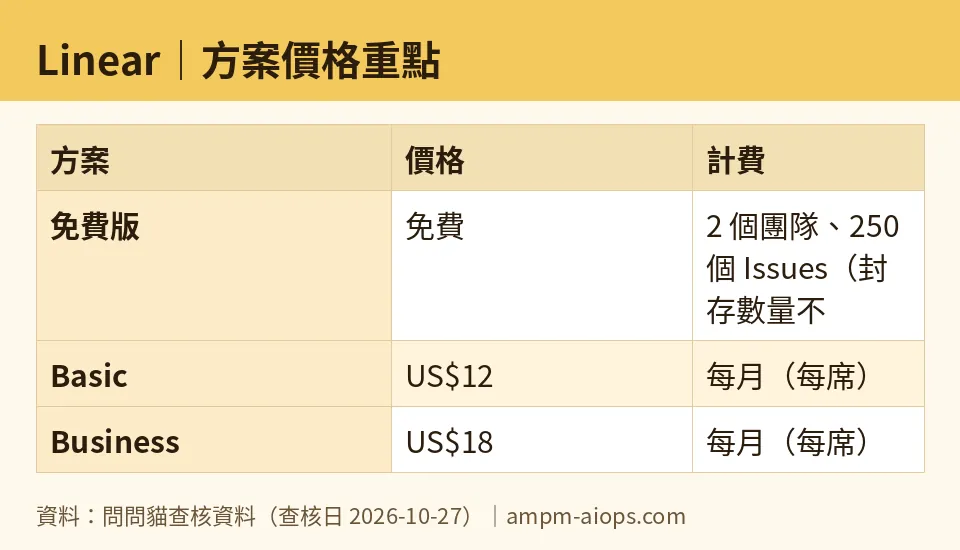
Figure: compiled by AMPM from its verified data (last verified 2026-10-27).
🔍 AMPM exclusive check
Nothing differed from the official page this time; every number below matches it, checked 2026-10-27.
☀️ AMO, the budget‑minded cat

AMO starts by looking at the bottom line. The free tier already supplies 2 teams, unlimited members, and 250 active issues. For a solo developer or a tiny startup that runs under that issue count, the cost is literally free. The 10 MB upload limit can be a nuisance for large binaries, but most code assets sit in Git, not Linear.
When you outgrow 250 issues, the next step is the Basic plan at US$12 per seat per month. If you have three developers, that’s US$36 each month. Paying annually brings the average down to US$10 per seat per month. The key gain is unlimited issues and the ability to add three more teams (up to five). If your organization already uses three or four product squads, this upgrade removes the need to juggle work across multiple tools.
AI credits are a hidden cost. Loops let you run automated workflows, but some Loop actions still require extra credits. AMO treats those as an optional add‑on; the base subscription does not include them. If you never use AI‑heavy automation, the Basic plan stays within the advertised price.
The Business tier jumps to US$18 per seat per month (or US$16 average with annual billing). The main justification is unlimited private teams, guest seats for contractors, and the full AI suite. If you need Zendesk or Intercom integration, or you rely on AI‑driven triage to cut down manual ticket sorting, the Business plan becomes a cost‑center rather than a luxury.
Bottom line for the frugal: stay on the free tier as long as you can keep active issues under 250 and file sizes under 10 MB. Upgrade to Basic the moment you need more than two teams or unlimited issues. Jump to Business only if you need private teams, guest access, or the premium AI features that promise to shave hours off triage.
🌙 PIMI, the performance‑minded cat

PIMI cares about speed, accuracy and how much the tool actually does for developers. The free tier’s Agent platform supplies basic AI suggestions, but it lacks the advanced models that power Triage Intelligence or Code Intelligence. Those are locked behind the Business plan. If your workflow depends on AI to suggest code snippets, auto‑complete issue titles based on recent commits, or surface hidden bugs, the free tier will feel thin.
Loops, available in Basic, let you script repetitive actions. For example, you can automatically move a bug to “In Review” when a pull request merges. However, some Loop actions still need extra AI credits, meaning you may encounter a “credit exhausted” notice mid‑automation. That can interrupt smooth pipelines unless you purchase credits separately.
The Business plan’s Triage Intelligence scans incoming tickets, categorizes urgency, and suggests owners. Code Intelligence reads your repository to suggest relevant code contexts directly in the issue view. Linear Insights provides analytics on cycle time, throughput, and bottlenecks. Linear Asks lets you query the dataset with natural language, turning raw metrics into readable answers. Those features dramatically reduce manual triage time and give engineering managers real‑time visibility. The integration with Zendesk and Intercom pulls customer support tickets straight into Linear, keeping the dev team in one place.
Performance-wise, the paid plans do not change the core UI speed; Linear is already snappy. The advantage is the reduction in manual steps. Teams that need fast onboarding of contractors benefit from guest seats, which Business provides without extra licensing headaches. Private teams keep internal work hidden from external collaborators—a must‑have for regulated industries.
If you are a small team that already uses GitHub Issues or a similar tracker and only need occasional AI hints, the free tier’s basic Agent functions may suffice. But if your product hinges on rapid issue triage, data‑driven retrospectives, or you need seamless support‑ticket import, Business is the only plan that delivers those performance gains.
Verdict: who should use it, who should skip it
Use Linear free if you:
- Operate ≤2 product teams
- Keep active issues ≤250
- Accept a 10 MB file upload limit
- Need only basic AI suggestions
Upgrade to Basic if you:
- Need up to 5 teams or unlimited issues
- Want admin roles and basic automation (Loops)
- Can tolerate occasional extra AI credit purchases
Choose Business if you:
- Require private teams, guest seats, or full AI suite
- Depend on advanced triage, code insight, analytics, or support‑ticket integration
- Have the budget for US$16‑US$18 per seat per month (annual average)
Skip Linear altogether if you already have a free issue tracker that meets your limits and you do not need AI‑driven workflow automation.
Written: 2026-10-28
Price last verified: 2026-10-27
Tool last health-checked: 2026-10-28
🔗 Related on AMPM
📎 Sources
All prices and quotas in this article come from AMPM’s verified dataset for Linear (last verified 2026-10-27); primary sources:
🐾 Meet the cats: AMO and PIMI

AMPM is a Taiwan-based AI-tool pricing watchdog. Our motto: ask before you subscribe. Two cats argue every tool from two sides:
- ☀️ AMO — the budget-minded cat. Always asks: is the free tier enough, and is paying actually worth it?
- 🌙 PIMI — the performance-minded cat. Cares about whether it works well, fast, and gets your job done.

When they are done arguing, you know whether to pay. Every number is checked by us, with the verification date at the end.
🐾 Our sister sites also checked
Read next
- Linear Full breakdown: pricing, features and real-world limits
- Linear Is the free quota enough?
- Linear Alternatives
- Free plan limits for every AI tool we track
