[Pricing] Magic Hour Pricing: The Free Tier Went Quiet, but It's Still There
- Free tier: Yes
- Cheapest paid plan: US$19/mo and up
- Free quota: 2026-10-24 官網直讀(magichour.ai/pricing FAQ、/faq):定價頁無獨立 Free 卡片,但部分公開工具( …
- Last checked: 2026-10-24
Article last updated: 2026-10-24



Magic Hour is an AI video platform that turns text prompts, still images, or a reference clip into finished video, with image and audio tools bundled in. If you’re trying to figure out Magic Hour pricing — whether the free tier survived a recent redesign, and whether Creator, Pro, or Business is worth paying for — the short answer is: free still exists, but the vendor buried it, and which paid tier makes sense depends entirely on whether you need video output or just images.
Here’s what actually changed, what each plan gives you, and where the money stops being worth it.
Where the Free Tier Went
As of our August 22, 2026 check, Magic Hour’s own pricing page (magichour.ai/pricing) no longer shows a dedicated Free plan card. It displays four tiers — Creator, Pro, Business, and a Custom/enterprise option — with only a small “Sign Up — It’s Free” link in the header hinting that anything free exists at all. That’s a meaningful layout change from older versions of the page, which used to advertise a daily quota of free image and video generations up front.
We couldn’t confirm from the pricing page alone whether the old daily allowance (reportedly around 10 free images and 3 free videos per day) is still the deal. What we could confirm, by checking Magic Hour’s FAQ and its standalone tool pages (AI Photo Editor, AI Image Editor), is that free access hasn’t disappeared — it’s just not marketed on the main pricing page anymore. More on exactly what we found below.
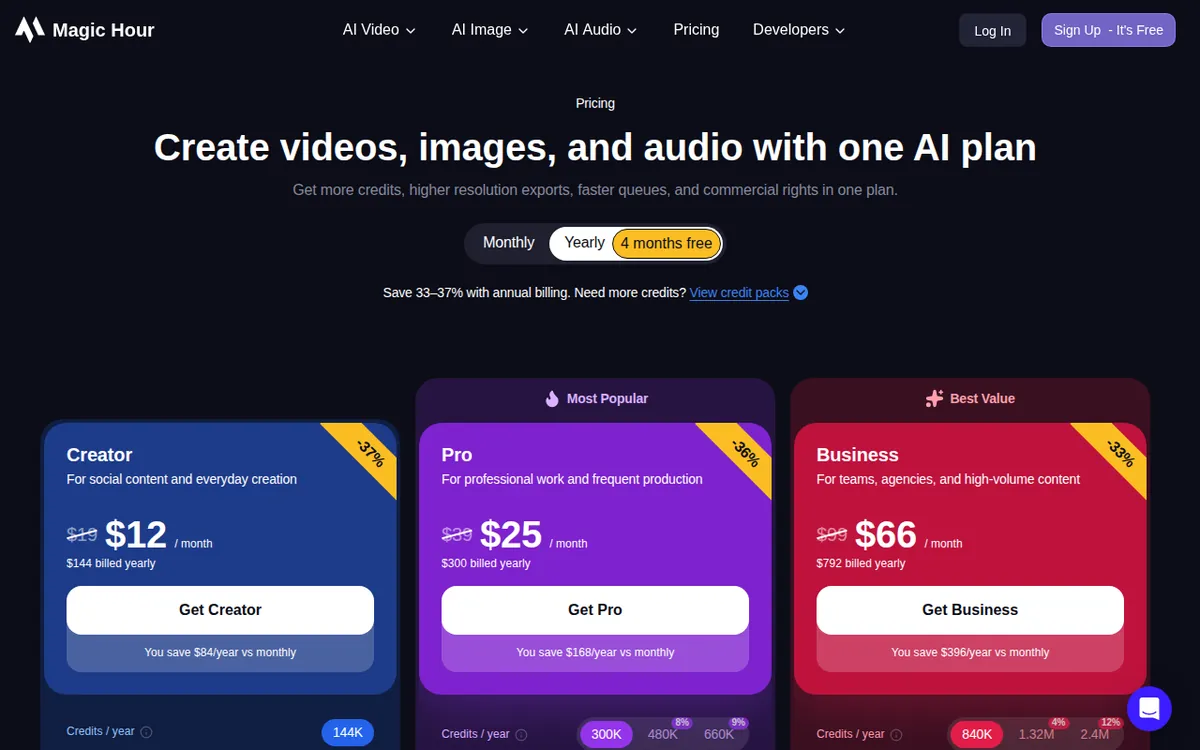
Figure: magichour.ai official pricing page, captured 2026-10-11.
Creator, Pro, Business: What You Actually Get
Magic Hour bills everything in “credits” — a prepaid currency where each generation (an image, a few seconds of video, an audio clip) draws down a set number of credits depending on resolution and output type. Here’s what each paid tier buys, based on our August 27, 2026 read of the live US pricing page:
Creator — US$19/month (monthly billing), or US$12/month if billed annually That annual rate totals US$144 for the year, and the site advertises savings of roughly 33–37% for going annual (the exact percentage varies by tier). Creator includes 12,000 credits a month — Magic Hour’s own estimate puts that at roughly 8 minutes of video or about 2,400 images, depending on what you’re generating. The plan also includes access to every AI tool, watermark-free exports, a commercial-use license, three simultaneous generations, priority queue and support, a 2GB upload cap, full API access, and the ability to earn extra credits by submitting templates. Output resolution tops out at 1024px.
Pro — US$39/month, or US$25/month billed annually Annual billing totals US$300 for the year. Pro doubles roughly the credit allowance to 25,000 a month (about 17 minutes of video or 5,000 images by Magic Hour’s estimate), bumps resolution to 1472px, raises simultaneous generations to five, and lifts the upload cap to 5GB. Everything else from Creator carries over.
Business — US$99/month, or US$66/month billed annually Annual billing totals US$792 for the year, with the site claiming about 33% savings over paying monthly. Business jumps to 70,000 credits a month (around 49 minutes of video or 14,000 images), and it’s the only tier that unlocks 4K output and unlimited simultaneous generations. Upload cap rises to 10GB.
There’s also a Custom/enterprise tier mentioned on the pricing page, but no public price is listed for it — anyone needing that scale has to contact sales.
The Cheapest Way to Upgrade
If Creator’s 12,000 monthly credits run out before the month does, the next step up is Pro at US$39/month (or US$25/month annual), which more than doubles the credit pool for roughly double the price — not a bad ratio if video length is the bottleneck. The more immediate savings move, though, is simply switching any tier from monthly to annual billing: staying on Creator but paying annually drops the effective monthly cost from US$19 to US$12, a change that costs nothing in features or credits.
Paying is not worth it if your output is just a handful of still images a month and you don’t need commercial rights — the no-signup free tools cover that without a subscription. It’s also not worth jumping straight to Business unless you specifically need 4K resolution or more than five things rendering at once; Pro’s 1472px ceiling is plenty for most social and web use.
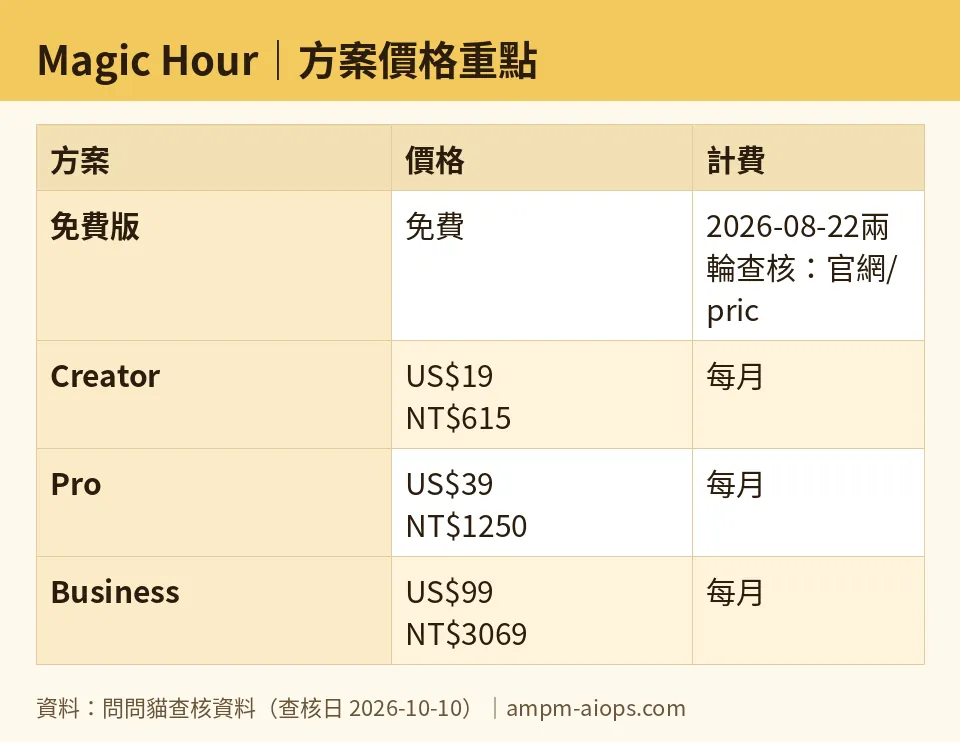
Figure: compiled by AMPM from its verified data (last verified 2026-10-10).
🔍 AMPM exclusive check
Two things we found that the vendor page doesn’t spell out clearly:
First, the free tier’s disappearance from the pricing page is cosmetic, not real. Checking Magic Hour’s FAQ and its separate AI Photo Editor and AI Image Editor product pages (last confirmed October 10, 2026) turned up a free tier that’s very much active: free tools work without creating an account at all, and free image output carries no watermark. Once you do sign up, a free account gets 400 signup credits, and basic accounts can claim 100 credits daily, up to 7 claims in total (Magic Hour FAQ, re-checked October 24, 2026). The catch is that free video and audio output may carry a watermark, and all free-tier content, watermarked or not, is restricted to personal, non-commercial use under Magic Hour’s own FAQ terms. None of that is visible from the redesigned pricing page — you have to go digging in the FAQ and tool pages to learn it.
Second, a currency and regional discrepancy. Reading magichour.ai/pricing from a US connection on August 27, 2026 returned USD prices exactly as listed above. Reading the identical page from a Taiwan connection, the same day, served a region-locked version in New Taiwan Dollars — NT$615/month for Creator, NT$1,250/month for Pro, NT$3,069/month for Business — but the credit allocation per tier matched the USD version exactly, so the underlying plans are identical; only the currency and local price point differ. We’re flagging this because an earlier version of our own pricing data had mistakenly filed those TWD numbers into the USD field — that error has now been corrected in our records.
☀️ AMO, the budget-minded cat

AMO only cares about one question: is the free version enough, or is it worth paying? For Magic Hour, the honest answer splits by what you’re making. If you just need the occasional still image touched up or generated, the free tools (AI Photo Editor, AI Image Editor) need no signup, cost nothing, and don’t slap a watermark on the result — that’s genuinely free and usable, as long as you don’t need to sell or publish it commercially. Magic Hour’s FAQ is explicit that free-tier output is personal use only.
Where it stops being enough is video. Free video and audio generation may come with a watermark, and the free allowance is small (400 signup credits plus at most 7 daily claims of 100), which makes it hard to plan around if you need consistent output. The moment commercial use or watermark-free video matters, the cheapest real option is Creator at US$19/month (US$12/month if you commit to a year, US$144 total). That buys 12,000 credits a month — enough, by Magic Hour’s own estimate, for about 8 minutes of video — plus full commercial rights and no watermark. For anyone testing the waters with occasional images, stay free. For anyone shipping video regularly, US$19/month is the real floor, not the vague “it’s free” banner on the homepage.
Verdict: who should use it, who should skip it
Use Magic Hour free if you only need occasional still images for personal use — the no-signup tools genuinely work with no watermark, no cost, no account.
Pay for Creator (US$19/month, or US$12/month annually) if you need commercial rights, watermark-free video, or more than the free allowance (400 signup credits plus up to 7 daily claims of 100) — 12,000 credits covers light, regular use.
Step up to Pro (US$39/month, or US$25/month annually) once 1024px resolution or 12,000 monthly credits genuinely run out — the jump to 25,000 credits and 1472px is proportionate to the price increase.
Reserve Business (US$99/month, or US$66/month annually) for teams or agencies that specifically need 4K output or more than five simultaneous generations — nothing below it unlocks either.
Skip Magic Hour altogether if your core need is commercial video at volume and you’re not prepared to commit to at least the Creator tier — the free plan’s watermark and non-commercial restrictions on video make it unworkable for anything client-facing.
Written: 2026-10-11 Price last verified: 2026-10-10 Tool last health-checked: 2026-10-11
🔗 Related on AMPM
📎 Sources
All prices and quotas in this article come from AMPM’s verified dataset for Magic Hour (last verified 2026-10-10); primary sources:
🐾 Meet the cats: AMO and PIMI

AMPM is an independent AI-tool pricing watchdog tracking official prices worldwide. Our motto: ask before you subscribe. Two cats argue every tool from two sides:
- ☀️ AMO — the budget-minded cat. Always asks: is the free tier enough, and is paying actually worth it?
- 🌙 PIMI — the performance-minded cat. Cares about whether it works well, fast, and gets your job done.

When they are done arguing, you know whether to pay. Every number is checked by us, with the verification date at the end.
🐾 Our sister sites also checked
Read next
- Magic Hour Full breakdown: pricing, features and real-world limits
- Magic Hour Is the free quota enough?
- Magic Hour Alternatives
- Free plan limits for every AI tool we track
