[How-to] MailerLite free vs paid: When the Free Plan Stops Being Enough
- Free tier: Yes
- Cheapest paid plan: US$12/mo and up
- Free quota: 250 subscribers, a monthly sending limit of 2,500 emails, 2 user …
- Last checked: 2026-11-02
Article last updated: 2026-10-24



MailerLite is an email marketing tool — software that sends newsletters and campaigns to a list of contacts — and it gives away more than most rivals before asking for a card. But “free” here comes with hard ceilings, and the moment you cross one, the cheapest paid plan is priced for a bigger list than the free tier even allows. This guide gets a complete beginner sending real email on the free plan, shows exactly what it can do, and marks the point where you’ll have to decide.
Everything below is the free plan and paid pricing we pulled on 2026-10-22. Prices vary by country; we checked from Taiwan.
What the free plan actually covers
The free plan is not a time-limited trial. It stays free. Here is the full box it draws around you:
- 250 subscribers. A subscriber is one person on your list. Hit 251 and the free plan can’t hold them.
- 2,500 emails a month. This is your send quota — the number of individual emails you can send across all campaigns in a month, not the number of campaigns. With 250 subscribers, that’s enough to email your whole list ten times a month.
- 2 seats. A seat is one login. You and one teammate.
- 3 automations. An automation is a rule that sends email on a trigger — for example, a welcome note the moment someone signs up. You get three of these flows.
- 1 landing page and website. A landing page is a standalone page built to collect sign-ups. You get one, plus one simple website.
- MailerLite branding on your emails. Every email you send carries a MailerLite mark. You cannot remove it on the free plan.
Read those two numbers together, because they interact. 250 subscribers and 2,500 sends is a sensible match. But if you grow your list to, say, 200 people and want to email them daily, the send quota — not the subscriber cap — is what runs out first. Most beginners hit the subscriber ceiling before the send ceiling, but if you send often, watch both.
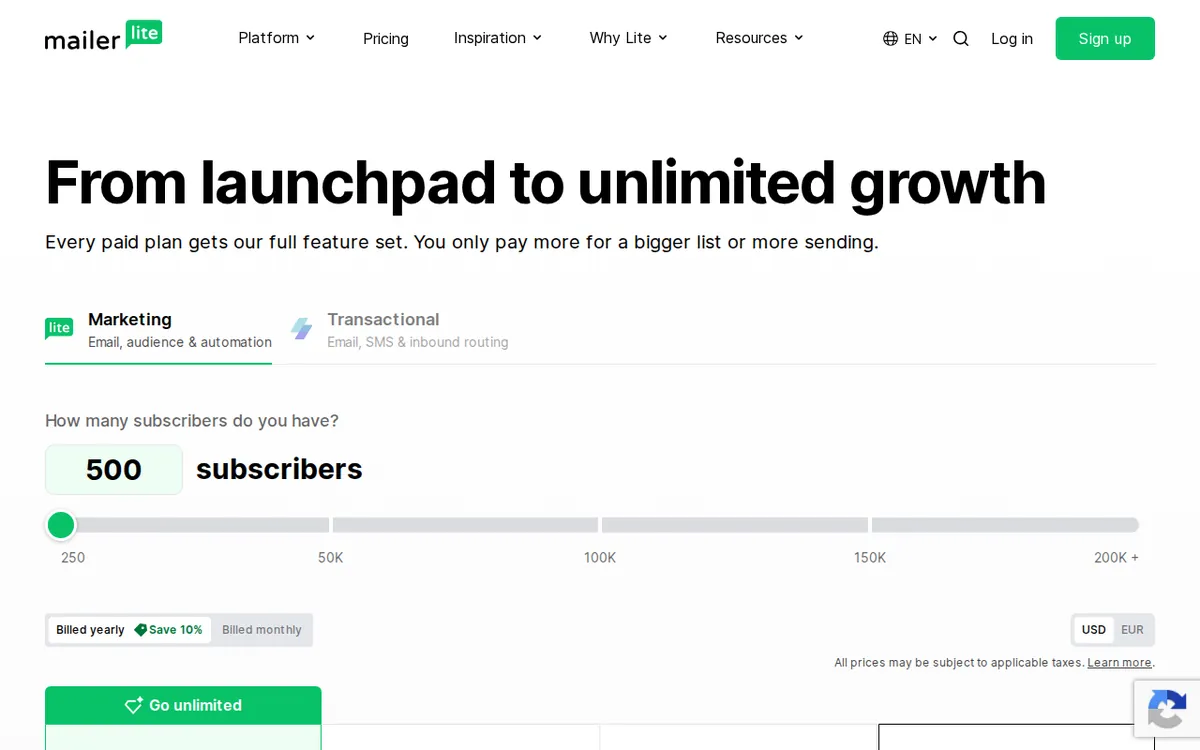
Figure: mailerlite.com official pricing page, captured 2026-10-24.
Your first campaign, step by step
You can go from zero to a sent newsletter in an afternoon. The order that avoids rework:

Illustration: Letters on the lower desk bear an inked seal, while the magical self-writing quill waits on the elevated tier.
- Create the account and verify your sending domain first. Before anything else, confirm the email address or domain you’ll send from. Skip this and your first campaign bounces or lands in spam. This is the single most common beginner blocker — do it on day one, not an hour before you want to send.
- Import or build your list, but stay under 250. If you’re importing contacts from a spreadsheet, count them first. The free plan won’t let you cross 250, and a half-finished import of a too-big file is a mess to clean up.
- Build one landing page to collect sign-ups. You get one on the free plan, so make it count. Point your social bio or site link at it. This is how the list grows without you adding people by hand.
- Set up your three automations deliberately. Three is not many. The usual first three: a welcome email for new sign-ups, a single follow-up, and one re-engagement note. Don’t spend an automation slot on something a one-off campaign could do.
- Write and send a campaign. The free plan does not include HeyLite AI, MailerLite’s built-in writing assistant, so you’re drafting subject lines and body copy yourself here. Write the subject line last, after the email exists, and keep it short.
Where beginners get stuck
- “My emails look like ads from MailerLite.” That’s the branding mark, and it’s baked into the free plan. There is no free setting to hide it. Removing it requires a paid plan.
- “I can’t schedule by best time.” Smart sending — which releases each email when a subscriber is most likely to open it — is a paid feature. On free, you send now or you pick one time for everyone.
- “I’ve run out of automations.” You have three, full stop. The fix is to consolidate: one automation can branch, so fold a follow-up into an existing welcome flow instead of starting a fourth.
- “My send quota is gone mid-month.” 2,500 resets monthly. If you burned through it, you either sent to too many people too often or your list is near the cap. There’s no top-up on free — you wait for the reset or you upgrade.
Where free runs out, and what the upgrade buys
The free plan is built to get outgrown. Two paid plans sit above it. One detail the pricing page doesn’t put front and center: these prices are quoted for a 500-subscriber list, while the free plan caps at 250. So the headline price isn’t a surcharge on your free setup — it’s the entry rate for the next list size up, the one you move to the moment you cross 250.
Comfort — US$12 a month (billed monthly; US$10.80 a month if you pay for a year, a 10% saving). This is the 500-subscriber starting rate. For that you get 5,000 sends a month, 3 seats, 50 automations, and — the two things most beginners actually upgrade for — the MailerLite branding is removed and you get HeyLite AI plus smart sending. If your only reason to pay is “I want my emails to look like mine,” this is the plan.
Power — US$25 a month (billed monthly; US$22.50 a month annually, also 10% off), again from 500 subscribers. This lifts the sending cap entirely: unlimited monthly emails, unlimited seats, unlimited automations, 24/7 live human support, and full MCP/API access — the hooks that let other software connect to and drive MailerLite. This is a plan for someone running email as a serious channel, not a first newsletter.
For a beginner, the honest path is: start free, and only look at Comfort when the branding or the AI writing help becomes worth US$12 a month to you. Power is a later problem.
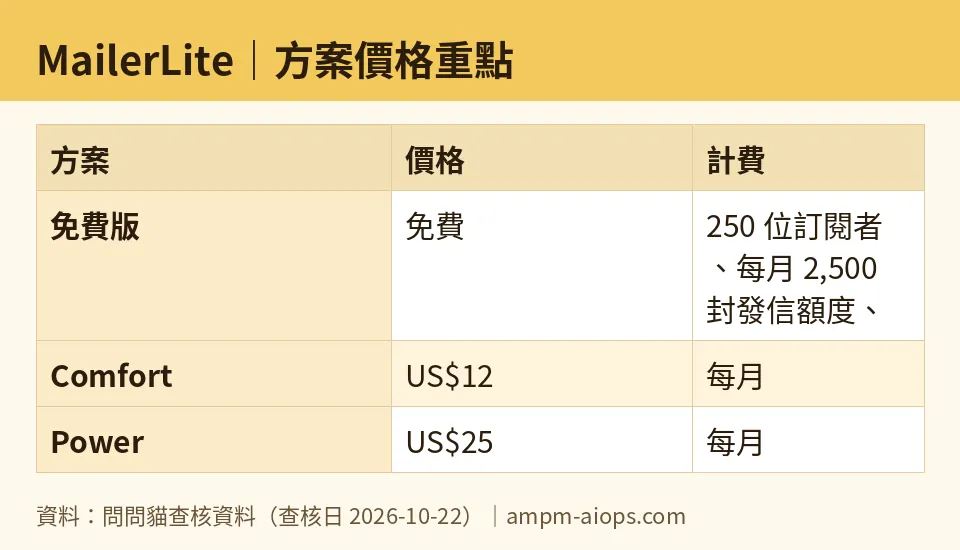
Figure: compiled by AMPM from its verified data (last verified 2026-10-22).
🔍 AMPM exclusive check
Two things the vendor’s own page does not spell out plainly, which we want you to see before you plan a budget:
First, the paid prices are 500-subscriber rates, not a figure tied to the 250-subscriber free tier. MailerLite’s price scales with list size, and US$12 and US$25 are the floor at the next tier up — so the real question isn’t “free or US$12,” it’s “how big will my list get,” because that number moves. The pricing page shows the slider; it doesn’t warn you that the advertised entry price already assumes you’ve doubled past the free cap.
Second, a transparency note we hold ourselves to: MailerLite entered our tracker as an auto-added challenger, and this data has been through one verification round, not our usual three-way manual cross-check. Every figure above matched the official pricing page when we read it on 2026-10-22, but we have not yet re-confirmed the commercial terms a second and third time. Treat the free quota and plan limits as current-as-of-that-date, and check the live page before you commit money. We’ll re-verify and update this note.
Nothing in the numbers differed from the official page on this pass. The gap is in what the page emphasizes, not in the figures themselves.
Verdict: who should use it, who should skip it
Use the free plan if you’re starting a newsletter, a small shop list, or a personal project and you’re comfortably under 250 subscribers. It’s a genuinely usable free product — you can collect sign-ups, automate a welcome, and send real campaigns without paying. The branding mark is the only thing that marks you as a free user, and for a new list, nobody minds.
Move to Comfort (US$12/month) when the MailerLite branding starts to undercut how your brand looks, or when you want the AI writing help and send-time optimization enough to pay for them. Pay annually if you’re sure you’ll stay — the 10% off is the only discount lever here.
Skip straight to Power (US$25/month) only if you already know you need uncapped sending, API access, or a team on it — that’s not a beginner’s situation, and paying for it before you need it is wasted money.
Skip MailerLite entirely if your list is already well past a few hundred people and you need heavy automation today — at that scale you should be comparing the US$25 Power plan against rivals head-to-head, not reading a free-tier guide.
Written: 2026-10-24 Price last verified: 2026-10-22 Tool last health-checked: 2026-10-22
🔗 Related on AMPM
📎 Sources
All prices and quotas in this article come from AMPM’s verified dataset for MailerLite (last verified 2026-10-22); primary sources:
🐾 Meet the cats: AMO and PIMI

AMPM is a Taiwan-based AI-tool pricing watchdog. Our motto: ask before you subscribe. Two cats argue every tool from two sides:
- ☀️ AMO — the budget-minded cat. Always asks: is the free tier enough, and is paying actually worth it?
- 🌙 PIMI — the performance-minded cat. Cares about whether it works well, fast, and gets your job done.

When they are done arguing, you know whether to pay. Every number is checked by us, with the verification date at the end.
🐾 Our sister sites also checked
Read next
- MailerLite Full breakdown: pricing, features and real-world limits
- MailerLite Is the free quota enough?
- MailerLite Alternatives
- Free plan limits for every AI tool we track
