[How-to] Make's Free Tier: Enough Credits and Scenarios for Real Automations, or Not?
- Free tier: There is
- Cheapest paid plan: US$9/mo and up
- Free quota: Free tier has 1,000 credits per month, up to 2 active scenarios, …
- Last checked: 2026-10-17
Article last updated: 2026-10-07



Make (formerly Integromat) is a drag-and-drop automation platform that connects over 2,000 apps into “scenarios” — visual workflows where one app’s action triggers another’s. In 2026, Make renamed its billing unit from “operations” to “credits.” Same math, new label: every time a module (a single step in your workflow, like “send email” or “filter row”) fires, it burns 1 credit. If you’re checking Make’s free tier before signing up, or wondering whether it’s worth it compared to paying, here’s what the numbers actually say.
The free plan gives you 1,000 credits a month, capped at 2 active scenarios running at once. That’s the whole deal — no credit card required to start. The question that matters isn’t “is 1,000 free credits a lot,” it’s “how fast does a real workflow eat through them.” That’s where most beginners get surprised.
How credits actually get spent
Each module in a scenario — not just the main action — counts. A trigger counts. A filter counts. A router that splits your workflow into branches counts. So a “simple” 5-step scenario that runs once isn’t 1 credit, it’s 5. Run that scenario 50 times a month and you’ve used 250 credits just for one automation. With 2 scenarios allowed on the free tier, a moderately active user can realistically chew through 1,000 credits well before the month ends.
This differs from how some competitors bill. Zapier charges per “task” but doesn’t charge for the trigger step itself — only the actions that follow. Make charges for everything, trigger included. If you’re migrating a Zapier workflow to Make expecting a similar credit burn, expect it to run out faster, because every single step in the chain has a cost.
There are other free-tier limits beyond the credit count. Scenarios can only run on a schedule as tight as every 15 minutes — fine for daily reports, not fine for anything that needs to react in real time. A single scenario run is capped at 5 minutes of execution time. Files you move through a workflow are capped at 5 MB. Execution logs — the record of what ran and what failed — stick around for 30 days on every plan, free included.
What you do get on the free tier, no upgrade needed: Maia, Make’s built-in AI assistant that builds workflows from a plain-language description, the beta AI Agents feature, support for MCP servers (a connection standard that lets AI tools call external services directly), and access to the full 2,000+ app library, including more than 350 AI-specific integrations. None of that is gated behind a paid plan — which is unusual, since most platforms hold AI features back for paying customers.
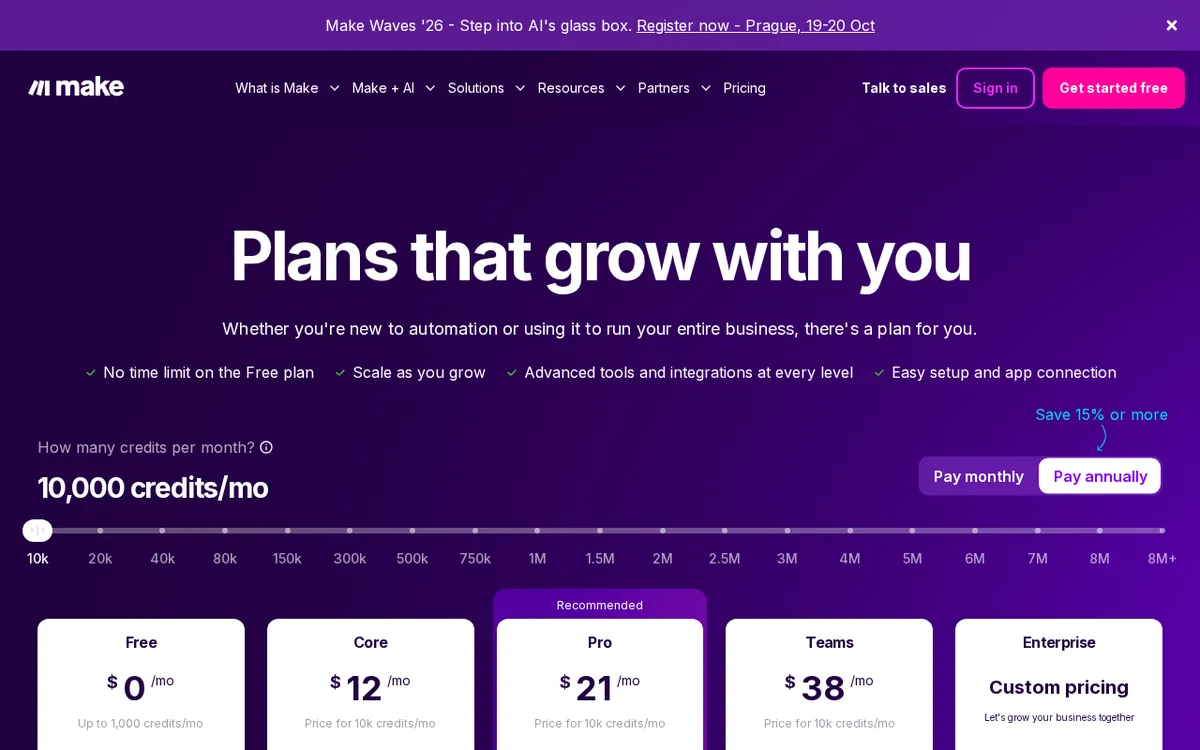
Figure: make.com official pricing page, captured 2026-10-07.
What changes when you pay
Three paid tiers sit above free, all billed either monthly or annually (annual billing is cheaper per month):
- Core — US$9/month billed annually (about US$10.59/month if you pay monthly). You get 10,000 credits a month, unlimited active scenarios instead of 2, a 1-minute minimum scheduling interval instead of 15, access to the Make API, 40-minute execution runs instead of 5, 100 MB file handling, and 5 GB of data transfer per 10,000 credits.
- Pro — US$16/month annually (US$18.82 monthly). Same 10,000-credit baseline as Core, but adds custom variables, full-text search across execution logs, priority execution so your scenarios don’t queue behind other users’ at peak times, and a bump to 250 MB files.
- Teams — US$29/month annually (US$34.12 monthly). Adds multi-team structure, role-based permissions, and shared templates, plus 500 MB file support.
- Enterprise — custom quote only, no listed price. Custom credit allocation, single sign-on, 60-day log retention instead of 30, and round-the-clock priority support.
The jump from free to Core is really about removing the two biggest free-tier walls: the 2-scenario cap and the 15-minute scheduling floor. The credit jump — from 1,000 to 10,000 — matters too, but for most beginners the scenario limit bites first.
Worth noting on comparison: Zapier’s Professional plan starts around US$49/month, which the data shows as roughly three times Make’s Pro price for broadly comparable automation power. Separately, n8n — a workflow tool that can be self-hosted — charges its cloud version by number of executions rather than by step, and the fully self-hosted version has no step-based billing at all. So the “cheapest” option depends entirely on how many steps your typical workflow has. A short workflow favors Make’s credit model; a long, many-step workflow might burn credits fast enough that a per-execution or self-hosted model ends up cheaper.
Common blockers beginners hit, and the fix
“My scenario stopped running mid-month.” You ran out of credits. They reset monthly and don’t roll over — unused credits don’t carry into next month, and overspent credits don’t borrow from next month either. The scenario simply stops until the reset. Fix: check your credit usage in the dashboard before building anything with a lot of steps, and strip unnecessary filters or router branches if you’re close to the cap.
“I can’t get my automation to run every 5 minutes on the free plan.” You can’t — 15 minutes is the floor until you upgrade to a plan with the 1-minute interval. Fix: if near-real-time triggering is the whole point of your automation, the free tier isn’t built for it; that’s a Core-or-above feature.
“My scenario failed halfway through a big file.” Free tier caps files at 5 MB. Fix: either shrink the file before it enters Make (compress, split, or pre-process it), or upgrade — Core jumps to 100 MB.
“I built one four-module scenario and it used way more credits than I expected.” This is the filter/router trap. Every module fires its own credit cost, including non-obvious ones like a filter step that just decides whether to continue. Fix: before scaling a workflow up, map out every module in it and count them — that’s your real per-run credit cost, not just the number of “real” actions you can see.
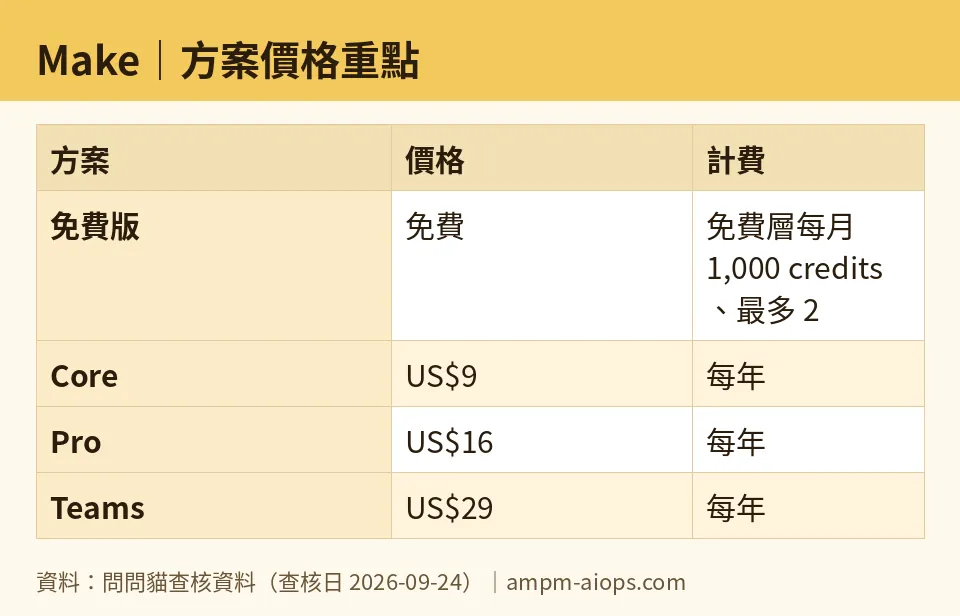
Figure: compiled by AMPM from its verified data (last verified 2026-09-24).
🔍 AMPM exclusive check
We checked Make’s pricing page directly on three separate dates — August 28, September 8, and September 24, 2026 — and the free-tier numbers (1,000 credits, 2 scenarios, 15-minute interval, 5-minute execution cap, 5 MB files) and paid-tier prices didn’t move across any of those checks. One thing the pricing page doesn’t spell out clearly up front: filters and routers consume credits exactly like app actions do. That’s buried in how the billing unit works, not flagged as a warning on the main pricing table, and it’s the single biggest reason free-tier users run out of credits faster than they expect. We also confirmed Make’s 2026 rename from “operations” to “credits” didn’t change the underlying unit or the free allotment — it’s a label change, not a pricing change.
Verdict: who should use it, who should skip it
If you’re automating something simple — a handful of short workflows, checked a few times a day, nothing time-sensitive — the free tier is genuinely usable long-term, and you get the AI assistant and the full app library without paying anything. If your workflows have more than a few steps, need to fire more than every 15 minutes, or you want more than 2 scenarios running at once, you’ll hit a wall fast and Core at US$9/month (annual) is the realistic next step. If you’re running many multi-step workflows at volume, count your modules per run before committing to a plan — that number, multiplied by how often each scenario fires, is what actually determines whether Make’s credit model is cheap or expensive for your case.
Written: 2026-10-07 Price last verified: 2026-09-24 Tool last health-checked: 2026-10-07
🔗 Related on AMPM
📎 Sources
All prices and quotas in this article come from AMPM’s verified dataset for Make (last verified 2026-09-24); primary sources:
🐾 Meet the cats: AMO and PIMI

AMPM is an independent AI-tool pricing watchdog tracking official prices worldwide. Our motto: ask before you subscribe. Two cats argue every tool from two sides:
- ☀️ AMO — the budget-minded cat. Always asks: is the free tier enough, and is paying actually worth it?
- 🌙 PIMI — the performance-minded cat. Cares about whether it works well, fast, and gets your job done.

When they are done arguing, you know whether to pay. Every number is checked by us, with the verification date at the end.
🐾 Our sister sites also checked
Let's take a look at these
- Make Comprehensive Introduction: Pricing, Features, and Actual Limitations
- Make Is the free quota enough?
- Make Alternatives
- Comprehensive Free Quota List for All Tools
More verified articles on this tool
- [Verified] How Fast Does Make's Free Plan Really Run Out? It Depends on One Thing
- Make's Free Credits: How Far They Really Go, and the One Module That Cuts Usage Most
