[Review] Make Free Plan Limits Hit Faster Than the Credit Count Suggests
- Free tier: Yes
- Cheapest paid plan: US$9/mo and up
- Free quota: Free tier has 1,000 credits per month, up to 2 active scenarios, …
- Last checked: 2026-11-01
Article last updated: 2026-11-05



Make is a visual automation builder. You drag boxes onto a canvas, connect them, and let the chain run on its own. The company used to call its billing unit an “operation”. In 2026 it renamed it a “credit”. Same idea: one credit is spent each time a step in your workflow runs.
This review looks at the data we verified and asks three questions. Where is Make annoying? Where is it poor value? What does it do well? Prices vary by country, and we checked from Taiwan. The US$ figures below are the ones Make lists.
What you get for free
The free plan is generous on features and tight on volume.
- Credits: 1,000 per month. They reset monthly and unused ones do not carry over.
- Active scenarios: 2. A scenario is Make’s word for one automated workflow.
- Schedule: the shortest gap between runs is 15 minutes.
- Run time: 5 minutes per execution.
- File size: 5 MB.
- Logs: run history is kept for 30 days.
Sign-up needs no credit card. Commercial use is allowed and there is no watermark. You also get the Maia AI assistant, which builds workflows from plain-language descriptions, and Make AI Agents, which is still in beta. The 2,000+ app connections, including 350+ AI apps, work on free too. So does Make’s MCP server, a standard way for AI assistants to connect to outside tools.
That is a real product, not a crippled demo. The catch is the meter.
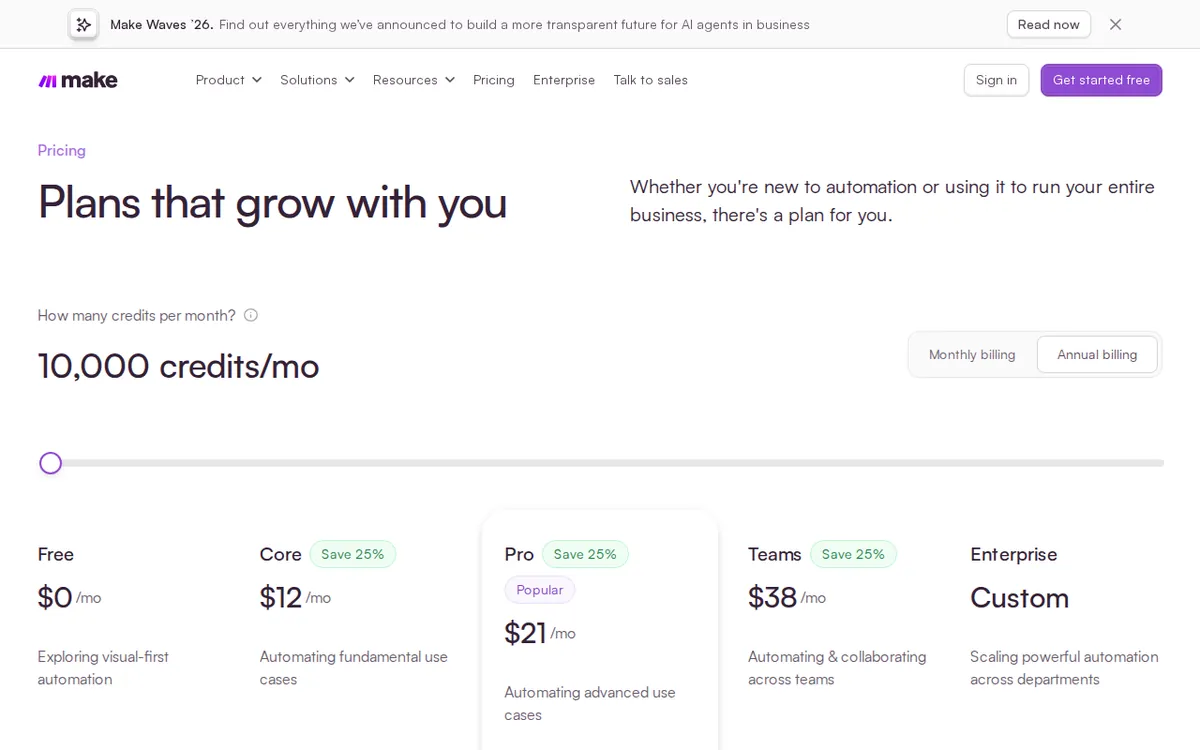
Figure: make.com official pricing page, captured 2026-11-05.
Annoyance #1: every step costs a credit, even the boring ones
Each module action costs 1 credit per run. The data is explicit that the trigger, filters and routers also count. A trigger is the event that starts the workflow. A filter checks a condition. A router splits the flow into branches.
So a run costs as many credits as it has steps. Add a filter to keep out junk, and it costs credits. Add a router to handle two cases, and that costs credits too. Plenty of tools treat these as free plumbing. Make does not.
The comparison in our data makes the point. Zapier bills per “task” and does not charge for the trigger. n8n’s self-hosted version has no step limit. n8n’s cloud version counts executions, not steps, so long workflows may cost less there.
When the free 1,000 credits run out, your scenarios stop for the rest of the month. They resume when credits reset. For a small automation that is a nuisance. For anything a customer depends on, it is a risk.
Annoyance #2: the paid ladder does not sell you more credits
This is the part the Chinese edition of this piece flagged first, and it is the oddest thing on the pricing page. Core, Pro and Teams all include 10,000 credits per month. The tiers differ in features, not volume.
| Plan | Monthly price on annual billing | Monthly billing | Credits |
|---|---|---|---|
| Core | US$9 | about US$10.59 | 10,000 |
| Pro | US$16 | about US$18.82 | 10,000 |
| Teams | US$29 | about US$34.12 | 10,000 |
Higher credit tiers can be bought as add-ons. The data does not list those prices, so we cannot tell you what they cost. Our data also has no single yearly price for any plan, only the monthly average on annual billing, so we are not quoting yearly totals.
What each step up buys:
- Core removes the free plan’s main walls. You get unlimited active scenarios, a 1-minute minimum schedule, 40-minute runs, 100 MB files, and access to the Make API. An API is a doorway that lets other software control Make. Core also includes 5 GB of data transfer per 10,000 credits.
- Pro adds custom variables, full run-log search, and priority execution, which means your runs do not queue at peak times. Files go up to 250 MB.
- Teams adds multi-team management, roles and permissions, and shared templates. Files go up to 500 MB.
If your workflows eat credits, none of these tiers helps by itself. You pay more for tools and still hit the same ceiling.
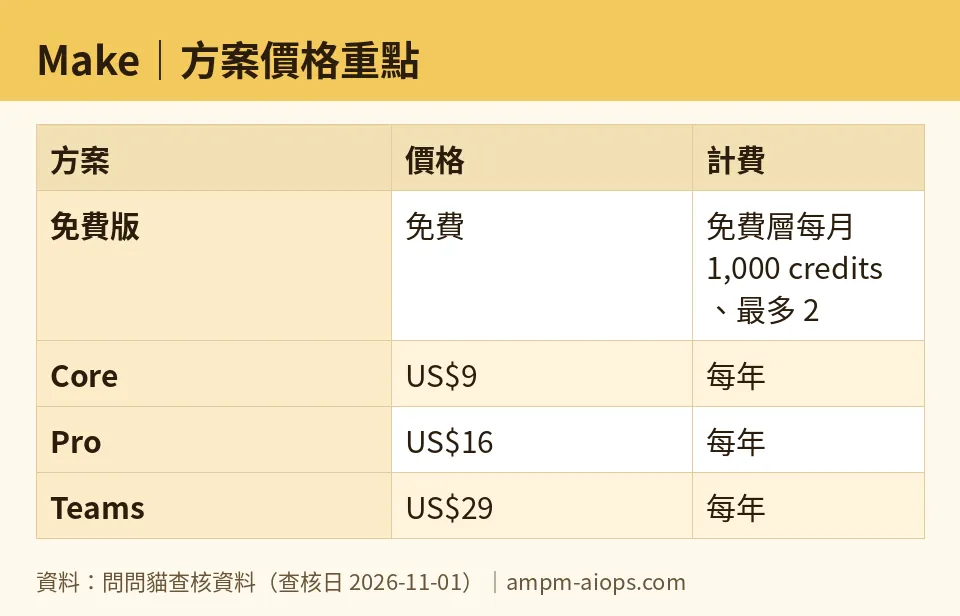
Figure: compiled by AMPM from its verified data (last verified 2026-11-01).
Annoyance #3: the free schedule is slow
The free plan checks for new events every 15 minutes at best. Paid plans drop that to 1 minute. If you want “new form submission, instant reply”, free will feel sluggish. Our data says plainly that the 15-minute floor does not suit anything needing real-time triggers.
The limit of 2 active scenarios is the other squeeze. It is fine for testing. It is tight once you automate more than a couple of jobs.
🔍 AMPM exclusive check
Nothing differed from the official page this time. We read Make’s pricing page directly on 2026-08-28. Every free-plan number in this article matched it, and our automated re-checks through 2026-11-01 found no changes.
Two things are worth knowing about how the numbers were sourced:
- The monthly-billing prices (about US$10.59, US$18.82 and US$34.12) were cross-checked against two outside pricing guides, from pxlpeak and Zapier’s blog. The annual-billing averages (US$9, US$16, US$29) come from Make’s page.
- The detail that filters and routers burn credits is the kind of line readers skim past. It comes from our verified notes on free-plan behavior, and it is the number-one reason a 1,000-credit allowance disappears early.
We have not run Make workflows ourselves for this review. Everything here traces to the verified data.
☀️ AMO, the budget-minded cat

Is free enough? For learning and light personal use, yes. You get 1,000 credits a month, 2 active scenarios, commercial use, no watermark and no card. That is a fair test bench. You can build, connect to 2,000+ apps, and even use the Maia assistant and AI Agents beta without paying.
Where it stops being enough is easy to predict. Two scenarios is a hard cap. A 15-minute schedule is slow. A 5-minute run limit and a 5 MB file limit rule out heavy jobs. And since filters and routers cost credits, a “simple” workflow can drain 1,000 credits sooner than you expect. When credits hit zero, everything stops until next month.
Is paying worth it? Core at US$9 a month on annual billing (about US$10.59 if you pay monthly) is the first sensible step. It removes the scenario cap and the slow schedule, and it gives you 10,000 credits, ten times the free amount.
Pro at US$16 and Teams at US$29 are harder to justify for credits alone, because the credit count does not change. Buy them only if you need the specific feature. Pro’s data point is Zapier Professional, listed from US$49 a month, so Pro costs about a third of that. For a budget buyer, that comparison is Make’s best argument.
My rule: stay free until you hit the scenario cap, then buy Core. Skip upward unless a named feature solves a real problem.
🌙 PIMI, the performance-minded cat

Does it work well? The platform side looks strong. The visual editor, 2,000+ app connections and built-in AI helpers cover a lot of ground. The AI features are not locked to paid plans, which is unusual. One caveat: AI Agents is labelled beta, so treat it as an experiment.
Speed depends on your plan. Free runs on a 15-minute minimum schedule. Every paid plan gets 1 minute. Free allows 5 minutes per run. Paid allows 40. If your job pulls large files or loops through lots of records, free will time out long before paid does. File limits climb from 5 MB on free to 100 MB on Core, 250 MB on Pro and 500 MB on Teams.
Pro is where the performance case gets interesting. Priority execution means your runs do not wait in line at peak times. Full log search and custom variables make debugging and structured builds much easier. If automations are your business, those matter more than raw credits.
Teams makes sense only when several people share the work. You get roles, permissions and shared templates. Enterprise adds SSO (single sign-on through your company identity system), 60-day logs and 24/7 support, on custom pricing.
The performance trade-off is cost per step. Long workflows burn credits fast, and n8n’s cloud plan, which counts executions instead of steps, may treat them better.
Verdict: who should use it, who should skip it
Use Make if:
- You are learning automation and want a capable free sandbox.
- You run a few light, non-urgent workflows on a 15-minute schedule.
- You are a solo builder who needs unlimited scenarios and a faster schedule. Core is the plan.
- You want AI-assisted workflow building without paying for it.
- You need priority runs and serious debugging tools, and Pro’s price against Zapier’s suits you.
Skip it, or look hard at alternatives, if:
- Your workflows are long, many-step chains and you want predictable costs. Per-step billing will punish you, and n8n’s self-hosted version has no step limit.
- You need near-instant triggers on a free budget.
- You assume a higher tier means more credits. On Core, Pro and Teams it does not.
- You depend on workflows that must never pause. Free stops when credits run out.
Do the maths on your busiest workflow before you pick a plan: count its steps, including filters and routers. Then decide.
Written: 2026-11-05 Price last verified: 2026-11-01 Tool last health-checked: 2026-11-05
🔗 Related on AMPM
📎 Sources
All prices and quotas in this article come from AMPM’s verified dataset for Make (last verified 2026-11-01); primary sources:
🐾 Meet the cats: AMO and PIMI

AMPM is a Taiwan-based AI-tool pricing watchdog. Our motto: ask before you subscribe. Two cats argue every tool from two sides:
- ☀️ AMO — the budget-minded cat. Always asks: is the free tier enough, and is paying actually worth it?
- 🌙 PIMI — the performance-minded cat. Cares about whether it works well, fast, and gets your job done.

When they are done arguing, you know whether to pay. Every number is checked by us, with the verification date at the end.
🐾 Our sister sites also checked
Read next
- Make Full breakdown: pricing, features and real-world limits
- Make Is the free quota enough?
- Make Alternatives
- Free plan limits for every AI tool we track
More verified articles on this tool
- [How-to] Make's Free Tier: Enough Credits and Scenarios for Real Automations, or Not?
- Make Free Plan 2026: Ops Cap That Hits Before Credits Run Out
- Make's Free Credits: How Far They Really Go, and the One Module That Cuts Usage Most
