[How-to] Meshy free vs paid: which plan a beginner actually needs
- Free tier: Yes
- Cheapest paid plan: US$20/mo and up
- Free quota: 100 credits/month (resets on the 1st); no credit card needed; …
- Last checked: 2026-10-24
Article last updated: 2026-10-18



Meshy turns a sentence or an image into a 3D model. Type “a mossy stone lantern,” wait a few minutes, and you get a mesh you can download, rig, and drop into a game engine or a render. The free tier costs nothing and asks for no card. The question every first-timer has is simple: can I actually finish something useful before the free bucket runs dry, and if not, which paid plan is the honest starting point? This piece walks you from zero to a first export, then tells you where the free tier stops.
First, one word you’ll see everywhere: credits. Credits are Meshy’s internal currency. Each generation spends some, and when they’re gone you wait or pay. You don’t buy them à la carte here — they come bundled with your plan.
What the free tier gives you
The free tier is 100 credits per month. The counter resets on the 1st of each month automatically — it does not roll over, so an unused balance on the 31st is gone on the 1st. No credit card is required to start.

Illustration: Depleted free allocations stall unfinished geometric work while prioritized express lanes advance smoothly past the waiting queue.
Two conditions matter before you build anything serious on top of it:
- Commercial use requires attribution. Free-tier output is released under CC BY 4.0, which in plain terms means you may use it commercially but you must credit Meshy as the source. If your project can’t show an attribution line, the free tier isn’t a fit for shipping.
- Lower queue priority. Free generations sit behind paid users in line. At quiet hours this is invisible; when the servers are busy, your job waits longer. That’s the real tax on the free tier — time, not money.
Our data lists the 100-credit figure and these terms. It does not specify how many credits a single text-to-3D or image-to-3D generation costs, so I won’t guess a number of models you can make. Treat 100 credits as “enough to learn the tool and produce a handful of drafts in a month,” and plan around the reset date.
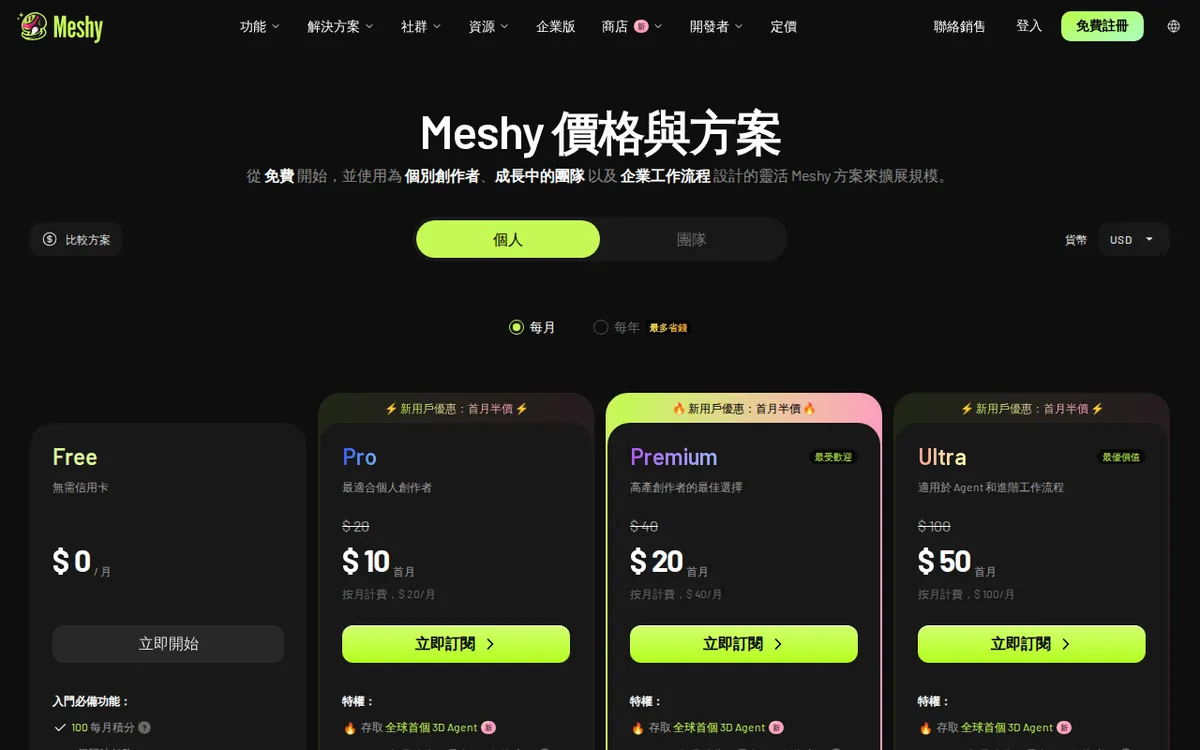
Figure: meshy.ai official pricing page, captured 2026-10-18.
A beginner’s first export, step by step
You don’t need any 3D background to get a first result.
- Sign up at meshy.ai. No card, so there’s nothing to cancel later if you walk away.
- Pick a mode. Text-to-3D takes a written prompt. Image-to-3D takes a reference picture. Start with text — it’s the easiest to control.
- Write a tight prompt. Name the object, one material, one style. “A low-poly wooden treasure chest” beats a paragraph. Vague prompts waste credits on results you’ll throw away.
- Generate and wait. Free jobs can queue; don’t refresh in a panic.
- Review before you refine. Meshy’s flow usually lets you preview a coarse shape, then commit credits to a refined, textured version. Check the rough shape first so you’re not polishing something that was wrong from the start.
- Export. Download in a standard mesh format and open it in Blender, Unity, or Unreal to confirm it imported cleanly.
Common blockers, and the fix:
- “My model is a blobby mess.” Simplify the prompt and name the silhouette. Complex scenes with several objects confuse text-to-3D; generate one object at a time and assemble later.
- “Generation is taking forever.” That’s the free-tier queue. Try off-peak hours, or accept that speed is one of the things paying buys.
- “I used up my credits mid-project.” The counter doesn’t refill until the 1st. Either wait for the reset or move to a paid plan. There’s no partial top-up in the data we have.
- “Can I sell this?” Only with the CC BY 4.0 credit line while you’re on the free tier. If silent commercial use is the goal, you’re looking at a paid plan — check the licence terms for your tier on the pricing page before you ship.
The paid plans, and what we can and can’t tell you
Here’s where I’ll be blunt about the limits of our data. Meshy’s paid ladder, by monthly price, is:
- Pro — US$20/month. New users get 50% off the first month.
- Studio — US$70/month.
- Premium — US$40/month. New users get 50% off the first month.
- Ultra — US$100/month. New users get 50% off the first month.
- Enterprise — quote only. You contact sales for a price.
All subscription, billed monthly. Our data carries no annual price, so I won’t invent a yearly figure or multiply anything out — if you want a yearly rate, the pricing page is the only source.
The new-user promo is half off the first month and applies to Pro, Premium, and Ultra. Studio is listed without that promo. Note the ladder isn’t strictly linear: Studio sits at US$70, between Premium (US$40) and Ultra (US$100), which usually signals it’s aimed at a different buyer — a team or output-volume plan rather than the next rung up. Our data doesn’t spell out who each tier targets or how many credits each includes, so treat the price as the only hard fact and read the feature breakdown on the page before paying.
For a beginner, the decision is really just free vs. Pro. Pro is the lowest-priced paid tier at US$20/month, and the first-month half-off lowers the cost of a trial run. If the free tier’s queue waits and attribution requirement are what’s blocking you, Pro is the obvious first step up. Everything above it is for people already producing at volume.
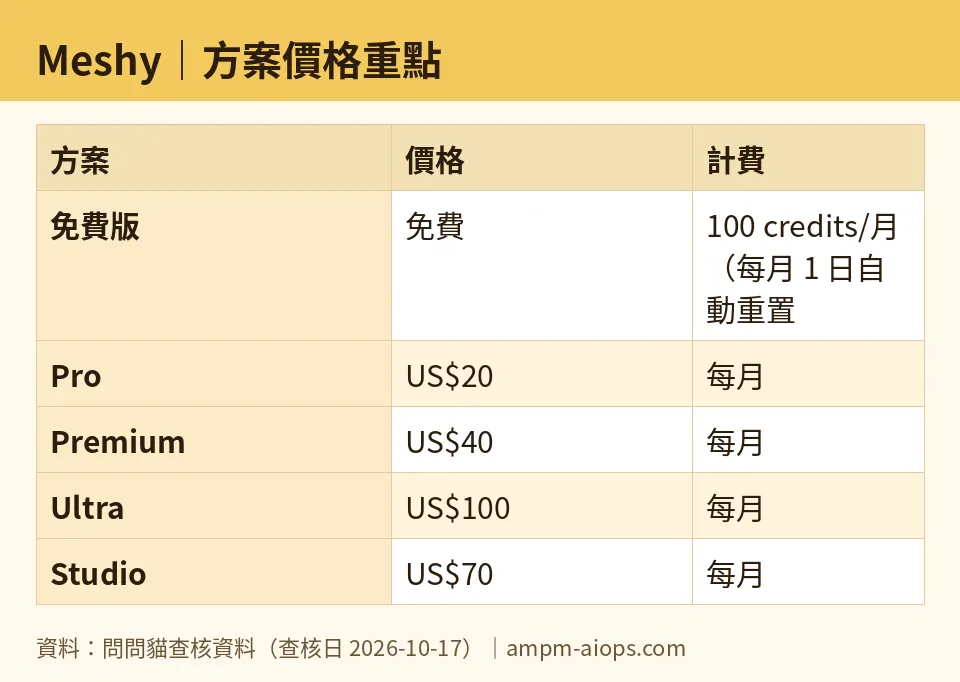
Figure: compiled by AMPM from its verified data (last verified 2026-10-17).
🔍 AMPM exclusive check
Two things the vendor page doesn’t put in front of you, and one caveat on our own side.
The reset is a cliff, not a rollover. The free 100 credits reset on the 1st and don’t accumulate. The pricing page states the monthly figure; it’s less loud about the fact that hoarding credits for a big project doesn’t work. Plan your month around the 1st.
The free licence is a business decision, not a footnote. CC BY 4.0 attribution is fine for learning, portfolios, and game jams. It’s a real constraint for a client deliverable or a storefront asset where you can’t show a credit line. Confirm the licence attached to whichever paid tier you’re considering — our data lists prices but not the per-tier licence terms, so don’t assume paying automatically removes the attribution requirement.
Our caveat: Meshy came into our tracker as an auto-added challenger, and this data has been through one verification pass, not our usual three-way manual cross-check. The price and quota numbers above matched Meshy’s own site on our checks of 2026-10-15, 2026-10-16, and 2026-10-17 — nothing changed across those dates. But the finer print (exact credits per plan, per-tier licence) should be read on the official page at the moment you buy. Where we have no number, we’ve said so rather than filled the gap.
Verdict: who should use it, who should skip it
Use the free tier if you’re learning text-to-3D, building a portfolio, prototyping game assets, or doing anything where crediting Meshy is fine. No card, 100 credits a month, and a monthly reset is plenty to decide whether 3D generation fits your workflow. Just respect the 1st-of-the-month cliff and the queue.
Step up to Pro (US$20/month) if the free queue waits are slowing real work or you need output you can use without the attribution line — and check that Pro’s licence actually grants that before you assume it does. The first-month 50% off makes the trial cheap.
Look at Premium, Studio, or Ultra only if you’re already generating at volume or running a team, and read the feature list to match the tier to your actual output. Skip Enterprise unless you need a custom contract; it’s quote-only.
Skip Meshy entirely if your work can’t carry an attribution line and you’re not ready to pay to remove it, or if you need guaranteed fast turnaround on the free tier — that’s exactly what the lower queue priority won’t give you.
Written: 2026-10-18 Price last verified: 2026-10-17 Tool last health-checked: 2026-10-17
🔗 Related on AMPM
📎 Sources
All prices and quotas in this article come from AMPM’s verified dataset for Meshy (last verified 2026-10-17); primary sources:
🐾 Meet the cats: AMO and PIMI

AMPM is a Taiwan-based AI-tool pricing watchdog. Our motto: ask before you subscribe. Two cats argue every tool from two sides:
- ☀️ AMO — the budget-minded cat. Always asks: is the free tier enough, and is paying actually worth it?
- 🌙 PIMI — the performance-minded cat. Cares about whether it works well, fast, and gets your job done.

When they are done arguing, you know whether to pay. Every number is checked by us, with the verification date at the end.
🐾 Our sister sites also checked
Read next
- Meshy Full breakdown: pricing, features and real-world limits
- Meshy Is the free quota enough?
- Meshy Alternatives
- Free plan limits for every AI tool we track
