[Review] Meshy Free Plan: Can You Use the Models Commercially, and What's Left Unsaid?
- Free tier: Yes
- Cheapest paid plan: US$20/mo and up
- Free quota: 100 credits/month (resets on the 1st); no credit card needed; …
- Last checked: 2026-11-02
Article last updated: 2026-11-01



Meshy turns a text prompt or a picture into a 3D model. That is useful if you build games, product mockups or AR scenes and don’t want to sculpt everything by hand. This review looks at one thing: whether the free plan is real or just a trial in disguise, and what you still can’t learn from the public numbers.
Short version of my angle: the free plan is more generous than most, but its commercial-use rule has a string attached. The paid side is where the data goes thin.
What the free plan actually gives you
You get 100 credits a month. Credits are the plan’s usage currency: each generation spends some of them, and when they run out you wait. The balance resets automatically on the 1st of each month. No credit card is needed to sign up.
That last point matters. Plenty of “free” plans ask for a card up front and bill you when a trial ends. Meshy’s free tier doesn’t, so there is no trial-expiry trap to dodge.
Two conditions come with it:
- Commercial use requires attribution. Free-tier output is licensed under CC BY 4.0. That is a Creative Commons licence. It lets you reuse the work, including for money, as long as you credit the source.
- Free users sit lower in the queue. Paid plans get priority. When the service is busy, your job waits behind theirs.
Our data does not say how many credits a single model costs. It also doesn’t say whether unused credits carry over. So I can’t tell you how many models 100 credits buys. Treat it as a monthly allowance, not a promise of a set number of models.
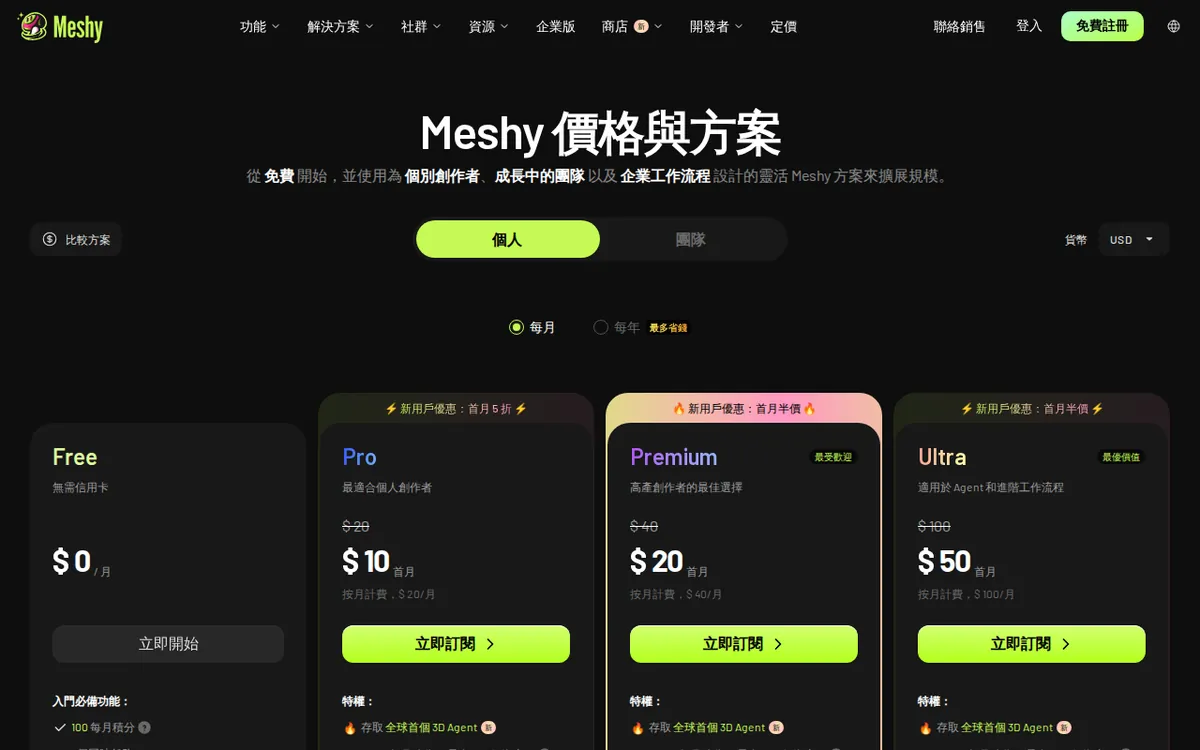
Figure: meshy.ai official pricing page, captured 2026-11-01.
The commercial-use catch
“Free for commercial use” sounds simple. Here it isn’t quite.
CC BY 4.0 means you must credit Meshy when you use what you made. For a game jam, a portfolio piece or a hobby project, that is easy. Put a line in the credits screen and move on.
For client work it can be awkward. A client may not want a third-party credit on a product page, in an app store listing, or inside a packaged asset. If you hand a model to someone else, they inherit the attribution duty. Whether that is a nuisance or a dealbreaker depends on your contracts.
The data confirms the free-tier rule. It does not confirm what changes on a paid plan. Does paying remove the attribution requirement? The data we hold doesn’t say. That is the single biggest open question for anyone planning commercial work.
The paid ladder
All paid plans are monthly subscriptions, meaning you pay each month and can stop. These are the prices in the data:
| Plan | Price per month | First-month deal |
|---|---|---|
| Pro | US$20 | New users get 50% off |
| Premium | US$40 | New users get 50% off |
| Ultra | US$100 | New users get 50% off |
| Studio | US$70 | None listed |
| Enterprise | Custom quote | None listed |
Two things stand out.
First, Studio (US$70) sits between Premium (US$40) and Ultra (US$100) in price, but the data gives no reason. No credit amount, no feature list, no seat count. I can’t tell you what makes it a “studio” plan.
Second, none of the paid plans list how many credits they include. The data gives prices only. So you can’t compare cost per credit, and you can’t tell whether the jump from free to Pro is a small step or a large one.
The first-month discount applies to Pro, Premium and Ultra only. Prices may vary by country; we checked from Taiwan.
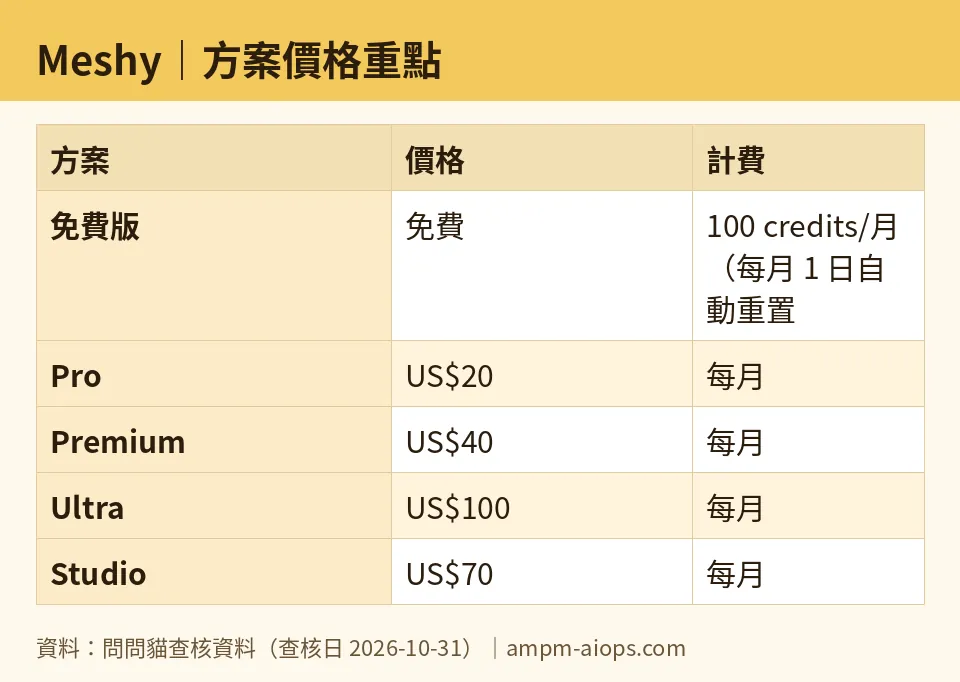
Figure: compiled by AMPM from its verified data (last verified 2026-10-31).
🔍 AMPM exclusive check
Here is what our check can and can’t back up.
What matched. Our records show the price and quota figures were re-compared against Meshy’s official page each day from 2026-10-16 through 2026-10-31, and nothing changed. The free-tier numbers (100 credits, reset on the 1st, no card, CC BY 4.0, lower queue priority) match what was read from the official page.
Where the gap is. The data for this tool has only been through one round of checking. It has not been cross-checked by three separate people, which is our normal bar. We flag it because Meshy was added as a challenger candidate, not a long-tracked tool.
What we could not confirm.
- Credits included in Pro, Premium, Ultra and Studio.
- Whether paid plans remove the attribution rule.
- What a single generation costs in credits.
- Whether unused free credits roll over.
- What Studio includes that justifies its price.
One more thing. We did not generate models for this review. Nothing here speaks to output quality or speed. Every point traces to the plan and price data. Check the official pricing page before you commit to anything.
☀️ AMO, the budget-minded cat

Is free enough? For testing, yes. For steady work, I doubt it.
The good part first. 100 credits a month at no cost, no card, and a reset on the 1st means you can try the tool properly before spending anything. You can run text prompts, run image uploads, and see if the output suits your style. That is a real evaluation window every month, not a one-time sample.
The catch is the attribution rule. If your project can carry a credit line, free works for commercial use. If it can’t, the free plan stops being free in practice, because you’d need to pay to find out whether the rule goes away. And our data can’t answer that.
Now the money. Pro is US$20 a month, which is the cheapest way in. New users get 50% off the first month on Pro, Premium and Ultra, so that is the cheapest moment to test a paid tier. But I’d be careful. A discounted first month tells you nothing about month two. Before paying, confirm how many credits Pro includes. Without that number, US$20 is a price with no unit.
Premium at US$40 and Ultra at US$100 only make sense if you’ve burned through free credits repeatedly and know your monthly usage. Studio at US$70 is a puzzle. It costs more than Premium, less than Ultra, and the data doesn’t say why.
My advice: stay on free until you hit the credit wall twice. Then buy one month of Pro, read the credit count and licence terms on the pricing page, and decide.
🌙 PIMI, the performance-minded cat

Does it work well and fast? I can’t tell you. Nobody on our side generated a model, and the data holds no quality or speed scores.
What the data does say about performance is one line: free users have lower queue priority than paid users. A queue is the line your job waits in before the service processes it. Paid jobs move ahead of free ones. On a quiet day you may not notice. When traffic is heavy, your free job waits longer.
That matters if you work against deadlines. Iterating on a 3D asset means generating, inspecting, tweaking and generating again. Each wait slows the loop. With 100 credits a month, you also get a limited number of tries. Fewer tries and longer waits is a poor combination for anyone chasing a specific look.
So for performance, free is a sampling tool, not a production tool. If speed matters, the ladder starts at Pro for US$20 a month. But the data does not say how much faster any paid tier is, or whether higher tiers like Premium (US$40) or Ultra (US$100) get better queue treatment than Pro. I’d want that in writing before paying more.
Studio at US$70 and Enterprise by quote suggest team features. The data lists no seats, no shared libraries, no export formats. For team pipelines I’d ask Meshy directly rather than guess.
Verdict: who should use it, who should skip it
Use the free plan if:
- You want to test text-to-3D and image-to-3D with no card and no risk.
- Your project can show a credit line, such as a jam entry, a portfolio or a personal build.
- You don’t mind waiting behind paid users.
Consider paying if:
- You keep running out of the 100 monthly credits.
- You need faster turnaround. Even then, confirm what the plan includes first.
- You want to find out whether paying removes the attribution rule. Read the licence terms before you pay, not after.
Skip it, or ask questions first, if:
- Your client or employer won’t accept a third-party credit.
- You need to budget per model. The credit costs and paid-plan allowances aren’t in our data.
- You need a team setup. Studio and Enterprise are listed as prices only.
The three annoyances, plainly: the free commercial licence demands attribution, free jobs wait in line behind paying ones, and the paid tiers show a price with no credit count. What Meshy does well is simple. It gives away a real monthly allowance with no card, and it spells out the free licence instead of hiding it.
Written: 2026-11-01 Price last verified: 2026-10-31 Tool last health-checked: 2026-11-01
🔗 Related on AMPM
📎 Sources
All prices and quotas in this article come from AMPM’s verified dataset for Meshy (last verified 2026-10-31); primary sources:
🐾 Meet the cats: AMO and PIMI

AMPM is a Taiwan-based AI-tool pricing watchdog. Our motto: ask before you subscribe. Two cats argue every tool from two sides:
- ☀️ AMO — the budget-minded cat. Always asks: is the free tier enough, and is paying actually worth it?
- 🌙 PIMI — the performance-minded cat. Cares about whether it works well, fast, and gets your job done.

When they are done arguing, you know whether to pay. Every number is checked by us, with the verification date at the end.
🐾 Our sister sites also checked
Read next
- Meshy Full breakdown: pricing, features and real-world limits
- Meshy Is the free quota enough?
- Meshy Alternatives
- Free plan limits for every AI tool we track
