Ask Cat › AI Tool Summary › n8n
[How-to] n8n Free Tier: What's Actually Free, What Gets Deleted After 14 Days
- Free tier: There is
- Cheapest paid plan: US$20/mo and up
- Free quota: (2026-08-28 checked on the official pricing page) The free version has …
- Last checked: 2026-10-06
Article last updated: 2026-10-07



n8n calls itself a workflow automation tool — you drag together “nodes” that connect to different apps and services, so instead of writing a script every time you want data to move from one app to another, you build a visual flowchart once and let it run automatically. It can also run AI agents: you wire in any AI model’s API key (an API is just the back-door connection that lets one piece of software talk to another) and let the model make decisions inside your automation.
Here’s the part that confuses people searching for n8n’s free tier: there are two completely different products wearing the same name. One is genuinely free forever. The other gives you 14 days and then deletes your work if you don’t pay. Mixing them up is the single most common way people get burned.
Self-hosting is free forever — if you run the server yourself
n8n’s core software is open source, meaning the code is public on GitHub and you can download and run it yourself instead of paying n8n to host it for you. This self-hosted version is called the Community Edition, and it has no execution limit at all — “execution” just means one run of a workflow, start to finish. Run it a thousand times a day or a million; the software itself won’t stop you. The only ceiling is how much your own server can handle.
You get the full visual editor, more than 400 integration nodes for connecting to other apps, AI Agent nodes for building LLM-powered automations (you supply your own model API key, and whatever that model charges is a separate cost from n8n), and the ability to write your own JavaScript or Python code inside a workflow when a pre-built node isn’t enough. Unlimited users and unlimited workflows, too — none of that is gated.
What you don’t get on the Community Edition: single sign-on (SSO/SAML) and LDAP for enterprise login systems, Git-based environment management for running separate dev/staging/production copies of your workflows, log streaming, and external secrets management. Those are Enterprise-only, whether you self-host or pay for Cloud.
There’s a licensing catch worth knowing before you build a business on this. The Community Edition uses something called the Sustainable Use License — a “fair-code” license, which is not the same thing as a standard open-source license (it hasn’t been certified by the OSI, the body that approves official open-source licenses). In plain terms: using n8n inside your own company, or for personal and non-commercial projects, is fine and free. What you can’t do is take n8n, slap your own name on it, and sell it as a hosted automation service to other people — that crosses from “using the software” into “reselling the software,” which the license doesn’t allow. Offering consulting or building automations for clients is fine; running a white-labeled n8n-as-a-service business is not.
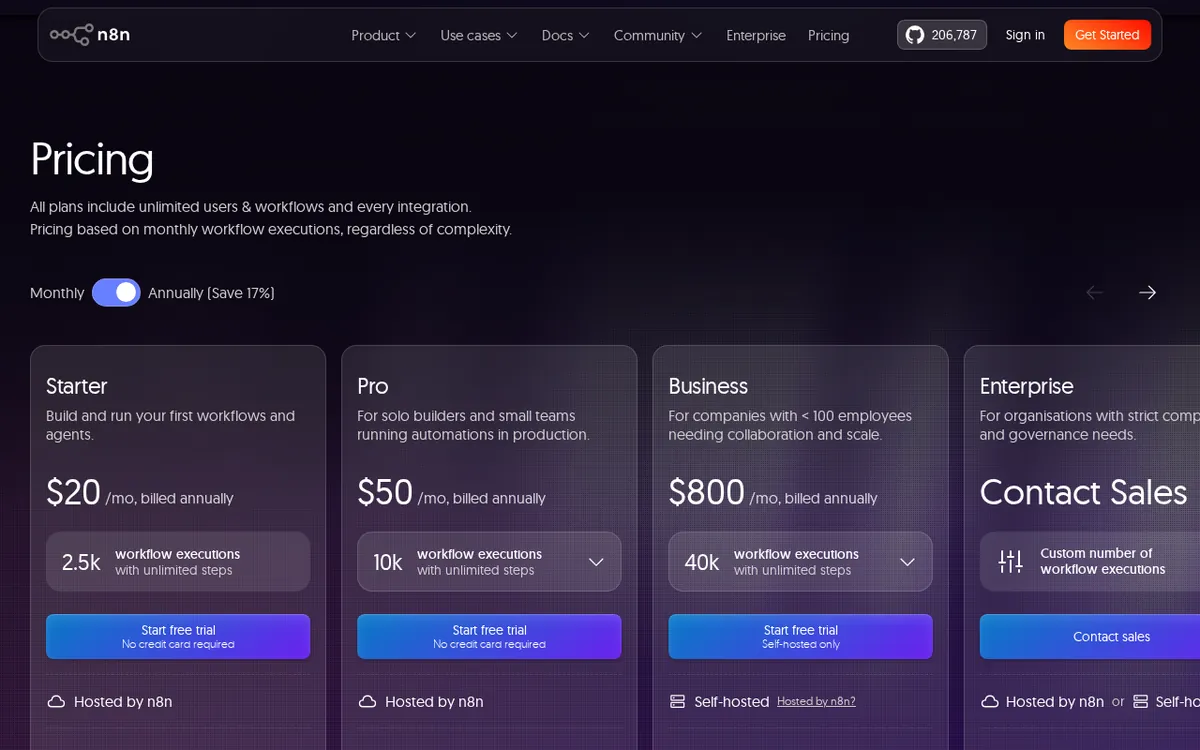
Figure: n8n.io official pricing page, captured 2026-10-07.
The Cloud free trial: 14 days, 1,000 runs, then deletion
This is where the confusion starts. n8n’s official Cloud — the hosted version where n8n manages the server for you — has no permanent free tier. What it has is a 14-day free trial, and the trial gives you full access to the Pro plan’s features, capped at 1,000 executions. No credit card required to start it.
When the 14 days run out and you haven’t upgraded to a paid plan, your workspace gets deleted. Your workflows aren’t necessarily gone forever — n8n lets you download them for up to 90 days after deletion — but the live, running workspace is wiped. If you were relying on Cloud for anything real during a trial, plan to either upgrade before day 14 or export everything well before the deadline.
What the paid Cloud plans actually buy you
Once the trial ends, here’s what paying for Cloud gets you, based on the published pricing page (these are n8n’s own listed figures in euros, not dollar conversions):

Illustration: Unpaid cloud trial environments vanish entirely once the time runs out, while self-hosted installations remain yours indefinitely.
Starter — €20/month, billed annually. 2,500 executions a month, 5 concurrent executions (how many workflow runs can happen at the same time), unlimited users and workflows, and 2,300 AI credits a month (credits are n8n’s internal usage allowance for AI-node features, separate from whatever you pay your model provider directly). You don’t get the Insights dashboard, global variables, or execution search — those start at Pro.
Pro — €50/month, billed annually. 10,000 executions a month, 20 concurrent executions, up to 13,700 AI credits a month, plus the operational tools Starter lacks: global variables, an Insights dashboard for monitoring workflow activity, and the ability to search past executions. This is the plan the free trial actually lets you test.
Business — €667/month, billed annually. 40,000 executions a month with concurrent execution that scales automatically, so you’re not capped at a fixed number running at once. Go over the included executions and n8n charges €4,000 per additional 300,000 executions. Unlike Starter and Pro, the Business trial requires a credit card up front.
Enterprise — custom quote. Executions and concurrency (200+) are negotiated directly with n8n’s sales team. This tier adds SSO/SAML and LDAP for centralized login, Git-based environment management, log streaming, and external secrets management — the same features missing from self-hosted Community Edition. If you need those specific compliance or governance features, Enterprise is available either as a Cloud plan or as a self-hosted deployment unlocked with a separate commercial license key.
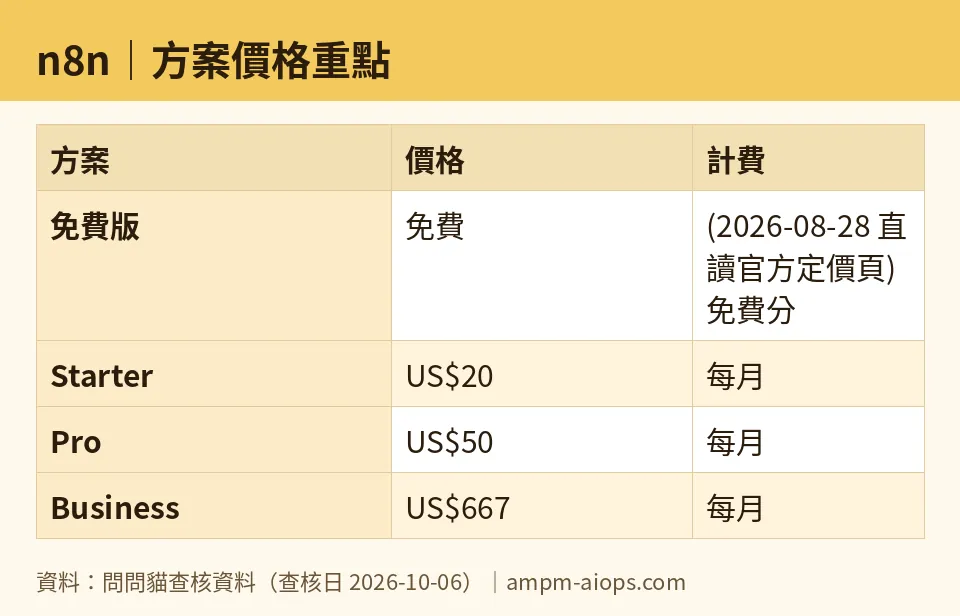
Figure: compiled by AMPM from its verified data (last verified 2026-10-06).
🔍 AMPM exclusive check
We went looking for n8n’s own documentation page listing exactly what Community Edition includes and excludes, expecting it to be the cleanest source. The page returned a flat 404 — it doesn’t exist at the URL n8n’s own site structure points to. We cross-checked the feature list (Folders, editor debugging, custom execution data as free-account perks; SSO, environments, and log streaming as Enterprise-only) against cached search results and n8n’s other documentation and pricing pages instead, since the primary source page itself was unreachable. Everything else in this piece — the trial length, the 1,000-execution cap, the 90-day download window, the per-plan quotas and prices — matched n8n’s live pricing page and trial documentation directly, checked 2026-10-06.
Verdict: who should use it, who should skip it
If you’re comfortable running a Docker container or a small server, self-hosting the Community Edition is the real free tier here — no execution cap, no 14-day clock, full node library. The tradeoff is you’re the one keeping the server patched and running.
If you want someone else to host it for you, there is no free lunch — only a 14-day test drive. Use that window to build and stress-test your actual workflows, not just poke around, because when it ends your workspace disappears unless you’ve upgraded or exported.
Skip Cloud entirely if your volume is low and you don’t mind server maintenance — self-hosting covers you at zero cost indefinitely. Consider Starter or Pro if you want managed hosting and your execution volume fits comfortably under 2,500 or 10,000 runs a month. Business only makes sense once you’re running production-scale automation and the €667/month and overage charges are a rounding error against what the automation saves you. Enterprise is only relevant if SSO, LDAP, or multi-environment governance are hard requirements — otherwise you’re paying for compliance features a smaller team doesn’t need.
Written: 2026-10-07 Price last verified: 2026-10-06 Tool last health-checked: 2026-10-07
🔗 Related on AMPM
📎 Sources
All prices and quotas in this article come from AMPM’s verified dataset for n8n (last verified 2026-10-06); primary sources:
🐾 Meet the cats: AMO and PIMI

AMPM is a Taiwan-based AI-tool pricing watchdog. Our motto: ask before you subscribe. Two cats argue every tool from two sides:
- ☀️ AMO — the budget-minded cat. Always asks: is the free tier enough, and is paying actually worth it?
- 🌙 PIMI — the performance-minded cat. Cares about whether it works well, fast, and gets your job done.

When they are done arguing, you know whether to pay. Every number is checked by us, with the verification date at the end.
🐾 Our sister sites also checked
Let's take a look at these
- n8n Comprehensive Introduction: Pricing, Features, and Actual Limitations
- n8n Is the free quota enough?
- n8n Alternatives
- Comprehensive Free Quota List for All Tools
More verified articles on this tool
- [Verified] n8n free tier: self-hosted forever vs. cloud's 14-day trap
- n8n Assistant Ships: Describe an Automation in a Sentence and Get a Workflow Someone Else Can Take Over
- n8n Self-Hosting Is Free and Cloud Has No Free Tier: The Pro-to-Business Jump Is 13x for 4x the Runs
