Ask Cat › AI Tool Summary › Nano Banana
[Pricing] Nano Banana Pricing: The US$4.99 Plan Is Real, But Ultra Now Splits Into Two Tiers
- Free tier: There is
- Cheapest paid plan: US$4.99/mo and up
- Free quota: The free version of Gemini includes a small amount of Nano Banana …
- Last checked: 2026-10-07
Article last updated: 2026-10-07



Nano Banana, Google’s image-generation model built into Gemini, got cheaper and more complicated in the same stroke. We went through the official Google One and Gemini pricing pages to check what changed and what the numbers actually mean for someone deciding whether to pay. Here’s the pricing picture as it stands, plan by plan, with nothing rounded or guessed.
Nano Banana is the generative image tool inside Gemini that became known for keeping a person’s face and style consistent across edits and re-generations, and for handling photo touch-ups well. Google has since renamed the underlying model “Nano Banana Pro” on its official pages, and split its top-tier plan into two separate price points. That second change is the one most people will trip over.
What’s actually in the free Gemini tier
The free version of Gemini includes a small quota of Nano Banana generations — Google doesn’t publish the exact number of images you get per day or month on the free tier. Every paid tier above it raises that quota ceiling, but again, without a published hard number for how many images that translates to.
Separately, if you’re a developer using the Gemini API directly rather than the consumer Gemini app, there’s a free tier for that too: free input and output tokens (the chunks of text or data the model processes and returns), and free access to Google AI Studio, the browser-based tool for testing prompts. Google is upfront that this developer free tier comes with a tradeoff: content you input gets used to improve Google’s products. That’s fine for testing prompts or a small side project, less fine if you’re feeding it anything sensitive.
Figure: one.google.com official pricing page, captured 2026-10-07.
The four paid plans, plan by plan
Google AI Plus costs US$4.99 a month. This is the one that actually dropped in price — it used to be US$7.99, and Google cut it permanently on 2026-06-09. It’s not a limited-time discount: the “50% off for your first two months” language that used to appear for new subscribers has been removed from the page entirely, which matches a straight price cut rather than a promo. Plus gives you 2 TB of cloud storage, full use of Gemini’s base models, access to Google Flow, and the ability to share the plan with up to 5 people. On Nano Banana specifically, Plus gives you double the free tier’s generation quota — again, no published raw number, just “2x.”

Illustration: The top-tier plan splits into two distinct tiers with a huge cost gap, requiring creators to choose carefully.
Google AI Pro costs US$19.99 a month. This plan used to be sold simply as “subscribe with Gemini” before Google renamed it. Pro steps up to the Pro version of the image model itself (not just more quota on the same model), plus 5 TB of storage, YouTube Premium Lite, Google Home Premium, a large allotment of Deep Research (Gemini’s multi-step web research feature), and sharing for up to 5 people. Image generation quota here is described as 4x the free tier.
Then the plan that used to be a single “Ultra” tier is now two separate SKUs. Google AI Ultra 5x costs US$99.99 a month and gives you the Ultra version of the image model, 20 TB of storage, full YouTube Premium, Google Home Premium, unlimited Deep Research, and a quota described as roughly 20x the free tier. Google AI Ultra 20x costs US$199.99 a month, doubling the price again for a quota described as 4x what Ultra 5x gets — which Google frames as roughly 80x the free tier. Everything else about the two Ultra tiers — the model version, the storage, the perks — is identical. The entire US$100 difference between them is quota headroom.
The cheapest way up, and when it’s not worth it
If you’re currently on free and just want more Nano Banana generations without jumping into a big subscription, Plus at US$4.99 is the obvious next step — it’s the cheapest paid tier, and the price cut means it’s a smaller jump than it used to be. The move from Plus to Pro is a bigger one, both in price (US$4.99 to US$19.99) and in what you get, since Pro switches you to a stronger version of the model rather than just adding headroom on the same one.
Where this stops being worth it: the jump from Ultra 5x to Ultra 20x. You’re paying double — US$99.99 to US$199.99 — for the same model version, same storage, same perks, and quota alone. Google’s own plan comparison notes annual billing saves roughly 16% on Pro and both Ultra tiers (no equivalent annual discount is listed for Plus), but there’s no published annual dollar figure on the page, so budget by the monthly number you’ll actually be charged. Unless you or your team are generating images at a genuinely industrial, daily volume — the kind of use case Google pitches Ultra 20x at, like agencies or studios running near-continuous generation — Ultra 20x is very likely more than you need.
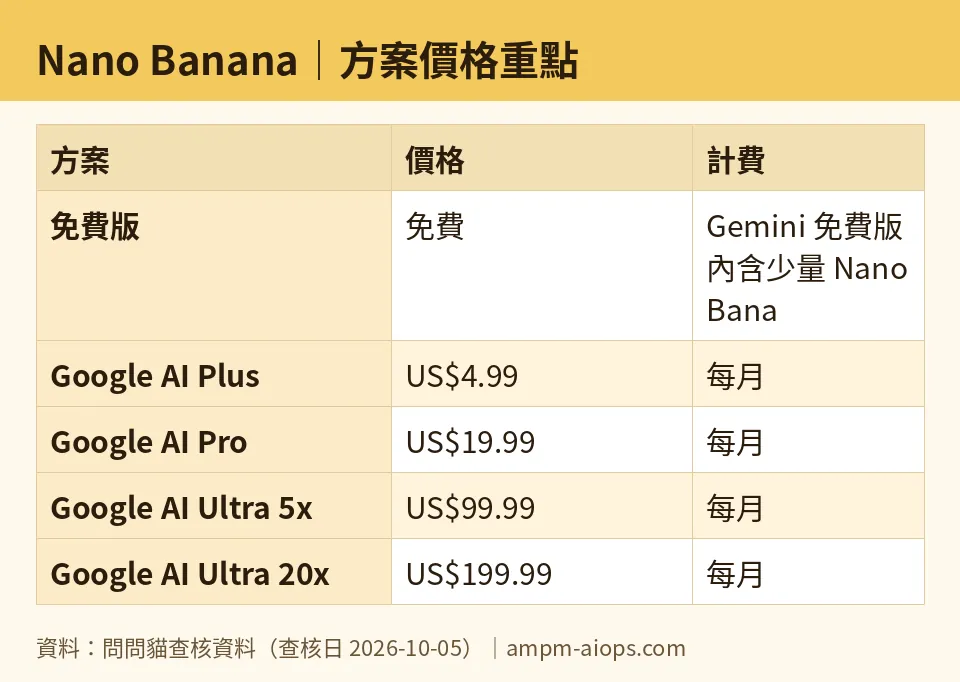
Figure: compiled by AMPM from its verified data (last verified 2026-10-05).
🔍 AMPM exclusive check
The gap here isn’t in the prices — those are clearly published and we confirmed them against the official Google One plans page and Gemini’s own pricing page, both as of 2026-10-05. The gap is in the quotas. Google tells you Plus gives “2x” the free tier’s image generations, Pro gives “4x,” Ultra 5x gives “~20x,” and Ultra 20x gives “4x Ultra 5x” (which stacks up to roughly 80x free). What Google does not publish anywhere on its official pages is what the free tier’s baseline actually is in raw image counts. So every one of those multipliers is relative to a number Google won’t state. Third-party estimates exist for what the free quota might actually be, but we’re not treating those as confirmed, because Google hasn’t confirmed them itself. If you’re deciding between plans based on “how many images can I actually generate this month,” the honest answer right now is: Google isn’t telling you the baseline, so you’re buying a multiplier of an unknown.
☀️ AMO, the budget-minded cat

AMO only cares about one question: is the free plan enough, or is it worth paying. For Nano Banana, free gets you a small quota of generations with no published number attached, which makes it hard to plan around if you’re a regular user. The first paid step, Google AI Plus at US$4.99 a month, is cheap enough that it’s a low-risk test: you get double the free quota, plus 2 TB of storage you’d likely use anyway if you’re already in the Google ecosystem. That’s the plan AMO would try first, because at under US$5 a month the downside of “I didn’t need it after all” is small. Google AI Pro at US$19.99 a month is where AMO gets more skeptical — it’s four times the price of Plus for a model upgrade and quota bump, and only worth it if image generation is a real recurring need rather than occasional use. The two Ultra tiers, US$99.99 and US$199.99 a month, are outside AMO’s normal territory entirely: that’s agency- or studio-level spending, not a casual user’s bill. AMO’s take: start free, upgrade to Plus the moment the free quota actually runs out in the same week more than once, and don’t go past Pro unless generation is part of your job, not your hobby.
Verdict: who should use it, who should skip it
Casual users who generate a handful of images a week should stay on free — there’s no published evidence the quota is tight enough to justify paying, even though Google won’t say exactly how big it is. Anyone hitting that free ceiling regularly should go straight to Plus at US$4.99; it’s the cheapest fix and the price cut makes it a near no-brainer. Pro at US$19.99 makes sense once you need the stronger model version itself, not just more of the same one. The two Ultra tiers are for people who already know they need enterprise-scale volume — if you’re not sure which one you need, you almost certainly don’t need either, and Ultra 20x in particular should be skipped unless Ultra 5x’s quota is demonstrably running out.
Written: 2026-10-07 Price last verified: 2026-10-05 Tool last health-checked: 2026-10-07
🔗 Related on AMPM
📎 Sources
All prices and quotas in this article come from AMPM’s verified dataset for Nano Banana (last verified 2026-10-05); primary sources:
🐾 Meet the cats: AMO and PIMI

AMPM is a Taiwan-based AI-tool pricing watchdog. Our motto: ask before you subscribe. Two cats argue every tool from two sides:
- ☀️ AMO — the budget-minded cat. Always asks: is the free tier enough, and is paying actually worth it?
- 🌙 PIMI — the performance-minded cat. Cares about whether it works well, fast, and gets your job done.

When they are done arguing, you know whether to pay. Every number is checked by us, with the verification date at the end.
🐾 Our sister sites also checked
Let's take a look at these
- Nano Banana Comprehensive Introduction: Pricing, Features, and Actual Limitations
- Nano Banana Is the free quota enough?
- Nano Banana Alternatives
- Comprehensive Free Quota List for All Tools
More verified articles on this tool
- [Review] Nano Banana Pricing: The US$4.99 Plan Is a Permanent Cut, Not a Sale
- [How-to] Nano Banana for beginners: start on the free tier, and know that US$4.99 Plus buys more quota, not a better model
