Ask Cat › AI Tool Summary › Napkin AI
[Pitfalls] Napkin AI Free Tier: Why 500 Weekly Credits Aren't the Whole Story
- Free tier: There is
- Cheapest paid plan: US$9/mo and up
- Free quota: Free: 500 AI credits per week (official site says 500 AI credits per …
- Last checked: 2026-10-07
Article last updated: 2026-10-08



Napkin AI turns pasted text into diagrams, flowcharts, and infographics, and its free tier markets itself as generous: unlimited visual editing, unlimited file imports, unlimited PNG and PDF exports. But “unlimited” is doing a lot of work on that pricing page. Before you build a workflow around the free tier, you need to understand what it actually caps, how the quota resets, and where the watermark shows up. We checked Napkin AI’s official pricing page and compared the free tier against both paid plans to find the traps that aren’t obvious from a quick skim.
Here’s the short version: the free tier isn’t unlimited where it matters most — the AI generation credits (a credit is the unit Napkin charges each time you ask it to generate or regenerate a visual) that actually create new diagrams. Everything else being “unlimited” is a distraction if you run out of credits on a Tuesday and have to wait for Monday’s reset.
The weekly reset trap
Napkin’s free tier gives you 500 AI credits per week, and the week resets every week — not every month. That distinction matters more than it looks. Most freemium tools in this space reset monthly, so if you’re used to budgeting a monthly allowance, you’ll misjudge how fast 500 credits actually run out.
If you’re prepping a single big project — say, turning a long report into a dozen infographics in one sitting — 500 credits can vanish in a single work session. Once they’re gone, you’re not locked out of Napkin entirely: editing, file imports, and exporting what you’ve already made still work. But you can’t generate new AI visuals again until the weekly reset lands.
How to avoid it: if your work is bursty (one big push, then nothing for weeks), the weekly reset works in your favor — you get a fresh 500 every seven days regardless of how little you used the week before. But if you need steady, predictable output across a whole month, map your actual weekly generation habits against 500 credits before you assume the free tier covers you. Track how many credits a typical diagram or flowchart costs you in your own usage, not a guess, and watch whether a single ambitious week burns the whole allowance.
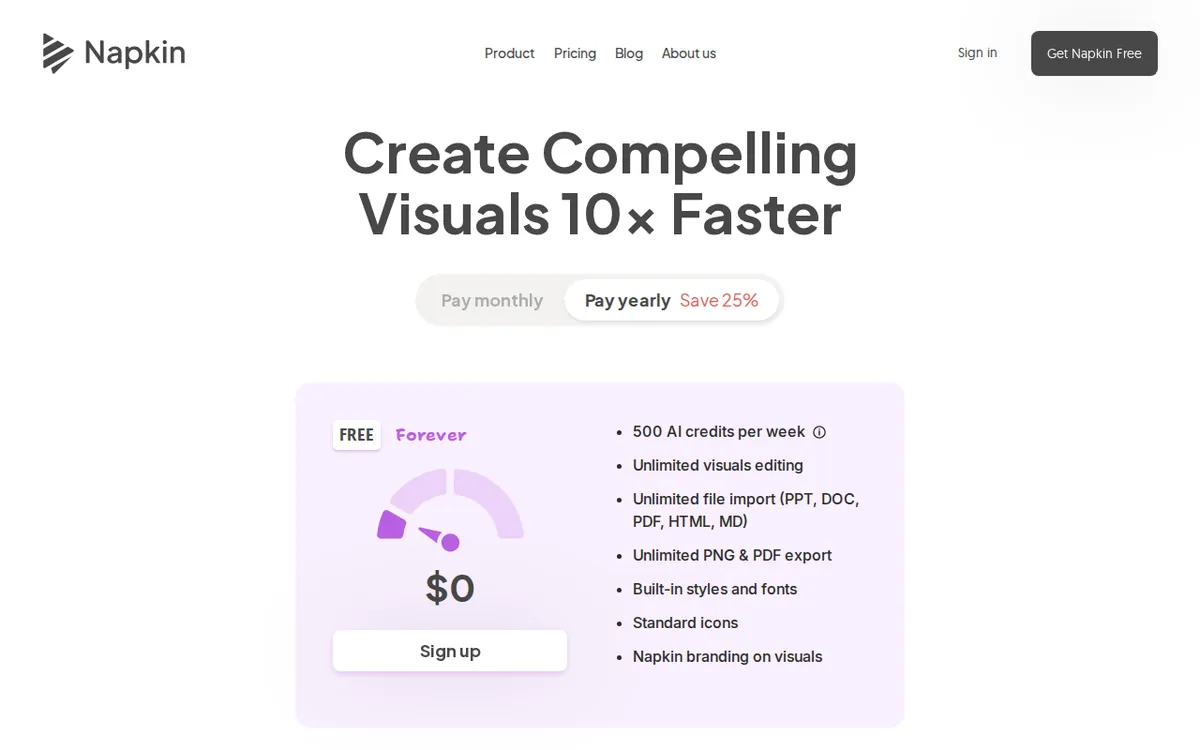
Figure: napkin.ai official pricing page, captured 2026-10-08.
The watermark asterisk on “unlimited”
The free tier’s unlimited PNG and PDF exports come with a catch the headline doesn’t mention: everything you export carries a Napkin watermark. So “unlimited exports” really means “unlimited exports with our branding on them.” For personal notes or internal drafts, that’s probably fine. For anything client-facing, a slide deck going to a customer, or a diagram going into a published report, the watermark is a dealbreaker.
Removing the watermark requires the Plus plan. That’s the real reason to upgrade for a lot of users — not because they’ve run out of credits, but because they need clean, unbranded output. If your use case is purely external-facing documents, budget for Plus from the start rather than assuming the free tier’s “unlimited” exports will cover you.
How to avoid it: before you commit to the free tier for a work project, export one test file and look at it full-size. If the watermark placement or size is a problem for your use case, you already know you need to pay before you build a habit around free exports.
Per-seat pricing math once your team grows
Both paid tiers are priced per seat: Plus is US$9 a month per person, and Pro is US$22 a month per person, both billed monthly at list price. That’s straightforward for a solo user, but it changes shape fast for a team. The listed price per person doesn’t shrink automatically as you add people — each additional seat is billed at that same per-person monthly rate. If you’re evaluating Napkin for a team rollout, the number to budget isn’t “US$9” or “US$22” — it’s that number multiplied by however many people actually need an account, and the pricing page doesn’t spell out any volume discount.
The jump between tiers is also worth noting on its own terms. Plus gives 10,000 AI credits a month for US$9. Pro gives 30,000 AI credits a month for US$22, plus exclusive design styles, unlimited custom branding, and the ability to upload your own fonts. If your team is credit-constrained rather than feature-constrained, Pro’s credit allowance is three times Plus’s for roughly two and a half times the price — worth comparing against your actual monthly credit burn rather than defaulting to the cheaper-looking plan.
How to avoid it: count actual active users before you price out a team plan, not the whole team roster. A tool that only three people touch weekly doesn’t need five paid seats sitting idle.
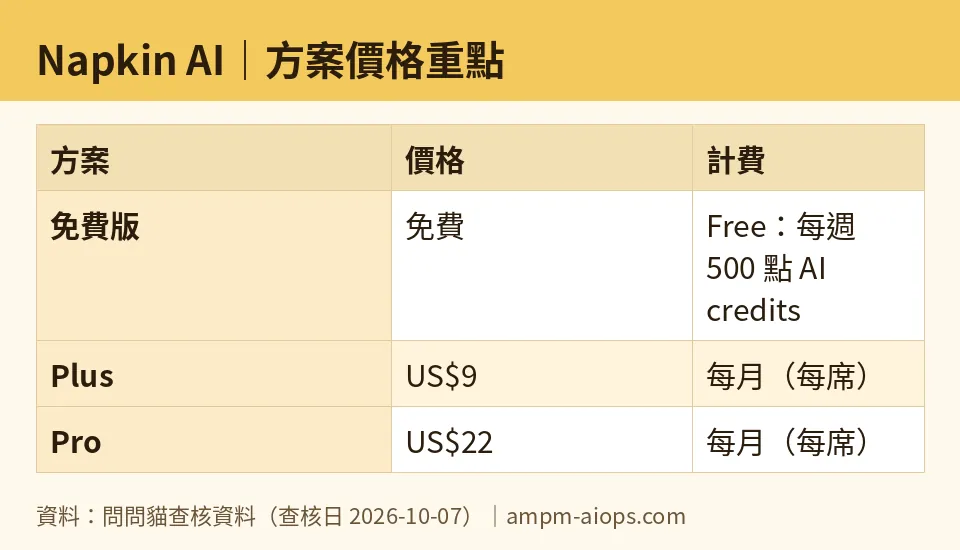
Figure: compiled by AMPM from its verified data (last verified 2026-10-07).
🔍 AMPM exclusive check
Nothing differed from the official page this time; every number below matches it, checked 2026-10-07. The free tier’s 500 weekly credits, the Plus plan’s US$9/month and 10,000 credits, and the Pro plan’s US$22/month and 30,000 credits all line up exactly with what Napkin AI’s own pricing page states.
What we can add that a single page-view doesn’t give you: we tracked this same pricing page across 23 separate checks between 2026-09-05 and 2026-10-07, and the credit allowances and prices held steady the entire time — no quiet mid-month adjustments, no silent shrinking of the free tier. That consistency is worth knowing if you’re deciding whether to build a workflow around the free plan: based on what we’ve observed over that stretch, the terms haven’t moved under users’ feet.
One honest caveat: this data comes from a single verification pass against the vendor’s own page, not yet cross-checked against three independent sources the way AMPM does for its most-established tool coverage. Treat the specific credit-cost-per-diagram math (how many credits a given flowchart or infographic actually consumes) as something to confirm yourself inside the tool, since the pricing page states the weekly and monthly totals but not a per-diagram breakdown.
☀️ AMO, the budget-minded cat

AMO’s question is always the same: is free enough, and if not, is paying actually worth it? For Napkin AI, the free tier is a real contender if your diagrams stay internal. 500 AI credits a week, resetting every week, is enough for someone doing occasional flowcharts or infographics for personal notes, internal team docs, or drafts that nobody outside the company will see. Unlimited file imports across PPT, DOC, PDF, HTML, and Markdown mean you’re not blocked on getting content in, and unlimited PNG/PDF export means you’re not blocked on getting it out either — just branded when you do.
The moment paying becomes worth it is the moment the watermark becomes a problem, not the moment credits run low. If you only occasionally hit the 500-credit wall, waiting for next week’s reset costs you nothing but a few days. But if even one diagram needs to go out clean — a client deliverable, a public blog post, a pitch deck — that single requirement justifies Plus at US$9 a month per person, since that’s the tier that strips the watermark and adds 10,000 monthly credits plus three brand styles on top.
Pro, at US$22 a month per person with 30,000 credits, exclusive design styles, unlimited custom branding, and custom font uploads, is a jump AMO would only recommend once you know you’re generation-heavy and branding-sensitive at the same time — a design or marketing function producing visuals constantly, not an individual user dabbling a few times a week. For most budget-conscious solo users and small internal teams, free-then-Plus is the sensible ladder; Pro is for people who already know they’ve outgrown Plus’s 10,000 credits or need the extra design controls.
Verdict: who should use it, who should skip it
Use the free tier if your diagrams and infographics stay inside your own team, you can tolerate a watermark, and your output needs don’t spike past roughly 500 AI-generated visuals’ worth of work in a single week. The weekly (not monthly) reset actually rewards occasional, bursty use — you get a full refill every seven days no matter how little you used the week before.
Upgrade to Plus if you need watermark-free exports for anything client-facing or public, or if you’re regularly running into the weekly credit ceiling. At US$9 a month per person with 10,000 monthly credits, it’s the plan that solves both the branding problem and the volume problem for most individuals and small teams.
Skip straight to Pro only if you already know Plus’s 10,000 credits won’t cover your volume, or you specifically need exclusive design styles, unlimited custom branding, or custom font uploads — features Plus doesn’t include. For a team rollout at either paid tier, remember the price is per seat: multiply the listed monthly price by actual active users, since the pricing page gives no volume discount for adding people.
Written: 2026-10-08 Price last verified: 2026-10-07 Tool last health-checked: 2026-10-08
🔗 Related on AMPM
📎 Sources
All prices and quotas in this article come from AMPM’s verified dataset for Napkin AI (last verified 2026-10-07); primary sources:
🐾 Meet the cats: AMO and PIMI

AMPM is a Taiwan-based AI-tool pricing watchdog. Our motto: ask before you subscribe. Two cats argue every tool from two sides:
- ☀️ AMO — the budget-minded cat. Always asks: is the free tier enough, and is paying actually worth it?
- 🌙 PIMI — the performance-minded cat. Cares about whether it works well, fast, and gets your job done.

When they are done arguing, you know whether to pay. Every number is checked by us, with the verification date at the end.
🐾 Our sister sites also checked
Let's take a look at these
- Napkin AI Comprehensive Introduction: Pricing, Features, and Actual Limitations
- Napkin AI Is the free quota enough?
- Napkin AI Alternatives
- Comprehensive Free Quota List for All Tools
More verified articles on this tool
- [Verified] Napkin AI's free 500-credit weekly limit: enough for sketches, but paid plans start at US$9/month
- Napkin AI Free Plan: How to Actually Use All 500 Weekly Credits (2026 Hands-On Guide)
