[How-to] Nitro PDF Free Trial: What Beginners Can Actually Finish Before It Ends
- Free tier: No
- Cheapest paid plan: US$15/mo and up
- Free quota: No permanent free plan; offers a 14‑day full‑feature free trial, no …
- Last checked: 2026-10-23
Article last updated: 2026-11-03



Nitro PDF sells itself as an all-in-one PDF editor with AI summaries built in. For a beginner, the real question is simpler: can you get useful work done during the trial, and what happens on day 15?
This is a how-to for people who have never touched Nitro PDF before. We will walk through setup, the tasks you can realistically finish, and the walls you will hit. Every number here comes from the official pricing page and our own check on 2026-10-23.
What you actually get before you pay
Nitro PDF has no permanent free plan. That is the first thing to understand. There is no forever-free tier with a watermark or a page cap. Instead, you get a 14-day full-feature trial, and you do not need to enter a credit card to start it.
That last part matters. A lot of PDF tools ask for card details before the trial begins, then auto-charge you if you forget to cancel. Nitro does not do that here. You can test the whole product for 14 days and walk away without a payment method on file.
The trial covers the full feature set. That includes cross-platform PDF editing, file conversion, OCR (optical character recognition, which turns scanned images into selectable text), Nitro AI for summaries and translation, and the admin console. For a beginner, that is more than enough surface area to figure out whether the tool fits your workflow.
The catch is the clock. Fourteen days is short if you only open the app twice. Plan your trial like a project, not a browse.
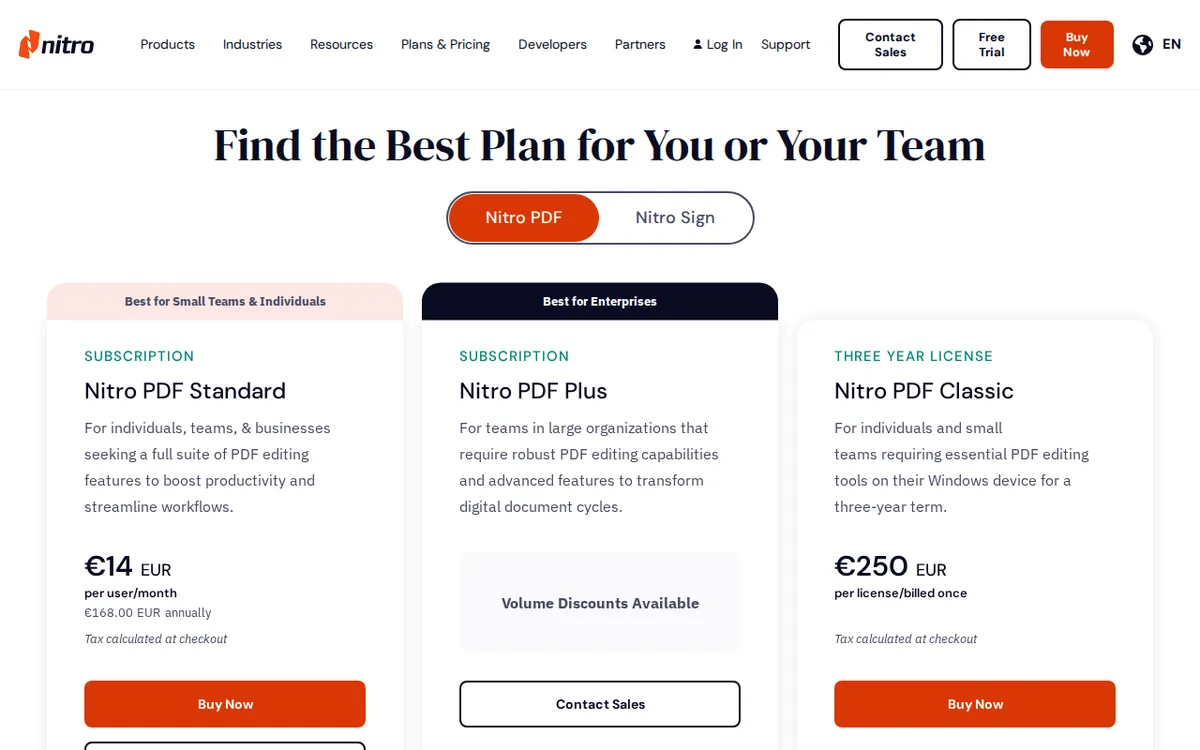
Figure: gonitro.com official pricing page, captured 2026-11-03.
Step-by-step: a beginner’s first week
Day 1 — Install and set one goal. Download Nitro PDF and sign in. Do not explore every menu. Pick one real document you need to work on: a contract, a scanned form, a report. Open it and try the three core actions: edit text, convert to another format, and run OCR if it is a scan.
Day 2 — Test the AI summary. Nitro AI summarizes and translates documents. Run it on something long, like a 20-page report. Check whether the summary is accurate enough to trust. This is the feature most likely to justify the price, so test it hard, not casually.
Day 3 — Try a signature workflow. If you send or sign documents, build one complete signing flow. This is where PDF tools either save you time or frustrate you.
Day 4-7 — Stress the conversion. Convert a messy file: a scanned PDF, a spreadsheet export, something with tables. Clean conversions are the difference between a tool you keep and one you drop.
Common blockers and fixes:
- OCR produces garbage. Usually the scan resolution is too low. Rescan at a higher DPI before blaming the software.
- Conversion breaks table layout. Try converting to a different target format, or split the document first.
- AI summary misses context. Feed it a cleaner source file. Scanned handwriting will not summarize well.
- Trial feels too short. Decide by day 10, not day 14. Give yourself buffer to compare alternatives.
What it costs when the trial ends
There are two paid paths, and they are very different.
Nitro PDF Standard is US$15 per seat, billed annually. The official pricing page has no monthly option. You pay for the year: US$180 per seat. That works out to roughly US$15 per month per seat, but the button you click charges the full year. If you expected a month-to-month escape hatch, there is not one. Standard includes cross-platform editing, conversion, OCR, Nitro AI summaries and translation, and the admin console.
Nitro PDF Classic is US$270 as a one-time purchase. It covers a three-year license, Windows desktop only. You get core editing, merging, conversion, and password protection. You do not get automatic upgrades or the advanced enterprise management features. If you work only on Windows and do not care about AI or admin tools, this is the cheaper long-run option.
Prices vary by country; we checked from Taiwan.
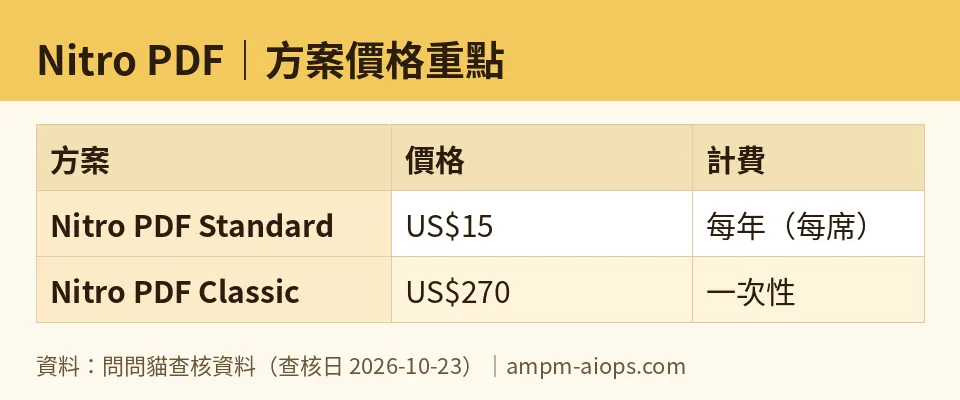
Figure: compiled by AMPM from its verified data (last verified 2026-10-23).
🔍 AMPM exclusive check
Here is the gap worth flagging. The pricing page presents US$15 as the headline figure for Standard, but there is no monthly billing button. The only way to buy Standard is the annual charge of US$180 per seat. A reader who sees “US$15” and assumes they can pay month by month will be surprised at checkout.
We also confirmed the trial does not require a credit card, which is not spelled out clearly on every page of the site. That means you can complete the full 14 days without any payment risk.
One caveat on our own data: this tool was checked in a single pass and has not yet gone through our full three-way manual cross-check. Treat the trial terms and commercial-use conditions as subject to change on the official site. Everything above matches what we saw on 2026-10-23.
☀️ AMO, the budget-minded cat

No free tier. That is the honest starting point. If you need a PDF editor you can use forever without paying, Nitro PDF is not it. The 14-day trial is generous in features but zero in duration beyond two weeks.
So the budget question becomes: is US$180 per year worth it, or is US$270 once every three years the smarter buy?
Run the math on your own usage. If you edit PDFs a few times a month, the Classic one-time purchase at US$270 covers three years on Windows. That is a fixed cost with no renewal surprise. The trade-off is no AI features, no automatic upgrades, and no cross-platform support.
If you need AI summaries, translation, or you work across Mac and Windows, Standard is the only option, and it is US$180 per seat per year. There is no monthly plan to soften that. You either commit to the year or you do not buy.
For a beginner testing the waters, the trial is genuinely free and card-free. Use all 14 days. If you cannot point to three tasks Nitro did better than your current setup, skip both plans. The absence of a monthly option makes this an all-or-nothing decision, and that should raise your bar for saying yes.
🌙 PIMI, the performance-minded cat

Does it actually work? The feature list is strong on paper: cross-platform editing, conversion, OCR, AI summarization and translation, admin console. The question is whether each one holds up under real files.
OCR is the make-or-break feature for anyone dealing with scans. Test it on your worst document, not your cleanest. If it handles low-quality scans, the tool earns its place. If not, you are paying for a feature you cannot use.
The AI summary and translation is the headline differentiator. Run it on a dense 20-page document and judge the output yourself. Summaries that miss nuance are worse than no summary, because they create false confidence.
Conversion quality matters more than speed for most beginners. A fast conversion that scrambles your tables costs you more time than a slow one that gets it right.
On the paid side, Standard at US$180 per seat per year buys you the full stack including AI and admin tools. Classic at US$270 one-time gives you three years of core editing on Windows only, with no upgrades. If performance is your priority and you rely on AI features, Classic is not a substitute. It is a different, narrower product.
The 14-day trial is your real test. Fourteen days is enough to run every feature against your actual workload. Do that before you commit to a year.
Verdict: who should use it, who should skip it
Use it if: you need cross-platform PDF editing with AI summaries and translation, you can commit to an annual US$180 per seat charge, and the 14-day trial confirms the AI and OCR work on your real files.
Skip it if: you need a permanent free tier, you want month-to-month billing, or you only edit PDFs occasionally on Windows. In that last case, Classic at US$270 for three years may fit, but only if you do not need AI or upgrades.
The beginner move: start the card-free trial today, pick three real tasks, and decide by day 10. If Nitro does not clearly beat what you already use, walk away. There is no monthly plan waiting for you, so the decision is bigger than it looks.
Written: 2026-11-03 Price last verified: 2026-10-23 Tool last health-checked: 2026-11-03
🔗 Related on AMPM
📎 Sources
All prices and quotas in this article come from AMPM’s verified dataset for Nitro PDF (last verified 2026-10-23); primary sources:
🐾 Meet the cats: AMO and PIMI

AMPM is a Taiwan-based AI-tool pricing watchdog. Our motto: ask before you subscribe. Two cats argue every tool from two sides:
- ☀️ AMO — the budget-minded cat. Always asks: is the free tier enough, and is paying actually worth it?
- 🌙 PIMI — the performance-minded cat. Cares about whether it works well, fast, and gets your job done.

When they are done arguing, you know whether to pay. Every number is checked by us, with the verification date at the end.
🐾 Our sister sites also checked
Read next
- Nitro PDF Full breakdown: pricing, features and real-world limits
- Nitro PDF Is the free quota enough?
- Nitro PDF Alternatives
- Free plan limits for every AI tool we track
