[How-to] NocoDB pricing: the per-seat rule that quietly flips in your favor
- Free tier: Yes
- Cheapest paid plan: US$15/mo and up
- Free quota: Cloud Free version: 3 editor seats, 10 reviewers, 1,000 records, 1 GB …
- Last checked: 2026-10-22
Article last updated: 2026-10-21



NocoDB turns a plain database into something that looks and feels like a spreadsheet you can click around in. If you have used Airtable, the layout will be familiar: tables, grid views, forms, a bit of automation. The difference is that NocoDB is open source, which matters a lot once you start reading the price list.
Most people land on the pricing page, see “per seat” next to every paid plan, and assume the bill only ever goes up as the team grows. That is the wrong read. There is a cap built into two of the three paid tiers, and the number where it kicks in is oddly specific. This guide gets you productive on the free tier first, then shows you exactly where the paid math stops hurting.
Start here: cloud free vs. self-hosted, and why the difference is huge
“Seat” means one paying user account. NocoDB counts two kinds: an editor who can change data, and a commenter who can only read and leave notes.
NocoDB gives you two free routes, and they are not the same thing.
Cloud free tier. You sign up at nocodb.com, no server required. You get 3 editor seats, 10 commenter seats, 1,000 records (rows across your tables), 1 GB storage, 100 automation runs per month, and 1,000 API requests per month. An “automation run” is one firing of an automated step — a webhook, an email trigger, that kind of thing. An “API request” is one call from an outside script or app asking NocoDB for data. For a solo builder or a tiny side project, this is genuinely usable.
Self-hosted community edition. This is the open-source version you run on your own machine or server. It is completely free, and — this is the headline — it has no record cap. The 1,000-row ceiling that limits the cloud free tier does not apply when you host it yourself.
So the real first decision is not “free or paid.” It is “do I want someone else to run the server, or will I?”
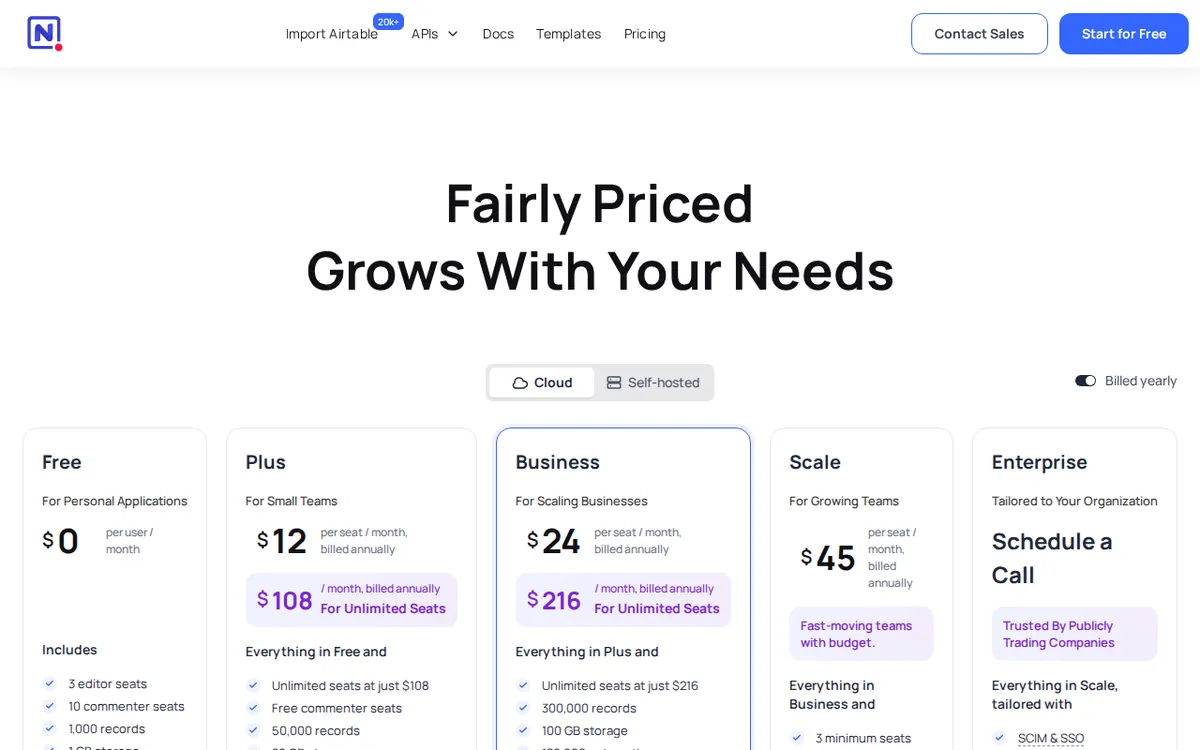
Figure: nocodb.com official pricing page, captured 2026-10-21.
The fastest path to a working base
If you picked cloud:
- Sign up and create a base (NocoDB’s word for a workspace that holds related tables).
- Import an existing spreadsheet — CSV or Excel — straight into a new table. This is the quickest way to see your own data in the grid.
- Add a second view on the same table. A view is just a saved way of looking at the data: a filtered grid, a kanban board, a calendar, or a form. Same rows underneath, different lens.
- Build a form view and share the link. Form responses drop in as new rows. This alone replaces a surprising number of Google Form plus spreadsheet setups.
If you picked self-hosted, the community edition runs from a single Docker container. Docker is a tool that packages software so it starts with one command instead of a manual install. Once it is up, you open the local address in your browser and the setup is the same as the cloud version from step 1 onward. The payoff for the extra effort is no row limit and full control of your data.
Common blockers on the free tier, and the fix
You hit 1,000 rows on cloud free and imports start failing. This is the most common wall. The fix is either to move to self-hosted (no cap) or to upgrade. Don’t try to shuffle data between bases to dodge it — the limit is on the workspace.

Illustration: The cost staircase is intercepted by a ceiling barrier, allowing all subsequent seats to remain level without added coins.
Your automation stopped running mid-month. The cloud free tier allows 100 automation runs per month. A single busy automation can burn through that fast. Check which automation is firing most and either throttle it or move up a tier.
An API script returns errors after working all morning. You have likely used the 1,000 monthly API requests. If you are connecting another app, budget those requests carefully, or plan for a paid tier where the ceiling is far higher.
You invited a teammate and it ate an editor seat you wanted to keep. Remember the split: 3 editors, 10 commenters on cloud free. If a person only needs to view and comment, add them as a commenter and save your editor seats for people who actually change data.
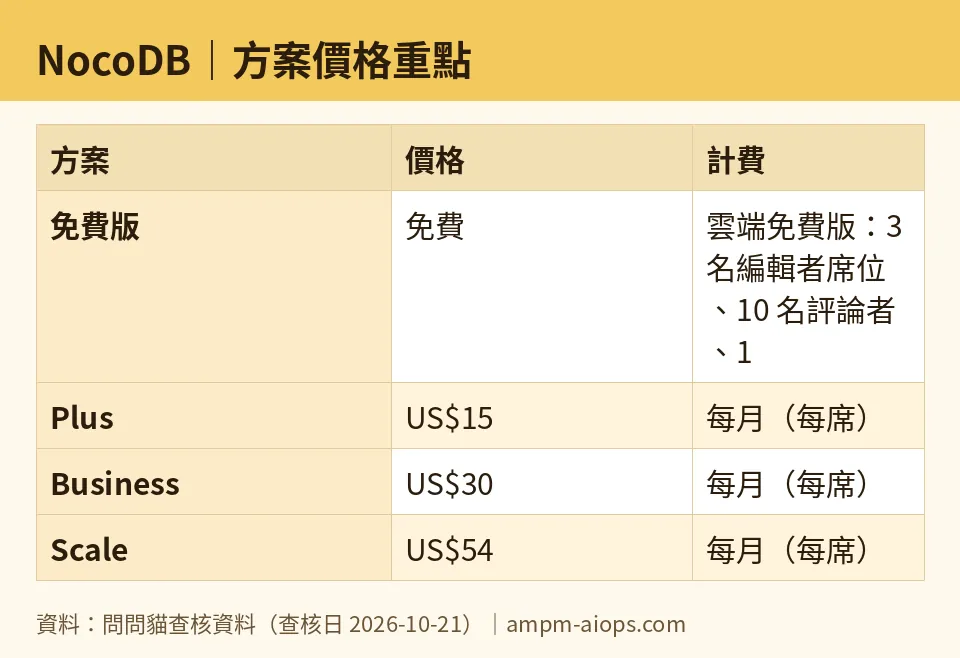
Figure: compiled by AMPM from its verified data (last verified 2026-10-21).
The per-seat rule worth doing the math on
Here is where NocoDB gets interesting, and where the pricing page buries the good part.
Plus is US$15 per seat on monthly billing. On annual billing it drops to US$12 per seat per month. It includes 50,000 records, 10 GB storage, 5,000 automation runs, and 50,000 API calls.
Business is US$30 per seat monthly, or US$24 per seat per month on annual billing. It includes 300,000 records, 100 GB storage, 120,000 automation runs, 1 million API calls, 10 external database connections, and SAML SSO — single sign-on, the corporate login that lets staff use their existing company account instead of a separate password.
Scale is US$54 per seat monthly, or US$45 per seat per month on annual billing, with a minimum of 3 seats. It includes 1 million records, 150 GB storage, 240,000 automation runs, 5 million API calls, Row Level Security (controls that decide which rows each user can see), and audit logs.
Now the part most readers miss. Plus and Business carry a cap. On annual billing, once you pay for 9 people, the whole team becomes unlimited — add as many users as you want beyond that without the bill climbing. NocoDB spells this out as an annual cap: Plus tops out at US$108 per month, and Business tops out at US$216 per month, both on annual billing.
That changes the shape of the decision. Per-seat pricing normally punishes growth — every new hire is another line on the invoice. Here the opposite happens past the 9th seat. For a team of 9, you are paying the cap. For a team of 40 on the same plan, you are paying the same cap. The bigger the team, the better the per-head value gets, which is the reverse of how seat-based tools usually work.
Note the asymmetry: Scale does not advertise this cap, and it demands a minimum of 3 seats. So the unlimited-team trick lives on Plus and Business only.
🔍 AMPM exclusive check
Two things the pricing page does not put front and center.
First, the cap. The page lists a per-seat price next to each plan, which trains your eye to multiply and assume linear cost. The annual cap — unlimited team members once you pay for 9 on Plus or Business — is the detail that actually decides whether this tool is cheap or expensive for you, and it is not where your eye lands first. We flag it because the per-seat framing misleads larger teams into thinking they can’t afford it.
Second, honesty about our own verification. NocoDB came into our tracker as an auto-entered challenger candidate, and these numbers have been through a single verification pass, not our usual three-way manual cross-check. Every figure above matches what the vendor’s official site and pricing page showed on 2026-10-21. We have not independently re-confirmed the cap behavior on a live billing account, so treat the “pay for 9, unlock unlimited” mechanic as the vendor’s stated claim until we re-verify. If the terms on the official page differ from what you see at signup, the live page wins.
Verdict: who should use it, who should skip it
Use the self-hosted community edition if you are comfortable running a Docker container and you want a real database with no row cap for nothing. This is the strongest free offer in the category and the obvious starting point for anyone technical.
Use the cloud free tier if you want zero setup and your project fits inside 1,000 records, 100 automation runs, and 1,000 API calls a month. Great for a personal tracker, a small form-driven workflow, or a trial before you commit.
Pay for Plus or Business if your team is heading past a handful of editors. The cap means a growing team is exactly who benefits — you reach the ceiling at 9 paid seats on annual billing and then add people for free. If you employ external-database connections or SAML SSO, Business is the entry point for those.
Skip the paid cloud tiers if you are a solo user or a two-person team that stays under the free limits, or if you would rather self-host and avoid subscriptions entirely. At small headcount you pay full per-seat rate with none of the cap benefit, and the self-hosted edition may cover you for free.
The short version: NocoDB’s per-seat label makes it look like a tool that gets pricier as you grow. For Plus and Business on annual billing, past the 9th seat, it does the opposite.
Written: 2026-10-21 Price last verified: 2026-10-21 Tool last health-checked: 2026-10-21
🔗 Related on AMPM
📎 Sources
All prices and quotas in this article come from AMPM’s verified dataset for NocoDB (last verified 2026-10-21); primary sources:
🐾 Meet the cats: AMO and PIMI

AMPM is a Taiwan-based AI-tool pricing watchdog. Our motto: ask before you subscribe. Two cats argue every tool from two sides:
- ☀️ AMO — the budget-minded cat. Always asks: is the free tier enough, and is paying actually worth it?
- 🌙 PIMI — the performance-minded cat. Cares about whether it works well, fast, and gets your job done.

When they are done arguing, you know whether to pay. Every number is checked by us, with the verification date at the end.
🐾 Our sister sites also checked
Read next
- NocoDB Full breakdown: pricing, features and real-world limits
- NocoDB Is the free quota enough?
- NocoDB Alternatives
- Free plan limits for every AI tool we track
