Ask Cat › AI Tool Summary › Gemini Notebook
[Pricing] Gemini Notebook Pricing: Free Tier Is Generous, But Google's Own Pages Disagree
- Free tier: There is
- Cheapest paid plan: US$4.99/mo and up
- Free quota: The free version is sufficient and permanently free, with limits on …
- Last checked: 2026-10-05
Article last updated: 2026-10-07



Gemini Notebook — the tool most people still call NotebookLM — lets you feed it documents, PDFs, web pages, and YouTube videos, and it gives you summaries, answers, and even a podcast-style audio briefing built from your own sources. We went looking for its pricing to settle a simple question: is the free tier actually enough, and if not, what does paying get you? The answer turned out to be messier than expected, because Google’s own pricing pages don’t agree with each other.
Here’s the short version. The free tier is permanent, requires no credit card, and covers most ordinary use. Paying doesn’t buy you a “NotebookLM subscription” at all — it buys you a Google AI plan (Plus, Pro, or Ultra), and higher NotebookLM quotas come along as a side effect. That distinction matters for anyone trying to budget, because the price you pay is set by what Gemini features you want, not by what NotebookLM alone is worth to you.
What the free tier actually gives you
No subscription, no card on file — just a Google account login. The limits, as last verified:
- 100 notebooks. A notebook is a workspace tied to one topic or project; you can run 100 of them at once.
- 50 sources per notebook. A “source” is anything you feed in — a PDF, a web page, a YouTube video, a Google Doc. Each notebook can hold up to 50 of them.
- 50 chat queries per day. This is the question-and-answer limit, and it’s the one most people hit first. It resets daily.
- Audio summaries included. The podcast-style voice overview — NotebookLM’s most talked-about feature — works on the free tier, no upgrade needed.
For a student juggling a few research topics or a freelancer organizing client notes, 100 notebooks and 50 sources each is a lot of headroom. The daily chat cap is the real ceiling, and it only bites if you’re running dozens of back-and-forth questions in a single day.
One catch applies at every tier below the most expensive: exported infographics and presentation-style outputs carry a watermark. According to Google’s own usage comparison table, “Watermark Removal” is listed as No for Free, Plus, and Pro — only the top-tier Ultra plans turn it off.

Figure: felloai.com official pricing page, captured 2026-10-07.
Paid plans: you’re buying Gemini, NotebookLM comes along for the ride
There’s no standalone NotebookLM subscription. Instead, four Google AI plans each bundle in a bigger notebook allowance:
- Google AI Plus — US$4.99/month. The newest, cheapest paid tier. It raises your Google storage allotment to 400GB and includes a higher NotebookLM quota, though the exact notebook/source/query numbers for this specific tier weren’t spelled out in Google’s materials the way Pro’s are (below).
- Google AI Pro — US$19.99/month. This is where the jump gets concrete: notebooks go from 100 to 500, sources per notebook go from 50 to 300, and daily chat queries go from 50 to 500. Also includes 5TB of storage.
- Google AI Ultra 5x — US$99.99/month. Five times the usage of Pro, with 20TB of storage. This is also the tier where watermark removal kicks in.
- Google AI Ultra 20x — US$199.99/month. Twenty times the usage of Pro, 30TB of storage, and NotebookLM’s top quota ceiling.
If you already pay for Gemini for other reasons — writing, coding help, Google Workspace integration — the NotebookLM quota bump is effectively free, since you’re not paying extra for it specifically. But if NotebookLM is the only reason you’d subscribe, you’re paying US$19.99 a month for a 5x notebook ceiling and a 10x source ceiling you may never approach, given how roomy the free tier already is.
The cheapest upgrade path
If the free tier’s 50-query daily cap is genuinely the thing stopping you, the cheapest way past it is Google AI Pro at US$19.99/month — that’s the plan with documented quota increases (500 notebooks, 300 sources, 500 daily queries). The US$4.99 Plus tier is cheaper, but based on the data we have, it’s sold on storage (400GB), not on a stated NotebookLM quota jump — so if your bottleneck is specifically the daily chat limit, Plus may not move that number at all. Paying is not worth it if your actual complaint is the watermark on exported infographics: that only disappears at Ultra, a 20x-to-100x price jump from Pro depending on which Ultra tier you pick.
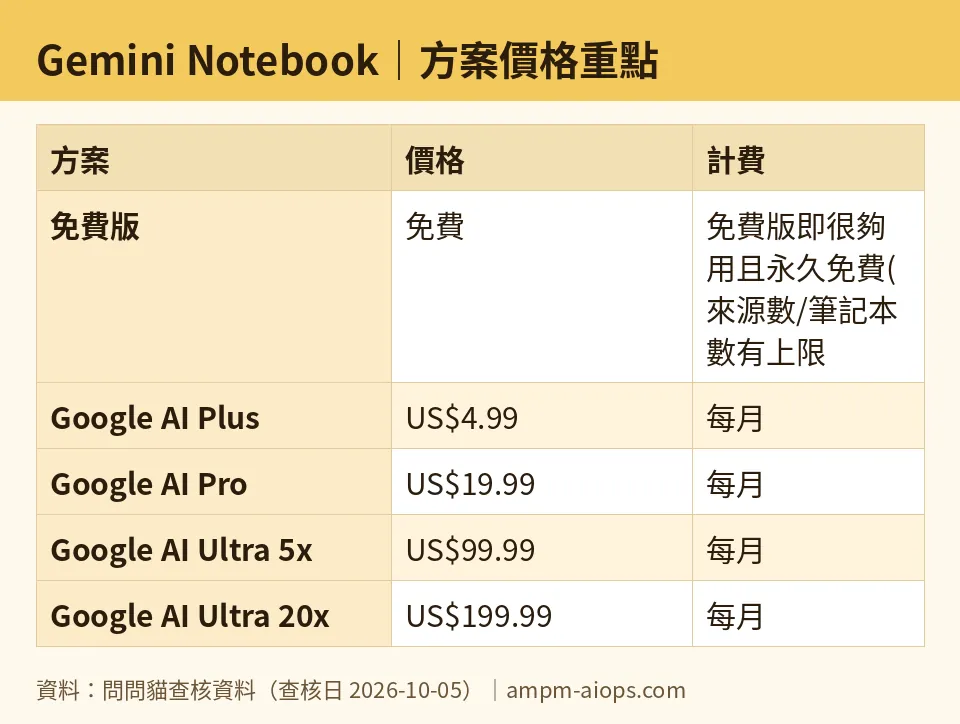
Figure: compiled by AMPM from its verified data (last verified 2026-10-05).
🔍 AMPM exclusive check
We compared Google’s own pricing pages against each other, not against a vendor claim — and they don’t match.
On gemini.google’s subscription page, “Google AI Plus” is listed at US$4.99/month with 400GB of storage. But one.google.com/about/plans lists a similarly positioned plan at US$9.99/month with 2TB of storage. These are not the same SKU, despite the overlapping branding — different price, different storage, on two pages Google controls itself. We’d originally logged the US$4.99 Plus plan’s storage as 2TB; on closer check, that 2TB figure belongs to the separate US$9.99 one.google.com plan, not the US$4.99 gemini.google one. We’ve corrected that in the breakdown above.
The Ultra tier has its own mismatch. Older pricing references show a single US$249.99 Ultra price. The current gemini.google/subscriptions page instead shows a two-tier split: US$99.99 for a 20TB/5x-usage Ultra plan, and US$199.99 for a 30TB/20x-usage Ultra plan. Neither Ultra tier appears on one.google.com/about/plans at all — that page simply doesn’t list it. So depending on which Google page you land on, you could come away thinking Ultra costs US$249.99, US$199.99, or isn’t available as a separate purchase at all.
Practical takeaway: if you’re comparing plans, use the gemini.google/subscriptions page, not one.google.com/about/plans — the two pages describe overlapping but distinct products at different prices, and only one of them currently matches what you get through the NotebookLM interface itself.
☀️ AMO, the budget-minded cat

AMO doesn’t care about 30TB of storage. AMO cares about whether the free 50-notebook, 50-source, 50-query setup gets a real task done today, and for Gemini Notebook, it mostly does. A hundred notebooks and 50 sources each is more room than most people fill, and the daily chat cap resets every 24 hours, so even a heavy research day just means picking it back up tomorrow for free. The free tier also already includes the audio-summary feature that gets the most attention — that’s not held back as a paywall carrot.
Is paying worth it? Only if the 50-query daily ceiling is a real, recurring wall for you — not a hypothetical one. If it is, the jump to Google AI Pro at US$19.99/month gets you documented, concrete increases: 500 notebooks, 300 sources each, 500 daily queries. That’s a real 10x on the source limit and a real 10x on daily queries, not a vague “more.” But AMO would skip the US$4.99 Plus tier specifically for NotebookLM purposes — it buys storage (400GB) without a stated NotebookLM quota increase, so if your bottleneck is chat limits, Plus doesn’t touch it. And AMO would never pay for Ultra (US$99.99 or US$199.99/month) just to remove a watermark on exported infographics unless that output is actually part of a paid workflow — that’s a lot of money for one cosmetic fix.
Verdict: who should use it, who should skip it
Use the free tier if: you’re a student, researcher, or anyone organizing reading material into a handful of active projects. 100 notebooks and 50 sources each will outlast most people’s actual workload, and the audio-summary feature — the one everyone talks about — is already unlocked.
Upgrade to Google AI Pro (US$19.99/month) if: you’re hitting the 50-query daily wall regularly, or you’re already paying for Gemini Pro for other reasons and the 500-notebook, 300-source, 500-query bump is a bonus rather than the reason you’re paying.
Skip Plus (US$4.99/month) for NotebookLM specifically if: your goal is a bigger notebook quota — the data shows it buys storage, not a stated chat or source increase.
Skip Ultra (US$99.99 or US$199.99/month) if: the only thing you want is watermark-free exports. That’s an expensive way to remove one cosmetic mark unless you’re already using Ultra’s other 20TB-to-30TB storage and 5x-to-20x usage for unrelated reasons.
Written: 2026-10-07 Price last verified: 2026-10-05 Tool last health-checked: 2026-10-06
🔗 Related on AMPM
📎 Sources
All prices and quotas in this article come from AMPM’s verified dataset for Gemini Notebook (last verified 2026-10-05); primary sources:
🐾 Meet the cats: AMO and PIMI

AMPM is a Taiwan-based AI-tool pricing watchdog. Our motto: ask before you subscribe. Two cats argue every tool from two sides:
- ☀️ AMO — the budget-minded cat. Always asks: is the free tier enough, and is paying actually worth it?
- 🌙 PIMI — the performance-minded cat. Cares about whether it works well, fast, and gets your job done.

When they are done arguing, you know whether to pay. Every number is checked by us, with the verification date at the end.
🐾 Our sister sites also checked
Let's take a look at these
- Gemini Notebook Comprehensive Introduction: Pricing, Features, and Actual Limitations
- Gemini Notebook Is the free quota enough?
- Gemini Notebook Alternatives
- Comprehensive Free Quota List for All Tools
More verified articles on this tool
- [Alternatives] Does Gemini Notebook's free version hold up, or do you need to pay for watermark-free research?
- [Verified] NotebookLM's free tier allows 50 questions a day, but removing the watermark costs US$99.99 a month
- Gemini Notebook Goes Compute-Based on September 2, 2026: Five-Hour Refreshes, Tier Multipliers, and the Old Daily Table Google Never Took Down
