Ask Cat › AI Tool Summary › Notion AI
[Special] Notion AI's Free Tier Only Buys You a Trial — Real AI Features Start at US$12 a Seat
- Free tier: There is
- Cheapest paid plan: US$12/mo and up
- Free quota: The free version has limited AI functionality (trial quota for …
- Last checked: 2026-10-07
Article last updated: 2026-10-07



Notion built its reputation as the one app that replaces your notes, your wiki, and your project boards. The AI layer on top used to feel like a bonus thrown in for everyone. As of our 2026-10-06 check, that’s no longer true. If you’re asking whether the Notion AI free tier still gets you real AI work, the short answer is: it gets you a trial, not the tool.
The free plan does include some AI, but it’s limited to a trial quota for things like generating a file or auto-filling a database. The features people actually want — Notion Agent handling multi-step tasks, AI Meeting Notes transcribing and summarizing calls — aren’t in the free plan at all. They live behind the Plus and Business paywalls. Here’s what that split actually costs, and what the free plan still gives you for nothing.
What “free” actually includes
Outside of the AI trial, the free Notion plan is more generous than you might expect for a tool this deep. You get unlimited pages and blocks for individual use (teams of two or more hit limits), basic forms, a basic public website you can publish from a page, a built-in calendar that can link multiple calendars, and full databases with sub-tasks and dependencies. Up to 10 external guests can collaborate with you, and page history — the record of past edits you can roll back to — goes back 7 days.
The catches are small but real. File uploads on the free plan cap at 5MB each. And if you publish a public form, it carries a visible Notion watermark — there’s no way to remove that branding without paying.
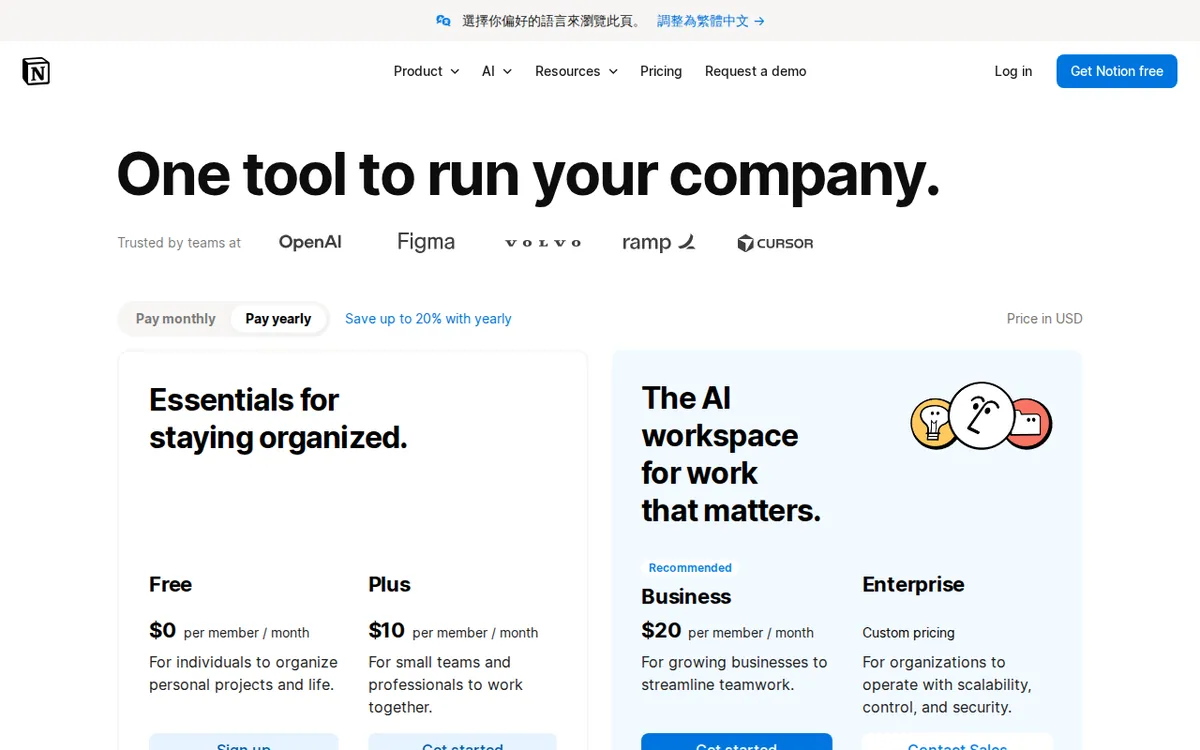
Figure: notion.com official pricing page, captured 2026-10-07.
The jump to Plus: US$12 a seat, or US$10 if you commit for a year
A “seat” is just Notion’s word for one paid user login on your workspace — you buy one per person who needs the paid plan, not one per workspace.

Illustration: The free tier offers merely a tiny trial sample, while full automated multi-tasking tools remain locked behind paid barriers.
Plus is priced at US$12 per seat per month if you pay monthly. Pay for the year upfront and it drops to US$120 per seat per year, which works out to a US$10 monthly average. Plus is where the AI trial becomes more useful and where several of the free plan’s annoyances disappear: the Notion branding comes off your public forms, you can customize how your forms and sites look, charts and collaborative blocks become unlimited, and file uploads go from 5MB to effectively unlimited, with a roughly 5GB cap per individual file. You also get basic integrations with tools like Slack and Google Drive.
Business, at US$24 per seat monthly (or US$240 per seat annually, a US$20 monthly average), is the plan that actually ships the AI features people mean when they say “Notion AI.” That’s Notion Agent — described by Notion as handling multi-step tasks using both your workspace’s internal content and web context — plus AI Meeting Notes, which automatically records meeting notes and action items. Business also adds an Enterprise Search beta that can pull results from connected apps like Slack and GitHub, SAML single sign-on, fine-grained database permissions, page verification, private team spaces, and domain verification.
Above that sits Enterprise, which Notion doesn’t price publicly — you have to talk to sales to get a number.
There’s one more free path worth knowing: students with a verified school email can get a full Plus plan, one seat, at no cost. Notion’s site doesn’t post an expiration date on that offer, so treat it as “free for now” rather than permanent.
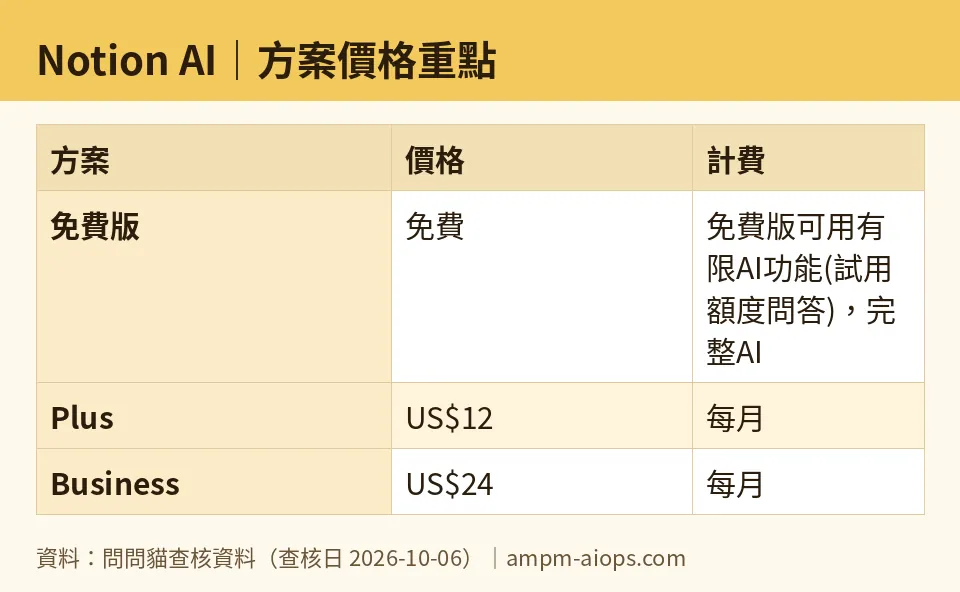
Figure: compiled by AMPM from its verified data (last verified 2026-10-06).
🔍 AMPM exclusive check
Here’s where our own numbers needed a correction, and it’s worth being upfront about it. Notion’s pricing page defaults to showing annual billing — the toggle on that page ships pre-checked to “year” — so the first price a visitor sees for Plus is the US$10-a-month annual-average figure, not the US$12 monthly rate you’d actually pay if you don’t commit for twelve months. A reader skimming the page for five seconds can walk away thinking Plus costs US$10 a month with no commitment, when the no-commitment price is US$12.
We’d previously recorded Plus and Business using the annual per-seat figure in the field meant for monthly billing — effectively repeating the page’s own default framing without flagging it. We’ve corrected that in our data: Plus is US$12/month billed monthly or US$120/year billed annually; Business is US$24/month billed monthly or US$240/year billed annually. If you’re comparing Notion AI’s cost against other tools, make sure you’re comparing the same billing cadence — monthly to monthly, annual to annual — because the page’s default view will otherwise skew the comparison in Notion’s favor.
☀️ AMO, the budget-minded cat

AMO only cares about one thing: is the free version enough, and if not, is paying actually worth it. For Notion, the free plan’s non-AI side holds up fine — unlimited personal pages, a real calendar, real databases, 10 guest seats, that’s a genuinely usable free workspace. But the AI itself on free is just a trial quota for generating files or filling in a database. If what you wanted was AI that drafts, summarizes, or answers questions about your notes day after day, the free plan doesn’t give you that — it gives you a taste.
So is it worth paying US$12 a month (or US$10/month if you pay US$120 upfront for the year) for Plus? AMO’s take: only if you actually need the things Plus unlocks that aren’t AI — no watermark on public forms, unlimited file uploads up to about 5GB a file, unlimited charts and collaborative blocks. Plus’s AI trial doesn’t go much further than free’s. The real AI jump is Business, at US$24/month or US$240/year (US$20/month average), where Notion Agent and AI Meeting Notes actually live. That’s a US$12-to-US$24 jump in monthly price just to get from “AI trial” to “AI that does meeting notes for you” — a real gap, not a rounding error. If you’re a student, check your school email first: a verified one gets you a full Plus seat free, no stated cutoff date.
Verdict: who should use it, who should skip it
Stick with free if Notion is your personal notes-and-database app and you rarely touch AI — the 7-day page history, 10 guest seats, and unlimited personal pages cover most solo use without AI at all. Pay for Plus (US$12/month or US$120/year) if the watermark on your public forms or the 5MB upload cap is actively in your way — you’re paying for storage and polish, not AI. Pay for Business (US$24/month or US$240/year) only if Notion Agent or AI Meeting Notes would genuinely replace a task you do by hand today, like writing up meeting summaries. If you’re a student, claim the free Plus seat through your school email before paying anyone. And if your team is large enough to need Enterprise, budget time to actually call sales — there’s no published number to compare against.
Written: 2026-10-07 Price last verified: 2026-10-06 Tool last health-checked: 2026-10-06
🔗 Related on AMPM
📎 Sources
All prices and quotas in this article come from AMPM’s verified dataset for Notion AI (last verified 2026-10-06); primary sources:
🐾 Meet the cats: AMO and PIMI

AMPM is a Taiwan-based AI-tool pricing watchdog. Our motto: ask before you subscribe. Two cats argue every tool from two sides:
- ☀️ AMO — the budget-minded cat. Always asks: is the free tier enough, and is paying actually worth it?
- 🌙 PIMI — the performance-minded cat. Cares about whether it works well, fast, and gets your job done.

When they are done arguing, you know whether to pay. Every number is checked by us, with the verification date at the end.
🐾 Our sister sites also checked
Let's take a look at these
- Notion AI Comprehensive Introduction: Pricing, Features, and Actual Limitations
- Notion AI Is the free quota enough?
- Notion AI Alternatives
- Comprehensive Free Quota List for All Tools
More verified articles on this tool
- How to Set Up a Notion Custom Agent: Three Ways to Create One, Four Trigger Types, and What to Throttle Before Credits Start on 15 October
- Notion Custom Agents Start Billing Credits on October 15: US$10 per 1,000, and Two Official Pages Disagree on Who Can Use Them
- Notion Affiliate Program 2026: Great Terms on Paper, But the Page Says It Is Closed to New Applicants
