[How-to] Set Up Omnisend's Free Plan: What a New Store Can Run Before Upgrading
- Free tier: Yes
- Cheapest paid plan: US$16/mo and up
- Free quota: Up to 250 contacts per month, 500 emails, 60 international SMS …
- Last checked: 2026-10-30
Article last updated: 2026-11-01



Omnisend is an email and text-message marketing tool built for online stores. This guide is for a beginner who wants to start on the free plan, run something useful, and know when to stop. I take a practical angle: what to set up first, what the caps allow, and which blockers you’ll hit.
One note before the steps. Prices vary by country, and we checked from Taiwan. Every US$ figure below is the one listed on Omnisend’s pricing page.
What the free plan gives you
Each month, the free plan allows:
- Up to 250 contacts (the people on your list)
- 500 emails
- 60 international SMS (text messages)
- 500 web push notifications (short browser alerts sent to people who opted in)
It also includes basic automation and all core features. Automation means emails that send themselves when something happens, such as someone signing up. The catch is branding: your emails and sign-up forms carry an Omnisend logo.
There is no card-paywall feature gating here, at least not on the list we have. The limits are on volume, plus the logo.
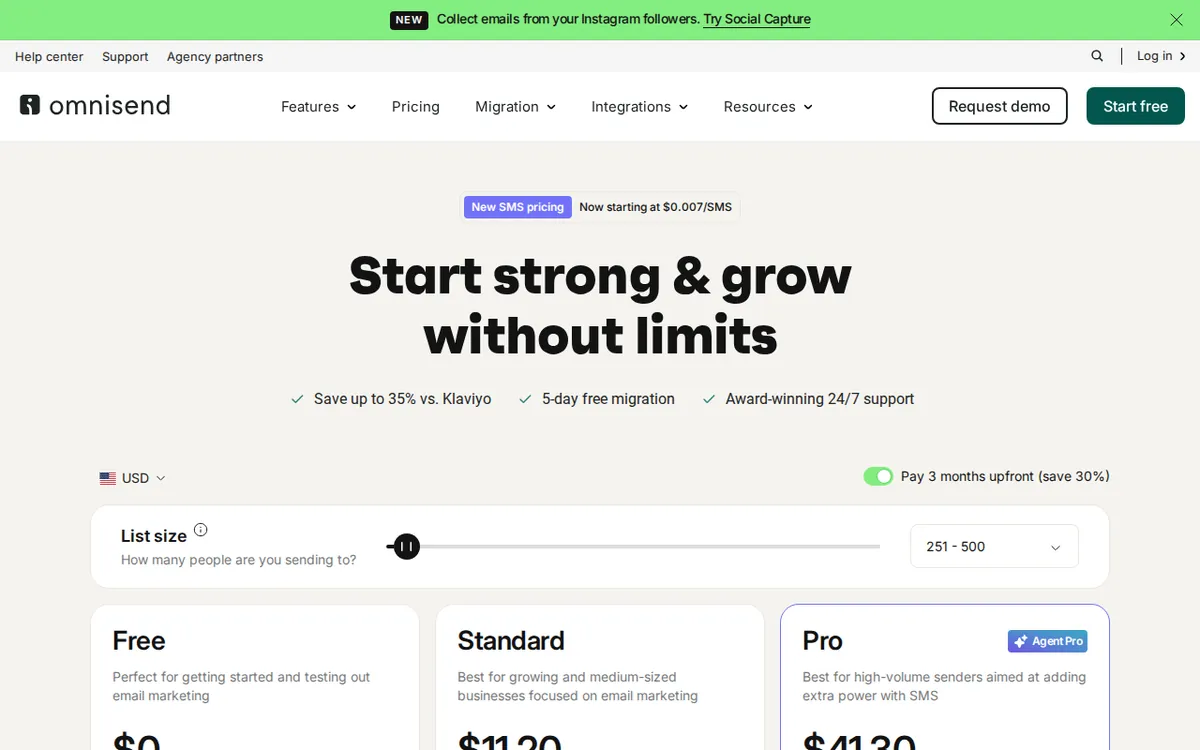
Figure: omnisend.com official pricing page, captured 2026-11-01.
Set it up in five steps
These are the steps in the order I’d do them. The exact menu names may differ slightly on the live site, so treat them as a map, not a screenshot.
1. Create the free account. Go to omnisend.com and sign up. Pick the free plan, not a trial of a paid one.
2. Connect your store. Omnisend is built for ecommerce, so linking your shop is the first real job. This is what lets it see customers and orders. If you run Magento, an Omnisend plugin for it is published on GitHub. For other platforms, check the integrations list on the official site.
3. Add a sign-up form. Put a form on your site to collect email addresses. The form will show the Omnisend logo on this plan. Accept that for now.
4. Build one automation. Start with a welcome email. It’s the simplest automation: someone joins, they get one message. It uses very few of your 500 monthly emails and it works while you do other things.
5. Send one campaign. A campaign is a one-off email to your list. Send it only after the welcome flow is live, so you know where your quota is going.
The blockers beginners hit
The 250-contact ceiling. The cap counts people on your list, not people who open emails. A growing form will fill it. Before you promote your form, decide what you’ll do when you get close: clean out dead addresses, or upgrade.

Illustration: A small pitcher cannot fill many waiting cups once sending frequency multiplies against the contact list.
The 500-email ceiling. This one arrives first. The email cap is small next to the contact cap, so a full list cannot get many sends in a month. Automations use the same pool as campaigns. Every welcome email counts. Check your usage before you schedule a big send.
The logo. If you’re sending to customers and want a clean look, the logo is the main reason people move up. Standard removes it.
The small SMS pool. 60 international texts is a taste, not a program. Use it to test one message, and don’t build a text strategy on it.
Unclear overage rules. Our data does not say what happens if you pass a cap. It might block sends, or it might push you to upgrade. Find out on the official page before you rely on a send going out at a deadline.
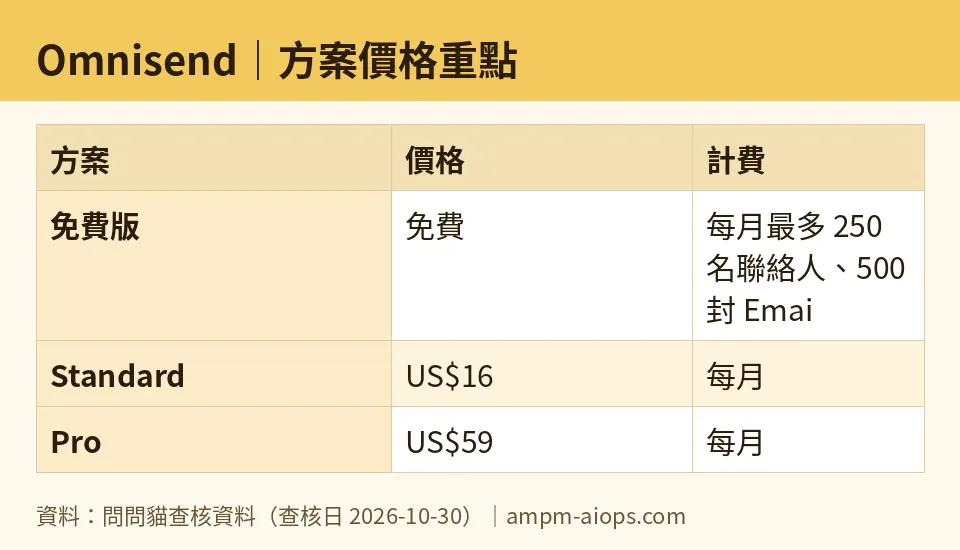
Figure: compiled by AMPM from its verified data (last verified 2026-10-30).
🔍 AMPM exclusive check
Nothing differed from the official page this time. The free-plan limits and both paid prices match what Omnisend lists, checked 2026-10-30.
Two limits on that check, stated plainly. First, this tool has had one round of checking. We have not cross-checked it against three independent sources the way we do for our longer-tracked tools. Second, our data does not cover what happens when you go over a cap, or the fine print on commercial use. Read both on the official terms before you build a business process on the free plan.
The data also gives no yearly price. Only monthly billing is listed, so we can’t tell you what an annual plan costs, or whether one exists.
☀️ AMO, the budget-minded cat

Is free enough? For a store that is just starting, often yes. You get 250 contacts, 500 emails, 60 international texts and 500 web push notifications each month, with basic automation and all core features. That’s enough to test whether email works for your shop at all, with no monthly bill.
The costs are the logo and the volume. If you outgrow 250 contacts or 500 emails, the next step is Standard at US$16 per month. That starts at 500 contacts. You can send 12 times your contact count in emails, so 500 contacts means 6,000 emails a month. It also includes an SMS allowance, removes the logo, and adds 24/7 support.
So the first paid step buys a lot more email, support at any hour, and a clean look. If you already have a list near 500 people and you send regularly, US$16 is the sensible move. If your list is small and you send rarely, stay free.
Pro is US$59 per month and starts at 2,500 contacts. It gives unlimited email, and each month it returns free SMS credits equal to your subscription fee. That’s a big jump from Standard. Skip it until your list is far past where free or Standard make sense.
My rule: stay free until the logo or the email cap actually costs you a sale. Then pay US$16, not more.
🌙 PIMI, the performance-minded cat

Does it do the job? I can speak to what the plan includes, not to speed or inbox placement. Our data has no measurements of delivery speed or how often emails land in the inbox, so I won’t guess.
What I can say: the free plan has all core features and basic automation. That means a real welcome flow and real campaigns, not a crippled demo. The weak point is capacity. With 500 emails a month, you’ll hit the wall before you learn much from your results.
Standard changes that. At 500 contacts you get 6,000 emails a month, which gives you room to run a welcome flow and regular campaigns together. You also get texts included and 24/7 support. If a send goes wrong on a Friday night, support at any hour matters.
Pro is where the performance case is strongest. It starts at 2,500 contacts and US$59 per month. You get unlimited email, advanced analytics, and dedicated support. Analytics is what tells you which emails earned money. If your list is big enough to experiment on, that’s the upgrade that pays back.
For a beginner on free, the practical advice: run one welcome automation first, keep campaigns few, and watch your monthly email count so a big send doesn’t stall.
Verdict: who should use it, who should skip it
Use the free plan if you run a small online store, your list is under 250 people, and you want to learn email marketing without paying. Set up the welcome flow and one campaign, then see what happens.
Move to Standard (US$16 per month) if your list nears 500 contacts, you send often, or the Omnisend logo bothers you. You get 12 times your contact count in emails, an SMS allowance, no logo, and round-the-clock support.
Look at Pro (US$59 per month) if you have at least 2,500 contacts and need unlimited email and deeper analytics.
Skip it if you aren’t running an online store. It’s built for ecommerce, and the extras are aimed at shops. Also skip the free plan if you need to send a lot of email right away, since 500 a month runs out fast.
Written: 2026-11-01 Price last verified: 2026-10-30 Tool last health-checked: 2026-11-01
🔗 Related on AMPM
📎 Sources
All prices and quotas in this article come from AMPM’s verified dataset for Omnisend (last verified 2026-10-30); primary sources:
🐾 Meet the cats: AMO and PIMI

AMPM is a Taiwan-based AI-tool pricing watchdog. Our motto: ask before you subscribe. Two cats argue every tool from two sides:
- ☀️ AMO — the budget-minded cat. Always asks: is the free tier enough, and is paying actually worth it?
- 🌙 PIMI — the performance-minded cat. Cares about whether it works well, fast, and gets your job done.
When they are done arguing, you know whether to pay. Every number is checked by us, with the verification date at the end.
🐾 Our sister sites also checked
Read next
- Omnisend Full breakdown: pricing, features and real-world limits
- Omnisend Is the free quota enough?
- Omnisend Alternatives
- Free plan limits for every AI tool we track
