[Review] OpenRouter pricing: Does One API Beat Separate Subscriptions?
- Free tier: Yes
- Cheapest paid plan: US$0/mo and up
- Free quota: More than 25 free models, 4 free providers, daily limit of 50 …
- Last checked: 2026-10-14
Article last updated: 2026-11-01



OpenRouter sells one thing: a single account that reaches hundreds of AI models from different companies. You write code against one API (the interface programs use to talk to an AI model) and pick the model per request. It also routes around outages and hunts for the cheaper provider.
We did not use it hands-on for this piece. This is our verdict after reading the verified pricing data. Every point below traces back to that data. Our angle is simple: the free tier is a demo, the paid side is fair but not free, and the real question is whether you need a switchboard at all.
What the free tier actually gives you
The headline sounds generous. The free tier includes 25 or more free models from 4 free providers. You need an account, but there’s no watermark, and commercial use is allowed.

Illustration: Inspecting the same pricing scroll, the cats discover two conflicting stacks of model blocks between the main field and the footnote.
Then comes the catch. All of those free models share one cap: 50 requests per day. It resets daily. A request is one call to a model. If you test five models, you share the same 50 calls among them. Our data calls this the main limit of the free tier, and we agree.
Two more limits matter:
- Paid models are off the table. You can’t touch them until you add credits. Credits are prepaid balance that gets used up as you make calls.
- Support is community only. No ticket line. You ask other users.
The free list also moves. Providers change their policies, and the list changes with them. The number of free models you see on the day you sign up may not match what we recorded.
Automatic price routing does work on the free tier. When several providers host the same model, the system picks a cheaper or available one.
Our reading: the free tier is good for trying the interface, checking that your code works, and light personal tinkering. It is not a work tool. Our own data says the same: real use means topping up.
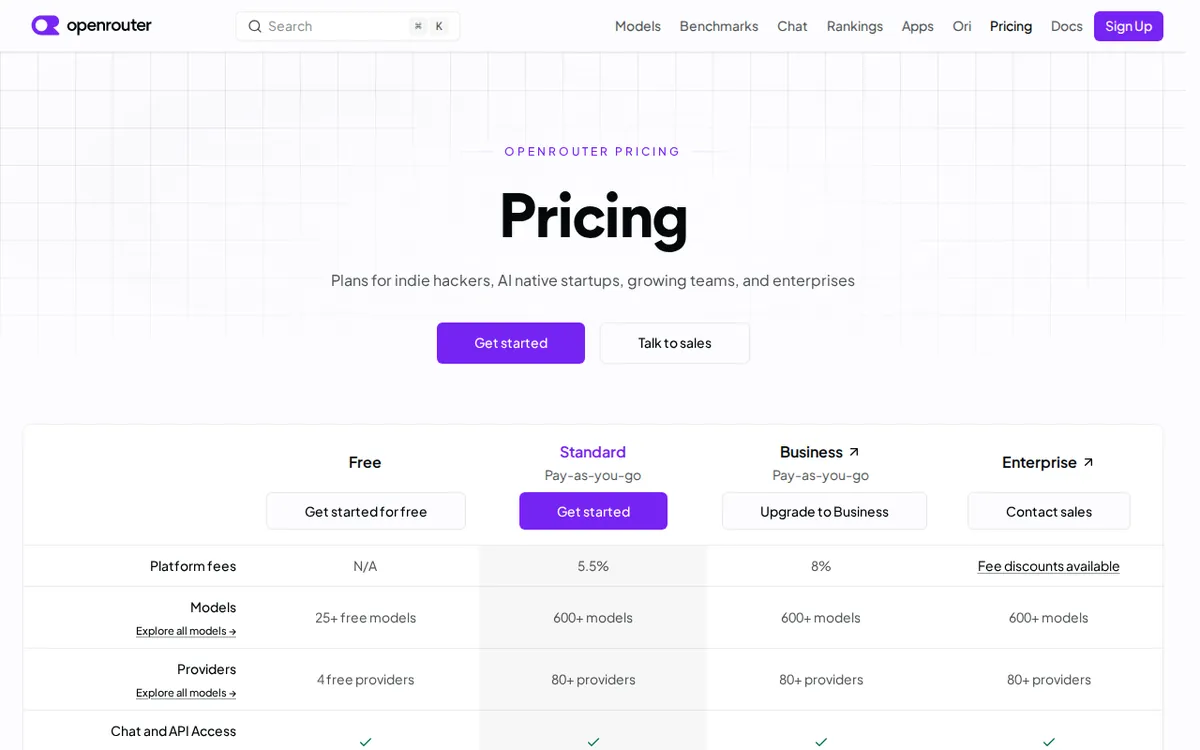
Figure: openrouter.ai official pricing page, captured 2026-11-01.
How pay-as-you-go works, and where the fee bites
Pay-as-you-go has no monthly fee and no minimum spend. You add credits and spend them. The model itself is billed at each provider’s own list price. OpenRouter earns its money on the top-up.
That top-up charge is a 5.5% platform fee. Our worked example: add US$100 in credits and you are charged about US$105.5. The credits can be spent on any of the models in the catalog.
You can pay by credit card or crypto. The plan includes:
- One API for the whole model catalog
- Automatic price routing, picking the cheapest or fastest provider
- Automatic rerouting when a provider fails
- Usage analytics
It does not include fee discounts, dedicated rate limits, an SLA (a written service guarantee) or dedicated support.
There is also BYOK, short for “bring your own key”. You plug in your own provider API keys and OpenRouter just routes the traffic. On pay-as-you-go, BYOK inference up to US$25,000 per month at list price carries no fee. Above that, the fee is 5%. Enterprise raises that free band to US$200,000 per month at list price, with the same 5% beyond it. That Enterprise figure comes from the BYOK limits row on the pricing page. It is not a normal usage figure.
Enterprise is the negotiated tier. It offers a platform fee discount, dedicated rate limits, an SLA and a shared Slack channel. The data’s own advice is blunt: it only pays off at high volume. Individuals and small teams should use pay-as-you-go.
The three things that annoy us
1. The 50-request ceiling is shared. “25+ free models” is a big number on the page. It shrinks fast when the whole pool shares 50 calls a day. A modest test script can burn through that before lunch. The gotcha is in how the offer is framed, not in hidden terms.
2. The 5.5% top-up fee is a tax on convenience. You pay the providers’ list price, and then you pay 5.5% on top, up front. If you already hold a key with one provider and only use that provider, the fee buys you little. It is the price of the switchboard, and you should know it before you load a large balance.
3. The numbers around the catalog don’t sit still. Our records carry two model counts: 400+ and 500+. They carry two provider counts as well: 70+ and 80+. More on that in the next section. For a buyer, the lesson is the same as with the free list. Don’t pick this tool for a specific model count. Check that the model you need is on the list today.
🔍 AMPM exclusive check
Here is where our records differ from each other, and what we can and can’t say about it.
Our data holds two sets of catalog figures. The older entries say 400+ models and 70+ providers. The pay-as-you-go note, updated 2026-08-22, says 500+ models and 80+ providers, and describes the scale as grown since earlier records. So both numbers are real entries in our file. The newer one reflects growth, not an error.
We read the official pricing page directly on 2026-07-31. Our automated daily checks then compared the quoted prices and quotas against the source from 2026-09-11 through 2026-10-14. They found no changes. Those checks cover prices and quotas, such as the 50 requests per day, the 5.5% fee and the BYOK limits. We did not re-count the model catalog ourselves in that period.
So here is what we can stand behind. The money figures matched the official page at our last check, 2026-10-14. For the catalog size, treat 500+ models and 80+ providers as the newer reading, and treat the older 400+ figure as out of date. Treat both as “hundreds”, not an exact count.
☀️ AMO, the budget-minded cat

Is free enough? For tinkering, yes. For anything else, no.
Free gives you 25+ models, 4 free providers and 50 requests a day, with no card and no watermark. Commercial use is allowed. That is a fair sandbox. But 50 calls shared across every free model runs out quickly. If you are building something that real users touch, you will hit the wall.
Is paying worth it? It depends on how you use AI today. Pay-as-you-go has no monthly fee and no minimum. The data compares it to a US$20 monthly subscription. If you only use top-tier models now and then, paying per use usually comes out cheaper than carrying that subscription. If you use one model all day, every day, the subscription may win. We have no usage numbers to calculate that for you, and we won’t guess.
The cost to watch is the 5.5% fee. Add US$100 in credits and you pay about US$105.5. That is a real premium over going direct. In return you get one balance, one bill and one API for many models. You also don’t have to sign up with each provider.
If you are a heavy user with your own provider keys, BYOK is the budget lever. Inference up to US$25,000 per month at list price carries no fee. That is far above what a solo user will reach, so for most readers it means the platform fee on BYOK traffic is zero in practice. Past that line it is 5%.
AMO’s call: start on free to test the interface. Top up a small amount when you hit the cap. Skip Enterprise unless a procurement team is involved.
🌙 PIMI, the performance-minded cat

Does it do the job? On features, the data says yes. We have no speed benchmarks, no latency tests and no output-quality comparisons, so we make no claims about how fast any model responds. What we can speak to is what the platform is built to do.
Automatic routing picks the cheapest or fastest provider for a given model. That works on the free tier too. When a provider fails, traffic is automatically rerouted. For anyone running something in production, that is the main reason to use an aggregator at all. One provider outage should not take your app down.
You also get usage analytics on pay-as-you-go. That helps you see which models eat your credits. Context length, meaning how much text a model can read at once, depends on the model you choose. OpenRouter doesn’t change that.
Where performance runs out: pay-as-you-go carries no SLA, no dedicated rate limits and no dedicated support. If your product needs a written uptime guarantee or a guaranteed request rate, that sits in Enterprise. Enterprise adds an SLA, dedicated rate limits, negotiable fee discounts and a shared Slack channel. It only makes sense at large volume.
On the free tier, the 50-request daily limit caps any real workload, and support is community only. PIMI wouldn’t build anything serious on it.
PIMI’s call: the routing and failover are the genuine strengths. Test your actual models on a small top-up before you commit. And if uptime guarantees matter to your business, ask about Enterprise early.
Verdict: who should use it, who should skip it
Use it if:
- You want GPT, Claude, Gemini and open models behind one account and one bill, and you don’t want several subscriptions.
- You use premium models in bursts, not all day.
- You build software and want automatic failover between providers.
- You already hold provider keys and want one routing layer. BYOK is free up to US$25,000 per month at list price.
Skip it if:
- You rely on one model and one provider all day. The 5.5% top-up fee buys you little.
- You expect the free tier to carry real work. The 50 daily requests are shared across everything.
- You need an SLA or dedicated support without enterprise-scale volume. Pay-as-you-go doesn’t include them.
- You are picking a tool for an exact model count. Our records show both 400+ and 500+, and the list moves.
What it does well: one API, automatic price routing, automatic rerouting on provider failures, no monthly fee, and a free tier that is honest about being small. What costs you: the shared 50-request cap, the 5.5% top-up fee, and a catalog that changes under you.
Written: 2026-11-01 Price last verified: 2026-10-14 Tool last health-checked: 2026-11-01
🔗 Related on AMPM
📎 Sources
All prices and quotas in this article come from AMPM’s verified dataset for OpenRouter (last verified 2026-10-14); primary sources:
🐾 Meet the cats: AMO and PIMI

AMPM is a Taiwan-based AI-tool pricing watchdog. Our motto: ask before you subscribe. Two cats argue every tool from two sides:
- ☀️ AMO — the budget-minded cat. Always asks: is the free tier enough, and is paying actually worth it?
- 🌙 PIMI — the performance-minded cat. Cares about whether it works well, fast, and gets your job done.

When they are done arguing, you know whether to pay. Every number is checked by us, with the verification date at the end.
🐾 Our sister sites also checked
Read next
- OpenRouter Full breakdown: pricing, features and real-world limits
- OpenRouter Is the free quota enough?
- OpenRouter Alternatives
- Free plan limits for every AI tool we track
More verified articles on this tool
- [Special] OpenRouter's Free Tier: Many Models, One Shared Daily Cap
- [How-to] Getting Started With OpenRouter's Free Tier: Which Models Work, and Where the Cap Bites
- AI2 Took Apart Thousands of Benchmark Questions: What the Social-Bias Benchmark Really Measured
