[Special] OpenRouter's Free Tier: Many Models, One Shared Daily Cap
- Free tier: There is
- Cheapest paid plan: US$0/mo and up
- Free quota: More than 25 free models, 4 free providers, daily limit of 50 …
- Last checked: 2026-10-14
Article last updated: 2026-10-06



OpenRouter’s pitch is simple: one account, one API (the connection method apps use to talk to an AI model programmatically), access to 400+ models from different AI labs, with the service automatically routing your request to whichever provider has the model working and priced well at that moment. The free tier sounds generous on paper — more than 25 free models, no credit card required. But every one of those free models draws from the same bucket: a shared cap of 50 requests per day, reset once every 24 hours. That’s the number that actually decides whether the free tier works for you, and it’s buried well below the headline.
This piece breaks down exactly what the free tier gives you, what changes once you start paying, and where OpenRouter’s own numbers shifted between our checks.
What the free tier actually includes
As of our 2026-07-31 direct read of openrouter.ai/pricing, the free tier includes 25-plus free models supplied by four free providers, a cap of 50 requests per day that resets daily, and community support only — no dedicated help channel. You need a registered account to use it, and commercial use is allowed; there’s no watermark on outputs either.

Illustration: Despite a long row of waiting glasses, all models depend on a single stingy tap that quickly runs dry.
What you don’t get on the free tier is access to paid models — those require topping up your account balance first. You do still get OpenRouter’s automatic price-comparison routing even on the free tier: if a given model is offered by more than one provider, the system will pick whichever one is cheaper or actually online at that moment.
The practical problem is math, not access. Twenty-five-plus models sounds like plenty of room to experiment. But they’re not 25 separate quotas — they’re 25 doors into the same 50-requests-a-day room. Spend the morning testing four or five models to see which writes better copy or handles code more cleanly, and you can burn through the daily cap before lunch. OpenRouter’s own free-tier documentation flags this directly: the easiest thing to misunderstand is that “25+ free models” sounds like abundance, when the real constraint is the shared 50-request ceiling. Anyone planning to use OpenRouter’s free models as a daily driver, rather than a one-time test, will hit that wall fast.
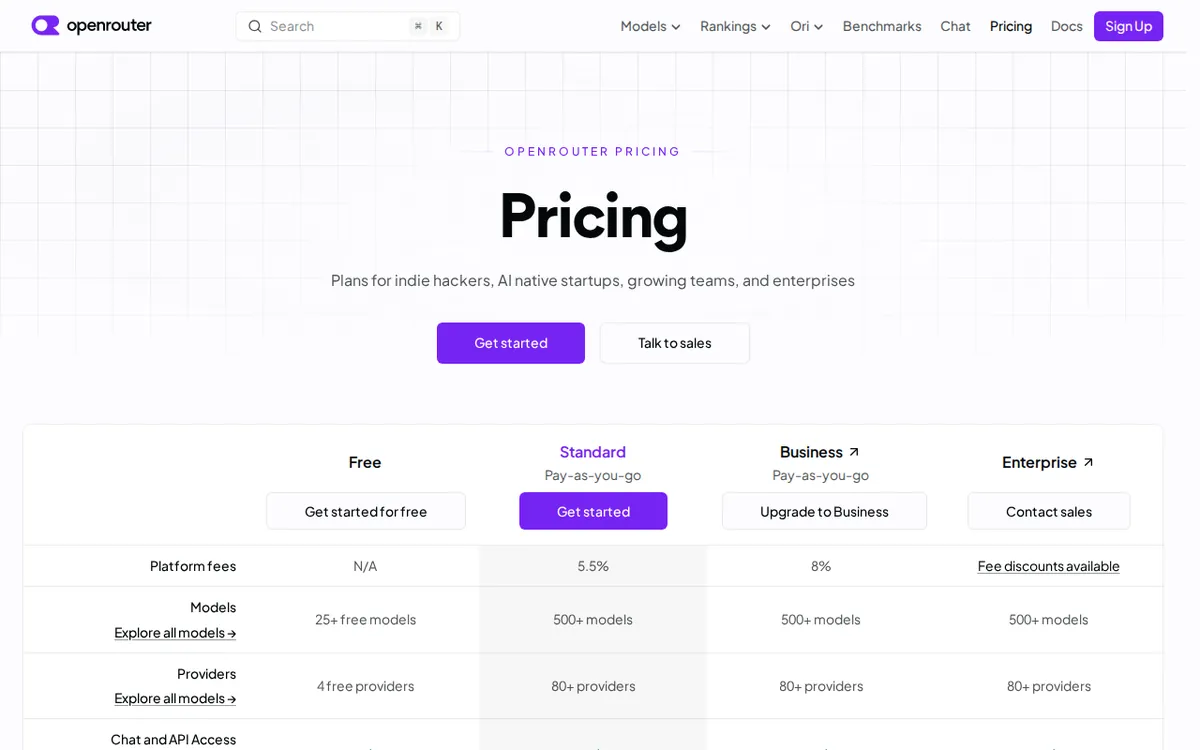
Figure: openrouter.ai official pricing page, captured 2026-10-06.
What you get once you start paying
OpenRouter’s main paid option is called Pay-as-you-go, and the name is accurate: there’s no monthly fee and no minimum spend. Instead, you load money into your account as prepaid credits — a balance you draw down as you use paid models — and pay only for what you use. The catch is a 5.5% platform fee charged when you top up credits, on top of whatever the underlying model provider charges at its own listed rate. OpenRouter gives a concrete example: load US$100 in credits, and the actual charge comes to roughly US$105.50 once that 5.5% fee is added. That credit balance can then be spent across any of OpenRouter’s supported models.
Scale here is where things get interesting. OpenRouter’s pricing page, updated 2026-08-22, describes Pay-as-you-go as covering 500-plus models and 80-plus providers. A separate plan-comparison section of the same verified data describes the identical Pay-as-you-go plan as 400-plus models and 70-plus providers. Both figures come from OpenRouter’s own site — they just reflect different capture dates, with the August update showing growth over the earlier count. Either way, you can pay by credit card or cryptocurrency, and your balance works across the entire catalog: switch from a flagship model to a cheaper open-source one mid-project without reopening a new subscription.
There’s also a lesser-known quota buried in OpenRouter’s terms for people who bring their own provider API key — called BYOK, or “bring your own key” — rather than paying through OpenRouter credits. Under BYOK, OpenRouter doesn’t charge its 5.5% top-up fee at all; instead, inference (a model actually processing your request) routed through your own key is free of platform fees up to US$25,000 of list-price usage per month. Go over that, and OpenRouter takes a 5% cut of the overage. That’s a materially different fee structure than the credit-based 5.5%, and it’s easy to miss if you only read the headline pricing table.
For larger teams, there’s an Enterprise tier, also billed on usage rather than a flat price, which adds negotiable platform-fee discounts, dedicated rate limits (a guaranteed ceiling on how many requests you can send per minute, reserved for you), an SLA (a contractual uptime and response-time guarantee), and a shared Slack support channel. The BYOK fee-free quota on Enterprise scales way up too — US$200,000 of list-price inference per month before that 5% overage kicks in. That volume only matters if you’re routing serious production traffic through your own keys; a solo user or small team has no reason to need it.
The catch nobody reads past the headline
Put the two tiers side by side and the shape of OpenRouter’s business becomes clear: the free tier exists to get you comfortable with the interface and the model-switching workflow, not to be a daily-use tool. The 50-requests-a-day ceiling is shared across every free model, so testing breadth works against you — the more models you sample, the faster the cap disappears. Once you need OpenRouter for actual work, Pay-as-you-go removes the request ceiling entirely, but introduces its own cost in the form of that 5.5% top-up fee, which stacks on top of whatever the model provider already charges.
🔍 AMPM exclusive check
Here’s where our verification turned up something the pricing page doesn’t make obvious: OpenRouter’s own site states two different catalog sizes for the identical Pay-as-you-go plan, depending on which part of the site you read. One section (last updated 2026-08-22) says 500-plus models across 80-plus providers. Another plan-comparison section says 400-plus models across 70-plus providers. Neither figure is wrong — they’re just from different update passes, and the page doesn’t flag the gap for readers comparing sections. If you’re sizing up OpenRouter based on “how many models can I reach,” trust the more recently updated figure (500+/80+) over the older one, and expect that number to keep climbing.
We also confirmed the BYOK (bring-your-own-key) fee structure is real and separate from the standard 5.5% credit top-up fee — it’s a flat percentage-free allowance up to a monthly list-price ceiling (US$25,000 for individual accounts, US$200,000 for Enterprise), with only a 5% charge on amounts above that ceiling. This detail sits in a “BYOK Limits” section that’s easy to scroll past if you’re only checking the top-line Pay-as-you-go pricing.
☀️ AMO, the budget-minded cat

AMO’s take: is OpenRouter’s free tier enough, or is paying worth it? For pure testing — trying out a model’s writing voice, comparing a couple of coding assistants side by side, seeing if a specific open-source model handles your use case — the free tier is genuinely useful, and it costs nothing. Twenty-five-plus models with no credit card and no watermark on outputs is a fair deal for that kind of occasional poking around, especially since commercial use is allowed even on the free tier.
But the 50-requests-a-day shared cap means the free tier stops being useful the moment you need OpenRouter daily, or need to run several test prompts across multiple models in one sitting. AMO’s math: once you’re bumping into that 50-request wall more than once a week, paying is worth it — and the actual cost of switching to Pay-as-you-go is a 5.5% fee on whatever credit you load, not a monthly subscription. Loading US$100 costs about US$105.50 total, and that balance doesn’t expire on a monthly clock the way a subscription does. For anyone who already pays for API access to models directly and just wants OpenRouter’s routing and failover on top, the BYOK path is worth checking first — it skips the 5.5% fee entirely up to US$25,000 of monthly list-price usage, which covers nearly every individual or small-team workload without ever triggering the overage charge.
Verdict: who should use it, who should skip it
Use OpenRouter’s free tier if you want to sample a handful of AI models without commitment, you’re building a prototype that doesn’t need daily heavy use yet, or you want automatic failover between providers without paying anything up front. The 25-plus free models and no-credit-card signup make it a low-risk way to kick the tires.
Skip the free tier, and go straight to Pay-as-you-go or BYOK, if you need OpenRouter for daily work, you test multiple models in the same session regularly, or you’re already paying for provider API keys directly and just want OpenRouter’s routing layer on top. The 50-request daily ceiling will frustrate anyone past the experimentation stage, and the actual cost of upgrading — a 5.5% top-up fee, or zero extra fee at all under BYOK up to the monthly ceiling — is low enough that there’s little reason to stay stuck at the free tier once you’re using it for real.
Written: 2026-10-06 Price last verified: 2026-10-03 Tool last health-checked: 2026-10-06
🔗 Related on AMPM
📎 Sources
All prices and quotas in this article come from AMPM’s verified dataset for OpenRouter (last verified 2026-10-03); primary sources:
🐾 Meet the cats: AMO and PIMI

AMPM is an independent AI-tool pricing watchdog tracking official prices worldwide. Our motto: ask before you subscribe. Two cats argue every tool from two sides:
- ☀️ AMO — the budget-minded cat. Always asks: is the free tier enough, and is paying actually worth it?
- 🌙 PIMI — the performance-minded cat. Cares about whether it works well, fast, and gets your job done.

When they are done arguing, you know whether to pay. Every number is checked by us, with the verification date at the end.
🐾 Our sister sites also checked
Let's take a look at these
- OpenRouter Comprehensive Introduction: Pricing, Features, and Actual Limitations
- OpenRouter Is the free quota enough?
- OpenRouter Alternatives
- Comprehensive Free Quota List for All Tools
More verified articles on this tool
- [How-to] Getting Started With OpenRouter's Free Tier: Which Models Work, and Where the Cap Bites
- AI2 Took Apart Thousands of Benchmark Questions: What the Social-Bias Benchmark Really Measured
- The Brakes to Set Before an AI Agent Touches Money: A Checklist From a Real Invoice Incident
