Ask Cat › AI Tool Summary › OpusClip
[Pricing] OpusClip's free tier gives 60 credits, but clips expire in 3 days
- Free tier: There is
- Cheapest paid plan: US$15/mo and up
- Free quota: Free tier: 60 credits per month, no credit card required; output up to …
- Last checked: 2026-10-07
Article last updated: 2026-10-08



OpusClip takes a long video — a podcast, a livestream, an interview — and cuts it into short, vertical clips for YouTube Shorts, TikTok, and Instagram Reels. It finds the best moments on its own, adds animated captions, and scores each clip for how likely it is to go viral. The free tier looks generous on paper: 60 credits a month, no credit card needed. But check the pricing page closely and a hard deadline shows up that the headline numbers don’t mention. This piece breaks down OpusClip’s free tier, pricing, and whether paying is actually worth it, plan by plan, using only what’s published on opus.pro/pricing as of October 7, 2026.
What the free 60 credits actually buys you
OpusClip runs on a credit system — a prepaid unit of usage that gets consumed as you process video, and resets each month if you’re on a paid plan. The free tier gives new users 60 credits every month, and signing up takes no credit card. For that, you get real functionality: output up to 1080p resolution, automatic reframing from horizontal to vertical video, and AI-generated captions with emoji and keyword emphasis built in.
The catch is in what the free tier withholds, not what it gives. Every clip you export carries a watermark. You can’t open a clip in OpusClip’s editor to trim or adjust it — what the AI cuts is what you get. And the clip becomes unexportable after 3 days. If you don’t download it in that window, it’s gone. You can upload source files up to 10GB on the free plan, which is generous, but the output side is built to expire. In practice, the free tier works as a trial, not a tool you can rely on month to month.
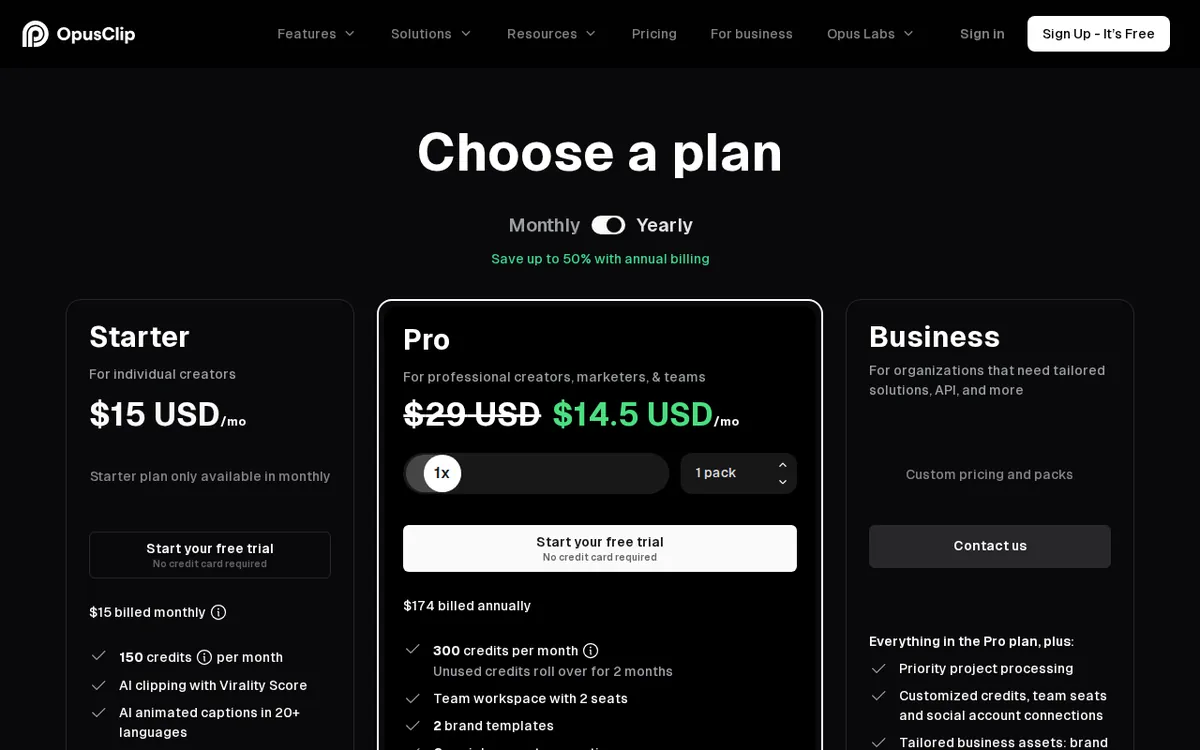
Figure: opus.pro official pricing page, captured 2026-10-08.
Starter and Pro: the real cost of removing the watermark
The jump from free to Starter, at US$15/month, is really a jump to usability. Starter triples your monthly allowance to 150 credits and removes the three biggest free-tier restrictions at once: no more watermark, access to the editor, and auto-publishing straight to YouTube Shorts, TikTok, or Instagram Reels instead of just downloading. You also get captions in more than 20 languages, one brand template, AI-driven virality scoring, and automatic removal of filler words and dead silence. One detail worth flagging: Starter is billed monthly only. OpusClip’s pricing page states this explicitly — there’s no annual discount option at this tier, unlike Pro.
Pro, at US$29/month, is aimed at people managing more than one channel or working with a small team. It adds a 2-seat team workspace (seats meaning how many people can log in and work under that plan), a second brand template, 6 connected social accounts, AI-generated B-roll footage, multiple export ratios (9:16, 1:1, and 16:9) instead of just vertical, social media scheduling, direct export to Premiere Pro and DaVinci Resolve, voice enhancement, AI video dubbing, and limited API access — an API being a way for other software to connect to OpusClip and trigger actions automatically, rather than a human clicking through the interface.
Pro’s annual option changes the math: US$14.5/month, billed as US$174/year, roughly half the monthly rate. But the credits don’t arrive monthly on this plan — OpusClip gives you the full year’s allocation, 3,600 credits, in one lump sum at signup. That’s convenient if you’ll use them steadily, but it means canceling partway through the year forfeits whatever credits are left unused. There’s no stated mechanism for prorating or rolling them over.
Business: the plan with no published price
Above Pro sits Business, which has no listed price — it’s quote-based, arranged directly with OpusClip’s sales team. What’s known from the pricing page is the feature list: priority processing (your jobs get queued ahead of lower tiers), custom limits on credits, seats, and connected social accounts, dedicated storage, full API access with custom integrations, a signed MSA (master service agreement, the standard contract larger companies require before buying software), and dedicated Slack support. This tier is built for organizations with specific compliance or integration needs, not individual creators — and since there’s no public number, anyone evaluating it needs to request a quote directly.
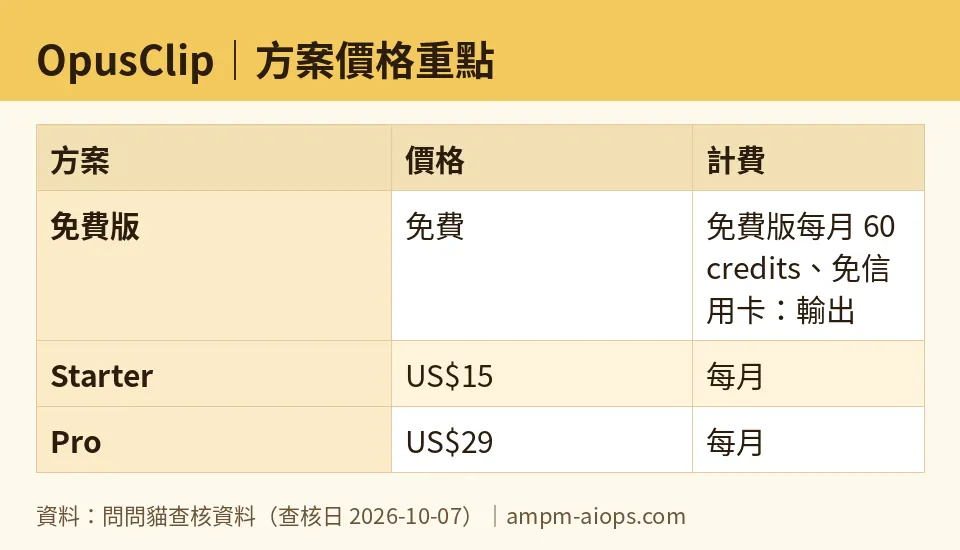
Figure: compiled by AMPM from its verified data (last verified 2026-10-07).
🔍 AMPM exclusive check
Two things stood out when we read the live pricing page ourselves rather than taking the plan-card summaries at face value. First, OpusClip never states how many minutes of source video one credit actually covers. The plan cards tell you credit totals — 60, 150, 3,600 — but not the conversion rate behind them. We’re not going to estimate or guess that number for you; if OpusClip ever publishes it, we’ll update this piece. Second, the 3-day export expiry on free-tier clips isn’t presented as a headline limit next to the “60 credits/month” claim — it’s a detail you only catch by reading the fine print under the free plan card, which means a lot of people signing up on the strength of “60 free credits” won’t discover the countdown until their first clip disappears. Everything else — the US$15 Starter price, the US$29/US$14.5 Pro split, Starter’s monthly-only billing, and the 3,600-credit annual lump sum on Pro — matches the official page exactly, checked October 7, 2026.
☀️ AMO, the budget-minded cat

AMO’s question is always the same: is the free version enough, and if not, is paying actually worth it? For OpusClip, free is enough only to answer one question — does this tool find good clips in your specific footage? With 60 credits, no credit card, and output up to 1080p, you can run a real test. But the watermark and the 3-day export window mean you can’t use free OpusClip as an actual production tool. You’re not saving money by staying free; you’re running a timed demo that resets every month.
The upgrade decision comes down to volume and whether you need the editor. If you’re publishing one or two short clips a month and don’t mind a watermark on a handful of throwaway tests, stay free. The moment you need a clean, editable, auto-published output — which is most real use — US$15/month for Starter is the actual price of entry, not the free tier. AMO’s take: don’t let “60 free credits” distract from the fact that none of those credits produce a finished, usable clip. Pro’s annual US$174/year only pencils out if you’ll steadily use most of the 3,600 credits across the year, since unused ones aren’t refunded on cancellation. For a budget-minded creator doing occasional clips, Starter’s US$15/month, paid only as needed, beats locking into Pro’s annual lump sum.
Verdict: who should use it, who should skip it
Use OpusClip’s free tier if you want to test whether its AI actually finds good highlights in your footage — the 60 monthly credits and no-credit-card signup make that test free and low-friction. Skip straight to Starter (US$15/month) if you intend to publish anything, since the free plan’s watermark and 3-day export cutoff make it unusable for real output. Pro (US$29/month, or US$174/year) makes sense once you’re managing multiple social accounts, need a second person in the workspace, or want B-roll and multi-format exports — but only commit to the annual rate if you’re confident you’ll use most of the 3,600 credits, since OpusClip doesn’t mention any refund or rollover for what’s left unused. Business is worth a sales call only if you specifically need API integration, dedicated storage, or a signed MSA — there’s no public price to compare against.
Written: 2026-10-08 Price last verified: 2026-10-07 Tool last health-checked: 2026-10-08
🔗 Related on AMPM
📎 Sources
All prices and quotas in this article come from AMPM’s verified dataset for OpusClip (last verified 2026-10-07); primary sources:
🐾 Meet the cats: AMO and PIMI

AMPM is a Taiwan-based AI-tool pricing watchdog. Our motto: ask before you subscribe. Two cats argue every tool from two sides:
- ☀️ AMO — the budget-minded cat. Always asks: is the free tier enough, and is paying actually worth it?
- 🌙 PIMI — the performance-minded cat. Cares about whether it works well, fast, and gets your job done.

When they are done arguing, you know whether to pay. Every number is checked by us, with the verification date at the end.
🐾 Our sister sites also checked
Let's take a look at these
- OpusClip Comprehensive Introduction: Pricing, Features, and Actual Limitations
- OpusClip Is the free quota enough?
- OpusClip Alternatives
- Comprehensive Free Quota List for All Tools
More verified articles on this tool
- [Verified] OpusClip's Free Tier Gives 60 Credits a Month, But Your Clips Expire in 3 Days
- OpusClip Free Plan: The Real Catch Is the 3-Day Export Window, Not the Watermark (2026 Price Check)
