[Review] Otter.ai Free vs Paid: Which Limit Cuts You Off First?
- Free tier: Yes
- Cheapest paid plan: US$16.99/mo and up
- Free quota: 300 minutes of transcription quota per month, single meeting recording …
- Last checked: 2026-11-02
Article last updated: 2026-11-01



Otter.ai records your online meetings, turns the audio into a written transcript, and adds a summary. It plugs into Zoom, Teams and Google Meet. The question isn’t whether it works. It’s which plan stops you from getting cut off mid-meeting, and what you pay for that.
This is a review based on verified pricing data, not hands-on testing. We read the official pricing page and checked it against our records. We did not run Otter in our own meetings, so this piece says nothing about transcript accuracy or speed. It’s about limits, prices and value. Prices vary by country; we checked from Taiwan.
Our verdict in short: the free plan is generous on monthly volume and stingy on meeting length. Three things are annoying or poor value, and we cover each below.
The free plan: decent volume, one painful cap
Free gives you 300 transcription minutes a month. That’s about 5 hours, or a little over an hour a week. The allowance resets every month. You need an account. There is no watermark, and commercial use is allowed. Summaries and action items are included, and so is the Zoom, Teams and Google Meet connection.
That’s a fair deal for light use. Now the catches.
Annoying thing #1: 30 minutes per meeting. A single meeting can be recorded for 30 minutes at most. After that, the recording stops. Most real meetings run longer than that. You can have 300 minutes in the bank and still lose the second half of every call. The monthly number looks big, but the per-meeting cap is the limit that actually bites.
Annoying thing #2: 3 file imports, for life. Free lets you upload existing audio or video files three times. That’s not three a month. It’s three, ever. Once they’re gone, you can’t upload another recording on the free plan. If you have a folder of old recordings, you’ll burn through the allowance quickly. It’s easy to read “3 imports” and assume it resets. It doesn’t.
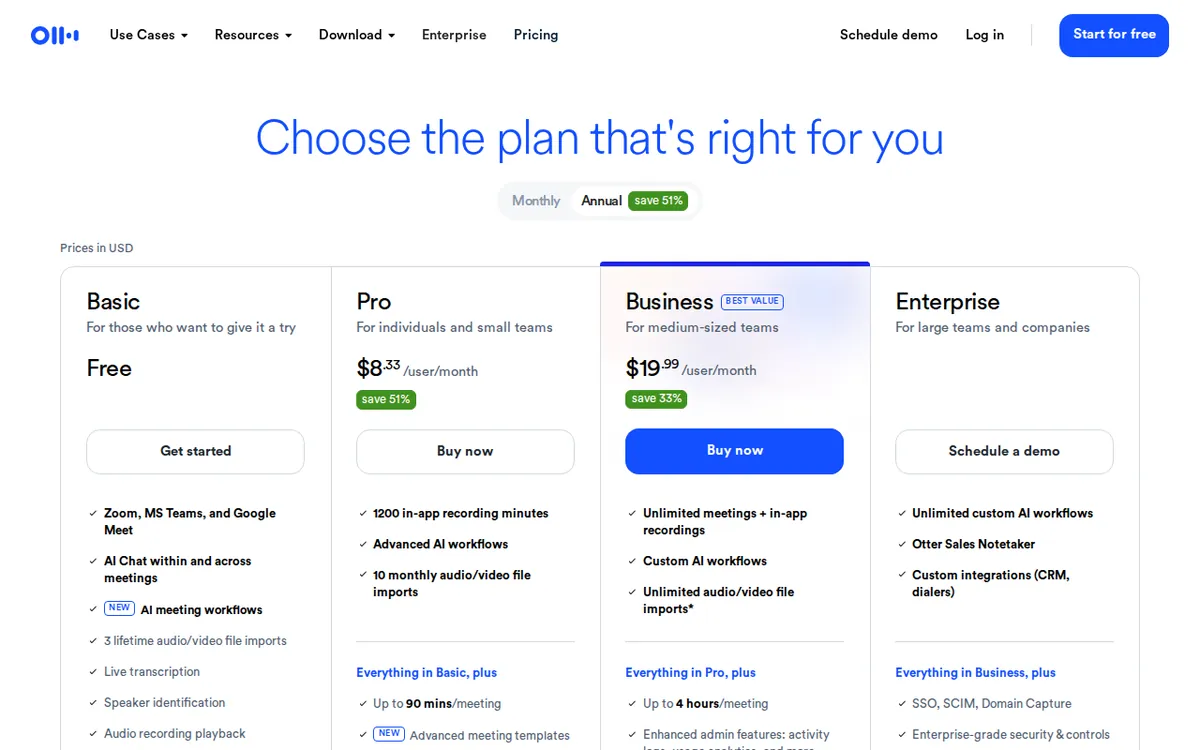
Figure: otter.ai official pricing page, captured 2026-11-01.
The paid ladder: Pro fixes length, Business fixes everything
Otter charges per seat. A seat is one person’s account, so a team of five pays five times.
Pro costs US$16.99 per person per month on monthly billing. On annual billing it drops to US$8.33 per person per month. The official page says annual saves 51%. You get:
- 1,200 transcription minutes a month (about 20 hours)
- Meetings up to 90 minutes
- 10 file imports a month
- The same Zoom, Teams and Meet connection
Compared with free, the big change is the meeting cap: 30 minutes becomes 90. Our data calls this the most important upgrade. The monthly allowance quadruples too, and the import limit stops being a lifetime cliff.
What Pro still doesn’t give you: unlimited transcription, 4-hour meetings, or unlimited imports.
Business lists at US$30 per person per month on monthly billing. Annual billing is US$19.99 per person per month. It includes:
- Unlimited transcription minutes
- Meetings up to 4 hours
- Unlimited file imports
- Team collaboration features
Enterprise is a custom quote. You have to talk to sales, so there’s no public price. It matches Business on the headline limits: unlimited minutes, 4-hour meetings, unlimited imports.
Annoying thing #3: the Business discount is temporary. Otter advertises 20% off Business for 3 months, which brings US$30 down to US$24. It’s for first-time subscribers only, and it needs a promo code. After the three months you pay the US$30 list price. If you budget from the US$24 figure, your cost goes up after the first three months. Annual billing at US$19.99 avoids that jump, but our data has no yearly total, so we won’t invent one. Check what the checkout screen actually charges before you commit.
There’s also a gap in the ladder. If your meetings regularly run past 90 minutes, Pro won’t hold them. Your only step up is Business, which costs well over Pro on the same billing cycle: US$19.99 against US$8.33 per person per month on annual, US$30 against US$16.99 on monthly. That’s a big jump just for longer meetings.
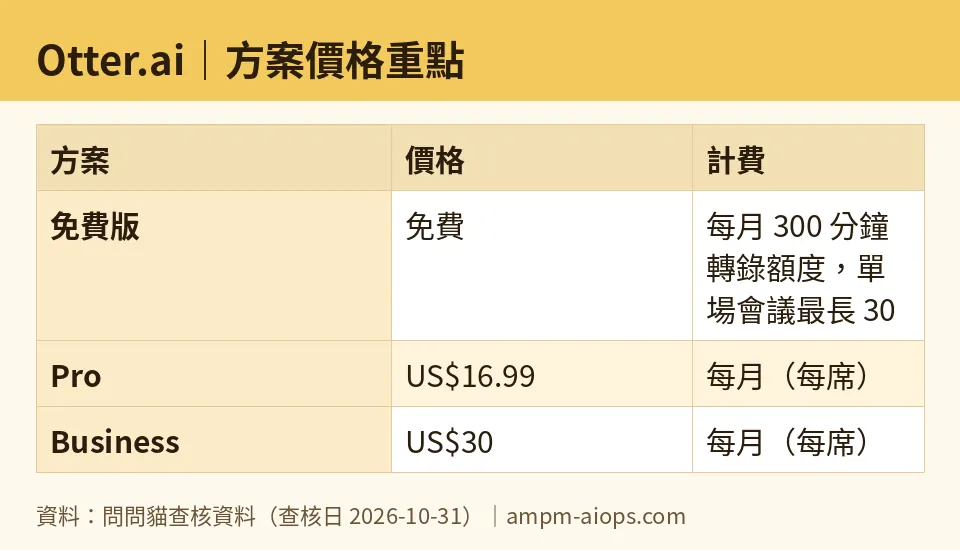
Figure: compiled by AMPM from its verified data (last verified 2026-10-31).
🔍 AMPM exclusive check
Nothing differed from the official page this time. Every number in this article matches it, checked 2026-10-31.
Here’s how that check worked. We read the limits and prices directly from otter.ai/pricing on 2026-07-31. Since then, our system has compared our records against the live page every day. We have daily entries from 2026-09-11 through 2026-10-31, and none flagged a change. So the free limits (300 minutes, 30 minutes per meeting, 3 lifetime imports) and the paid prices have been stable across that window.
One thing to know when you read the page itself: the US$24 Business figure is a promotion, not a price. The US$30 list price is the one that applies after the first three months.
☀️ AMO, the budget-minded cat

Is free enough? For a narrow kind of person, yes.
Take the numbers. Free gives you 300 minutes a month, about 5 hours. If you sit in a few short calls a week, that covers you. Summaries and action items are included. There’s no watermark, and you’re allowed to use it for work. For zero cost, that’s a real tool.
But free breaks the moment your meetings run past 30 minutes. A one-hour call gets half recorded. You can’t spread the pain around either, because the cap applies to every single meeting. If most of your calls are quick check-ins, you’re fine. If you have even one weekly hour-long meeting, free will let you down on exactly the call you wanted notes for.
Is paying worth it? Pro on annual billing at US$8.33 a month is the value pick. You get 90-minute meetings, 1,200 minutes a month, and 10 imports a month. Monthly billing at US$16.99 costs about double that rate, and the official page puts the annual saving at 51%. If you know you’ll use it, annual is clearly cheaper per month. If you’re unsure, start on free and see how often the 30-minute wall hits you before paying anything.
Business is harder to justify on cost alone. It’s US$19.99 a month on annual billing, or US$30 monthly. Pay for it only if you need meetings longer than 90 minutes, or you have a team that needs the collaboration features. Don’t let the US$24 promo price fool you into thinking it’s the real rate.
My budget call: free first, then Pro annual. Skip Business unless length or team size forces it.
🌙 PIMI, the performance-minded cat

I’ll be upfront about what the data can and can’t tell me. It has no measurements of transcript accuracy, speed or summary quality. I can’t tell you how well Otter transcribes. I can tell you what it will let you do before it stops.
On that measure, the plans are very different.
Free caps a meeting at 30 minutes. For performance, that’s the number that matters most. A tool that stops recording partway through a meeting hasn’t done the job, however good the transcript of the first half is.
Pro raises that to 90 minutes and gives you 1,200 minutes a month, about 20 hours. That covers most standard meetings and a decent weekly load. The 10 monthly imports are enough for occasional uploads of recorded calls.
Business removes the ceilings that matter: unlimited transcription minutes, 4-hour meetings, unlimited imports. If you run long workshops, interviews or all-day sessions, this is the only public plan that fits. Enterprise has the same headline limits with custom terms.
What I like: all tiers connect to Zoom, Teams and Meet, and even free includes summaries and action items. You aren’t locked out of the core features until you pay.
What I’d test before paying: whether the transcripts are good enough for your accents, topics and audio quality. The pricing page doesn’t answer that, and neither does our data. The free plan is the right place to find out, using 30-minute meetings, before you commit to a paid seat.
My performance call: Pro is the minimum for serious use, because the 30-minute cap makes free unreliable. Move to Business only when your meetings regularly run past 90 minutes.
Verdict: who should use it, who should skip it
Use free if your meetings are short, under 30 minutes, and you have fewer than about 5 hours of them a month. It’s a real, watermark-free tool for that.
Use Pro if you’re one person with regular meetings of up to 90 minutes. Annual billing at US$8.33 a month is the sweet spot. Monthly billing at US$16.99 is fine for a short trial period.
Use Business if you routinely record meetings over 90 minutes, need unlimited minutes and imports, or are rolling it out to a team. Budget for US$30 a month per person on monthly billing, or US$19.99 on annual, not the US$24 promo.
Skip it if you mostly hold hour-long calls and don’t want to pay. The free plan will cut you off, and the lifetime import limit means you can’t work around it by uploading recordings.
Ask sales if you’re a large organization. Enterprise pricing isn’t public.
The three things that annoy us: the 30-minute meeting cap on free, the 3 imports that never reset, and a Business promo that ends after three months. What it does well: a usable free tier, a cheap annual Pro, and no ceilings at all on Business.
Written: 2026-11-01 Price last verified: 2026-10-31 Tool last health-checked: 2026-11-01
🔗 Related on AMPM
📎 Sources
All prices and quotas in this article come from AMPM’s verified dataset for Otter.ai (last verified 2026-10-31); primary sources:
🐾 Meet the cats: AMO and PIMI

AMPM is a Taiwan-based AI-tool pricing watchdog. Our motto: ask before you subscribe. Two cats argue every tool from two sides:
- ☀️ AMO — the budget-minded cat. Always asks: is the free tier enough, and is paying actually worth it?
- 🌙 PIMI — the performance-minded cat. Cares about whether it works well, fast, and gets your job done.

When they are done arguing, you know whether to pay. Every number is checked by us, with the verification date at the end.
🐾 Our sister sites also checked
Read next
- Otter.ai Full breakdown: pricing, features and real-world limits
- Otter.ai Is the free quota enough?
- Otter.ai Alternatives
- Free plan limits for every AI tool we track
More verified articles on this tool
- How to Budget Otter.ai's Free Minutes: The Per-Meeting Cap and the Lifetime Import Limit (2026)
- Microsoft's MAI-Transcribe-2 Promo Price Looks Cheap. Why Most People Still Shouldn't Use It
