[How-to] Pagewiz Free Trial 2026: The Real Catch Isn't the Credit Card
- Free tier: No
- Cheapest paid plan: US$29/mo and up
- Free quota: No permanent free plan. 30-day free trial (up to 200 visitors, no …
- Last checked: 2026-10-22
Article last updated: 2026-10-22



Pagewiz sells its free trial on one line: 30 days, no credit card. That’s true, and it’s not the part that will stop you. The part that stops you is a number buried under the headline — a 200-visitor ceiling that runs alongside the 30-day clock. Point any real traffic at your page and the trial can end days before the calendar does. This guide gets a first-timer building a landing page on Pagewiz, shows exactly what the trial lets you do, and names the blockers that catch people before they convert a single lead.
A landing page, if the term is new to you, is a single standalone web page built to get one action — a sign-up, a download, a sale — with nothing else competing for the click. Pagewiz is a tool for building those pages fast and running A/B tests on them, where you show two versions of a page to different visitors and keep whichever one converts better.
What the free trial actually gives you
There is no permanent free plan here. What you get is a 30-day free trial, capped at 200 visitors, with no credit card required up front. That last detail matters: because you never hand over a card, nothing auto-charges you when the trial ends. If you do nothing, the account simply pauses.
Here’s the catch the headline skips. The trial has two limits, not one, and they run in parallel: 30 days and 200 visitors. Whichever you hit first ends the free run. Thirty days sounds generous. Two hundred visitors is not. If you send a modest paid-ad campaign — paid traffic, meaning you’re buying clicks from Google or Meta — to your new page, 200 people can arrive in an afternoon. The clock becomes irrelevant.
A “visitor” here means a person landing on your page. Two hundred of them is enough to see whether your layout works and whether the builder suits you. It is not enough to validate a real offer with statistical confidence, and it is nowhere near enough for an A/B test to produce a trustworthy result. Treat the trial as a hands-on tour of the tool, not a live campaign.
One more thing in your favor: when the trial expires without payment, Pagewiz pauses the account but keeps your data and your pages. You are not starting from scratch if you decide to pay later. Your work waits for you.
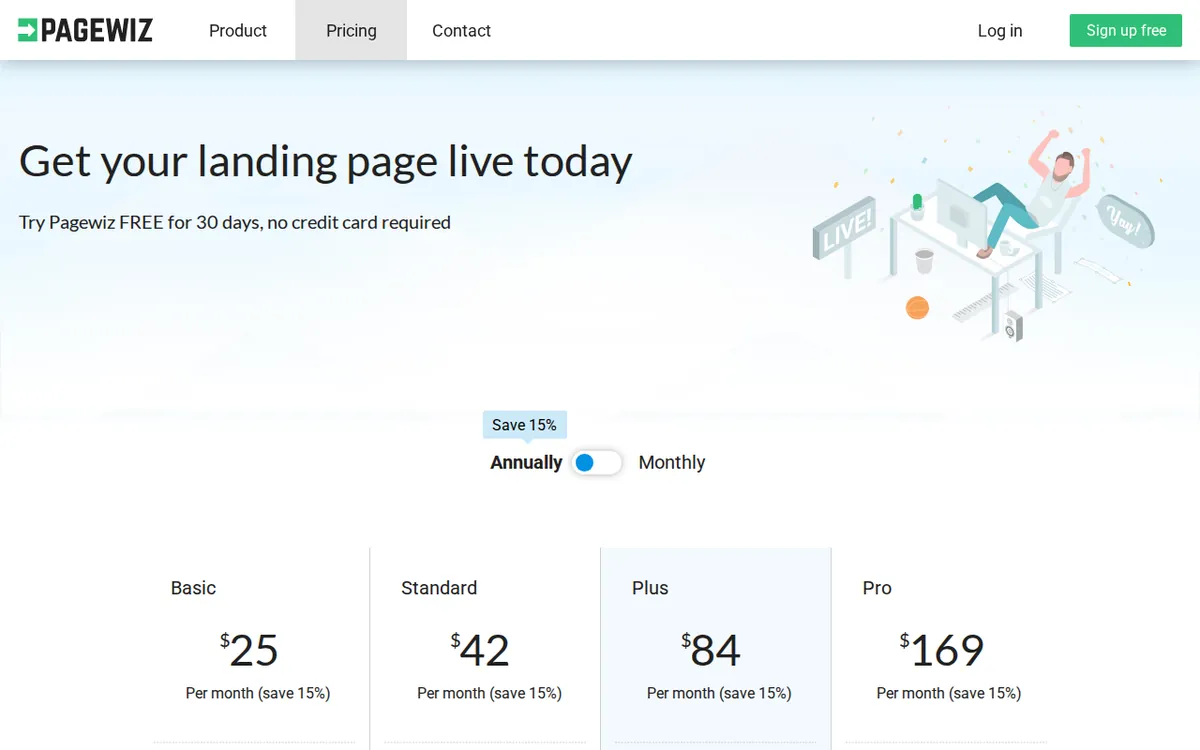
Figure: pagewiz.com official pricing page, captured 2026-10-22.
Get your first page live: a beginner’s path
You don’t need design skills to get something up. A sensible first-run order:
- Sign up without a card. Use the trial exactly as offered. Resist the urge to pick a paid plan on day one — you learn more by building first.
- Pick a template and strip it down. Start from one of Pagewiz’s templates and remove everything that isn’t the single action you want. One headline, one offer, one button.
- Connect your tools before you launch, not after. Pagewiz includes third-party integrations — links to outside services like your email marketing tool — so leads captured on the page flow where you need them. Wire this up while traffic is zero. A page that collects emails into nowhere wastes every one of your 200 visitors.
- Set up the A/B test, but understand its limits on the trial. You can build two versions. Just know that 200 visitors split across two pages leaves roughly 100 each — too few to call a winner. Use the trial to learn the mechanics, not to decide anything.
- Hold your traffic until the page is finished. This is the single most important move. Every visitor you spend on a half-built page is gone from your 200.
If you plan to point your own web address at the page, note that custom domains — your own branded URL instead of a Pagewiz subdomain — come into play on the paid plans, where the allowance starts at 2 domains and climbs from there.
The blockers that trip people up (and the fixes)
Blocker: the trial ends “early.” You assumed 30 days and got cut off in a week. Cause: you crossed 200 visitors. Fix: don’t send paid ads during the trial. Test with a small organic audience — a link to a few colleagues, a single social post — so you’re spending visitors on feedback, not on a cold campaign.
Blocker: your page vanished. After the trial lapsed, the live page went offline. Cause: the account paused. Fix: this is expected, and your data and pages are retained, so subscribing restores them. If you need the page live without interruption, pay before the trial ends rather than after.
Blocker: you picked a plan by price and it’s the wrong fit. The number that actually constrains you is monthly unique visitors — distinct people, counted once each per month no matter how often they return — not the dollar figure. Choose by the traffic you realistically expect.
Here is how the paid plans line up, straight from the pricing page:
- Basic — US$29/month (US$25/month average if you pay for the year, a 15% discount). Includes 2 custom domains, unlimited landing pages, A/B testing, third-party integrations, and 5,000 unique visitors a month.
- Standard — US$49/month (US$42/month on annual billing). 5 custom domains and 10,000 unique visitors a month.
- Plus — US$99/month (US$84/month on annual billing). 10 custom domains, 30,000 unique visitors a month, and a dedicated Script library for custom code.
- Pro — US$199/month (US$169/month on annual billing). 25 custom domains and 100,000 unique visitors a month.
Note that only Basic’s listing spells out “unlimited landing pages, A/B testing, third-party integrations” in the data we pulled; the higher tiers are described by what they add on top. Pagewiz lists prices in US dollars; we checked from Taiwan and saw the same figures, but prices can vary by country, so confirm your own at checkout.
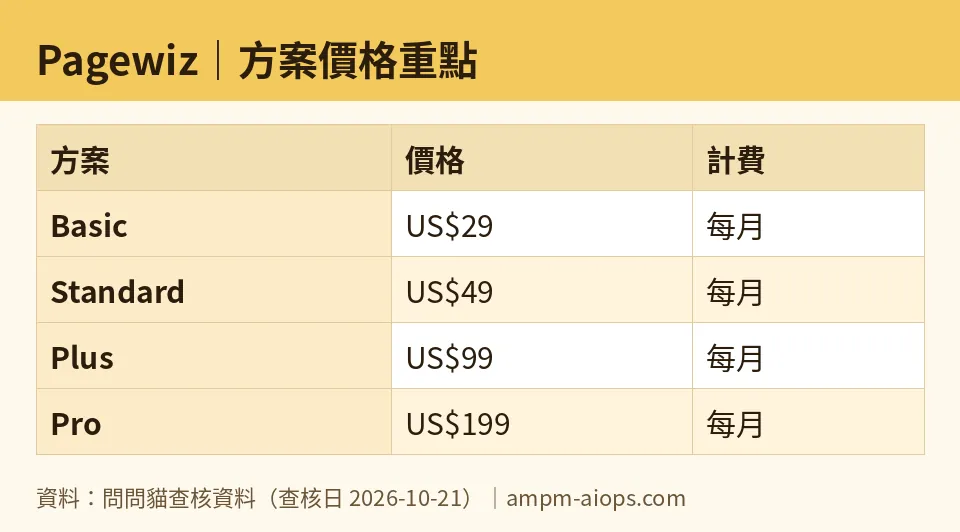
Figure: compiled by AMPM from its verified data (last verified 2026-10-21).
🔍 AMPM exclusive check
What the vendor’s headline does not spell out: the free trial is governed by two independent ceilings — 200 visitors and 30 days — and the visitor cap is the one most new users hit first. The marketing leads with “30 days free.” For anyone running paid traffic, the honest limit is 200 people, and we think that’s the number you should plan around, not the calendar.
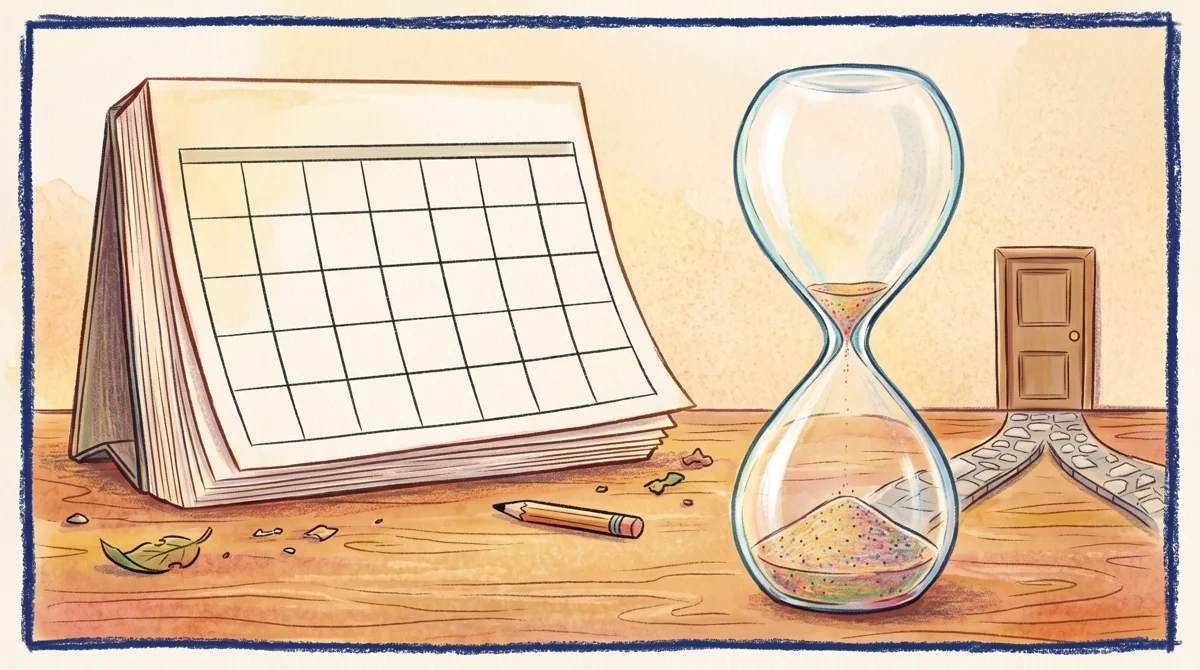
Illustration: The calendar trial remains largely untouched while the visitor hourglass has already completely drained.
We also confirmed the quieter, friendlier detail the pricing page states plainly but buries: no credit card is required, so there is no surprise charge, and your pages and data survive an expired trial. Nothing is deleted when the clock runs out — the account is paused, not wiped.
Full transparency, because our standard demands it: Pagewiz entered our tracker as a challenger candidate, and this is a first-round check. The numbers above matched the official site when we read it on 2026-10-21, but they have not yet been through our full three-way manual cross-verification. Treat the free-trial terms and commercial conditions as current-as-of-that-date, and confirm against pagewiz.com before you commit money.
Verdict: who should use it, who should skip it
Use the trial if you want to learn whether Pagewiz’s builder fits how you work, and you can keep traffic low while you build. It costs nothing, risks nothing (no card), and leaves your work intact if you walk away. For a solo marketer or a small team testing one offer, that’s a clean, no-strings look at the tool.
Pay for Basic if you’ve validated the fit and expect up to a few thousand visitors a month — US$29/month, or US$25/month on the annual plan, buys you room the trial never could.
Skip it if your plan is to point a live paid-ad campaign at a brand-new page during the trial. You’ll exhaust 200 visitors before you’ve learned anything, and the “30 days” you signed up for will feel like a bait. Either start on a paid tier from day one, or hold your spend until you’ve subscribed.
The free trial is genuinely useful. Just use it for what it is — a guided walk through the product — and don’t mistake it for a runway you can launch from.
Written: 2026-10-22 Price last verified: 2026-10-21 Tool last health-checked: 2026-10-22
🔗 Related on AMPM
📎 Sources
All prices and quotas in this article come from AMPM’s verified dataset for Pagewiz (last verified 2026-10-21); primary sources:
🐾 Meet the cats: AMO and PIMI

AMPM is a Taiwan-based AI-tool pricing watchdog. Our motto: ask before you subscribe. Two cats argue every tool from two sides:
- ☀️ AMO — the budget-minded cat. Always asks: is the free tier enough, and is paying actually worth it?
- 🌙 PIMI — the performance-minded cat. Cares about whether it works well, fast, and gets your job done.

When they are done arguing, you know whether to pay. Every number is checked by us, with the verification date at the end.
🐾 Our sister sites also checked
Read next
- Pagewiz Full breakdown: pricing, features and real-world limits
- Pagewiz Is the free quota enough?
- Pagewiz Alternatives
- Free plan limits for every AI tool we track
