[How-to] Petal Free vs Paid: The One-Time Credit Trap Beginners Miss
- Free tier: Yes
- Cheapest paid plan: US$4.99/mo and up
- Free quota: Free plan includes 1 GB cloud storage, 1 seat, 3 collaborator guests, …
- Last checked: 2026-10-24
Article last updated: 2026-10-24



Petal’s free plan reads like a gift. You get a gigabyte of cloud storage, a working account, room to invite a few collaborators, and 400 AI credits to spend. Then you read the fine print. Those 400 credits are a one-time grant. They do not refill next month, or ever. That one word — one-time — is the whole decision, and most people sign up before they understand it.
Petal is a tool for reading and managing academic papers. You upload PDFs, ask an AI to summarize or cross-reference them, and keep your citations organized in one place. If you are a student or researcher weighing the free plan against the paid tiers, here is how to get useful work done fast, and exactly where the free tier quietly runs dry.
What “free” actually covers
Here is the free plan, in plain terms, as it stood when we checked:
- 1 GB of cloud storage. Enough for a few dozen PDFs, depending on how heavy they are.
- 1 seat. A seat is one paid login that belongs to you. On the free plan you get the single account and nothing more.
- 3 collaboration guests. These are people you invite to view or work alongside you without needing their own paid account. Useful for a small study group or a co-author.
- 400 AI credits, one-time. Credits are the points Petal deducts each time you run an AI action, such as a summary or a cross-document question. The data does not publish how many credits each action costs, so treat the pool as a finite budget and watch it drop.
The number that matters most is that last one, and the word attached to it. On the free plan, 400 credits is a lifetime starter allowance. It is not topped up at the start of each month. Once you have spent them, the AI side of the free plan is done.
That is easy to miss because the same figure — 400 credits — shows up again on the cheapest paid plan, Plus, where it is a monthly amount. Same number, completely different meaning. More on that below.
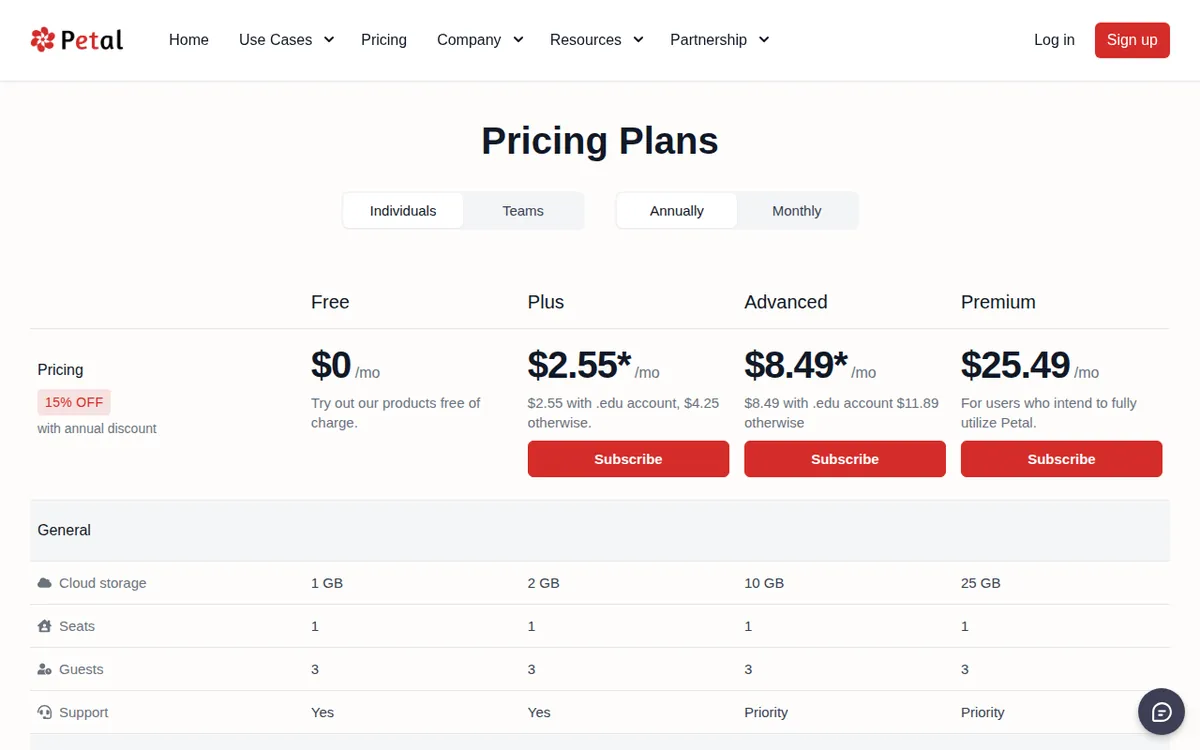
Figure: petal.org official pricing page, captured 2026-10-24.
A first run that doesn’t waste credits
The smartest thing a new user can do is separate the free work from the paid work. Reading and organizing your library does not burn AI credits. Running the AI does. So front-load the free stuff and spend credits only where they earn their keep.
A sensible first session looks like this:
- Create your account and confirm you are on the free plan. Do not enter card details yet. You want to see what the AI does before you decide whether it is worth paying for.
- Upload a paper or two. Uploading and storing PDFs draws on your 1 GB, not your credits. Get your most important documents in first.
- Organize before you ask. Sort your references and build out your library. This is the management side of the product and it costs nothing in credits. Do it while the pool is full.
- Spend credits on the hard reading. Save your AI actions for the tasks a human would find slow: pulling the argument out of a dense paper, comparing claims across two documents, or getting a fast orientation on something outside your field. Those are where an AI summary actually saves you time.
- Watch the counter. Because the free grant does not refill, every credit you spend is gone for good. Run one real task, see how far it moves the number, and plan the rest around that.
A common blocker for beginners: expecting the free plan to include everything the marketing pages show. It does not. Petal’s citation generator — the feature that formats references for you — is listed as part of the Plus plan in the data we have, not the free tier. If generating clean citations is the main reason you came to Petal, the free plan may not be the thing you are actually testing. Check what is live in your own account before you build a workflow around it.
A second blocker: hitting the 1 GB wall mid-project. If storage fills, you cannot keep adding papers. There is no fix on the free plan other than deleting files or upgrading, so keep the library lean while you are evaluating.
When the free tier runs out — and the cheapest way past it
Two things end the free run: the one-time credits dry up, or the 1 GB fills. Neither resets. When you reach either, these are the paid options, as listed when we checked.
Plus — US$4.99 per month. This is the plan where the credit model changes. It gives 2 GB of storage and 400 AI credits every month, plus the citation generator and the ability to share across workspaces. If you have a student email on an .edu domain, Plus drops to US$2.99 per month. For a lot of users, the honest comparison is not “free vs Plus” but “400 credits once vs 400 credits a month for a few dollars.” Framed that way, the free plan is a trial and Plus is the actual product.
Advanced — US$13.99 per month. This steps up to 10 GB of storage and 1200 AI credits a month, and it adds the features heavier users ask for: multi-document conversation (asking questions across several papers at once) and AI Create, Petal’s deeper reading-and-analysis mode. The .edu student price is US$9.99 per month. Paid annually, it works out to US$8.49 per month. The data lists those as separate numbers; we are not multiplying anything out.
Premium — US$29.99 per month. The heavy-research plan: 25 GB of storage, 2000 AI credits a month, and priority technical support. An annual early-bird rate is listed at roughly US$25.49 per month.
One region note: prices vary by country, and we checked from Taiwan. Use the US$ figures above as your reference and confirm the exact number at checkout in your own location.
The practical takeaway for a beginner on a budget: if you qualify for student pricing, the .edu rates change the math more than any feature does. Plus at US$2.99 a month turns Petal from a one-time experiment into something you can actually lean on month after month.
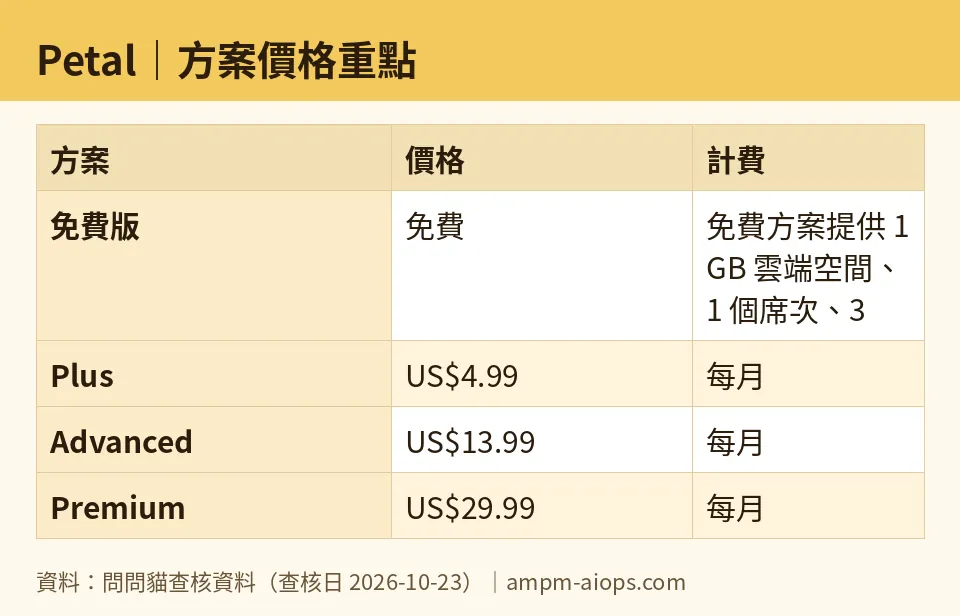
Figure: compiled by AMPM from its verified data (last verified 2026-10-23).
🔍 AMPM exclusive check
The gap the vendor page does not make obvious is the double meaning of “400 credits.” On the free plan it is a one-time grant; on Plus it is a monthly allowance. Same figure, printed the same way, meaning two different things. A first-time reader scanning the plans can easily assume the free tier refills like the paid one does. It does not. That is the single most important thing to understand before you register, and it is the reason to treat the free plan as a test drive rather than a long-term home.
Our honesty caveat: Petal came into our tracker as an automatic challenger entry, and the numbers above come from a single round of checking — not yet our usual three-way manual cross-check. Every figure here matched Petal’s own site on 2026-10-23, but the free-credit terms and any commercial-use conditions are exactly the kind of detail vendors adjust quietly. Confirm the live numbers in your own account before you commit money to a plan.
Verdict: who should use it, who should skip it
Use the free plan if you want to find out whether an AI reading assistant fits how you work, and you are happy to spend a finite pool of credits once to decide. Load a few real papers, run the tasks that actually slow you down, and judge from there. It is a genuine trial, not a permanent free tier.
Skip straight to paid if you already know you will use Petal week to week. The free grant is too small and too final for ongoing research, and the moment you need credits to refill, Plus at US$4.99 a month — or US$2.99 with a student email — is the obvious next step. Researchers juggling many documents will feel the pull toward Advanced for the multi-document features and the larger monthly credit pool.
The one group that should not linger on free: students with an .edu address. Your discounted paid pricing is low enough that burning your one-time credits to “save money” is a false economy. Test briefly, then switch.
Written: 2026-10-24 Price last verified: 2026-10-23 Tool last health-checked: 2026-10-24
🔗 Related on AMPM
📎 Sources
All prices and quotas in this article come from AMPM’s verified dataset for Petal (last verified 2026-10-23); primary sources:
🐾 Meet the cats: AMO and PIMI

AMPM is a Taiwan-based AI-tool pricing watchdog. Our motto: ask before you subscribe. Two cats argue every tool from two sides:
- ☀️ AMO — the budget-minded cat. Always asks: is the free tier enough, and is paying actually worth it?
- 🌙 PIMI — the performance-minded cat. Cares about whether it works well, fast, and gets your job done.

When they are done arguing, you know whether to pay. Every number is checked by us, with the verification date at the end.
🐾 Our sister sites also checked
Read next
- Petal Full breakdown: pricing, features and real-world limits
- Petal Is the free quota enough?
- Petal Alternatives
- Free plan limits for every AI tool we track
