[How-to] PLAUD free usage limits 2026: What the Starter Plan Really Covers
- Free tier: Yes
- Cheapest paid plan: US$17.99/mo and up
- Free quota: Starter (free): 300 transcription minutes per month; recording …
- Last checked: 2026-10-23
Article last updated: 2026-10-23



PLAUD sells a small AI recording card — the PLAUD NOTE — that captures audio and sends it to the cloud, where it’s turned into text and short summaries. The free plan, called Starter, is the software layer that does that transcription (turning recorded speech into written text) and summarizing. Here’s the part most “free tier” rundowns skip: the free plan is only free once you own the hardware. There is no PLAUD without a PLAUD device. So the first real question isn’t “is the free quota enough?” It’s “am I willing to buy the card to find out?”
This guide is for someone who already has the card, or is about to buy one, and wants to know exactly what the free Starter plan lets them do, where it stops, and how not to burn the allowance by accident.
What “free” actually means here
Starter costs nothing per month. What you get on it:
- 300 minutes a month of transcription. That’s the cap on how much recorded speech gets converted to text each month.
- 112+ languages supported for that transcription.
- AI summaries and basic templates — the feature that takes a long transcript and gives you a shorter write-up.
- A monthly reset. The 300-minute counter refills at the start of each cycle.
Note that the 300 minutes governs transcription, not recording. The device can record more than that. What it won’t do, past the limit, is keep turning that extra audio into text for free.
One housekeeping point for readers outside Taiwan: prices and some plan details vary by country; we checked from Taiwan. The US$ figures below are the ones PLAUD lists.
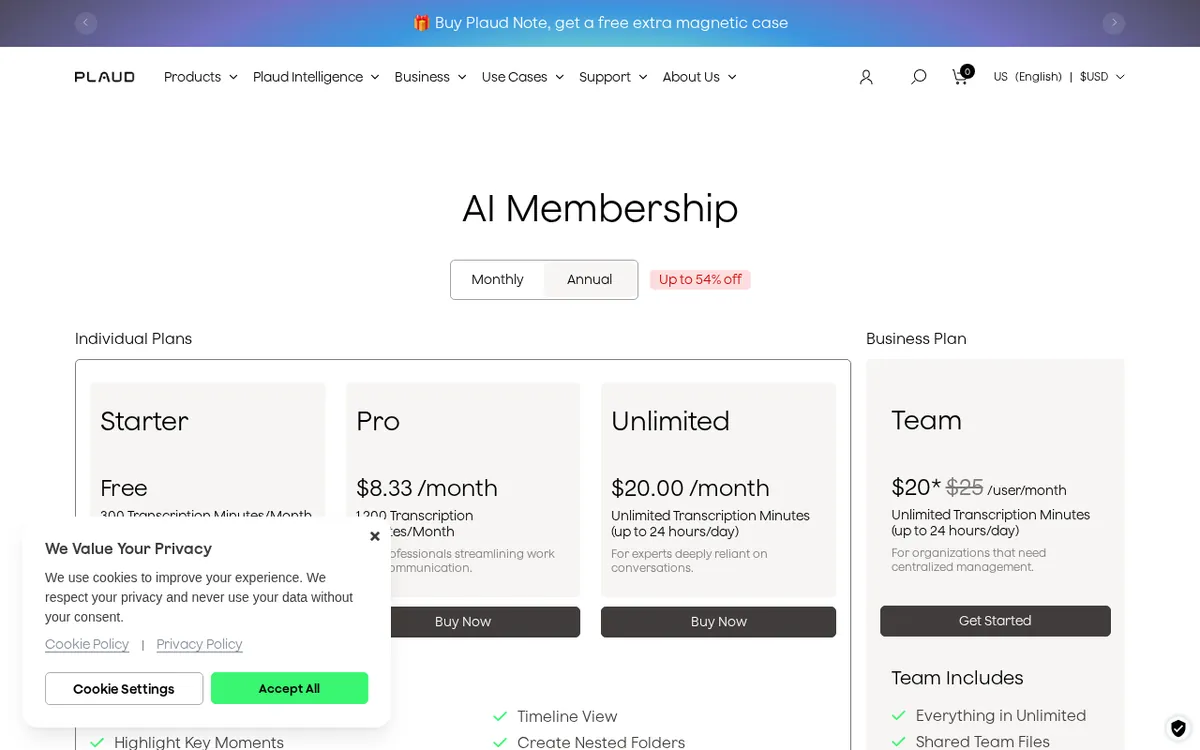
Figure: plaud.ai official pricing page, captured 2026-10-23.
The 300-minute month, and what happens when it runs out
Three hundred minutes is five hours of transcribed audio a month. For a student recording two or three lectures a week, or someone who logs a couple of meetings, that stretches further than it sounds. For anyone recording most of their working day, it’s gone fast.
The useful detail is what happens when you hit the ceiling. Recording keeps going — the audio is still captured and saved. Transcription is what pauses. So you don’t lose the recording; you lose the automatic text for anything over the limit until the counter resets next month (or until you upgrade). That’s a gentler failure than most free tiers, which simply stop capturing. But it means a beginner can finish a long month thinking everything is transcribed, then find a backlog of audio sitting there untouched.
A practical habit: check how much of your 300 minutes you’ve used before a long recording, not after. If you’re close to the cap and the meeting matters, you’ll want to know the transcript won’t appear until the reset.
Getting productive on the free tier: a beginner’s path
You don’t need a paid plan to get real value out of PLAUD. Here’s the shortest route from “box arrived” to “first useful summary”:
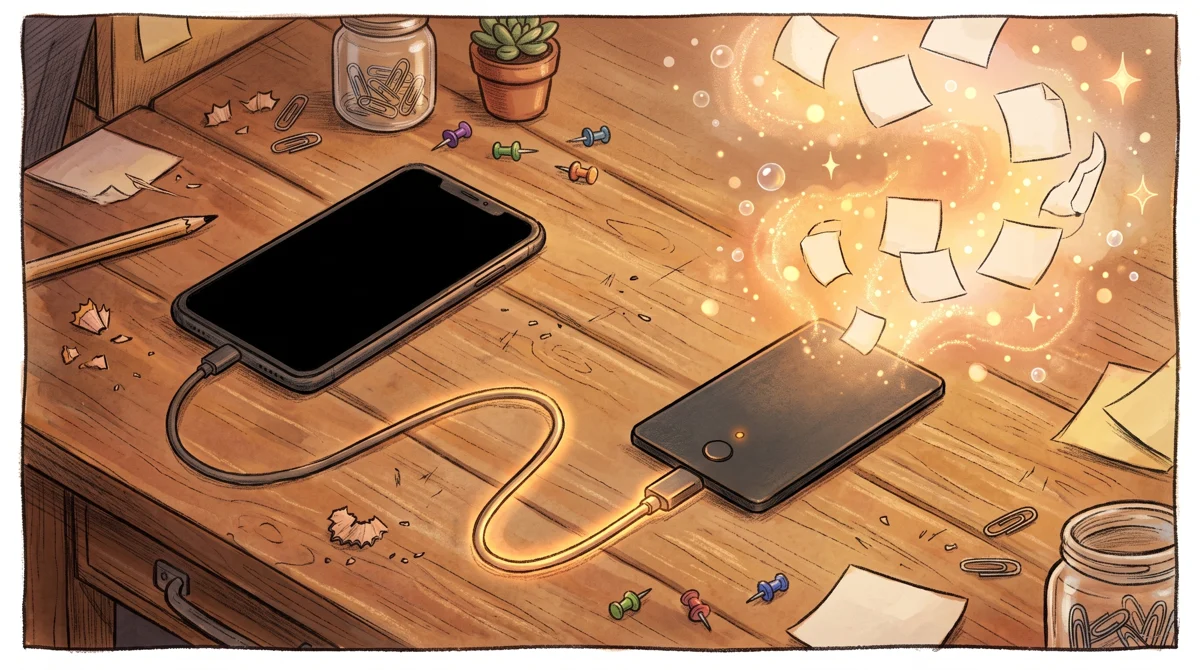
Illustration: The physical recording card serves as the essential key, unlocking cloud transcription capabilities only after the hardware is paired.
- Set up the device and the app. Pair the PLAUD NOTE card with the PLAUD app on your phone. The card records; the app and cloud do the rest. Nothing works until these two are talking to each other.
- Confirm you’re on Starter. You’re on the free plan by default when you don’t subscribe. You don’t need to pick anything to stay free — you need to avoid upgrading until you’ve tested your real usage.
- Set your transcription language. With 112+ languages available, make sure the one you actually speak in is selected before your first important recording. Transcription quality depends on getting this right.
- Record something short first. A five-minute test — talk, read, hold a quick chat — then let it sync and transcribe. This tells you how the device handles your voice, your accent, and your room before you trust it with a lecture or a client call.
- Read the AI summary, not just the transcript. The summary is where the time savings live. A raw transcript is a wall of text; the summary is the version you’ll actually reuse. Try the basic templates to see which output shape fits your notes.
- Watch the counter. Treat the 300 minutes as a monthly budget. If you know you’ll go over, decide in advance which recordings matter enough to transcribe now and which can wait for the reset.
Common beginner blockers:
- “My recording didn’t turn into text.” First check whether you’ve hit the 300-minute cap — the audio is there, the transcription just paused. If you’re well under the limit, it’s a sync issue: the audio hasn’t reached the cloud yet. Give it time on a stable connection.
- “The transcript is garbled.” Usually the wrong language is selected, or the audio is quiet. Fix the language setting and record closer to the speaker.
- “I thought the whole month was transcribed.” This is the overage trap above. Build the habit of checking usage, not assuming it.
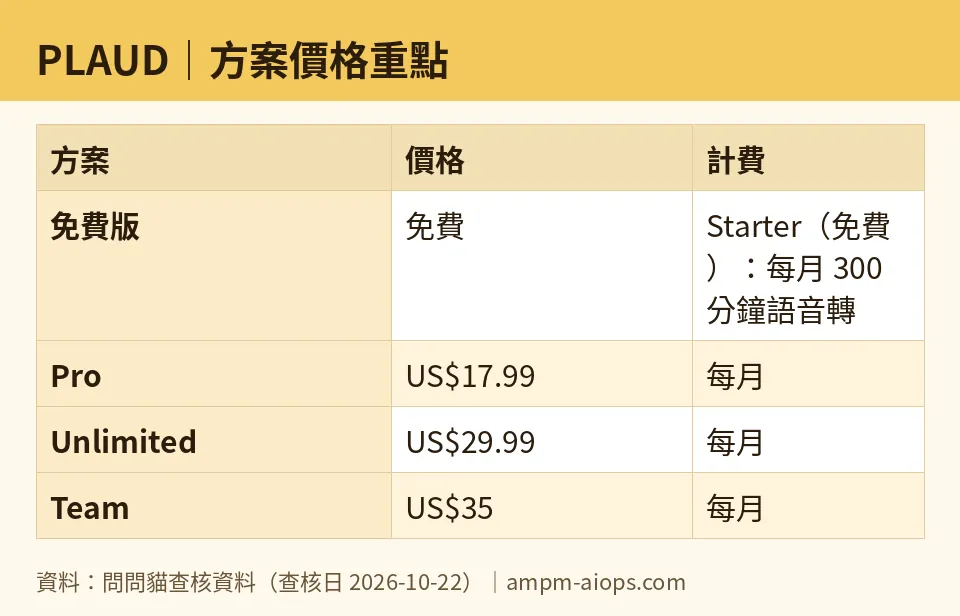
Figure: compiled by AMPM from its verified data (last verified 2026-10-22).
When the free tier stops being enough
Starter is a trial of your own behavior. Run it for a month and you’ll know whether five hours of transcription covers you. If it doesn’t, here’s what PLAUD charges (checked 2026-10-22):
- Pro — US$17.99 a month, or US$8.33 a month on an annual plan (US$99.96 a year).
- Unlimited — US$29.99 a month, or US$19.99 a month on an annual plan (US$239.88 a year).
- Team — billed per seat (one paid user). The list price is US$35 per person a month. A launch promotion running until 2026-11-30 drops that to US$28 per person a month, or US$20 per person a month on an annual plan (annual list US$25 per person a month). The data we have lists no single annual dollar total for Team, so we won’t invent one.
The plan names tell the story. If 300 minutes is the only thing holding you back and you want more headroom, Pro is the step up. If you record constantly and never want to think about a counter again, Unlimited is the “stop metering me” tier. Team is for a group buying together.
🔍 AMPM exclusive check
The number worth flagging is the one vendor pricing pages tend to state once and move past: what happens at the 300-minute ceiling. We confirmed the behavior — recording continues, transcription pauses, and the quota resets each month — because it changes how you should ration the free tier. A beginner who assumes “limit reached” means “recording stopped” will lose nothing; a beginner who assumes everything recorded is automatically transcribed will be surprised by a text backlog.
Full transparency on freshness: PLAUD entered our tracking as a challenger candidate, and this data has been through one automated check pass (most recently 2026-10-22), not our usual three-way manual cross-check. The 300-minute Starter quota, the 112+ language count, and the plan prices above all matched the official site on that date and on each daily re-check since 2026-10-15. Treat the free allowance and the Team promo window as accurate as of that date, and confirm the current terms on PLAUD’s own pricing page before you buy — especially the Team promo, which is dated to expire 2026-11-30.
Verdict: who should use it, who should skip it
Use the free Starter plan if you own or are buying a PLAUD NOTE and your transcription needs are occasional — a few lectures, a handful of meetings, interviews here and there. Five transcribed hours a month, in your language, with AI summaries, at no monthly cost, is a genuinely usable free tier. Run it for a cycle before paying a cent.
Skip straight to a paid plan if you already know you’ll record most days; the overage pause will annoy you fast, and Unlimited exists precisely so you stop counting.
Skip PLAUD entirely if you’re not prepared to buy the hardware. Everything above — free tier included — depends on owning the card. If you want cloud transcription from audio you already have, without a dedicated device, this isn’t the tool for you. The free plan is real, but it’s the reward for a hardware purchase, not a no-cost way to try the idea.
Written: 2026-10-23 Price last verified: 2026-10-22 Tool last health-checked: 2026-10-23
🔗 Related on AMPM
📎 Sources
All prices and quotas in this article come from AMPM’s verified dataset for PLAUD (last verified 2026-10-22); primary sources:
🐾 Meet the cats: AMO and PIMI

AMPM is a Taiwan-based AI-tool pricing watchdog. Our motto: ask before you subscribe. Two cats argue every tool from two sides:
- ☀️ AMO — the budget-minded cat. Always asks: is the free tier enough, and is paying actually worth it?
- 🌙 PIMI — the performance-minded cat. Cares about whether it works well, fast, and gets your job done.

When they are done arguing, you know whether to pay. Every number is checked by us, with the verification date at the end.
🐾 Our sister sites also checked
Read next
- PLAUD Full breakdown: pricing, features and real-world limits
- PLAUD Is the free quota enough?
- PLAUD Alternatives
- Free plan limits for every AI tool we track
