[How-to] Plus AI pricing: Which Plan Actually Turns Your PDF Into Slides?
- Free tier: No
- Cheapest paid plan: US$15/mo and up
- Free quota: No permanent free plan. 7-day free trial with 1,000 AI credits (credit …
- Last checked: 2026-10-22
Article last updated: 2026-10-20



Plus AI is an add-on for Google Slides and PowerPoint that builds and rewrites presentations for you. The pitch is simple: you describe a deck, or hand it a document, and it drafts the slides. But the plan you need depends on one question the pricing page buries — do you want to turn an existing file into a presentation, or just polish slides you’re already making? Those two jobs sit on different tiers, and the cheaper one can’t do the first.
This guide walks a first-time user through getting productive: what the trial gives you, what the entry plan actually covers, and the exact point where you have to pay more.
Start here: there is no free plan, only a trial
First thing to know. Plus AI has no permanent free tier. What it offers is a 7-day free trial that includes 1,000 AI credits — “credits” being the internal unit each AI action spends, like generating a deck or rewriting a slide.
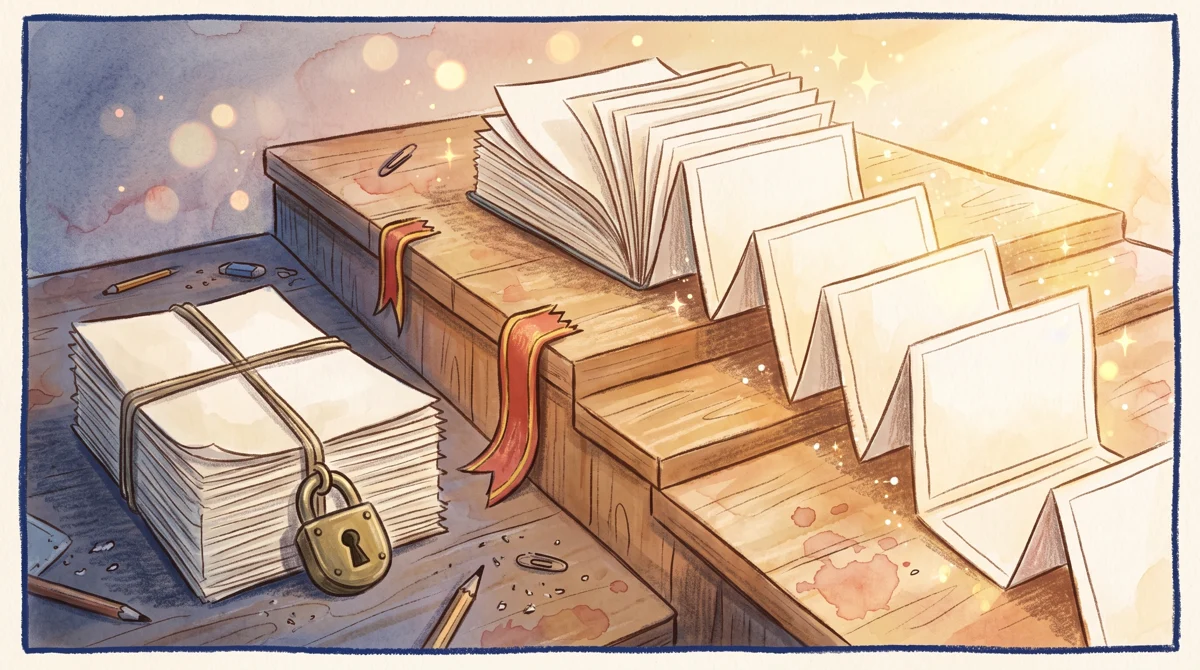
Illustration: Turning whole document stacks into slides remains firmly padlocked on the starter tier, unlocking only when moving up a level.
The catch is in the setup. The trial requires a credit card, and if you don’t cancel before day 7, it auto-charges. So treat the trial as a paid plan you’ve prepaid with your attention. Put a reminder on day 6. If the tool isn’t clicking for you, cancel before the clock runs out.
Within those seven days, 1,000 credits is enough to build a few real decks and feel out whether the output matches your style. Use it on an actual project, not a toy prompt. That’s the only way to learn whether its layouts and rewrites save you time or just give you something to clean up.
How to get your first deck out
- Install the add-on inside Google Slides or PowerPoint (Plus AI runs as an extension, not a separate website).
- Open a blank presentation and launch Plus AI from the add-ons menu.
- Give it a topic or outline. The more structure you provide, the less you’ll fix afterward.
- Let it draft, then use the single-slide tools to rewrite copy and swap layouts on the slides that miss.
That rewrite-and-relayout loop is the daily-driver feature, and it’s available on every paid plan, including the cheapest. If your work is “I already make slides, I just want them faster and cleaner,” you may never need more than the entry tier.
Figure: plusai.com official pricing page, captured 2026-10-20.
The Basic vs Pro wall: file-to-deck lives on Pro
Here’s the decision most people get wrong.
Basic costs US$15/month per seat (“per seat” means per user — a team of three pays three times). It gives you 1,500 AI credits a month, single-slide insertion, AI rewriting, and layout changes. That’s a solid toolkit for someone building decks by hand who wants AI assistance along the way.
What Basic does not do: turn a document into a presentation. If your workflow is “I have a PDF, a Word file, or a text file and I want slides out of it,” Basic can’t take the input. That feature starts one tier up.
Pro costs US$25/month per seat and raises you to 3,000 AI credits a month. The jump isn’t really about credits — it’s about what unlocks:
- Document-to-deck: feed it a PDF, a .docx, or a .txt file and it builds slides from the content.
- Long prompts over 100,000 characters, so you can paste in large source material instead of trimming it down.
- AI image generation inside your slides.
- MCP Server / Presentation API access — plumbing that lets other software drive Plus AI programmatically (MCP is a standard way for AI tools to talk to each other; an API is a hook for your own scripts).
So the real question isn’t “can I afford US$15 versus US$25.” It’s “does my job involve existing files?” If yes, the US$15 plan is a dead end for you and you should start on Pro. If no, Basic is genuinely enough.
When Team and Max make sense
Team is US$40/month per seat with 6,000 AI credits a month. The reason to climb here is branding, not volume. Team adds custom brand visuals — your logo, color palette, and fonts baked into the output — plus advanced image models and shared team presets so everyone’s decks come out looking the same. If you’re one person, you’re paying for things you won’t use. If you’re a marketing or sales team that needs on-brand decks without manual restyling, this is the tier that earns its price.
Max is US$240/month per seat and offers unlimited AI credits plus priority email support. This is for heavy, continuous generation where credit math becomes a distraction. Most individuals and small teams will never hit the ceiling on lower plans. Only go here if you’ve actually watched your monthly credits run dry and the interruption is costing you real time.
About annual billing
Plus AI lists a lower monthly-equivalent rate if you pay yearly: US$10/person on Basic, US$20/person on Pro, US$30/person on Team, and US$200/person on Max. Note what these are — the per-month average under annual billing, not a total you pay once. The data gives no single yearly lump-sum figure, so we won’t invent one. If you’re confident the tool fits your workflow after the trial, the annual rate is cheaper per month; if you’re still unsure, stay monthly and keep the exit easy.
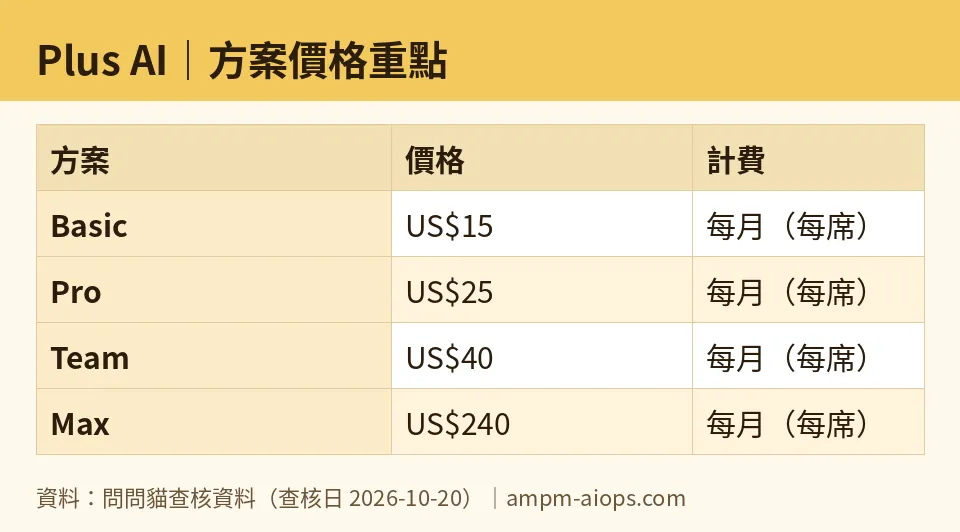
Figure: compiled by AMPM from its verified data (last verified 2026-10-20).
🔍 AMPM exclusive check
Two things the pricing page doesn’t put in plain sight, both of which we confirmed on 2026-10-20:
The “free” badge is a trial, not a free tier. The 1,000-credit offer requires a card and auto-charges on day 7 if you don’t cancel. Read as a free plan, that’s misleading; read as a prepaid week, it’s fair. Budget your reminder accordingly.
The US$15 Basic plan cannot convert documents to slides. This is the single most common reason people pick the wrong tier. Document-to-deck (PDF, .docx, .txt), long prompts, AI image generation, and API access all begin at Pro (US$25). If file conversion is why you came to Plus AI, Basic is the wrong starting point — and the pricing page doesn’t frame that trade-off as sharply as it deserves.
One disclosure, in keeping with how we work: this tool entered our list as an auto-nominated challenger, and the figures above come from a single verification pass, not yet cross-checked by multiple hands. Every number here matches what the official site showed on 2026-10-20, but treat the live pricing page as final if anything has shifted since.
Verdict: who should use it, who should skip it
Use Plus AI if you build presentations regularly and want to cut the grind. Match the plan to the job, not the price:
- Hand-building decks with AI help, no file conversion → Basic (US$15/month) is enough.
- Turning PDFs, Word docs, or text files into slides, or needing image generation and API access → start on Pro (US$25/month). Don’t waste a cycle on Basic first.
- A team that needs on-brand output and shared presets → Team (US$40/month).
- Nonstop, high-volume generation where credit limits interrupt you → Max (US$240/month).
Skip it if you make slides rarely, or you want something genuinely free to keep forever — there’s no permanent free tier here, and the trial costs you a card and a cancellation deadline. If a one-off deck is all you need, run the 7-day trial, build it, and cancel before day 7.
Whatever you choose, run the trial on real work first. The tool either saves you time or gives you cleanup. Seven days is enough to tell which.
Written: 2026-10-20 Price last verified: 2026-10-20 Tool last health-checked: 2026-10-20
🔗 Related on AMPM
📎 Sources
All prices and quotas in this article come from AMPM’s verified dataset for Plus AI (last verified 2026-10-20); primary sources:
🐾 Meet the cats: AMO and PIMI

AMPM is a Taiwan-based AI-tool pricing watchdog. Our motto: ask before you subscribe. Two cats argue every tool from two sides:
- ☀️ AMO — the budget-minded cat. Always asks: is the free tier enough, and is paying actually worth it?
- 🌙 PIMI — the performance-minded cat. Cares about whether it works well, fast, and gets your job done.

When they are done arguing, you know whether to pay. Every number is checked by us, with the verification date at the end.
🐾 Our sister sites also checked
Read next
- Plus AI Full breakdown: pricing, features and real-world limits
- Plus AI Is the free quota enough?
- Plus AI Alternatives
- Free plan limits for every AI tool we track
