[How-to] PostHog free usage limits 2026: What Happens When You Go Over?
- Free tier: Yes
- Cheapest paid plan: US$0/mo and up
- Free quota: Monthly free quota: Product Analytics 1,000,000 events, Session Replay …
- Last checked: 2026-10-28
Article last updated: 2026-10-30



You want to know what PostHog costs before you wire it into your app. Fair. This guide takes the beginner’s angle: how to get set up, what the free tier covers, and where a surprise bill could come from.
PostHog is a product analytics platform built for developers. It tracks what users do in your app, records their sessions, controls feature rollouts, and now watches AI features and errors too. There is no fixed monthly plan to pick. You pay by usage, and every product has a free allowance first.
Prices vary by country; we checked from Taiwan.
What the free tier gives you each month
Each product has its own free allowance. They are separate buckets, not one shared pool.
- Product analytics: 1 million events. An event is one recorded action, like a page view or a button click.
- Session replay: 5,000 recordings. A recording is a playback of one user’s visit, so you can watch where they got stuck.
- Feature flags: 1 million requests. A feature flag is an on/off switch that shows a new feature to only some users. A request is one check of that switch.
- LLM/AI observability: 100,000 events. This logs what your AI features send and receive, so you can debug them.
- Error tracking: 100,000 exceptions. An exception is one crash or error your code reports.
These reset monthly. Stay under them and the bill is nothing.
Two things to hold onto. The buckets are per product, so heavy use of one does not eat another. And 5,000 recordings is the tightest number here. A busy site can burn through it faster than the 1 million events.
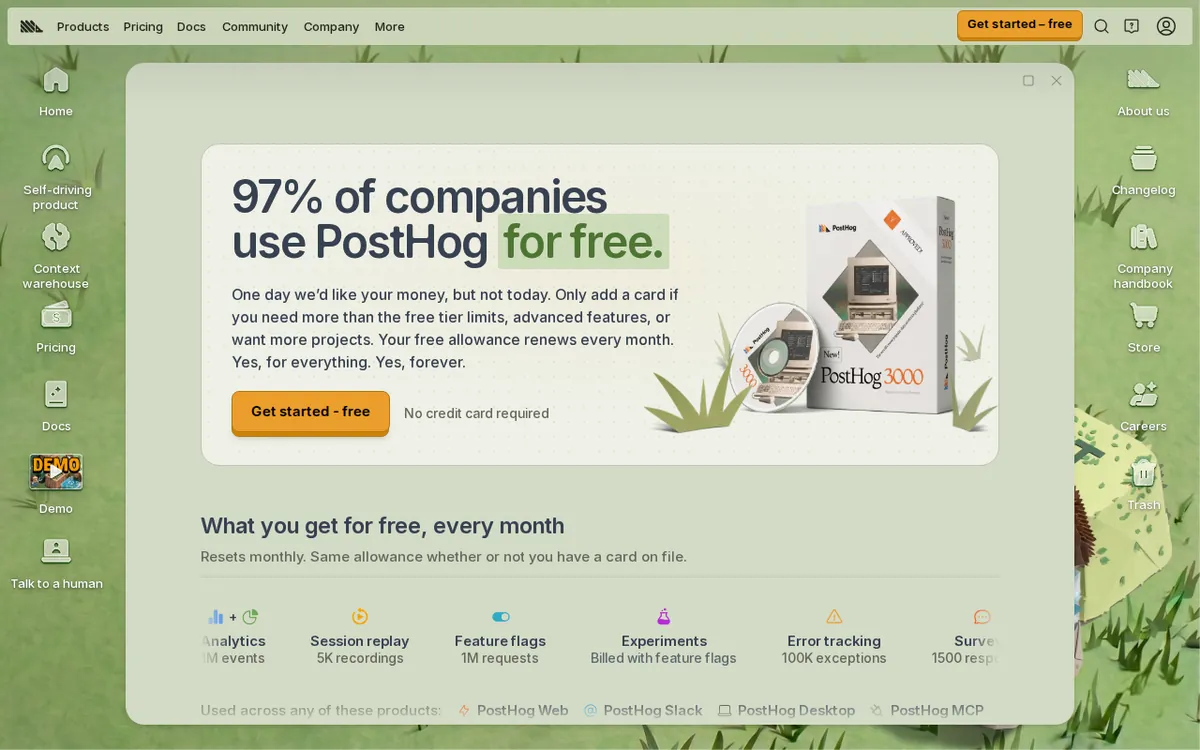
Figure: posthog.com official pricing page, captured 2026-10-30.
Set it up in five steps
- Create an account and a project. A project is the container for one app or site. Use separate projects for testing and production so test clicks don’t pollute your real numbers.
- Install the tracking code. The setup screen gives you a short snippet or a package for your language. Paste it in, or install the package, and deploy.
- Send a test event. Open your app, click around, then check the live events view in PostHog. If you see your own actions, tracking works.
- Turn on only what you need. Don’t enable session replay, error tracking and AI logging all at once on day one. Each product counts against its own meter. Start with analytics and add one more when you have a reason.
- Set spending limits before you invite real traffic. PostHog lets you cap spend per product. Do this first. It is the single most useful setting for a beginner.
What happens when you go over
This is where the “free” label stops. PostHog uses pay-as-you-go billing with no fixed monthly fee to get in. Once a product passes its free allowance, you are charged by use, on a tiered scale. Tiered means the price per unit is set by bands of volume.
The two examples on the pricing page:
- Feature flags: from US$0.0001 per request after the free amount.
- Analytics events: from US$0.00005 per event after the free amount.
“From” matters. Those are the starting rates, not a flat price for all volume. We did not find a yearly price in the data, and we are not going to guess a monthly total for you. Open the pricing page, pick your expected volume, and use its calculator if there is one.
The fix for runaway cost is the per-product spending cap from step five. Set a limit for each product you use. If traffic spikes, the cap is what stops the meter.
Common blockers and fixes
“I see no events.” Check that the snippet is on the page you are testing and that the project key matches the project you are looking at. Ad blockers can also block tracking scripts, so test in a clean browser window.
“My free recordings vanished fast.” Session replay has the smallest allowance at 5,000. If a busy page is recording every visitor, you will hit it early. Turn replay on for fewer pages, or only while you investigate a specific problem.
“I’m not sure which product is costing me.” Billing is per product. Check each product’s usage separately rather than looking for one total.
“My test traffic is counting.” Every event counts, including yours. Keep dev and production in separate projects, as in step one.
🔍 AMPM exclusive check
Our check is thinner than usual, and you should know that. The figures above were read from PostHog’s official site and pricing page on 2026-10-28, and our health check ran on 2026-10-30. That was one pass. We have not yet cross-checked it against a second and third source by hand.
We did not run a real overage and read the invoice. So we cannot tell you how the tiers step down in practice. We also cannot confirm commercial-use terms beyond what the pricing page shows. Treat the free allowances and the two example overage rates as what the vendor page said on that date. Where PostHog’s page changes, its page wins.
Nothing we saw contradicted the official page. We just haven’t tested past it.
☀️ AMO, the budget-minded cat

Is free enough? For a small app or an early-stage product, probably yes, and by a wide margin on some products. 1 million analytics events a month is a lot of clicks for a young product. 1 million feature flag requests is also roomy. Error tracking at 100,000 exceptions and AI observability at 100,000 events should cover a side project or a small launch without trouble.
The weak spot is session replay. 5,000 recordings is the allowance most likely to run out first, especially if you record everyone. If replay is your main reason for choosing PostHog, do the math on your own traffic before committing.
Is paying worth it? There is no plan to upgrade to. You just keep using it and pay for what goes over. That is friendly to small teams, since nothing forces you into a bigger fixed bill. The risk is the opposite: with no ceiling by default, a traffic spike costs money unless you set limits. The starting rates, US$0.00005 per analytics event and US$0.0001 per feature flag request, look tiny per unit. They add up with volume, and we have not modeled where that stops being cheap.
My advice: stay free as long as you can, set a cap on every product you use, and look at usage weekly for the first month.
🌙 PIMI, the performance-minded cat

Does it do the job? On breadth, yes. One platform covers product analytics, session replay, feature flags, AI observability and error tracking. That means fewer tools to install, fewer scripts slowing your pages, and one place to look when something breaks. For a developer who wants to see what users did, what broke, and whether a new feature is behaving, that is a real convenience.
The free allowances are generous enough to test it properly. With 1 million events, 1 million flag requests, 5,000 recordings, 100,000 AI events and 100,000 exceptions, you can run a real product on it and judge it on real data, not a toy demo.
What I can’t tell you is speed. We did not benchmark query times, dashboard load, or how much the tracking code adds to your page. Nobody should claim that from a pricing page. If page weight matters to you, measure it in your own app with the snippet on and off.
One practical point: the AI observability piece is the newest part of the pitch. If you ship LLM features, turn it on in a test project first and check that the logs show what you need.
Verdict: who should use it, who should skip it
Use it if you are a developer or small team that wants analytics, replays, flags and error tracking in one place, and you are fine with usage-based billing. Start free, keep each product’s cap set, and expand only when you hit a limit.
Skip it, or test carefully, if you need a fixed, predictable monthly bill with no variable part. Or if session replay is your main use and you expect more than 5,000 recordings a month. Also pause if you need firm commercial terms in writing, because our check did not confirm those beyond the pricing page.
The short version: free is real and sizable, paying is only by use, and the cap setting is what keeps it safe.
Written: 2026-10-30 Price last verified: 2026-10-28 Tool last health-checked: 2026-10-30
🔗 Related on AMPM
📎 Sources
All prices and quotas in this article come from AMPM’s verified dataset for PostHog (last verified 2026-10-28); primary sources:
🐾 Meet the cats: AMO and PIMI

AMPM is a Taiwan-based AI-tool pricing watchdog. Our motto: ask before you subscribe. Two cats argue every tool from two sides:
- ☀️ AMO — the budget-minded cat. Always asks: is the free tier enough, and is paying actually worth it?
- 🌙 PIMI — the performance-minded cat. Cares about whether it works well, fast, and gets your job done.

When they are done arguing, you know whether to pay. Every number is checked by us, with the verification date at the end.
🐾 Our sister sites also checked
Read next
- PostHog Full breakdown: pricing, features and real-world limits
- PostHog Is the free quota enough?
- PostHog Alternatives
- Free plan limits for every AI tool we track
