[How-to] Read AI free vs paid: does upgrading actually unlock meeting replay?
- Free tier: Yes
- Cheapest paid plan: US$19.75/mo and up
- Free quota: 5 meetings per month (each up to 1 hour), including verbatim …
- Last checked: 2026-11-02
Article last updated: 2026-10-25



Read AI records your meetings, writes a transcript — a word-for-word written record of what was said — hands you a summary, and scores how engaged people were. The free plan is good enough that a lot of people never need to pay. But the upgrade path has one trap that catches buyers who think they know what they’re getting: the feature most people assume comes with the first paid tier isn’t there. It’s two tiers up.
This guide gets you productive on the free plan first, then shows you exactly where it stops and which paid step actually fixes that — so you don’t pay US$19.75 a month for the wrong thing.
Start on the free plan — here’s what it actually covers
The free tier gives you 5 meetings a month. Each one can run up to 1 hour. For every meeting in that budget you get the full transcript, an auto summary, and basic engagement metrics (a read on who talked, who stayed quiet, how the call flowed).
Two numbers decide whether free works for you, and they work together:
- 5 meetings per month. Not 5 hours — 5 distinct meetings. A 10-minute standup burns the same slot as a 55-minute planning call.
- 1 hour cap per meeting. This is the one that surprises people. If your call runs long, you don’t get a trimmed version of the whole thing — the capture stops at the limit. Plan around it: put your note-taker on the meetings that matter, not every recurring sync.
If you take four or five real meetings a month and each stays under an hour, the free plan is the whole product. Don’t overthink it.
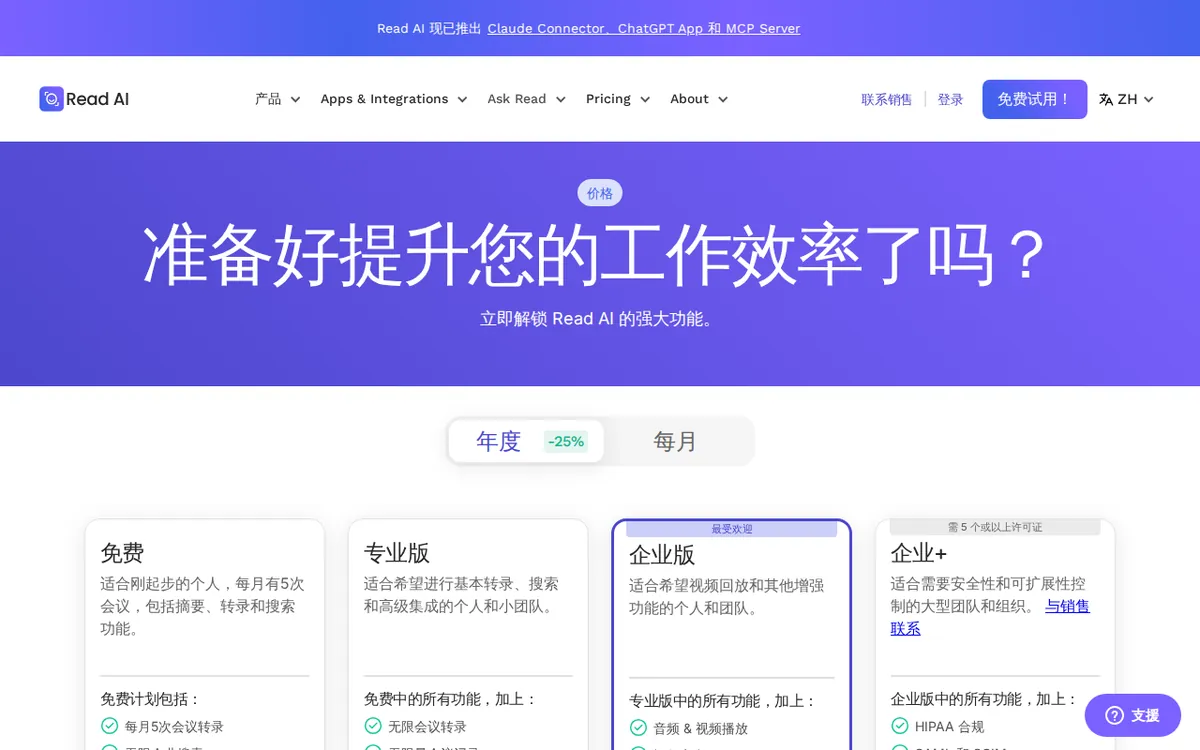
Figure: read.ai official pricing page, captured 2026-10-25.
Getting your first meeting captured (and the blockers that trip beginners)
The setup is the same shape as every meeting assistant: connect the tool to your calendar and your video platform, and it joins the call for you. A clean first run looks like this:
- Sign up and connect your calendar. This is what lets Read AI see your upcoming meetings and know when to join.
- Connect your meeting platform (your video-call app). Grant it permission to enter calls on your behalf.
- Pick which meetings it joins. Turn it off for the ones you don’t want recorded. On the free plan this isn’t optional housekeeping — it’s how you protect your 5 slots.
- Open the recap after the call. Transcript, summary, and the engagement read land in your dashboard once the meeting ends.
Common blockers:
- It didn’t join. Almost always a permissions gap — the calendar or meeting-platform connection didn’t go through, or the event wasn’t on the connected calendar. Reconnect and re-check the specific event.
- The recording cut off. You hit the 1-hour free cap. Nothing is broken; that’s the ceiling.
- You ran out of meetings mid-month. You’ve used your 5. The count resets monthly — it doesn’t roll over.
- You wanted to re-watch the video and there’s nothing to play. This isn’t a bug, and it isn’t fixed by the first paid tier. More on that below, because it’s the single most expensive misunderstanding here.
Separate from meetings, every paid tier includes an audio file upload quota — minutes per month you can feed in recordings made elsewhere. The free plan has no upload allowance; that’s a paid-only feature.
The upgrade trap: Pro gets you volume, not replay
Here’s where buyers lose money. There are three paid tiers, and all prices are per seat — one paid license per person on the account.

Illustration: Upgrading opens up unlimited written notes, but video playback remains strictly locked under a glass dome.
Pro is US$19.75 per month billed monthly, or an average of US$15 per month if you pay for a year up front. It removes the two free walls: unlimited meetings instead of 5, and up to 4 hours per meeting instead of 1. It adds 100 minutes a month of audio file upload, plus integrations (auto-sending your notes into another app) with Notion, HubSpot, and Salesforce. If your problem is “I have too many meetings for the free cap,” Pro is the answer.
What Pro does not include: video playback. If what you actually want is to re-watch the meeting — the video and audio, not just read the transcript — Pro won’t give you that.
Enterprise is US$29.75 per month billed monthly, or an average of US$22.50 per month on annual billing. This is the first tier with video playback and highlight clips — the ability to rewatch the recording and pull short cuts from it. It also raises upload to 200 minutes a month and keeps everything in Pro.
So the quiet trap is this: the person who upgrades “to save my meetings and watch them back later” wants Enterprise, but the price they see first and anchor on is Pro’s. Buy Pro for that reason and you’ve paid for unlimited transcripts while the replay feature you were picturing is still locked.
Enterprise+ is US$39.75 per month billed monthly, or an average of US$29.75 per month annually, with a minimum of 5 seats. It stretches the meeting cap to 8 hours, upload to 300 minutes a month, and adds the things procurement and IT care about: SAML SSO (corporate single sign-on login), custom data-retention policies, and HIPAA compliance (the US health-data privacy standard). This is a company-buys-it tier, not an individual one — the 5-seat floor makes that clear.
Prices vary by country; we checked from Taiwan, and the US$ figures above are the ones Read AI lists.
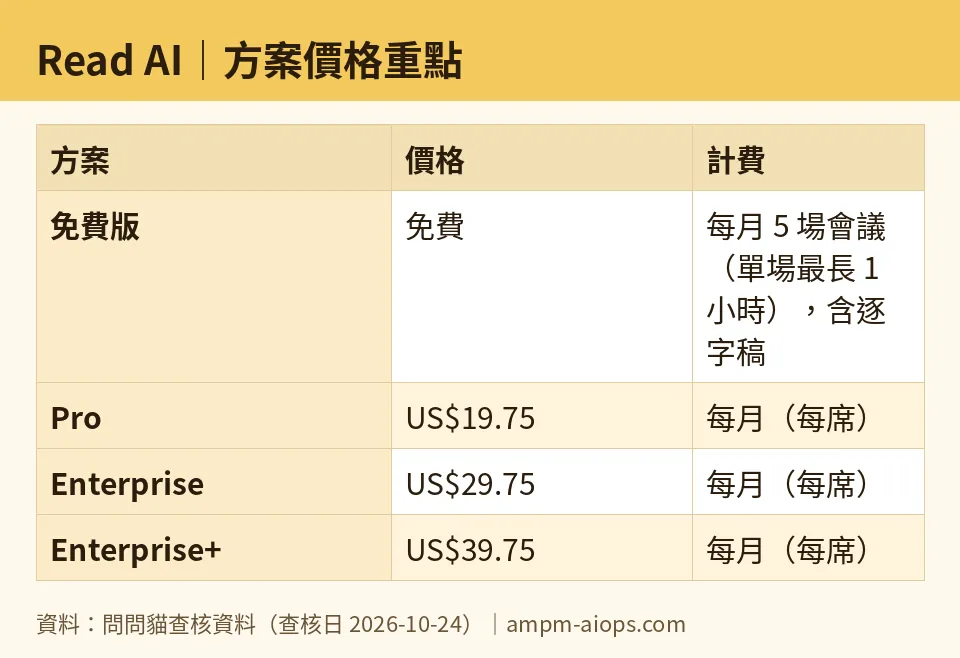
Figure: compiled by AMPM from its verified data (last verified 2026-10-24).
🔍 AMPM exclusive check
The vendor’s pricing page lists each tier’s features, so none of this is hidden exactly — but the page doesn’t warn you about the mismatch between what people expect from the first paid tier and what it contains. Reading the tiers line by line, the thing worth flagging is that video playback and highlight clips sit in Enterprise (US$29.75/month, or US$22.50/month annual), not in Pro. Pro’s upgrade is about volume and length; replay is a separate, higher purchase. If you came here to rewatch calls, that’s the number to plan against, not the US$19.75 Pro price your eye lands on first.
Two honesty notes, because padding a “check” with common knowledge helps no one:
- We also want to flag the free cap mechanics the pricing headline glosses over — “5 meetings” counts events, not hours, and the 1-hour free limit truncates rather than compresses. Those are easy to miss until a long call stops short.
- Read AI entered our tracking as an auto-added challenger candidate, and this is a first-round check — read from the official site and pricing page on 2026-10-24, not yet put through our usual three-way manual cross-verification. Every figure here matches the official page as of that date. Treat the free allowance and any commercial terms as “correct at time of check, confirm against the live page before you buy,” especially since free limits are the sort of thing vendors adjust quietly.
Verdict: who should use it, who should skip it
Stay on free if: you take a handful of meetings a month, each under an hour, and you mainly want the transcript and summary. Five slots and the 1-hour cap are enough for a lot of individual users. Don’t pay to solve a problem you don’t have.
Go Pro (US$19.75/month, or US$15/month annual) if: your real constraint is volume or length — you blow past 5 meetings, or your calls routinely run longer than an hour — and reading the notes back is all you need. Add the Notion/HubSpot/Salesforce routing if your notes should land in those tools automatically.
Go Enterprise (US$29.75/month, or US$22.50/month annual) if: you specifically want to rewatch meetings or clip highlights. This is the lowest tier that unlocks replay. Do not buy Pro expecting it.
Enterprise+ (US$39.75/month, or US$29.75/month annual, 5 seats minimum) is for teams, not individuals — you’re buying it for SSO, data-retention control, HIPAA, 8-hour calls, or the larger 300-minute upload, and you need at least five people on it.
The one mistake to avoid: upgrading to Pro because you pictured watching your meetings back. That feature starts at Enterprise. Match the tier to the job — transcripts and volume are one purchase, replay is a bigger one.
Written: 2026-10-25 Price last verified: 2026-10-24 Tool last health-checked: 2026-10-25
🔗 Related on AMPM
📎 Sources
All prices and quotas in this article come from AMPM’s verified dataset for Read AI (last verified 2026-10-24); primary sources:
🐾 Meet the cats: AMO and PIMI

AMPM is a Taiwan-based AI-tool pricing watchdog. Our motto: ask before you subscribe. Two cats argue every tool from two sides:
- ☀️ AMO — the budget-minded cat. Always asks: is the free tier enough, and is paying actually worth it?
- 🌙 PIMI — the performance-minded cat. Cares about whether it works well, fast, and gets your job done.

When they are done arguing, you know whether to pay. Every number is checked by us, with the verification date at the end.
🐾 Our sister sites also checked
Read next
- Read AI Full breakdown: pricing, features and real-world limits
- Read AI Is the free quota enough?
- Read AI Alternatives
- Free plan limits for every AI tool we track
