[How-to] remove.bg free vs paid: Where the Free Tier Quietly Stops You
- Free tier: Yes
- Cheapest paid plan: US$9/mo and up
- Free quota: Web version offers unlimited low-resolution preview downloads (up to …
- Last checked: 2026-10-21
Article last updated: 2026-10-23



remove.bg has been the go-to for one-click background removal for years. Drop in a photo, the background disappears, you get a clean cutout. For online sellers it’s a staple. The free version is real, and for some jobs it’s all you need. But it has one hard limit that catches almost every first-time user, and the pricing page doesn’t put that limit front and center. This guide walks you through what the free tier actually finishes, where it stops you cold, and whether a one-time credit pack or a monthly plan makes more sense.
A quick word on “credits,” since the whole pricing model runs on them: a credit is one unit of download budget. Spend one credit, download one full-resolution image. That’s it.
What the free tier actually does
You can get a result in under a minute, no account needed:
- Go to remove.bg and drag a photo onto the page.
- Wait a few seconds. The cutout appears automatically.
- Download the preview. You can do this as many times as you want — the free web preview has no cap on how many images you run.
Here’s the catch. Every free download is capped at 0.25 megapixels. A megapixel is just a resolution measure — one million pixels. 0.25 megapixels is roughly a 500-by-500-pixel image. That’s fine for a tiny thumbnail or a quick mockup. It is too small to print, too small for a clean product listing, too small for anything where the image fills real screen space.
To get a usable high-resolution file, you need a credit. When you sign up for a free account, remove.bg gives you one free credit — one high-resolution download. So the honest shape of the free tier is this: unlimited small previews, plus exactly one clean high-res image, free.
There’s a third free allowance if you build software: 50 API preview requests per month. API just means other programs can call remove.bg automatically instead of you uploading by hand. Fifty preview requests a month is enough to test an integration, not to run a real workflow.
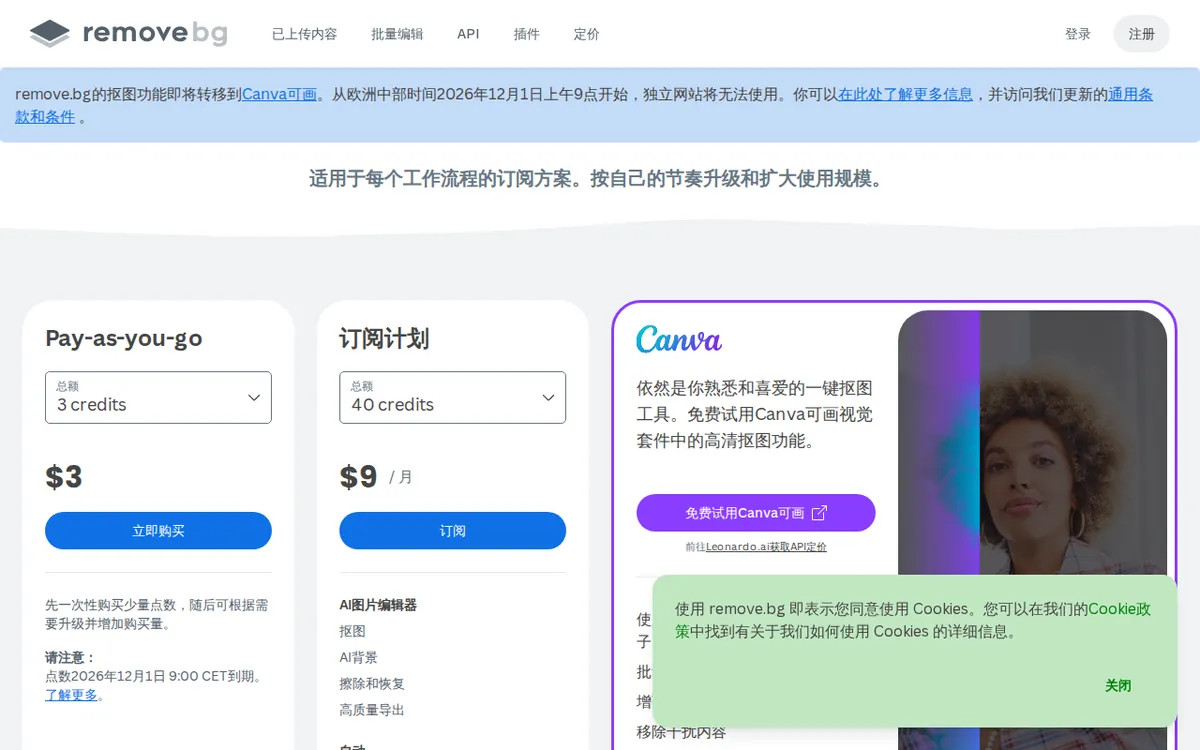
Figure: remove.bg official pricing page, captured 2026-10-23.
Where it stops you — and the fixes
Three things trip up beginners. All three have the same root cause: the gap between a free preview and a paid high-res file.

Illustration: Endless piles of tiny blurry frames lie everywhere, while the sole high-definition frame remains locked under glass, accessible with just one key.
“My download looks blurry or tiny.” That’s the 0.25-megapixel preview cap. Nothing is broken. You’re looking at the free-tier resolution. The fix is a credit — either your one free signup credit, or a purchased one.
“I used my free credit. Now the site wants money.” Expected. The single free credit is a trial of the full-resolution output, not an ongoing allowance. From here you either buy a credit pack or subscribe.
“The edges around hair or fur look rough.” remove.bg handles most subjects cleanly, but fine strands are the hardest case for any automatic tool. Use the built-in editor to brush back or erase edge areas before you spend a credit on the final file. You don’t want to burn a credit and then notice a ragged edge.
One more trap: if you need to process many images at once — that’s batch processing, running a whole folder in one go — it sits on the paid plans, along with API access and the up-to-50-megapixel output ceiling. None of that is in the free tier.
Credit pack or subscription: the real decision
This is where most of the money question lives, and the data makes the choice clearer than the pricing page does.
There are two ways to pay.
Pay-as-you-go. A one-time purchase, no recurring charge, and the credits never expire. The entry pack is US$9 for 10 credits. Larger one-time packs run US$49 for 75 credits and US$99 for 200 credits.
Monthly subscription. You get a credit allowance that refills every month. The tiers are US$9/month for 40 credits, US$39/month for 200 credits, and US$89/month for 500 credits. On the US$9 monthly plan that works out to about US$0.23 per image, and it unlocks the 50-megapixel ceiling, API access, and batch processing. Pay annually and the per-month figures drop to roughly US$8.10, US$35.10, and US$80.10.
Now put the two US$9 options side by side, because they expose the whole trade-off. For US$9 one time, you get 10 credits that sit in your account forever. For US$9 every month, you get 40 credits — but only if you keep paying, and unused monthly credits don’t wait for you the way a one-time pack does.
So the question is pace, not price. If you remove backgrounds in bursts — a product drop here, a batch of listings there, then nothing for weeks — the one-time pack is the smarter first move. You buy credits, they wait for you, nothing bills in the background. If you’re removing backgrounds most days and you want high-resolution output, API, and batch tools, the monthly plan earns its keep and the per-image cost stays low.
Prices vary by country; we checked from Taiwan.
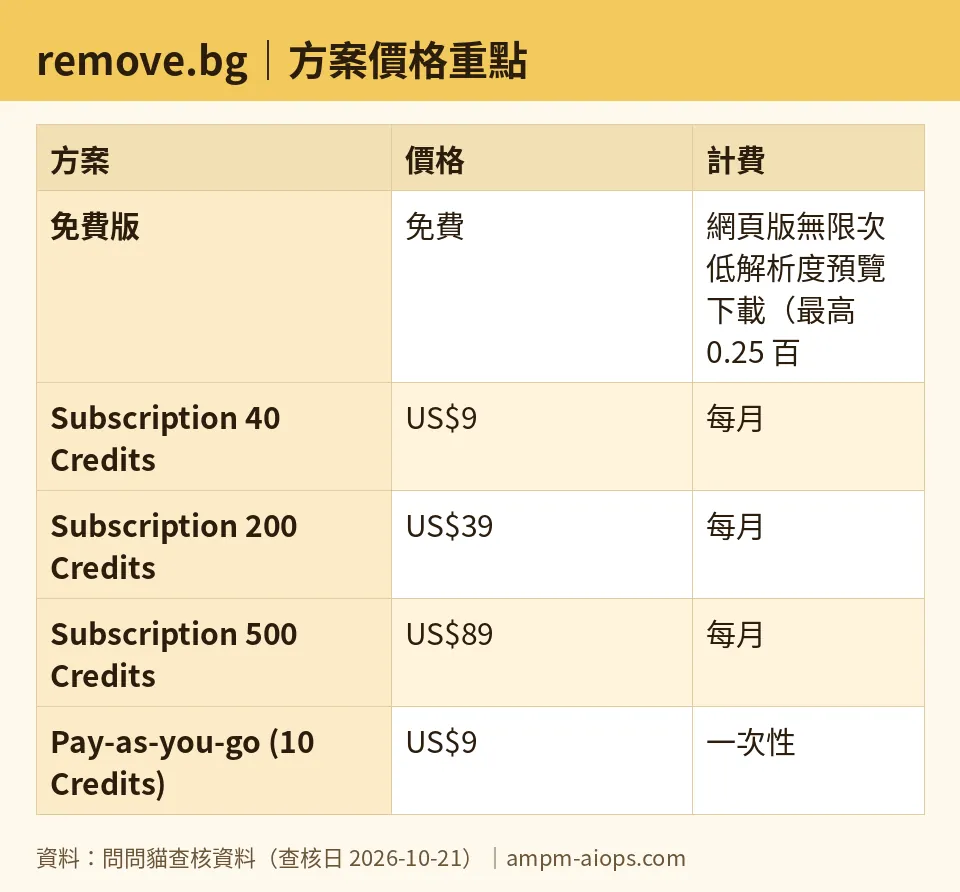
Figure: compiled by AMPM from its verified data (last verified 2026-10-21).
🔍 AMPM exclusive check
The remove.bg pricing page sells credits and subscriptions. What it doesn’t put up front — and what trips up newcomers — is the real shape of the free tier. We confirmed it ourselves: the free web preview is genuinely unlimited (run as many images as you like), but every free download is hard-capped at 0.25 megapixels, and you get exactly one high-resolution credit free when you register. That “unlimited but tiny, plus one good one” structure is the part beginners miss, and it isn’t spelled out in a single clear line on the pricing page.
We’ll also flag what we could not pin down. remove.bg does not publish a plain per-credit conversion on its own site, so we don’t print one either — the only per-image figure we’ll stand behind is the ~US$0.23 the data attaches to the US$9 monthly plan. And one honesty note on our side: this tool came in as a new entry, and we’ve run it through a single verification pass, not our usual multi-round cross-check. The numbers above matched the official page on 2026-10-21, but treat the commercial terms as “verify on the site before you buy,” especially if you’re spending at the US$49 or US$99 level.
Verdict: who should use it, who should skip it
Use the free tier if you need thumbnails, quick mockups, or a single clean cutout — your one free credit covers that last one. Previews are unlimited, so you lose nothing by testing remove.bg on your actual photos before paying a cent.
Buy the one-time pay-as-you-go pack if your background-removal work comes in bursts. Credits that never expire beat a subscription you’ll forget to cancel.
Take a monthly subscription only if this is routine work — near-daily volume, high-resolution output, batch folders, or an API integration. At that pace the per-image cost is low and the refill model fits.
Skip the paid tiers entirely if you need exactly one or two high-res cutouts, ever. The single free credit plus a US$9 one-time pack will carry you a long way before a subscription makes any sense.
Written: 2026-10-23 Price last verified: 2026-10-21 Tool last health-checked: 2026-10-23
🔗 Related on AMPM
📎 Sources
All prices and quotas in this article come from AMPM’s verified dataset for remove.bg (last verified 2026-10-21); primary sources:
🐾 Meet the cats: AMO and PIMI

AMPM is a Taiwan-based AI-tool pricing watchdog. Our motto: ask before you subscribe. Two cats argue every tool from two sides:
- ☀️ AMO — the budget-minded cat. Always asks: is the free tier enough, and is paying actually worth it?
- 🌙 PIMI — the performance-minded cat. Cares about whether it works well, fast, and gets your job done.

When they are done arguing, you know whether to pay. Every number is checked by us, with the verification date at the end.
🐾 Our sister sites also checked
Read next
- remove.bg Full breakdown: pricing, features and real-world limits
- remove.bg Is the free quota enough?
- remove.bg Alternatives
- Free plan limits for every AI tool we track
