[How-to] Resemble AI Free Tier: What You Can Actually Detect Before Paying
- Free tier: Yes
- Cheapest paid plan: US$350/mo and up
- Free quota: Flex plan has no monthly fee (US$0/mo), no credit card required for …
- Last checked: 2026-11-02
Article last updated: 2026-11-02



Resemble AI sells itself as a deepfake detection and anti-spoofing platform. Voice, video, image forensics, plus digital watermarking. That is a crowded, noisy category right now, and most buyers arrive with the same two questions: can I get real work done on the free plan, and what does the first paid tier actually buy me?
This is a how-to for beginners. It walks through what the free Flex plan includes, how to get productive on it, where people get stuck, and how to decide whether Team or Business is worth it. Every number here comes from our verified data, checked from a Taiwan connection on 2026-11-01. Prices vary by country; we checked from Taiwan.
What the free Flex plan actually gives you
The headline is simple: Resemble AI’s Flex plan has no monthly fee. US$0/mo. No credit card required to register. One seat. Full API and platform access.
That last part matters more than the price. Plenty of free tiers in this category hand you a demo box and hide the real product behind a paywall. Here, the free tier is the same platform, just metered.
The meter is credits. A credit is a prepaid unit you spend when the system processes a detection or generation job. You top up, you spend down. Two things stand out. First, it is pay-as-you-go, so you are not locked into a subscription just to run a handful of checks. Second, the credits never expire. That is unusual and genuinely useful for anyone who needs detection only occasionally.
So the free plan is not “free usage.” It is free access with a paid meter attached. The monthly fee is zero; the usage is not.
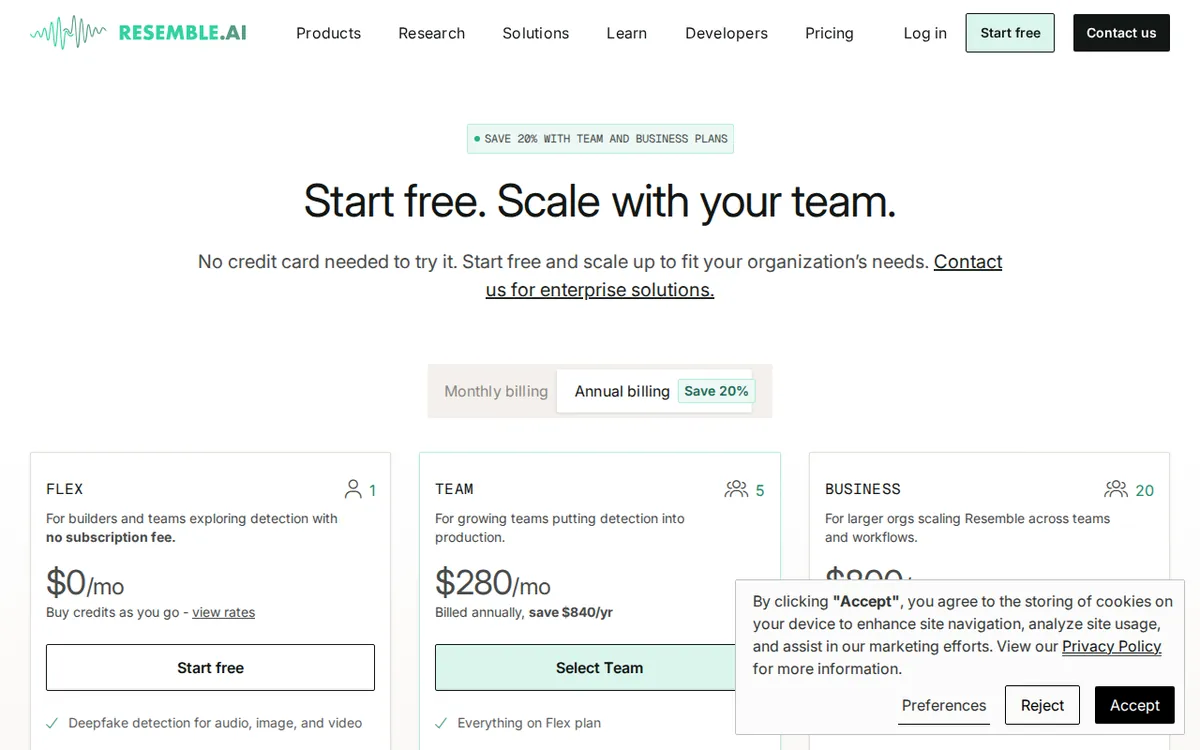
Figure: resemble.ai official pricing page, captured 2026-11-02.
Step-by-step: getting productive on Flex
Step 1 — Register without a card. Sign up, confirm, log in. One seat means one login. If two people on your team need access, you are already looking at Team.
Step 2 — Find the API keys and the web console. Both are included. If you are a developer, grab the key and wire it into your pipeline. If you are not, use the console and upload files directly.
Step 3 — Top up credits before you need them. This is the step beginners skip. The free tier does not come with a starter balance in our data. You register, you have access, you have no credits. The first detection job will fail or stall until you add funds. Do this on day one so you are not debugging a payment screen at midnight.
Step 4 — Start with one file, not a batch. Batch upload is a Team feature. On Flex, feed the system a single file and read the output carefully. Learn what a detection report looks like before you scale.
Step 5 — Watch file size. Large file upload, described as 150MB+, is also a Team feature. If your media is big, the free tier is the wrong door.
Step 6 — Track your spend per job. Because credits are consumption-based, your cost scales with how much audio or video you push through. Run a few small jobs first and note what each one costs you in credits. That number is your real budget, not the US$0 monthly fee.
Common blockers and how to fix them
“I signed up and nothing works.” You have no credits. Top up.
“My upload was rejected.” Check the size. Big files are gated behind Team.
“I need to check twenty files at once.” Batch upload is Team. On Flex, queue them one at a time.
“Two colleagues need logins.” One seat on Flex. Team includes 5 seats; Business includes 20.
“I only need this twice a year.” Good news. Credits never expire, so a top-up you buy today is still there in six months. This is the strongest argument for staying on Flex.
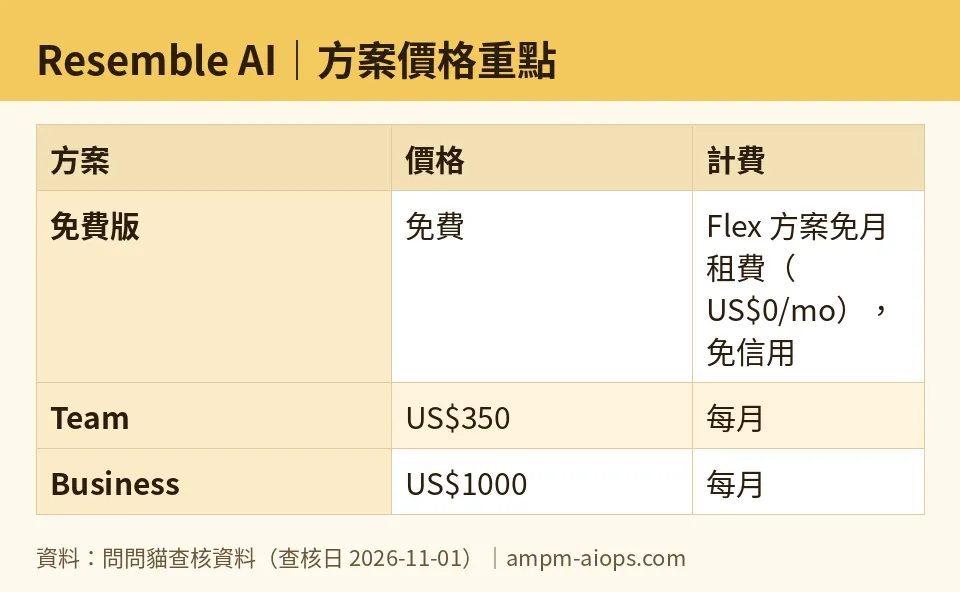
Figure: compiled by AMPM from its verified data (last verified 2026-11-01).
🔍 AMPM exclusive check
Two things worth flagging.
First, the free tier is easy to misread. “Free” here means no monthly fee and no credit card at signup, with one seat and full API access. It does not mean free detection volume. Our data shows no bundled starter credits on Flex. If you read “free tier” and assume you can run a detection job immediately after registering, you will hit a wall. The vendor page describes the plan accurately; the trap is in the word “free,” not in any missing disclosure.
Second, our data carries an explicit caution: this tool was logged as an auto-entry challenger candidate, checked in a single pass, and has not yet been through three-way human cross-verification. Free quota and commercial terms should be confirmed against the live site at the moment you buy. Nothing in the pricing numbers differed from the official page across our daily re-checks from 2026-10-24 through 2026-11-01 — every figure matched. But the verification depth is thinner than our fully cross-checked entries, and we are saying so rather than pretending otherwise.
☀️ AMO, the budget-minded cat

Here is the question I care about: is free enough, and if not, is paying worth it?
Start with what US$0/mo buys. One seat. Full API and platform access. No credit card to register. Credits that never expire. For a solo operator who needs to run a deepfake check on a suspicious voice note once a month, this is close to ideal. You top up a small balance, you spend it slowly, and nothing drains while you sleep. No subscription, no renewal date, no forgotten charge.
Now the jump. Team is US$350/month billed monthly, or US$280/month billed annually, which the vendor states saves US$840/year. Business is US$1,000/month monthly, or US$800/month annually, saving US$2,400/year. Those are not casual upgrades. Team buys 5 seats, meeting analysis, 150MB+ uploads, batch upload, and cheaper detection rates: US$0.015 per second of voice, US$0.03 per second of video. Business buys 20 seats, company-wide calendar integration for detection coverage, real-time meeting security alerts, and SSO.
Do the math on your own usage before you flinch at US$350. If you are processing enough audio and video that the cheaper per-second rates matter, the plan can pay for itself in processing alone. If you are not, you are buying seats and features you will not open.
My read: stay on Flex until you hit one of three walls — you need a second seat, you need batch upload, or your per-second processing volume makes the Team rates cheaper than Flex credits. Until then, US$0/mo with non-expiring credits is a genuinely good deal.
🌙 PIMI, the performance-minded cat

Free is cheap. Does it work?
The platform claim is broad: voice, video, and image deepfake forensics plus digital watermarking, all reachable through the API on the free tier. That is the right architecture. Detection belongs in a pipeline, not in a browser tab, and Flex does not cripple the API to push you upward. Good sign.
Where performance gets real is throughput. On Flex you are uploading single files, one at a time, with no batch and no large-file lane. For spot checks, fine. For a moderation queue or a newsroom verifying a flood of clips, that is a bottleneck no amount of cheap credits fixes.
Team changes the physics. Batch upload plus 150MB+ files plus lower per-second rates: US$0.015 per second for voice, US$0.03 per second for video. Lower unit cost at higher volume is exactly how a detection pipeline should scale. Business adds the operational layer — calendar-integrated detection coverage, real-time meeting security alerts, SSO — which is what you need when detection stops being a tool and becomes policy.
One caution on judging speed. Our data does not include latency or accuracy benchmarks, so I will not invent them. What I can say is that the free tier runs the same engine as the paid tiers, so if detection quality disappoints you on Flex, upgrading will not fix it. Upgrade for volume, seats, and workflow — not for a better model.
Verdict: who should use it, who should skip it
Use the free Flex plan if you are a solo operator, a journalist, or a developer who needs occasional deepfake checks, wants API access without a subscription, and values credits that never expire. Top up once, spend slowly, pay no monthly fee.
Move to Team if you need 5 seats, batch uploads, 150MB+ files, meeting analysis, or your processing volume makes US$0.015 per second of voice and US$0.03 per second of video cheaper than Flex credits. US$350/month monthly, or US$280/month annually.
Move to Business if you need 20 seats, company-wide calendar-integrated detection, real-time meeting alerts, and SSO. US$1,000/month monthly, or US$800/month annually.
Skip it if you expected “free tier” to mean free detection volume. It does not. You register free, then you fund the meter. If that model does not suit you, look elsewhere.
One last note: this entry has had only a single verification pass and no three-way human cross-check. Confirm free quota and commercial terms on the official site before you commit money.
Written: 2026-11-02 Price last verified: 2026-11-01 Tool last health-checked: 2026-11-02
🔗 Related on AMPM
📎 Sources
All prices and quotas in this article come from AMPM’s verified dataset for Resemble AI (last verified 2026-11-01); primary sources:
🐾 Meet the cats: AMO and PIMI

AMPM is a Taiwan-based AI-tool pricing watchdog. Our motto: ask before you subscribe. Two cats argue every tool from two sides:
- ☀️ AMO — the budget-minded cat. Always asks: is the free tier enough, and is paying actually worth it?
- 🌙 PIMI — the performance-minded cat. Cares about whether it works well, fast, and gets your job done.

When they are done arguing, you know whether to pay. Every number is checked by us, with the verification date at the end.
🐾 Our sister sites also checked
Read next
- Resemble AI Full breakdown: pricing, features and real-world limits
- Resemble AI Is the free quota enough?
- Resemble AI Alternatives
- Free plan limits for every AI tool we track
